Apple Apple Magic Keyboard for iPad Pro (M4 and M5)
Keyboards

Apple

Apple Magic Keyboard for iPad Pro: What Real Users Actually Think

Apr 2026

Last Analyzed

8/10

Overall Rating

26

Positive Reviews

15

Negative Reviews

Summary

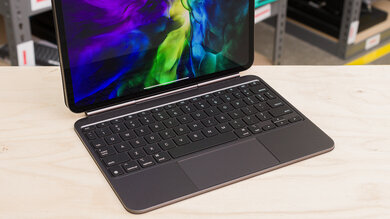
The Apple Magic Keyboard for iPad Pro (M4 and M5) is widely regarded as the best keyboard case available for the iPad Pro, transforming it into a genuinely productive laptop-like device. Reddit sentiment is predominantly positive, with users praising the typing feel, backlit keys, and the extra USB-C port it adds. The main friction points are price — many find it too expensive — and weight, particularly on the 11-inch model where the bulk-to-screen-size ratio feels less justified. One key community insight: the M4 and M5 versions are hardware-identical, with Apple simply updating the branding; older pre-M4 keyboards are not compatible due to different magnet placement. Users with multiple devices (MacBook + iPad) debate whether it's truly worth the cost, while those who use the iPad as their primary work machine tend to call it essential.
Pros

  • Typing experience is excellent — keys are well-spaced, backlit, and significantly better than any previous Magic Keyboard generation, which users describe as having 'the build quality of a potato' by comparison
  • Adds a second USB-C passthrough port, which is a practical upgrade for users who want to charge while using accessories
  • Connects magnetically with zero setup — no pairing, no Bluetooth configuration, attaches and works instantly
  • Backlight is auto-adjusted by iPadOS to match ambient light, saving battery compared to always-on MacBook behavior
  • M4 and M5 keyboards are hardware-identical — existing M4 keyboard owners don't need to rebuy for the M5, and the keyboard is confirmed compatible across both generations
  • Open-box and eBay options regularly appear at $100–$120 off retail, making it more accessible for budget-conscious buyers

Cons

  • Retail price is steep — the 13-inch version costs £349 / ~$350, making it one of the most expensive keyboard cases on the market
  • Adds substantial weight, especially on the 11-inch model where the keyboard nearly doubles the overall form factor; one user noted it's 620g vs 220g for lightweight third-party alternatives
  • Locked to landscape-only use — no portrait mode support, which frustrates users who read or annotate documents vertically
  • No cross-device switching — unlike Logitech or JLab alternatives, the Magic Keyboard only works with the paired iPad, which is a dealbreaker for multi-device users
  • Backward compatibility is limited — pre-M4 Magic Keyboards will not fit the M4/M5 due to redesigned magnet placement and a smaller camera module cutout
  • Does not support three-finger drag gestures that some users rely on in tablet mode, reducing trackpad flexibility

Battery Drain: More Complicated Than Apple Admits

The keyboard draws power directly from the iPad via the magnetic connector — there's no internal battery. While most users report minimal real-world impact, others note the backlit keys do add some drain, and at least one user observed degraded battery life after regular use. It won't kill your battery overnight, but it's not truly 'free.'

Is It Worth It If You Already Own a MacBook?

This is the most-debated question across multiple threads. Reddit consensus: if you have a MacBook, the Magic Keyboard turns your iPad into a worse laptop. But if the iPad is your primary portable device, it's transformative. The keyboard works best as a productivity multiplier, not a MacBook substitute.

Third-Party Alternatives Are Closing the Gap — Mostly

Logitech Combo Touch ($150–$180) is the most recommended alternative, offering a kickstand, portrait mode support, and detachable keyboard. ESR cases also appear frequently as a budget option around $90. The Magic Keyboard still wins on typing feel and seamless integration, but it's no longer the only serious option.

User Reviews (41 of 100 analyzed)

7
0
cannaeoflifer/ipad2d agopositive

I love the Magic Keyboard and find that it turns the ipad from a toy into a tool for my workflow. Your mileage maybe vary, but I was extremely pleased with the newer version of the Magic Keyboard. The old one, while functional, had the build quality of a potato.

View Original Comment
7
0
keep_it_simple-9r/iPadPro2d agopositive

Yes it will affect battery life. It may, or likely will, cause your battery to go through cycles faster. Whether or not it actually degrades the battery faster I'm not sure. The keyboard does not have a battery of its own. I love the Magic keyboard. It doesn't allow your iPad Pro to work like a Mac completely, but it's pretty close. I rarely use the iPad without it.

View Original Comment
7
0
WilliamH-r/iPadPro2d agopositive

No. Those who buy quality only cry once. Get the Apple keyboard.

View Original Comment
6
0
No_Telephone3160r/iPadPro2d agopositive

I second this. The magic keyboard is the best.

View Original Comment
5
0
Paul_Deemerr/iPadPro2d agopositive

I have the iPad Pro M5, Magic Keyboard and Pencil Pro always connected and the drain isn't bad. I wouldn't worry about it.

View Original Comment
3
0
MaverickJV78r/iPadPro2d agonegative

I use the logitech keyboard case. It offers a different function but I find it extremely useful for drawing and note-taking.

View Original Comment
2
0
mshonhallr/iPadPro2d agopositive

Absolutely worth the money!! And, the backlit keys are excellent! As an added bonus: it provides extra protection, as well! 13" M5 iPad Pro

View Original Comment
2
0
docgener/iPadPro2d agonegative

Nope. Not the Magic Keyboard iPad cases, but the old Bluetooth standalone magic keyboards will… even the oldest. I find it's a good alternative and a lighter option. The MKCases are purposely heavy so the keyboard will act as a counterweight to the iPad itself, so it doesn't tip over.

View Original Comment
2
0
keep_it_simple-9_altr/iPadPro2d agopositive

It does not. You can pick up a Magic Keyboard for the M5 for much less than retail. EBay is an option. Look at Best Buy open box. Most are barely used for a good discount. I have an iPad M4 that came with a Magic Keyboard. The Magic Keyboard is worth every penny.

View Original Comment
2
0
Dylan_Vayner/ipad2d agonegative

Hi guys, just bought one and now sharing the experience: the quality is great, and heavy (as expected), need to adjust my habit of typing (too narrow layout). Cannot use 3fingers dragging (which I like most). Overall, will use it for pure typing stuff and movies. Cannot rely on it for productive tasks, coding is too much for small screen and ios just terrible.

View Original Comment
2
0
phrekyos69r/ipad2d agopositive

Pretty sure they are identical. For example, I ordered my M5 iPad Pro with an 'M5' Smart Folio from Apple. The Smart Folio that arrived says M4 on the box and does not mention the M5 at all. Probably the same for the Magic Keyboard. Also, if you expand the 'Compatibility' part on the Apple Store web site, it lists both M4 and M5 iPads.

View Original Comment
2
0
Business-Forever-342r/iPadPro2d agopositive

The answer is on the Apple Store website, the magic keyboard is there for the M5 model, £349 for 13" and £299 for 11". Compatibility says it's for both M5 and M4 iPad Pros so it's the same keyboard!

View Original Comment
2
0
noturavgpeachr/iPadPro2d agonegative

I haaaated this after awhile, the casing is wrecked on mine

View Original Comment
2
0
Few_Coyote6408r/ipad2d agopositive

I have it for my m5 11 inch but I don't own a personal laptop that's not a company one. I think it depends what you plan to use more and if it'll benefit u in the longrun

View Original Comment
1
0
chancepackr/iPadPro2d agopositive

Yes, love turning my iPad into a mini laptop and gaining an extra usb-c port.

View Original Comment
1
0
angryslothbearr/iPadPro2d agopositive

It's all I'll use

View Original Comment
1
0
InfiniteHenchr/iPadPro2d agonegative

The Pro got a slight redesign with the M4 so previous Magic Keyboards won't work with it.

View Original Comment
1
0
cnassaneyr/iPadPro2d agonegative

No learned the hard way

View Original Comment
1
0
InsuranceNerd75r/ipad2d agopositive

I personally love it. I do not use it all of the time but found I adjusted quite a bit even, with my internet scrolling to now doing that while attached to the MK. I also have a 14" MBP which I will use when I want to do more computing tasks but MK is a great tool. I will say, as good as they are, I think they are too expensive. If you are on the fence or even if your heart is set on buying one, look for open box or refurb.

View Original Comment
1
0
flyingsoap1984r/ipad2d agopositive

I got the magic keyboard in the end after trying out others (e.g. logitech folio) - is just easier to carry and flip open with the magic keyboard. I keep a moft case with me when I don't need the keyboard. Granted the magic keyboard is only stable when flat on a desk but after adjusting to using it, is not bad, and the keys are nice.

View Original Comment
1
0
imprecis2r/ipad2d agonegative

I have 13" and MK is great for it, but probably wouldn't get it for 11". The screen is quite small and would only use it for browsing/reading, with occasional note taking. I think a keyboard is not needed for it, and it's better to just have it being more portable.

View Original Comment
1
0
Fr05t_B1tr/ipad2d agonegative

Tbh apple peripherals are kinda a pain in the ass, as you can't hot swap between other devices. Other 3rd party keyboards give you a dongle connection and 2 Bluetooth connections. If you plan to get the keyboard just for your iPad then sure, but you're honestly overpaying for limited features and an integrated TouchID—just tap the spacebar and type in your passcode.

View Original Comment
1
0
8bit-Raspberry-Jamr/ipad2d agopositive

I use it frequently, even though I own a MacBook Air. I wouldn't be responding to you on my iPad right now without it.

View Original Comment
1
0
AlliPadAlltheTimer/ipad2d agopositive

I think it can replace most people's laptop in that configuration. If you, however, are just going to consume with it, get something like a Zugu case.

View Original Comment
1
0
Successful_Ability33r/ipad2d agonegative

I write a lot and like the 'laptop' like experience a keyboard case gives. The Magic Keyboard case is great and feels great to type on, but I just switched to the Logitech Combo touch case and like it a lot better. If you like changing up the orientation of your iPad, I would look at a keyboard that supports more modes.

View Original Comment
1
0
loliko-lolikandor/iPadPro2d agopositive

The Magic Keyboard that is connected to your iPad through the port on the back DOES NOT drain your battery. It's literally like a USB keyboard connected to your laptop. I'd even say that it uses less battery than using the on-screen keyboard. Yes, the backlight on the keyboard might take up a bit more, but that's still negligible, since it is 99% of the time off.

View Original Comment
1
0
Jazzlike-Spare3425r/iPadPro2d agopositive

I also mostly use it with the Magic Keyboard and I noticed that on my Mac, the backlight is persistently on what I set it. But on iPad, Apple interestingly automatically adjusts the backlight to your surroundings, so if you are in a bright environment, it at least won't try to light up the keys in a manner that you wouldn't be able to see anyways.

View Original Comment
1
0
ioncloud9r/iPadPro2d agonegative

After debating between the Magic Keyboard and the ESR one, I opted for the ESR one. I bought 2 on Amazon for $90 each, it has an included case for the iPad, it has a nice protected spot for the pencil, and can also handle the iPad in portrait mode. My work flow will work better with it in a case.

View Original Comment
1
0
Metal-Feline2944r/iPadPro2d agopositive

I don't know what your budget is, but you could look for open box Magic Keyboards at Best Buy (or other places). I found an 'excellent' condition open box Magic Keyboard for $120 off list price; it looks new.

View Original Comment
1
0
its-christianur/iPadPro2d agopositive

Get the Magic Keyboard. It's pricey, but it's better than anything else!

View Original Comment
1
0
watchOSr/iPadPro2d agopositive

All M4 cases and keyboards will fit the M5, they are identical in shape and form.

View Original Comment
1
0
mihneamr/iPadPro2d agopositive

I went to an Apple store to check this. Sales guy said he didn't think there were any changes, and I put my M4 one next to the new one on display to compare - they are identical.

View Original Comment
1
0
NeighborhoodOdd9584r/iPadPro2d agopositive

Yes, it's handy, I have it on my 11 M5

View Original Comment
1
0
IllPapaya8294r/iPadPro2d agonegative

I'm wondering the same thing. My battery life has not been very good after testing this week

View Original Comment
1
0
bkl7flexr/ipad2d agopositive

Get it. I have a MBP and a folio case and I'm always switching between both specially when I have to type stuff.

View Original Comment
1
0
positmattr/iPadPro2d agonegative

It's all a waiting game - but if you have the m4 ipad pro I cannot fathom why you would need to upgrade to the m5.

View Original Comment
1
0
loneuniverser/iPadPro2d agonegative

Do you have a MacBook or laptop? If you do, you don't really need the Magic Keyboard. Unless you plan to use the iPad for a ton of typing. I have the 13 inch M4 and did not get the keyboard it's so much lighter and easy to use as just an iPad.

View Original Comment
1
0
Extreme-Nerve3029r/iPadPro2d agonegative

This! I don't like how the magic apple one leaves it naked

View Original Comment
1
0
keep_it_simple-9_mwr/ipad2d agopositive

Do you want to use it as an iPad or a pseudo laptop? I have a 13" with a magic keyboard. The keyboard gives it a little feel like a laptop. But it isn't really. I find the keyboard makes the iPad Pro more useful

View Original Comment
1
0
jcruz827r/ipad2d agonegative

I use the Logitech combo touch with my M1 iPad Pro and love it. You can disconnect the keyboard and use it as a tablet as you wish and the kick stand is convenient too. The flaw is with the keyboard you can't use it in your lap essentially as there is no hinge. The typing experience is good, it is better on the Magic Keyboard but it's not bad on the Logitech at all.

View Original Comment
1
0
chronomegar/iPadPro2d agopositive

I'm using one right now

View Original Comment