Corsair Corsair VANGUARD PRO 96
Keyboards

Corsair

Corsair Vanguard PRO 96: What Real Users Actually Think

Apr 2026

Last Analyzed

6/10

Overall Rating

8

Positive Reviews

37

Negative Reviews

Summary

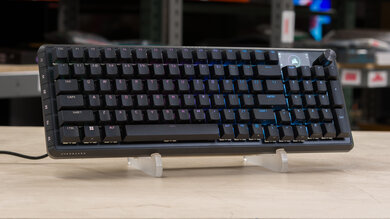
The Corsair Vanguard PRO 96 is a hall effect 96% gaming keyboard targeting enthusiasts who want rapid trigger, a compact layout, and a built-in LCD screen — all in one package. Community sentiment is genuinely mixed: users consistently praise the typing feel and MGX Hyperdrive switches, but early adopters were burned hard by the absence of iCUE support at launch, which has since arrived but brought its own share of bugs. Sticky and double-pressing keys were a recurring QC complaint during the early release window, with multiple users returning their units out of the box. The Web Hub-only software situation alienated much of Corsair's existing ecosystem, since anyone running iCUE for other peripherals had to disable it just to configure the keyboard. For buyers willing to accept a rockier-than-usual launch, this is a capable HE board — but Corsair's execution left a lot of goodwill on the table.
Pros

  • MGX Hyperdrive hall effect switches with Rapid Trigger support offer a noticeably smoother and quieter typing experience compared to the K70 PRO TKL — switches are also hot-swappable
  • 8,000Hz hyper-polling gives a competitive edge in fast-paced games where input latency matters
  • 96% layout retains a full numpad while eliminating the navigation cluster, making it only slightly larger than a TKL
  • Dedicated G-Keys double as reprogrammable macro keys and can be mapped to Stream Deck-style functions, media controls, or DPI toggles
  • iCUE support eventually landed, unlocking LCD widgets like sensor readouts, Spotify info, and clock — meaningfully expanding what felt like a half-baked screen at launch
  • Dial for volume control is a well-received addition that gives quick media access without needing function layer combos

Cons

  • Launched without iCUE support on a $200+ keyboard targeting existing Corsair ecosystem users — forcing them to disable iCUE entirely just to configure the board via Web Hub
  • Multiple users reported sticky keys, double-pressing, and ignored inputs straight out of the box, particularly with lower actuation points on the MGX switches
  • iCUE integration, when it finally arrived, shipped with bugs: certain keys (commonly O or T) get stuck as dim green and require factory resets or reinstalls to fix
  • The LCD screen is physically recessed into the board and faces away from the user at most angles, making it nearly invisible during normal use
  • Web Hub software is browser-only and requires Chromium, cannot run alongside iCUE simultaneously, and was widely described as clunky and slow to sync changes
  • No dedicated media keys — users must either remap G-Keys or navigate function layers to control playback, which feels like a missed opportunity given the 96% layout

Sticky Keys Straight Out of the Box

A notable number of early buyers reported double-pressing, ignored inputs, and stuck keys immediately after unboxing — issues that persisted even after calibration. Some returned their units within days, while others found workarounds like changing USB ports or doing factory resets. The problem appears more prevalent at lower actuation distances.

A $200+ Keyboard That Couldn't Talk to Corsair's Own Software

Launching without iCUE support was the community's loudest complaint — not because Web Hub is unusable, but because the entire value proposition of a Corsair keyboard is ecosystem integration. Users with existing Corsair mice, headsets, and fans had to kill iCUE just to tweak their new keyboard, which felt like a step backwards for a flagship product.

The LCD Is Cool in Theory, Frustrating in Practice

The built-in screen generated early excitement but disappointed once users realized it was deeply recessed, faced away from them, and limited to static images and GIFs at launch. With iCUE integration now live, widgets like CPU temps and media info have arrived — but bugs with GIF saving and screen flickering still pop up regularly.

User Reviews (45 of 255 analyzed)

42
0
Sudden_Target8707r/Corsair2d agonegative

Good luck, opened mine about 2 hours ago, its already boxed up and going to be returned. Web based hub is worse than ICUE. Needs to be constantly refreshed. Pages endlessly loading. Changes made to keyboard taking forever to update. My 9, 0, shift, and spacebar were stuck and double pressing/continuously pressing out of the box. Even after calibrating twice, moving switches around, and changing actuation point, the keys are still sticking.

View Original Comment
37
0
Sudhelmr/Corsair2d agonegative

I really like the idea of the iCUE Web Hub. But not having proper iCUE support for those folks who already bought into the ecosystem is wild on a >$200 flagship keyboard. It really should be up to the user to be able to choose what they prefer.

View Original Comment
35
0
Opposite_Practice_56r/Corsair2d agonegative

Who tf thought it would be a good idea to only support the Web hub and not ICUE. Probably 95% of people who would buy a 180-230€ keyboard from Corsair already use ICUE for other devices. It would have been a wonderful idea if BOTH the Web Hub and ICUE would have been supported.

View Original Comment
24
0
INFERNOdllr/Corsair2d agonegative

Not making a 'pro' product compatible with your own damn software is certainly a bold move, and a hell nah from me.

View Original Comment
23
0
ZarianPrimer/Corsair2d agonegative

Sorry but no iCue support and the fact that it isn't full-sized is a major deal breaker for me. I was about to drop some money on a new keyboard but I'm sorry to say I will have to look elsewhere if this is where you guys are aiming for your future keyboards.

View Original Comment
17
0
motionpriorityr/Corsair2d agonegative

If this is the future of Corsair, I'll be swapping all my components over to anything else. The fact that they're just abandoning the ecosystem they've built over the past decade or two and just saying 'sucks' doesn't give me any faith in them. Used to be happy having a 100% Corsair setup.

View Original Comment
16
0
DeathLives4Nowr/Corsair2d agopositive

The only issue i have with it is it doesnt work with ICue. Other than that fantastic keyboard.

View Original Comment
15
0
Holyfighter133r/Corsair2d agonegative

I'm returning mine. Love the look and feel but if you have anything else that requires ICUE then what's the point. The Web based ICUE is terrible. And it's like this product fights other Corsair products and goes all wonky. If I turn my headphones on which are the HS80 Max the keyboard resets. If this is the route for Corsair to divide its own products then I'm done.

View Original Comment
15
0
Entire-Signal-3512r/Corsair2d agonegative

I would buy today if it was also icue compatible. Its nice having options, but icue should be the default option. The whole point of me buying corsair is to keep everything under one program.

View Original Comment
11
0
Nicalay2r/Corsair2d agonegative

No iCue support? Damn that's a huge dealbreaker and a very bad move. Web Hub is cool and definitely good to have, but it lacks A LOT of things iCue has (syncing with other devices, use of realtime information, advanced/complex lighting effects...). You just can't give up on iCue and its ecosystem.

View Original Comment
10
0
Kooky_Signature_3994r/Corsair2d agonegative

It's available in my area today, so I can purchase it. I was already looking forward to its release, but the lack of iCue support seems to be a persistent issue. It's a good option for new Corsair users, but for those who already own a lot of Corsair products, this is a bit of a turn-off.

View Original Comment
6
0
kolenel_mugir/Corsair2d agonegative

I fail to understand why this keyboard isn't in Icue? it's literally printed on the box that it specifically supports Icue, and going to the link sends me to the same Icue I already have installed. to make matters worse using the website to make changes to the keyboard is somehow worse than the program, I can't seem to shift click keys to select multiple in a group, and it doesn't even give you the option to sync up the colors to what you already have in the corsair ecosystem.

View Original Comment
6
0
markrlomasr/Corsair2d agonegative

I have the same issue with the Vanguard 96 Pro but with the T key, it works fine when ICUE is closed but is a faint green when ICUE is running no matter what colour I set the key as. A few other issues with the ICUE integration too — the LCD dial mode icon disappears completely when ICUE is running.

View Original Comment
5
0
Broad-Ad-646r/Corsair2d agonegative

I bought this and I think it's a very nice feeling keyboard for my standards. I can at least say that either this or webhub was not ready to go. The fact that Icue isn't supported is very annoying. The webhub is so clunky and annoying to navigate. Having to disable Icue to tweak something is so tedious and it gets old after a few times.

View Original Comment
5
0
Corsair-X21r/Corsair2d agonegative

Please tell the team designing the next one to not recess the LCD screen into oblivion. It should be about 5mm higher than the base and tilted slightly forward. Also Web Hub is a complete no go unless you can access it on a non-Chromium browser, preferably without having to turn off ICUE.

View Original Comment
5
0
Vladjayer/Corsair2d agonegative

Unless they plan to add ICUE into it - there is no way I'm using it instead of my K100. I have a full blown corsair ecosystem in my water build and I can't switch between 'silent' and 'gaming' profiles in iCUE with that keyboard. Imagine waiting for new products to release and not being able to use either of them due to complete lack of integration.

View Original Comment
4
0
DelaZacr/Corsair2d agopositive

I absolutely love mine, I upgraded from the corsair rgb 70 Pro, it feels much smoother, its much quieter and the rgb on it is much more vibrant.

View Original Comment
4
0
SoggyBagelBiter/Corsair2d agonegative

I can't be the only one who doesn't understand why they released these keyboards without iCUE support out of the gate. They already have one piece of software they can't maintain properly, not sure why you would pivot to something else when you literally already have an entire ecosystem and APIs for it.

View Original Comment
3
0
motionpriorityr/Corsair2d agonegative

$230 and can't even use the iCUE software with the rest of my devices. Feel free to fire whoever thought of that.

View Original Comment
3
0
TuneComfortable412r/Corsair2d agonegative

I had one and sent it back because I hate the feel of them Hall effect switches! I bought the standard vanguard 96 after and it's a great keyboard.

View Original Comment
3
0
Zyntaksr/keyboards2d agonegative

I'll chime in as I have this keyboard. I don't agree that it's underfeatured (although I don't have much frame of reference to other keyboards) but it probably is overpriced. The 96 layout takes a bit of getting used to, at least it did for me. When I want to hit those arrow keys, I sometimes don't position my hands over it exactly every time.

View Original Comment
3
0
Key-Rise76r/Corsair2d agonegative

Just got mine and it was randomly missing inputs to the point I blocked myself on some webservice due to misspelled passwords. After calibration it was even worse, some keys reacted to light touch and other needed more press and sometimes would not register. What fixed it for now is I had keyboard plugged to a different USB port.

View Original Comment
2
0
psychrager/Corsair2d agonegative

This Vanguard Pro 96 keyboard is bad. Like REALLY BAD. I'll likely be returning it. I got the keyboard on Friday. I updated to latest firmware immediately after unboxing. I have to unplug it, and plug it back in with every power down or reboot. I have a huge issue with random sticky keys AND ignoring inputs in both normal and game mode. Initially the space bar wasn't registering at all in game mode.

View Original Comment
2
0
TerrabyteX3r/Corsair2d agonegative

I bought a k100 earlier this year. I was about to order this keyboard to replace it but then i read in the comments no icue support. Why can't it be both icue and icue web support? Such a step backwards. I have a lot of icue gear and my wife too. This is a deal breaker to me.

View Original Comment
2
0
YoungCeoJrr/Corsair2d agonegative

As a keyboard yes. As a corsair keyboard, no. I have endured so much pain with the firmware updates and all the idiotic behavior from corsair I wish I could tell you this is the perfect keyboard because its really great.

View Original Comment
2
0
bugmenot47r/keyboards2d agonegative

People don't review Corsair because it's generally overpriced, not as good quality, and lacks core features like hotswap.

View Original Comment
2
0
ArgentStonecutterr/keyboards2d agonegative

It's Corsair so the (justified) assumption is that it's overpriced and underfeatured. Very few people here are going to even look at it.

View Original Comment
2
0
psychrager/Corsair2d agonegative

My Vanguard Pro has sticky W, E, T, S, D, and N keys and will randomly completely ignore some inputs from all keys. Already did a factory reset, 2 calibrations. What a mess. Will probably return it in the next couple of days.

View Original Comment
2
0
Dave2363r/Corsair2d agonegative

Bro I got mine and all of my key presses sometimes double or keep getting stuck its so annoying. Ima return this shit.

View Original Comment
2
0
Florflokr/Corsair2d agopositive

Now they just need a wireless vanguard and I'm all aboard.

View Original Comment
2
0
Mattz1nhor/Corsair2d agonegative

The problem is if you are using ICUE for anything else it will automatically detect the keyboard and override whatever you've done on the webhub, if you stick the keyboard in onboard mode it just stops syncing. Almost a month later now and still no fix for the dim key.

View Original Comment
2
0
Ok-Ice2899r/Corsair2d agonegative

Same issue here — O key is dimly lit green after installing iCUE compat and the rotary knob stops working as well. Once iCUE is closed it works normally. This is really giving the impression this keyboard was overlooked and the update never got tested widely.

View Original Comment
2
0
Ahrimistr/Corsair2d agonegative

I fix the dim key bug by running the web-app and letting its settings take over iCue (even when iCue is running!). Other issues fixed by using the web-app: the screen flickering between my set PNG and the default Corsair PNG, and the Dial forgetting its only set function. Surprised 2 weeks+ and this is still an issue.

View Original Comment
1
0
Ill_Ad_2753r/Corsair2d agonegative

It seems like every user of the Vanguard feels the same right now... I just got mine a few days and really want to keep it as it is a great keyboard just for itself - but on the other hand the software is so poorly designed at this point, that it makes all the nice features that it has, barely useable.

View Original Comment
1
0
VANSTERDAM60420r/Corsair2d agonegative

G keys + polling rate is the only reason why I want to keep mine. Software is so trash. Wish I could use FN as a macro cuz using FN+F12 or FN+F2 to change profile sucks. I also don't like how game mode you can't edit individual key actuations. Has to be same for the whole keyboard.

View Original Comment
1
0
Wilson-theVolleyballr/Corsair2d agonegative

I use the G-Keys for media control. G1 for next track, G2 for play/pause, and G3 for previous track. The screen is indeed disappointing though; I wouldn't even mind its limited functionality if it actually worked. Every time I try saving a GIF to it, it fails so hopefully they fix that in a future update.

View Original Comment
1
0
Stickywulfr/Corsair2d agonegative

Don't buy it. I just bought one today and when I opened it up the wrist rest doesn't align to the keyboard. Very cheap manufacturing and quality control. Trying to return it and there is no customer service, only non-functional AI which is unable to complete an RMA. Absolute garbage company selling cheap shitty products.

View Original Comment
1
0
ROB448Mr/Corsair2d agopositive

I had the K100 pro and got the 96 pro, bit smaller to get used to but feels nicer imo.

View Original Comment
1
0
jandb19r/keyboards2d agopositive

Just bought this board yesterday. New to Corsair. Loving it so far. Went to buy a Razer, walked out with the vanguard 96 after trying the demo. Web software is not the best but promising. I think every company has crappy software. However with the web version it let me use it without installing more software. First time using Corsair liking it so far.

View Original Comment
1
0
GaryHTXr/Corsair2d agopositive

Have been using the Vanguard Pro 96 for about a month now and have been loving it. I picked up some Owlab Ti HE switches in case I didn't like the stock switches, but have yet to feel the urge to swap them all out.

View Original Comment
1
0
EmotionalMarzipan985r/Corsair2d agopositive

I tried swapping out the keycaps for some old frozen llama ones I had laying around, a lot of the keys don't swap nicely lol but I'll just swap the stock ones back in tomorrow I like the little texture they have anyways. It's a great keyboard. I did swap the switches with Gateron Jade Pros and that definitely made a big enough difference for me.

View Original Comment
1
0
rbmskr/Corsair2d agopositive

Yes, the key spacing is normal. At first I was hitting the arrow keys by accident not so much now but still do on occasion. Other than that, I type the same as I did on my other keyboards.

View Original Comment
1
0
jkalisonr/Corsair2d agonegative

I love mine, the offline web version works okay... but the biggest issue I am having is that when I reboot my PC the keyboard is never active. I don't understand what is happening with that.

View Original Comment
1
0
kari99r/Corsair2d agonegative

Fun keyboard but it's sadly just that - for a $230 USD keyboard and being forced to use Web Hub (even when you might have other peripherals that run on iCUE) it feels more like a slap in the face to Corsair fans. You can get a comparable keyboard for literally $90 USD at full price without a corsair logo engraved on it.

View Original Comment
1
0
420Juliansr/Corsair2d agonegative

Just updated Icue and was excited to see Vanguard FINALLY being supported and all of a sudden the T Key is a different color and the # and < key are stuck pressing. Literally cant do anything because it keeps on holding either # or <.

View Original Comment