Keychron Keychron B1/B6 Pro
Keyboards

Keychron

Keychron B1/B6 Pro: What Real Users Say About Rollover

Apr 2026

Last Analyzed

6/10

Overall Rating

22

Positive Reviews

18

Negative Reviews

Summary

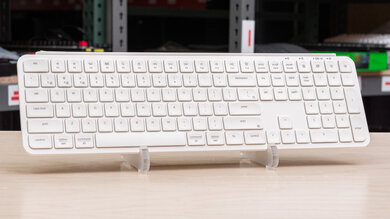
The Keychron B1/B6 Pro are ultra-slim scissor-switch keyboards targeting users who want a low-profile, wireless typing experience at a budget-friendly price — essentially a more affordable alternative to the Logitech MX Keys. Reddit sentiment is genuinely mixed: many users appreciate the compact form factor, multi-device connectivity, and impressive battery life, but a recurring set of hardware and firmware complaints keeps this keyboard from being a universally safe recommendation. The key rollover limitations are the most debated issue — real-world fast typers report missed keystrokes, and the keyboard matrix was not designed to minimize these conflicts. For light office typists or those coming from laptop keyboards, it tends to satisfy; for power users or developers relying on rapid key combinations, it regularly disappoints.
Pros

  • Exceptional claimed battery life of up to 1,200 hours on a single charge for B1 and B6 Pro models, making battery anxiety essentially a non-issue for most users
  • Supports three connectivity modes — Bluetooth, 2.4GHz USB dongle, and wired USB-C — plus easy Mac/Windows layout switching with a physical toggle, making it genuinely versatile across setups
  • Ultra-flat profile is thinner than the Logitech MX Keys, and multiple users find it comfortable for extended typing sessions without needing a wrist rest
  • Keychron Launcher app offers full key remapping via a VIA-style interface, and the ZMK-based firmware has an open-source codebase (released in early 2024), giving tinkerers more flexibility than typical budget keyboards
  • Includes a generous accessory box: USB-C cable, USB-C to USB-A adapter, 2.4GHz USB-A dongle, and a silicone keyboard cover — solid value at the $45–$70 price point
  • Compatible with iOS, Android, Windows, and macOS, making it a rare budget wireless keyboard with true cross-platform flexibility

Cons

  • Key rollover is effectively 2KRO — pressing three or more keys simultaneously, especially combinations involving adjacent rows, causes missed or phantom inputs, a serious problem for developers and fast typists
  • Wider keys like left shift and spacebar are noticeably 'crunchy' out of the box, a complaint that appears consistently across multiple threads and is not isolated to early units
  • No backlighting on any model in the B series, a deal-breaker for users working in dim environments — the B2 Pro also has the same absence while offering far shorter battery life (300 hours) for unclear reasons
  • Build quality concerns include visible chassis gaps near the USB-C port, plastic construction that feels premium only by budget standards, and at least one user reporting total unit failure within 4 months
  • No kickstands or tilt adjustment options, making it permanently flat — some users resorted to third-party riser pads from Amazon with imperfect results
  • Typing feel is roughly equivalent to a laptop keyboard or generic scissor-switch board — users expecting MX Keys-level quality are frequently disappointed, with several describing it as feeling like a $20 keyboard despite costing significantly more

The Rollover Problem Is Real — and It Affects Typing, Not Just Gaming

Multiple users discovered that the B1/B6 Pro's 2KRO limitation causes dropped keystrokes during normal fast typing — not just gaming. Common English letter sequences like 'NUE' or 'KDE' can fail to register, and the keyboard matrix wasn't designed to minimize these conflicts the way most budget boards are.

A Solid MX Keys Alternative at Half the Price — With Caveats

At roughly $45–$70 depending on region, the B1/B6 Pro undercuts the Logitech MX Keys S significantly. For light office work and casual typing across multiple devices, it punches above its weight. But it doesn't replicate the MX Keys typing experience — it matches a good laptop keyboard at best.

ZMK Firmware and Open Source Code Make This a Surprisingly Hackable Budget Board

Unlike most scissor-switch keyboards, the B1/B6 Pro runs ZMK firmware with full key remapping through Keychron Launcher. The source code was made public in early 2024, which means tinkerers can build custom firmware — unusual for a sub-$70 wireless keyboard.

User Reviews (40 of 115 analyzed)

3
0
rorybdr/Keychron2d agopositive

I have now tried the B1 Pro and would like to give an update. In short, I am impressed. The outer case feels very solidly built, with only minor flex on the left and right sides. The typing experience isn't terrible, though the travel is a little too short for my liking. The up and down arrow keys specifically do feel pretty awful, as they're much lighter than all of the other keys and almost feel broken. Some of the wider keys and especially the left shift key do have some crunchiness.

View Original Comment
2
0
sotos2004r/Keychron2d agopositive

I got the B2 Pro, and I'll be honest, even though it does feel like any good laptop keyboard (because there are some really bad scissor keyboards out there) I still like it as this is what I expected from a super thin keyboard.

View Original Comment
2
0
BawbbySmithr/Keychron2d agonegative

I just got it in the mail. But first impressions... Yeah, 'crunchy' is a good descriptor of some of the keys. Maybe it'll get better over time as it gets worked in, but I'm honestly pretty disappointed with it so far. Good chance I won't keep it.

View Original Comment
2
0
iKiair/keyboards2d agopositive

Keychron is overall a solid brand in my eyes for people getting into the 'nicer' keyboard space. The B6 Pro looks pretty nice.

View Original Comment
2
0
wayne2087r/keyboards2d agonegative

My worry is that scissor switches feel mushy. I really need clear tactile feedback on my fingertips. Otherwise I fly over the keys and accidentally skip a key.

View Original Comment
2
0
owlIsMySpiritAnimalr/Keychron2d agonegative

I am fairly certain it is not a hardware issue since it triggers specifically on layers 1 and 3. The B key and apparently the Windows key don't work on other layers without pressing any other key first. It is weird.

View Original Comment
2
0
Serious-Bat9612r/Keychron2d agonegative

This is the first time I've experienced a membrane keyboard that can't register certain letters when I press them faster than 'normal.' For example, when I type 'NUE,' it usually only types 'NU,' and similar issues happen with other key combinations. I know that sometimes it's 'my fault' for not fully releasing the previous key, but come on... other keyboards don't have this problem.

View Original Comment
2
0
Keychron-Supportr/Keychron2d agopositive

The battery life is not entirely determined by the battery capacity, but is also related to the chip. The MCU used in B1P and B6P is different from that in B2P.

View Original Comment
2
0
candy49997r/Keychron2d agonegative

Membrane boards are almost never NKRO. If rollover is not mentioned, assume 2KRO for a membrane.

View Original Comment
2
0
sikkhimr/Keychron2d agopositive

Just bought one from Korea. It's a cheap keyboard (~29 USD). It's like a cheap version MX Keys mini with a similar layout. The marketing material shows it as 'a new basic default keyboard' for basic users.

View Original Comment
2
0
Captain_Nomad_Jrr/Keychron2d agopositive

A month in, so far, so good — I keep the Keychron in the office, so only use it maybe 1-2 days per week, but it's been a great experience.

View Original Comment
1
0
ImaginaryKingr/Keychron2d agonegative

All in all this was just a bad purchase. And it does make me reconsider Keychron as a source for my keyboards altogether. I have some older K1 and K3 boards and also had a K8. They are ok-ish, but for the price they are asking now (around 100 EUR) not really.

View Original Comment
1
0
Still_Affect_8071r/Keychron2d agonegative

My B6 Pro died after 4 months.

View Original Comment
1
0
ElBraderinor/Keychron2d agopositive

I've had a B1 since release day connected to a Mac mini M1 and have encountered no issues. I alternate between the B1 and K3 depending on the day and when it needs to be recharged (rarely). I would recommend it if someone asked me for a good low profile keyboard.

View Original Comment
1
0
Many_Magician5855r/Keychron2d agopositive

Upgrading from a Techware Phantom Elite brown Gateron switches to Keychron B1 Pro feels like a big upgrade. I can type much faster on this keyboard, and it feels great. The build is sturdy, keys are tactile and quiet.

View Original Comment
1
0
terrisnjwr/Keychron2d agopositive

I just bought the B1 Pro keyboard. I like it. Before I made the purchase, I was contemplating between this and the K1. I made the final decision on this after testing both literally more than 10 mins, and I must say that this is one of the best purchase decisions I've made. The keyboard is small, yes, but compared to my previous Razer BlackWidow, I don't have to move my hands as much.

View Original Comment
1
0
Ggggggg420r/Keychron2d agonegative

B6 Pro is very bad if you type very fast, it's laggy and doesn't write all letters (tested on cable and 2ghz). I've just ordered original MX Keys. I hope there will be better.

View Original Comment
1
0
DekiSmeki14r/Keychron2d agopositive

I've been using it for a year. For me it's a great keyboard. I like the switches. Very compact. Comfortable to type. You get a lot in the box — a nice long cable, 2.4ghz adapter, USB-C to USB-A adapter and a silicon keyboard cover. I've bought it for my office. I'm going to buy a second one for home. Best keyboard for the price.

View Original Comment
1
0
DekiSmeki14_2r/Keychron2d agopositive

I don't have the crunchy keys issue.

View Original Comment
1
0
Still_Affect_8071_br/Keychron2d agonegative

I loved my B6 Pro but it died after just 4 months. Pushing the 'o' would return a 'o' and a 'u' (ou), same with 'm' every time I hit '.'. Tried on multiple computers, on BT, 2.4 and plugged in but no fix. The 'u' key would also randomly trigger every now and again and occasionally got 'stuck' down even though I wasn't touching it.

View Original Comment
1
0
Character_Number_182r/Keychron2d agopositive

I like it. Very low profile, great for long sessions. Pretty good aesthetics with the white colorway (magic keyboard look) and the black colorway (mac keyboard look). The keys are very clicky and nice to type with. Very thin, easy to transport, and has all of the function keys for mac. Also, easily changeable from windows to mac — just the flip of a switch.

View Original Comment
1
0
robbiekhanr/keyboards2d agopositive

I really like the B6 Pro. The 1000Hz polling rate on wireless and wired helps — the MX Keys S has latency and 125Hz max. The B6 Pro is a noticeable improvement in that department.

View Original Comment
1
0
TheOneWhoWorkr/keyboards2d agonegative

I just wish they made a backlit version of this.

View Original Comment
1
0
ThrowRABluebird22r/Keychron2d agopositive

In the product info it says in bold text '1200 Hours of Use on A Single Charge' both for B1 and B6 Pro. That is so odd. Still confusing though. I ordered it anyway.

View Original Comment
1
0
dkinvokerr/Keychron2d agopositive

For PC it is excellent. At first I was skeptic about lack of dedicated PgUp, PgDn, Home and End buttons, but once I got used to the combination of Fn + arrow keys I think it's even better (smaller hand movement). It's quiet, so thin that you don't need a palm rest or tilt.

View Original Comment
1
0
Creepy_Kitchen_1006r/Keychron2d agonegative

Bad material. Keychron chose cheap plastic to make it. But typing is decent.

View Original Comment
1
0
WarmCactir/Keychron2d agonegative

The left shift key, enter key (all wider keys) are crunchy.

View Original Comment
1
0
azir_tear/Keychron2d agopositive

It uses a NRF52 microcontroller and doesn't have n-key rollover. It does not require any drivers on Windows — the microcontroller pretends to be a generic mass storage device.

View Original Comment
1
0
quasidesr/Keychron2d agopositive

The USB-A dongle is a feature — it's a normal USB-C cable and you also get a converter. USB-A for wireless makes sense because USB-C ports are very limited on most boards, so using USB-A saves your precious USB-C slots.

View Original Comment
1
0
rorybd_br/Keychron2d agonegative

The crunchiness was hardly an issue in my opinion, and it also seemed to ease up after a few minutes of use. I returned the B1 since I kept the Cherry instead, though.

View Original Comment
1
0
Code4Carer/Keychron2d agopositive

Typing this on a B6 Pro. The only issue with ghosting or missed letters is with 'MY.' KDE and everything else is fast and no issues.

View Original Comment
1
0
3ctor/Keychron2d agonegative

I get 300 hours is still a lot, but a keyboard running out of battery mid-use is a situation to be avoided. Instead of jumping onboard I'm continuing to hold out for something more compelling — I basically want a 96-key MX Keys if possible.

View Original Comment
1
0
TJonathanLr/Keychron2d agonegative

This keyboard seems like a great fit in terms of features for what I need and it is at a great price point. But hearing about these rollover issues in some of the threads has kept me from purchasing it.

View Original Comment
1
0
bootcamper64r/Keychron2d agopositive

They probably did market research and determined there's no demand for a $200 scissor switch keyboard in the United States.

View Original Comment
1
0
Fluid-Mycologist6434r/Keychron2d agonegative

I use the dongle mode on my Mac and I get weird delay, and the battery doesn't last that long when on dongle mode — mine lasts about 1 week max.

View Original Comment
1
0
SnooSongs5410r/keyboards2d agonegative

Everything is pretty good when compared to the MX Keys S. Heavy switches and keycaps that chip and degrade. It's otherwise robust but it is a poor typing experience.

View Original Comment
1
0
PrimalSaturnr/keyboards2d agonegative

Why do you say it's a poor typing experience?

View Original Comment
1
0
Ricasbpr/Keychron2d agopositive

Interested in buying the B6 Pro — are there any issues to be aware of after extended use?

View Original Comment
1
0
Apocaelypzer/Keychron2d agopositive

Has anyone been able to provide a detailed comparison between the B6 Pro and the MX Keys after extended use?

View Original Comment
1
0
nikeitar/Keychron2d agopositive

Please let us know if you find info or reviews about B6 Pro compared to MX Keys.

View Original Comment