Keychron Keychron B33/B36
Keyboards

Keychron

Keychron B33/B36: What Real Users Actually Think

Apr 2026

Last Analyzed

6/10

Overall Rating

17

Positive Reviews

24

Negative Reviews

Summary

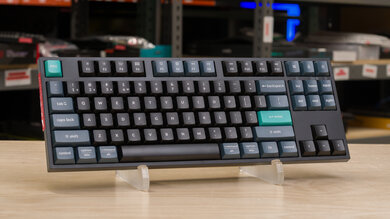
The Keychron B33 and B36 are budget-oriented wireless office keyboards targeting users who want a slim, Apple Magic Keyboard-adjacent experience without paying Apple prices. Reddit sentiment is mixed — plenty of users appreciate the value proposition for basic office work, but the keyboards draw consistent criticism for their scissor switch implementation, key rollover limitations, and Keychron's notoriously frustrating customer support. These boards sit in an unusual middle ground: priced and positioned for the mainstream office crowd, yet falling short of the polish expected even at that tier.
Pros

  • Affordable entry point for wireless office use, with the B33/B36 combo available at around $35-50 — significantly cheaper than Apple Magic Keyboard or Logitech MX Keys
  • The B33 is available as a keyboard and mouse combo (with the BM25) that shares a single 2.4GHz USB receiver, solving the multi-dongle frustration common to Keychron's other wireless lines
  • Compact, portable form factor that fits well in office bag setups; users switching from full-size boards appreciate the reduced desk footprint
  • Wireless connectivity covers both Bluetooth and 2.4GHz, with multi-device switching between Windows and macOS — useful for users bouncing between platforms
  • Praised as a comparable feel to the discontinued Logitech K740 at roughly half the price, making it attractive for fans of that profile

Cons

  • Key rollover is limited — the B36 explicitly lists no NKRO support, meaning fast typists and programmers report missed or doubled keypresses, particularly with rapid successive inputs on arrow keys
  • Full-height scissor switches are widely seen as a design misstep: scissor switches exist to enable low-profile boards, so making them full height sacrifices the main advantage with none of the benefits of mechanical switches
  • ABS keycaps, plastic case, and single colorway make these boards feel budget despite the Keychron branding premium — users note no alternate caps for Option/Win key legends
  • Keychron's customer support is consistently described as poor — warranty claims often result in component replacements rather than full board swaps, with users reporting weeks-long resolution times and unhelpful ticket handling
  • At least one user received two consecutive B36 units with arrow key registration issues, suggesting quality control consistency problems in this line
  • Debounce and key travel sensitivity can cause missed inputs for users not used to full key depression on each press — not intuitive for fast typists

Arrow Keys That Miss Arrows

Multiple B36 buyers reported arrow key registration failures out of the box — one programmer went through two replacement units with the same issue. Keychron confirmed NKRO is not supported, meaning rapid successive keypresses can simply not register.

The Only Keychron Combo With One Dongle

Keychron frustrates users by requiring separate receivers for keyboard and mouse — but the B33 + BM25 combo is one of the rare exceptions. For users who want a unified Keychron wireless desk setup, this combo is currently the cleanest path.

Reddit's Verdict: Fine for Office, Frustrating for Anything Else

The B33/B36 gets a pass from casual office typists who just want wireless and quiet keys. But programmers, fast typists, and anyone who's had to deal with Keychron's support after a defect come away with a much harsher opinion.

User Reviews (41 of 189 analyzed)

16
0
hvbqueirozr/Keychron2d agonegative

Good value, terrible latency, not great Bluetooth.

View Original Comment
13
0
KingLuisr/Keychron2d agopositive

I have a k2 v2 for a few months that I use for work and personal. I love it coming from a regular work provided ibm keyboard. The sound, the rgb, the build quality is great. My only gripe which I have read about is that it's a bit tall. So a wrist rest is needed. But no issues.

View Original Comment
8
0
Wild-subnetr/Keychron2d agonegative

Yes if you're not comfortable disassembling the board to perform repairs best not buy from Keychron as they are more likely to send a component rather than the entire board. That being said, it's fairly easy to repair. I would draw the line at soldering but swapping parts is straightforward.

View Original Comment
7
0
worldlybedouinr/Keychron2d agopositive

I've got a K8 and K8 Pro. Best boards I've used in my 35+ years of computing/typing. I'm not into MKs as a hobby or anything. Just kinda found my way to the K8 Pro which is now my daily driver. Works, does what I need.

View Original Comment
6
0
dr_barnowlr/Keychron2d agonegative

Priced and specced to catch the "premium office market" (ie, budget but nice). No alternate caps for Option/Win to save money. Plastic case to save money. ABS caps. Scissor switches. Only one colourway.

View Original Comment
4
0
ArgentStonecutterr/Keychron2d agonegative

The Keychron B boards are membrane so if you're paying more than the $3.99 a used Dell L100 would cost you at the local thrift store you're paying too much. A full height scissor switch seems to be a crime against nature.

View Original Comment
3
0
penscrollingr/Keychron2d agonegative

Never deal directly with the keychron website. If you can get a keychron board from Amazon or such with a good return policy that's an option, but yeah they have the worst customer service.

View Original Comment
3
0
Fine_Anywhere989r/Keychron2d agonegative

I've had stronger customer support from Razer than Keychron. I know that wasn't your alternative, but I bring it up because people like to trash Razer for their quality and support. They've been nothing but good to me.

View Original Comment
3
0
seashellsnycr/Keychron2d agonegative

Yeah I asked something similar a few weeks ago for Q1 Max and Q0 Max, and unfortunately it's a no on one receiver. It makes me appreciate Logitech's wireless receiver setup.

View Original Comment
3
0
rorybdr/Keychron2d agopositive

I have now tried the B1 Pro and would like to give an update. In short, I am impressed. The outer case feels very solidly built, with only minor flex on the left and right sides. The typing experience isn't terrible, though the travel is a little too short for my liking. The up and down arrow keys specifically do feel pretty awful, as they're much lighter than all of the other keys and almost feel broken.

View Original Comment
2
0
PeterMortensenBlogr/Keychron2d agonegative

Unless Keychron has designed the keyboard matrix better for the B33 (to minimise the problem), it has severe key rollover problems, like the rest of the keyboards in the B / B Pro series.

View Original Comment
2
0
StarMan315r/Keychron2d agonegative

Recently bought a Keychron B36 wireless keyboard. I started using it and within the first day noticed that the right arrow key did not always register keypresses. I contacted Keychron support and they ended up sending me a replacement keyboard. I received the replacement keyboard today and immediately tested it on the Keychron Launcher out of the box, and 3/4 of the arrow keys have issues registering rapid successive key presses.

View Original Comment
2
0
BawbbySmithr/Keychron2d agonegative

I just got it in the mail. "Crunchy" is a good descriptor of some of the keys. Maybe it'll get better over time as it gets worked in, but I'm honestly pretty disappointed with it so far. Good chance I won't keep it.

View Original Comment
2
0
John-Orionr/Keychron2d agopositive

I can confirm they do send parts but it worked out perfect for me.

View Original Comment
2
0
ArgentStonecutter_2r/Keychron2d agonegative

ZMK can hold multiple connections open and directs output to the one you have selected, QMK only does one connection and has to drop and renegotiate if you switch outputs. ZMK is pretty much ready to sweep QMK. It just takes companies deciding to make the switch.

View Original Comment
2
0
QuiteFattyr/Keychron2d agonegative

QC is terrible and the keyboards on a technical level (the one I have) can do per key RGB they just don't implement it. You have to go third party and pray you don't brick it. Mainly the QC.

View Original Comment
1
0
lifeisnothingbutexamr/Keychron2d agopositive

For a regular office use i think this is very good. It would have been perfect if it has volume knob with mute click.

View Original Comment
1
0
Plank_With_A_Nail_Inr/Keychron2d agopositive

Its a cheap office keyboard NKRO isn't needed. It costs $35 lol, this is a massive over reaction. This keyboard isn't aimed at the keyboard as a hobby crowd.

View Original Comment
1
0
unholy_alliancer/Keychron2d agonegative

You might check the debounce settings in the Launcher which they call something like Reset Time or some such, I think it is under advance mode tab. Mine was set at 50ms from the factory which imo is WAY too high.

View Original Comment
1
0
Virtual-Nose7777r/Keychron2d agonegative

Not on Amazon Canada. My keyboard went bad after 4 months so you have to deal with keychron. They send your ticket to a guy with a gmail account and expect you to act as a service technician. Their warranty means nothing.

View Original Comment
1
0
penscrolling_2r/Keychron2d agonegative

Yeah the keychron warranty means nothing and their quality control is garbage. Also, I work in technology and was giving them really good bug reports with screen grabs of the errors their code was throwing, and they were having none of it.

View Original Comment
1
0
Equal-End-5151r/Keychron2d agopositive

They do offer it in a combo kit I just purchased. I had to order the combo direct from Keychron - and I don't know if they offer this with different models than what I got (Keychron B33 Keyboard and BM25 Mouse Wireless Combo). They share one receiver.

View Original Comment
1
0
ricperry1r/Keychron2d agonegative

Well, shit. I didn't read this before I bought my B6 Pro and my M6. I was so happy to reduce to a single receiver, you know, getting devices made by the same manufacturer. Goddamnit, Keychron!!

View Original Comment
1
0
lNosneb20lr/logitech2d agopositive

It's not an exact replacement for the k740 but the new keychron B36 and B33 keyboards have a very similar feel, for roughly half the price, no backlight and double the height unfortunately.

View Original Comment
1
0
ElBraderinor/Keychron2d agopositive

I've had a B1 since release day connected to a Mac mini M1 and have encountered no issues. I alternate between the B1 and K3 depending on the day and when it needs to be recharged (rarely). I would recommend it if someone asked me for a good low profile keyboard.

View Original Comment
1
0
Many_Magician5855r/Keychron2d agopositive

I don't know about you guys, but upgrading from a Techware Phantom Elite brown Gateron switches to Keychron B1 Pro feels like a big upgrade. I can type much faster on this keyboard, and it feels great. The build is sturdy, keys are tactile and quiet.

View Original Comment
1
0
Ggggggg420r/Keychron2d agonegative

B6 Pro is very bad if you type very fast, it's laggy and doesn't write all letters (tested on cable and 2ghz). I've just ordered original mx keys. I hope there will be better.

View Original Comment
1
0
DekiSmeki14r/Keychron2d agopositive

I've been using it for a year. For me is a great keyboard. I like the switches. Very compact. Comfortable to type. You get a lot in the box. You get nice long cable, 2.4ghz adapter, USB c to USB an adapter and silicon keyboard cover. I've bought it for my office. I'm going to buy a second one for home. Best keyboard for the price.

View Original Comment
1
0
Still_Affect_8071r/Keychron2d agonegative

I loved my B6 Pro but it died after just 4 months. Pushing the 'o' would return a 'o' and a 'u'...(ou), same with a 'm' everytime I hit '.'. Tried on multiple computers, on BT, 2.4 and plugged in but no fix.

View Original Comment
1
0
Character_Number_182r/Keychron2d agopositive

I like it. Very low profile, great for long sessions. Pretty good aesthetics with the white colorway (magic keyboard look) and the black colorway (mac keyboard look). The keys are very clicky and nice to type with. Very thin, easy to transport, and has all of the function keys for mac. Also, easily changeable from windows to mac.

View Original Comment
1
0
hyuga144_respr/Keychron2d agonegative

The B1 Pro has a higher key travel (i.e. the keys press deeper), so you might prefer it, but in my opinion it's definitely not better than the Magic Keyboard as far as build quality and typing experience is concerned.

View Original Comment
1
0
terrisnjwr/Keychron2d agopositive

I just bought the B1 Pro keyboard. I like it. I made the final decision on this after testing both literally more than 10 mins, and I must say that this is one of the best purchase decisions I've made. The keyboard is small, yes, but compared to my previous Razer BlackWidow, I don't have to move my hands as far.

View Original Comment
1
0
Code4Carer/Keychron2d agopositive

Interesting that while I type this on a B6 Pro. The only issue with ghosting or missed letters is with "MY", shift or no shift. KDE and everything else is fast and no issues.

View Original Comment
1
0
wanderspectrer/Keychron2d agonegative

I am not a fan of a normal scissor type either. It would be interesting to see a review on the unit. I also want to see if they are going to make a low profile HE or not.

View Original Comment
1
0
Mediocre_Sherbet8179r/Keychron2d agonegative

Same boat...bought a B1 Pro and M6 thinking it should work with the one receiver...absolutely ridiculous that you need both receivers.

View Original Comment
1
0
HarmoniousBoschr/Keychron2d agonegative

Did the crunchiness ever get resolved? How's the B1 holding up now?

View Original Comment
1
0
rorybd_returnr/Keychron2d agopositive

The crunchiness was hardly an issue in the first place in my opinion, and it also seemed to ease up after a few minutes of use.

View Original Comment
1
0
portfolioratingr/logitech2d agopositive

LOL I actually have one [a Logitech K740]. I used it for maybe 3 weeks before switching to a wireless keychron. Pretty sure it's still in its original box in my closet.

View Original Comment
1
0
Theinvoker1978r/Keychron2d agonegative

Razer is really good. They replace my mouse with very little proofs. Meanwhile, I got a Keychron keyboard for work only available on their website. It's very hard to return anything.

View Original Comment
1
0
Loud-Tackle9228r/Keychron2d agonegative

Had to send my Q1 back due to rgb fault where certain keys would just stay on one colour and couldn't be changed. Couldn't replace like for like so after a $20 upgrade and 8 weeks wait i got the Q1 Pro (wireless with knob) — knob came with rust specs on it which after $300 total and 2 months is pretty disappointing.

View Original Comment
0
0
Ok-386r/Keychron2d agopositive

Keychron will help you to troubleshoot the keyboard, find the culprit, then send you the replacement part for whatever is broken and help you to replace it.

View Original Comment