Logitech Logitech MX Keys S
Keyboards

Logitech

Logitech MX Keys S: What Real Users Actually Think

Apr 2026

Last Analyzed

7/10

Overall Rating

24

Positive Reviews

18

Negative Reviews

Summary

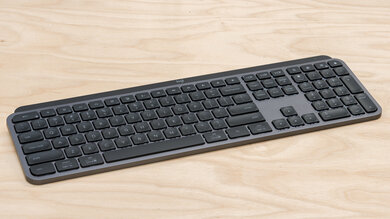
The Logitech MX Keys S is a premium wireless scissor-switch keyboard aimed squarely at productivity-focused users who want a quiet, low-profile typing experience across multiple devices. Reddit sentiment is genuinely mixed — enthusiastic long-term owners who swear by its comfort and multi-device switching coexist with vocal critics calling it overpriced for what amounts to an incremental upgrade over its predecessor. It excels in office and work-from-home contexts, particularly for users who switch frequently between laptops and desktops, but struggles to justify its price tag against cheaper alternatives that have emerged in the low-profile mechanical space. Durability concerns surface consistently in longer threads, with reports of key wobble, paint wear, and backlight degradation appearing after 2–3 years of heavy use.
Pros

  • Easy multi-device switching via the Logi Bolt receiver is consistently praised by users juggling a work laptop and personal PC — Flow functionality lets some users move seamlessly between machines
  • Quiet scissor-switch feel appeals to office environments and roommate-conscious users; noticeably quieter than most mechanical alternatives and comparable to Apple's keyboard feel
  • Battery life gets strong marks — users report over a week of use per charge, with a fast 30-minute top-up getting them back quickly
  • Spherically-dished key caps reduce typos for touch typists, and the low-profile feel is described as a natural extension of high-end laptop keyboards like ThinkPads
  • The MX Keys S fixed the most complained-about issue from the original: backlight timeout is now customizable up to 30 minutes via Logi Options+, with settings persisting across paired devices
  • Combo value is frequently cited — buying the MX Keys S + MX Master 3S as a bundle gives a cohesive, premium desk setup that's straightforward to expense as a business purchase

Cons

  • At $100–$130, it faces serious competition from Keychron's B Pro series (roughly half the price) and NuPhy Air75 V3, which offer true low-profile mechanical switches with hotswap and onboard memory
  • Durability complaints are a pattern: keys losing paint, keycaps becoming wobbly, and backlight failing after 2–3 years of heavy use — multiple users specifically note the S model uses cheaper plastic than the original MX Keys
  • Backlight behavior frustrates many users — the proximity sensor that triggers lighting is erratic for some, and there's still no option to keep it permanently on; 30 minutes is the max timeout
  • No standard Print Screen key — it sends a WIN+SHIFT+S shortcut instead, which breaks workflows that rely on a hardware PrtSc key, especially on locked-down work machines where Logi Options+ can't be installed
  • Wake-from-sleep latency causes missed keystrokes for some users, particularly on Mac, where the non-S 'MX Keys for Mac' version reportedly wakes more reliably
  • The Shift+R+G ghosting bug from the original MX Keys was not fully resolved — some users on the S model still report AG and RG key combinations misfiring under rapid input

The Backlight That Won't Stay On

It's been the top complaint since the original MX Keys launched. The S model finally adds customizable timeout (up to 30 min), but the proximity sensor still misfires for many users — and there's still no 'always on' option. For dark-room workers, it remains a dealbreaker.

Premium Price, Mid-Range Competition

When the MX Keys S launched, it had few real rivals in the quiet low-profile space. That's changed. Keychron's B Pro series and NuPhy's Air75 V3 now undercut it on price while offering hotswap mechanical switches — Reddit increasingly recommends these alternatives first.

Office Keyboard of the Year, Every Year

Despite the criticism, it keeps winning in one specific context: the corporate desk setup. Easy to expense through business suppliers, quiet enough for open offices, and the multi-device Bolt switching just works. For office workers, the complaints barely register.

User Reviews (42 of 191 analyzed)

21
0
reshoupr/buildapcsales2d agopositive

You can get the mouse for 20% off using Logitech's recycle program at Best Buy, just bring in a junk mouse and get a discount on any eligible Logitech product, in store only though for obvious reasons.

View Original Comment
5
0
Keyan06r/logitech2d agopositive

Biggest changes are switch to the Bolt receiver and customizable backlight duration (finally). Confirmed that backlight settings persist across different devices with or without the Logi Options+ software — I set it to 1 minute using the software on my PC, switched to iPad, and backlight duration is still one minute.

View Original Comment
5
0
Izzyrealthor/buildapcsales2d agopositive

I really like this keyboard due to how easy it is to switch between devices. Would highly recommend to anyone who does work from a different device other than your PC.

View Original Comment
5
0
TedLimr/buildapcsales2d agopositive

I believe most people use these for the office. If I used a mechanical keyboard in the office, everyone would hate me!

View Original Comment
4
0
xangkoryr/logitech2d agopositive

I have been using MX Keys for 5 or 6 years. I came from over a decade of using Mac keyboards and it is the closest thing that I have found that is both similar but slightly more substantial. I have one at home and one at work. I did spill on one and had to replace it. I'm not aware of anything else that I would use instead of it.

View Original Comment
4
0
kusmogr/logitech2d agonegative

That's how you promote the S in MX Keys S as an official representative of Logitech? That it's eco-friendly? That's what's going to have the people come in droves to buy a $100+ keyboard? So they can feel like a Planeteer? Talk about burying the lede! But on brand considering how tone deaf Logitech has been with responding to the complaints about the original MX Keys backlight issues.

View Original Comment
4
0
hrflowersr/logitech2d agopositive

It's an excellent keyboard.

View Original Comment
4
0
DV8_MKDr/buildapcsales2d agopositive

That's why I bought it! I need the easy switching between my work laptop and personal PC. Also the mouse has the option to seamlessly move between two PCs with the default Logitech app, no other app needed.

View Original Comment
4
0
Gloriathewitchr/buildapcsales2d agonegative

Consider the Keychron variant of this which is half the price and similarly featured.

View Original Comment
4
0
husky_gr/buildapcsales2d agopositive

I've been using this for gaming and productivity. I found that it works pretty well. You just have to get used to the short key press which I happen to like for gaming anyways.

View Original Comment
3
0
Inevitable-Unit-4490r/logitech2d agonegative

The typing experience is good. The backlight is very bad - if youre going to use it in low light conditions, you had better be very tall or have a shtick up your ass, because the light just shines through all the keys and you will have trouble orienting. I wouldnt recommend it.

View Original Comment
3
0
Reflective_Tempistr/logitech2d agopositive

I've had nothing but good experiences with the MX Keys S. Mine came with the 3s through a combo and I couldn't be happier! Please note I use both at 8 hours minimum daily and have for the past 2 years.

View Original Comment
3
0
shaunydubr/logitech2d agopositive

Don't know what you are doing but I have none of these issues with my MX Keys. Half of these things are muscle memory you need to adjust with a lot of new devices.

View Original Comment
3
0
yellowsubmarinrr/buildapcsales2d agopositive

Love this keyboard but it's meant for business use, I've tried gaming on it and the keys are too small for me. But for work I love it.

View Original Comment
3
0
Deckzr/buildapcsales2d agopositive

Soft touch keys if hard mechanical presses hurt your hands. This is my every day driver for work and home. Battery lasts a very long time.

View Original Comment
3
0
dhnguyenr/buildapcsales2d agopositive

Office people. Dgaf mostly, but multi device and long battery life are important.

View Original Comment
3
0
daveylur/buildapcsales2d agopositive

I have one at my workplace (got the keyboard + mouse + wristrest combo). Easy to get approved as a business expense when it comes from Logitech, says 'Business' on the package and the office supplier my workplace uses has it in stock.

View Original Comment
3
0
Banzambor/logitech2d agonegative

I was expecting improvements after coming from a 13-year-old keyboard. What I found out is that the level is the same...when it's not worse. It's a small thing but for example my K750 has the FN key printed in yellow, so you immediately see it. The new ones are just overpriced.

View Original Comment
2
0
RadRyan527r/logitech2d agopositive

The only complaint I see--over and over and over--is the backlight doesn't stay on. But if you can touch type, it's a total non-issue.

View Original Comment
2
0
sonicReducer_ptr/logitech2d agonegative

Love mine, but after 4 years now it stopped working correctly — phantom key presses if on battery, only works correctly if connected to the cable. Already tried to replace battery, and does not fix it. It's not very long lasting.

View Original Comment
2
0
madderbearr/logitech2d agonegative

Logitech mouses are mostly the best, but I think the keyboards are overpriced and not that great. I really like the typing experience on the Melgeek O2 I purchased a few months ago. I've heard good things about the new NuPhy Air75 V3, though have not used it myself.

View Original Comment
2
0
No-Squirrel6645r/logitech2d agonegative

Compared to the mx keys for Mac (not s), I found the mx keys s to not be as reliable or responsive waking from sleep. Had issues waking my Mac too. I returned it and kept my mx keys for Mac.

View Original Comment
2
0
darksloth05r/logitech2d agopositive

I have been using an MX keys mechanical mini for several months and it is meh to me. Way too many typos. Too much key travel for my taste. Got a MX keys mini yesterday and so far much prefer it. It is quiet, nice key pressure and travel, and far fewer typos. Got a refurb for $66 and looks new. Very happy.

View Original Comment
2
0
Jedi_of_the_nightr/logitech2d agopositive

I love the MX Key S, it's quiet, sleek and 'just works' well.

View Original Comment
2
0
Omphaloskeptiquer/logitech2d agonegative

Quality is not what it used to be. The same could be said for pretty much anything.

View Original Comment
2
0
Fender_Stratoblasterr/logitech2d agopositive

I love my MX Keys S, and I use it a significant portion of the day. The low profile is something I didn't realize had grown on me until I tried some Razer keyboards, and even their lowest felt uncomfortable after using this. The little wrist rest is nice.

View Original Comment
1
0
Aware_Operation8803r/logitech2d agonegative

I have the first release MX keys. I've had that now for about 3 years, and I have never had not one problem with it. I think it's the MX keys S that have the most problems. When mine does break for some reason, I'll be buying another older MX keys for cheap. They just seem to be made better back then. The plastic on the MX keys S seems like it isn't as strong as it was on the old mx keys, The plastic is weaker and cracks easier, then the number keys start to break and fall off.

View Original Comment
1
0
valainr/logitech2d agopositive

I got one a few days ago. I really like it. I was looking for a keyboard that comes as close as possible to the "Thinkpad keyboard" touch & feel, and while it's not the same, it comes close enough. I mainly use it for productivity work; a bit of gaming. It's certainly no gaming keyboard, but it does the job for an occasional session of FPS. I like the rounded keys, and the low noise level while typing. It has an overall sturdy look and assembly, and battery life is great so far.

View Original Comment
1
0
zolakttr/logitech2d agonegative

I just bought it. Straight out of the box, definitely not worth it. Too firm, wobbly keys, spacebar is a joke... Under heavy usage, this won't last a year. Not comfortable, not durable... The problem is that there aren't any real alternatives for this type of keyboard. As I've written in the other post, each new Logitech generation is a step backwards.

View Original Comment
1
0
mully_and_sculderr/logitech2d agonegative

Be aware that this keyboard has no print screen button by default and requires remapping with the software to get one. So if you can't install it on your work computer then no print screen for you. Build quality seems ok. It has no angle adjust feet, and it's very low profile with low profile keys so it's more like a quality laptop keyboard.

View Original Comment
1
0
Few_Consideration73r/logitech2d agopositive

I have the MX Keys S keyboard, and I absolutely love it. As an end user who does consulting work and serves as a department head in local government, I can confidently say that this is the best keyboard I have ever owned. I'm glad I made this purchase!

View Original Comment
1
0
PrimalSaturnr/logitech2d agopositive

Yes! Very very worth it. I use it everyday and it's always a delight to use and battery is honestly really good and lasts like a week and a half maybe and only takes 30 mins to charge anyways.

View Original Comment
1
0
matTmin45r/logitech2d agonegative

Mine broke after 3 years, can't repair. Some keys started to giggle or completely fell off. The first idea was to buy some cheap spare parts on AliExpress or Amazon, but it turns out that there's absolutely no spare parts for this keyboard as it's a LogiTEK special hinge, and they don't sell those.

View Original Comment
1
0
InterestingPaper4598r/logitech2d agonegative

I just replaced a dead K800 with MX Keys and it's a huge step backwards for me. It takes much longer to wake from standby, losing keystrokes regularly, at the same time the battery only lasts half as long as on K800. It's much heavier, will break easier when dropped. There's no spaces between the groups of F-Keys, good luck seeing the difference between F4 and F5 in their tiny print.

View Original Comment
1
0
OOH_REALLYr/logitech2d agonegative

I can confirm that the Shift+RG ghosting is still an issue. I had this problem with the MX Keys and with the MX Keys S, too. I cannot type RG in quick succession, neither AG. Other combinations of letters do work though. At least I did not notice more combinations. Seems like a minor issue, but it is really frustrating for me.

View Original Comment
1
0
FoeWithBenefitsr/logitech2d agonegative

Not even my dream keyboard, but there are so little good options for low profile scissor keyboard users. Logi certainly jack up their prices a little beyond what's reasonable because what they have is essentially a monopoly.

View Original Comment
1
0
Bonzographerr/logitech2d agopositive

Just bought mine a couple weeks ago. I swap between windows (work) and Mac (personal) and I absolutely love it. Flow works great too!! Paired with a Mx master 3s, this will be my setup forever.

View Original Comment
1
0
SnoopCMr/logitech2d agopositive

I got mine today, my first expensive keyboard ever (over $100) and I am glad I got it. It pairs up real nice with the MX Master 3, and typing feels so smooth on it almost like a hack. Still as good as new, I use it almost daily. It does tend to get dirty but can be wiped off with any baby wipes. Build quality is really impressive and the typing is a breeze.

View Original Comment
1
0
Zav0dr/logitech2d agonegative

Mouse is amazing, keyboard is crap. For its price you can get much better alternatives, look for low profile mechanical keyboards.

View Original Comment
1
0
gadget-freakr/logitech2d agopositive

I have both the MX Keys and MX Keys S and the feeling for the key press is distinctly different. The S uses the new Bolt USB receiver which is incompatible with previous Logitech USB receivers. So if you want to pair a Logitech mouse to the same USB receiver you need one that also supports Bolt.

View Original Comment
0
0
mssrsnaker/logitech2d agonegative

There are now tons of other options other than Logitech in the low profile keyboard market. It makes no sense to get the MX Keys when Keychron, Nuphy, and Lofree all have true mechanical hotswap low profile keyboards for less money than the Logitech. All while having better build quality and better configuration options and onboard memory.

View Original Comment
-1
0
New_Employee_TAr/buildapcsales2d agonegative

Maybe I just don't understand the target audience here, but this seems like a rip off. I've never typed on one of these, maybe they're nice, but it's not a mechanical keyboard. You can find solid mechanical keyboards with multi device functionality for $75.

View Original Comment