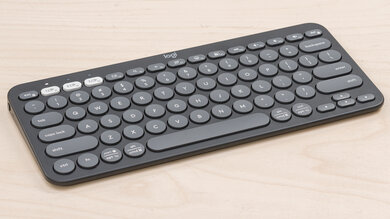
Logitech Logitech Pebble Keys 2 K380s
Keyboards

Logitech

Logitech Pebble Keys 2 K380s: What Reddit Really Thinks

Apr 2026

Last Analyzed

7/10

Overall Rating

31

Positive Reviews

10

Negative Reviews

Summary

The Logitech Pebble Keys 2 K380s is a compact, lightweight Bluetooth keyboard aimed at people who want portability without sacrificing too much on typing feel. Reddit sentiment is largely positive, with users praising its battery life, quiet keys, and multi-device convenience — though opinions on the round key design are split. It sits in a budget-friendly price range (around $30–50 USD) that most agree delivers solid value, and it's a popular pick for tablet and multi-device setups. Reliability concerns surface occasionally, including key registration issues at high typing speeds and some reports of keys failing within months.

Pros

  • Exceptional battery life — users report up to 36 months, with one developer still at 100% after 2 months of daily use
  • Quiet, low-profile keys that feel familiar to anyone coming from a laptop or MacBook keyboard
  • Seamless multi-device switching via Easy-Switch button, connecting up to 3 devices with sub-second reconnect times
  • Compatible with Logi Bolt USB receiver as an alternative to Bluetooth, improving reliability on older or finicky hardware
  • Linux support added in the K380s generation — a meaningful upgrade from the original K380
  • FN key lock toggleable directly from the keyboard (Fn + Esc) without needing Logitech Options+ software

Cons

  • Round key design causes missed keystrokes for some users, especially those who type above ~70 WPM — an issue some never fully adapt to
  • No backlighting and no caps lock LED indicator, which frustrates users coming from more premium keyboards
  • Key registration failures reported: some keys don't register when pressed from the edge, requiring deliberate centered presses
  • Not officially compatible with PS5 via Bluetooth — requires the Logi Bolt USB receiver as a workaround, which isn't included in all bundles
  • Bluetooth pairing issues are a known friction point; resetting via the Esc-O-Esc-O-Esc-B sequence is a community-standard fix
  • Durability concerns: some users report key failures within months, and at least one comparison found the original K380 held up better long-term

Round Keys: Love Them or Leave Them

The Pebble Keys 2's circular key design is the keyboard's most divisive feature on Reddit. Fans say it mirrors the feel of a laptop keyboard and allows smaller hand sizes to reach higher WPM. Critics say it causes misfires, especially at speed, and that the feel never improves with time.

A $35 Keyboard Holding Its Own Against the MX Keys Mini

Multiple threads compare the K380s directly to the MX Keys Mini, a keyboard that costs 2–3x more. Many users prefer the Pebble's quieter keys and lighter weight for daily carry — and some even clock higher WPM on it. The MX Keys wins on build quality and key travel, but the value gap is hard to ignore.

The Bluetooth Pairing Problem Has a Fix — But You Have to Find It

A recurring Reddit complaint involves the K380s failing to pair via Bluetooth while the companion mouse connects fine. The community-discovered fix — a reset sequence of Esc-O-Esc-O-Esc-B — resolves it for most, but the issue isn't mentioned in official setup docs, leaving new users frustrated.

User Reviews (41 of 127 analyzed)

3
0
AfricanTyper/logitech2d agopositive

I use it daily, I work from home as a developer. It feels great, I love how the keys feel and how it was not an adjustment from regularly typing on a macbook keyboard. The battery life is insane, 2 months in and its still on 100%. Its very efficient, the way it only uses power when necessary is a huge advantage.

View Original Comment
3
0
WelvenTheMediocrer/logitech2d agonegative

The keys dont feel the same at all. The pebbles 2 feels like a cheap k780, not smooth at all and they are quite stiff. The mx mini has wonderful switches. The pebbles 2 backspace is farther to the right even though the keyboard is smaller. My biggest gripe was the spacing off the M and comma. And even after a month it felt as if the T was in a weird spot. Those round keys dont work with this travel, stiffness, them being small.

View Original Comment
3
0
matteventur/logitech2d agopositive

Pebble 2 K380 is a $30-40 keyboard, not a $90 one.

View Original Comment
3
0
caramelcoolerr/logitech2d agopositive

I bought a Pop Icon when I needed a keyboard in a pinch, but ended up ordering the Pebble instead to return the Pop one, since I like the colors more and wanted it to be a bit slimmer and more portable for traveling. So far both keyboards function nearly identically and work very well, the keys felt similar too. The main difference I've noticed is the size and shape.

View Original Comment
3
0
Snake_Case_Simonr/logitech2d agopositive

It finally supports Linux!

View Original Comment
2
0
apesgreenr/logitech2d agonegative

I own both pebble mouse 2 and keyboard. Sometimes the keyboard doesn't register key strokes, especially when pressed from an edge of a button. You need to stroke it with little force for it to register any key-press properly. The mouse's primary click button started giving me issues within 6 months. I'm not sure if pebble 2 can be relied on.

View Original Comment
2
0
Stunning_Ad_8499r/logitech2d agopositive

Hand size might make the experience pretty variable. For me, I can hit around 70 WPM on the Pebble, but for some reason, on the MX Keys Mini, I top out at ~55+ WPM. My hands are on the smaller side, so that may be a noticeable factor. The Pebble keys also feel a bit closer to a mechanical feel, whereas the MX Keys don't. I really like the rounded edges on the Pebble.

View Original Comment
2
0
_FoxDie_r/logitech2d agopositive

I had a K380 and it was a joy to use especially for the price. I ended up replacing mine for the MX keys mini which I love even more. I'm not big on mechanical keyboards but I enjoy the silent clicky feel of the scissor keys from the MX Mini.

View Original Comment
2
0
Bacon-80r/logitech2d agonegative

Damn that employee did you sorry. The pebble isn't technically compatible with PS5, but the k380 (no s) is via Bluetooth and they look nearly identical.

View Original Comment
2
0
bankyanr/logitech2d agopositive

For super casual usage or portability on the go, say for a tablet, the Pebble 2 would do. For work, the Pop Icon Keys is much more robust; has larger keys due to shape, so it's easier to hit them; key travel and the arrow keys are much better.

View Original Comment
2
0
NoctysHiraethr/logitech2d agopositive

It feels slightly more responsive to me than the original K380, but it may just be placebo. I would need to dig out my original K380 to do a full comparison.

View Original Comment
1
0
MagazineRelevant1551r/logitech2d agonegative

Its a nightmare for me. Keyboard keys keep jumping from their slots. I regret purchasing this combo.

View Original Comment
1
0
Jazzybee01r/logitech2d agopositive

It's worth noting that when enabling FN-lock the volume-up key (which is also insert) still turns up the volume instead of triggering insert. This key doesn't seem to be affected by FN-lock at all. It gets confusing to use because FN-lock does work for the other volume buttons. I find myself missing the keys from time to time because of the round keys. Other than that I love it. It's small, the battery lasts.

View Original Comment
1
0
RandomZorelr/logitech2d agonegative

The original k380 is better, more durable. I have it for 2-3 years, then I gave it to someone else, switched to k380s and in a few months some keys start failing.

View Original Comment
1
0
Piersons_Puppeteerr/logitech2d agopositive

Call me insane, but I've ditched aula 75 for pebble keys 2. Used laptops all my life, couldn't get used to mechanical for over a year. And I actually play games on it, been great for me.

View Original Comment
1
0
Waveatthesunr/logitech2d agonegative

I have just bought the Pebble Keys 2, and the only thing that bothers me is the loose on/off switch. I reckon it isn't loose enough to shut itself down accidentally, but the switch is way more solid on my MX keys so I wonder if this is normal.

View Original Comment
1
0
crowdyriverr/logitech2d agonegative

I just bought this pebble keyboard, for me it's just really shit. I don't really understand how people like this much more than the mx keys mini. Mine broke some days ago so following this post I did buy the pebbles k380s. The keyboard typing feel is much worse in my opinion, feels more plastic. Also who the f likes that mini enter layout.

View Original Comment
1
0
Radiant-Pepper-9146r/logitech2d agopositive

I have a K380s I bought 2 years ago and used daily, last year I bought the MX Keys Mini as a gift for myself. Since I got the MX Keys Mini, I still find myself using the K380s more. It's just the perfect size, it's small so it gives my MX Master 3s more room to move on my desk. The keys are more silent compared to MX Keys Mini, and the travel of the buttons are lower. It's the perfect keyboard for me.

View Original Comment
1
0
Short-Ad2011r/logitech2d agopositive

For the price that I got it (30 dollars), it feels really great, doesn't feel any lag or something like that.

View Original Comment
1
0
synnthhr/logitech2d agonegative

I have the original K380 and there's a slightly annoying issue I've noticed. When I type above ~70wpm, certain keystrokes don't register properly. For example: samon (salmon), glases (glasses), airpod (airpods). It seems like some keys just don't get registered when I type quickly. If I slow down, the issue doesn't happen.

View Original Comment
1
0
BeneficialDonkey9122r/logitech2d agopositive

I figured it out! It made 0 sense for a newer keyboard to not support the PS5 when the older one supported it. All you have to do is use the LOGI BOLT receiver on the PS5 (comes in the mouse + keyboard combo, or can be purchased separately).

View Original Comment
1
0
Waste-Key-3697r/logitech2d agopositive

I got it to work with the Logi Bolt USB receiver. Complete the setup using the Logi Options+ software on a Windows PC, once that's done unplug the USB from the PC and plug it into the PS5.

View Original Comment
1
0
Ill_Nefariousness242r/logitech2d agopositive

K380S now supports logi bolt receiver and use Bluetooth 5. Also, fn keys can be toggled with fn + esc.

View Original Comment
1
0
XeltosRebirthr/logitech2d agopositive

They're the same size (I have both combos) just lots of great improvements software wise and the bolt receiver can be connected to both mouse and kb at the same time. The pebble 2 is also quieter somehow. K380s also has an extra year of battery life.

View Original Comment
1
0
GarenYondemr/logitech2d agopositive

Latency is around 18ms with logi bolt receiver.

View Original Comment
1
0
ImmediateCan2r/logitech2d agopositive

I had exactly the issue. Mouse connects but not the keyboard. I had to reset the keyboard. And after that the keyboard paired without any issues. There's a sequence of keystrokes to reset — esc o esc o esc b. There's a YouTube video on this believe it or not. But that did the trick.

View Original Comment
1
0
WorkingStick581r/logitech2d agopositive

TLDR: Make your laptop's Bluetooth discoverable (Settings -> Bluetooth & Devices -> Devices -> More Bluetooth settings -> Check 'Allow Bluetooth devices to find this PC'). I know this sounds like a dumb fix and that it should already be on by default but it resolved my pairing issue.

View Original Comment
1
0
Suitable_Bad_4500r/logitech2d agonegative

I am embarrassed, but this happened to me too, and it took me forever to realize there was a power switch on the left side of the keyboard that is NOT mentioned in setup directions. After doing all the troubleshooting and getting new batteries, that was the fix all along.

View Original Comment
1
0
Crimsonandclover33r/logitech2d agopositive

The Logitech support article worked for me. What they mean by the 'connect' button is the grey button to the right of the escape key — the one with the white blinking light above it. Push that button down and hold it until you see it appear in the 'nearby devices' in your Bluetooth settings.

View Original Comment
1
0
aperocknroll1988r/logitech2d agopositive

I use this keyboard and mouse combo on my phone at work so that I'm not slowed down by my thumbs. Recently got a new phone and was struggling to get it to work, but the reset trick sorted it out. I really should make a cheat sheet with these instructions and tape it to the bottom of the keyboard.

View Original Comment
1
0
karma_5r/logitech2d agopositive

I used both almost daily, and frankly, I don't feel the difference between the Pebble 2 and MX Keys Mini. I can't carry the MX Keys Mini to the office because it is too heavy for my liking. So, the Pebble 2 is for the office, and I never felt that the MX Keys Mini was much better.

View Original Comment
1
0
your-barney-wroter/logitech2d agopositive

Try the Lift mouse instead of the Vertical. I use it with the K380S, and I believe you can't get any better for their price.

View Original Comment
1
0
Slipguardr/logitech2d agonegative

I have and sometimes use the Pop keys, but I cannot stand the feel of those keys. They are so scratchy I actually bought key lube and lubed all the switches and it still is too scratchy.

View Original Comment
1
0
Snowedin-69r/logitech2d agopositive

I ended up buying the k380s and have had no problems with it so far.

View Original Comment
1
0
NoList1918r/logitech2d agopositive

After resetting the keyboard using the Esc-O-Esc-O-Esc-B codes, I turned the keyboard OFF and then ON. After that it started getting connected. The connecting message asked me to enter some codes. It was after entering the codes that the keyboard was connected. It is working properly now.

View Original Comment
1
0
Short-Ad2011_updater/logitech2d agopositive

I am using it without any problem! It works really great for the price. And the change devices mode is very nice, without any lagging problem and useful.

View Original Comment
1
0
HistoricalBeing4r/logitech2d agopositive

The Esc-O-Esc-O-Esc-B keystroke reset worked for me. Typing on the Pebble 2 now.

View Original Comment
1
0
Radiant-Pepper-9146_macr/logitech2d agopositive

Yes it works with a Mac. I use it daily with a M4 MBP. The only con is that Ctrl and Fn are swapped because my K380s is the Windows version. You could get a version for Mac and all the buttons would be on the right places.

View Original Comment
1
0
karma_5_longr/logitech2d agopositive

Yes, I still have it and still use both daily (one at the office and one at home), and I stand by my opinion after all this time.

View Original Comment
1
0
Bulgogi_busterr/logitech2d agopositive

Had to scroll far down for the power switch tip but thank you so much — that was the fix!

View Original Comment
1
0
fallenempires1r/logitech2d agopositive

The reset sequence worked for me too! Thank you!

View Original Comment