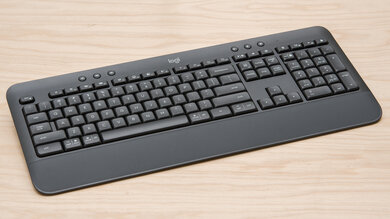
Logitech Logitech Signature K650
Keyboards

Logitech

Logitech K650: What Real Users Say About Comfort vs Quirks

Apr 2026

Last Analyzed

6/10

Overall Rating

16

Positive Reviews

25

Negative Reviews

Summary

The Logitech Signature K650 is a full-size wireless comfort keyboard aimed at office and home productivity users who prioritize ergonomics over raw typing performance. Reddit sentiment is mixed-to-positive: users who want a soft, quiet typing experience with a built-in palm rest generally love it, while those coming from mechanical keyboards or who need power-user features like N-key rollover or true multi-device switching are regularly disappointed. The cushioned rubber dome switches divide opinion sharply — comfort typists embrace the squishy feel, while enthusiasts dismiss it. A recurring frustration is the Insert key being remapped to a language switcher by default with no easy native fix, which has driven multiple users to return the keyboard entirely.

Pros

  • Built-in palm rest and cushioned rubber dome switches make it genuinely comfortable for long typing sessions — users report zero wrist fatigue after hours of use
  • Exceptional battery life rated at up to 36 months, making it truly low-maintenance for everyday office use
  • Supports both Logi Bolt USB dongle and Bluetooth, giving flexibility across desktops and laptops without extra hardware
  • Logi Options+ Smart Actions support lets users assign custom shortcuts and automation to programmable keys
  • Quiet, soft keystrokes make it ideal for shared office spaces or open-plan environments where noise matters
  • Works across Windows, macOS, and ChromeOS with automatic keyboard mode switching via Logi Options+

Cons

  • No backlighting — a notable omission at this price point that limits usability in dim or dark environments
  • Not a true multi-device keyboard despite appearing in Logitech's own multi-device search filters — it can only be paired to one device at a time, frustrating users who expected seamless switching
  • The Insert key defaults to a language switch function with no in-built fix; workarounds require PowerToys, xmodmap on Linux, or physical hardware modification — several users returned the keyboard over this alone
  • Rubber dome switches feel mushy to anyone used to mechanical or even quality membrane keyboards — described as 'old school rubber dome' comparable to budget office keyboards
  • No N-key rollover makes it unsuitable for gaming or any workflow requiring simultaneous multi-key input
  • No dedicated Print Screen key — requires learning Fn+F7 shortcut or third-party remapping, which doesn't work reliably in all enterprise/locked-down environments

The Insert Key Issue Is a Dealbreaker for Many

Logitech chose to make the Insert key default to a language switcher — and didn't include it in FN Lock. Multiple Reddit users returned the K650 specifically for this reason, and the workaround involves third-party tools like PowerToys or manual Linux configs. For power users who rely on Insert-based shortcuts in legacy software, it's a frustrating design choice with no clean fix.

Marketed as Multi-Device, But It Isn't

Logitech's own store lists the K650 in multi-device keyboard search results, but it officially connects to only one PC at a time. Users who bought it expecting seamless Bluetooth-to-dongle switching were burned — the connection key requires re-pairing rather than switching, making it unsuitable for dual-computer setups.

The Comfort Crowd Loves It — Everyone Else Should Look Elsewhere

Users who explicitly want a soft, quiet, ergonomic membrane keyboard for long typing days consistently rate the K650 highly. But it's a hard sell for anyone coming from mechanical switches, needing gaming-grade input, or wanting a keyboard that just works across two machines without hassle.

User Reviews (41 of 104 analyzed)

5
0
-UserRemoved-r/buildapc2d agonegative

There really isn't a distinction between a gaming keyboard and an office keyboard, they are designed, made, and operated the exact same way. There are 2 main types of keyboards, ones that use membranes and one that are mechanical. Mechanical keyboards are generally preferred, as many of them allow you to change the key type if you want something different.

View Original Comment
3
0
InsidePraliner/logitech2d agonegative

I recently got the K650 and also was disappointed in how it behaves as well. I have the USB dongle in my Xbox One X and the keyboard connected to my PC via Bluetooth. While not as seamless as it should be, and it may not fit the definition of multi-device, you can still accomplish switching between devices with the connection key.

View Original Comment
3
0
MarxistMan13r/buildapc2d agonegative

The K650 is a membrane keyboard, generally the lowest-end, least-preferred type of keyboard. Most people hate the squishy membrane typing experience. If that's what you prefer though, you're in luck! It's the cheapest technology available in keyboards.

View Original Comment
3
0
ATXsantuccir/logitech2d agopositive

So with the K580 you have membrane switches, it's going to be less tactile, so you might not like it as much coming from a mechanical keyboard. The K650 has rubber dome switches, they will feel more squishy than the mechanical that you are used to but provide more tactile feedback. I would lean towards the K650. The K650 will be a Logi Bolt device which is the current dongle we have, K580 will be unifying which is the older standard.

View Original Comment
2
0
Frotsier/logitech2d agonegative

I am returning my keyboard for the exactly same reason. Why would you prioritise the swap language button (which is rarely used imo) over the Insert function? You do realise that CTRL+Insert/Shift+Insert/Shift+Delete are the old key combinations used for Copy/Paste/Cut, still used by many (legacy) programs where CTRL+C/CTRL+V/CTRL+X are already used for other functions?

View Original Comment
2
0
CHOPosaurus_Rexr/logitech2d agonegative

This may be the silliest move I've seen for a keyboard. Not making this an option to set which default you want is a huge oversight. Was there really a big clamoring for a dedicated language switch button as default? It couldn't have been the secondary? I need that input button for work and to have to use two keys now with no option to change it is a deal breaker.

View Original Comment
2
0
prepubescentpuber/logitech2d agopositive

I kind of like that old school keyboard feeling. Is it comparable to old school office keyboards?

View Original Comment
2
0
weerobirdr/logitech2d agonegative

Same here, cry

View Original Comment
1
0
Josyscleir/logitech2d agonegative

Just got a K650 and ended up returning it, the keys are very old school rubber dome, the typing experience is horrible. Feels like typing on mush. Plus the keys are very close together.

View Original Comment
1
0
Fabulous_Can_2215r/logitech2d agopositive

Yes, it does. Just bought this keyboard and absolutely happy with my new purchase. I used to have a similar keyboard 10-ish years ago and this keyboard gave me absolutely the same feelings. Shortcuts are amazing, so many additional functions here, it's just great. Maybe it's euphoria but I love it even more than keyboard on my MacBook although it's almost perfect.

View Original Comment
1
0
yellow_tunr/logitech2d agonegative

It is cheap abs piece of garbage...I tried mech and keys in store and it is flimsy and avg keyboard...found mk 295 and mk650 much better, keycaps are in place, quiet and comfy to type.

View Original Comment
1
0
ve1ovisr/logitech2d agonegative

Are you kidding me? Why does it have an extra connection key when you cannot change the connection with it. Without it, it can go directly into the trash.

View Original Comment
1
0
wizendorfr/logitech2d agonegative

Please note that on the Logitech store site, the K650 appears in searches for multi-device keyboards. That's probably why so many people think it is one. Yes, the K650 page mentions it is not a multi-device keyboard in its device comparison table, but I didn't see that before buying.

View Original Comment
1
0
biocinr/logitech2d agonegative

I have resolved this idiotic issue with Power Toys Keyboard Manager under Windows. If you go into settings, there are two types of mappings, one button to button, second shortcut to button. When you select the second option (Remap a shortcut) you can map this button (translates as Win Left + Space) to Insert. This then works Windows-wide. Thanks to Logitech for crippling a perfectly fine product with their usual software scam.

View Original Comment
1
0
No_Maximum9157r/logitech2d agonegative

Not a direct fix, but I reassigned another key that I don't use to be the 'insert' key instead. I chose the 'settings key', because I can just as easily navigate to settings by typing this in the search bar. I will use 'insert' multiple times per day and only use 'settings' once a week or so.

View Original Comment
1
0
ondrejmalekczr/logitech2d agonegative

Disaster returning this product.

View Original Comment
1
0
dasheasyr/logitech2d agonegative

Yup! Same reason I will return the keyboard.

View Original Comment
1
0
CompetitionGlobal715r/logitech2d agonegative

this keyboard removed a key people have used prolly for 30+ years... how dumb

View Original Comment
1
0
rabidpuppyr/logitech2d agonegative

You can also bring up the windows virtual keyboard whilst you have the Logi Options remap open, and use that to remap the print key to prtscn. Unfortunately my work does not allow me to run any 3rd party software so I can't use prtscn at all, have to reach over to the laptop keyboard if I want to use prtscn. So I just use the snipping tool like the kids do.

View Original Comment
1
0
akg7091r/logitech2d agonegative

OMG! The same thing happened to me 2 days back. Same model. Just randomly stopped working.

View Original Comment
1
0
Chippy-Catr/logitech2d agopositive

This needs to be pinned somewhere!! This saved me $64.

View Original Comment
1
0
Stock-Psychology-983r/logitech2d agonegative

Too bad those of us who this keyboard was forced on in a corporate environment don't have access to install software like this. F'ing terrible product.

View Original Comment
1
0
QLeadersr/logitech2d agopositive

The Solution for this: 1- Download PowerToys. 2- Install it then Open PowerToys and select Remap a Shortcut. 3- from 'Select' select: Win(Left) + Space. 4- from 'To' select: Insert Numpad. The problem solved!

View Original Comment
1
0
Mysterious_Fan_5419r/logitech2d agopositive

i got the same keyboard - to use insert function use shift+fn+ins. It works.

View Original Comment
1
0
kllssnr/logitech2d agonegative

This is absolute bs. I bet they are doing it so in cases connections is somehow interrupted and user cannot connect to the keyboard anymore it is presented as a 'new' keyboard to pair it again. I luckily have a desktop setup with a KVM switch that does the job with the USB dongle.

View Original Comment
1
0
TruckNew844r/logitech2d agonegative

I have a Steam Deck connected via wireless USB and my Mac laptop connected via Bluetooth. Every time I switch from Mac to Steam, it works perfectly, just by holding down the button for a few seconds. But every time I try to go back to the Mac, I need to pair it again, and it's detected as a new device, making it basically useless.

View Original Comment
1
0
Arenus_chr/logitech2d agonegative

Thank you for your answer but that does not really help because I use insert quite often and always use it with the FN-Button is annoying... Why can't you just enable the esc+fn function for all buttons or let the customer decide which button got assigned with which function?! I hate it when you buy a keyboard and have to search for standard functionality and can't even achieve it.

View Original Comment
1
0
Ok-Lecture7776r/logitech2d agonegative

why there's no setting about that Key? I dont like language switch in the middle of the keyboard, I usually do it with alt+shift.

View Original Comment
1
0
OppositeReflection43r/logitech2d agonegative

I have the same problem. I hope Logitech will take your question seriously soon and make the key to be primarily 'insert' and secondary 'change language'.

View Original Comment
1
0
Huge-Ad1565r/logitech2d agopositive

Fix for Linux - https://github.com/bokic/logitech-k650-fix

View Original Comment
1
0
flash7gordonr/logitech2d agopositive

ok i got these results on a 4 yr old hp laptop with windows 11. the logi k650 was straight out of the box, no software modifications. i got the snip tool to come up 2 ways. If you just touch only f7 at the top the snip tool will come up.

View Original Comment
1
0
Particular_Ad_8267r/logitech2d agopositive

hold down the FN key, while pressing F7. Notice that the F7 key has a camera icon with a cropping square. A few buttons will appear so that you can decide how big is the area you want to crop/snip.

View Original Comment
1
0
IndependentDistance9r/logitech2d agopositive

yes, you may assign sleep function in logi options+ to a key.

View Original Comment
1
0
effgeredditr/logitech2d agopositive

that worked a treat, once I read the instructions properly. I can't believe you only got 1 upvote.

View Original Comment
1
0
hrga12r/logitech2d agopositive

When adding shortcut, on left click edit shortcut (pencil) and click insert button (or change language if we ask logitech). On right side edit shortcut (pencil) and click fn+insert button. This way windows will insert shortcuts automatically.

View Original Comment
1
0
LumensAquilaer/buildapc2d agopositive

As others have mentioned you'll want a 'membrane' or 'rubber dome' keyboard. I also haven't found a single mechanical keyboard that I liked the feel or sound of, so I've stuck with these keyboards.

View Original Comment
1
0
mrpirror/logitech2d agopositive

I was able to resolve the Print Screen issue by following a guide using the Windows on-screen keyboard to press the print screen key when Logi Options asks you to match the key, after that it should work.

View Original Comment
1
0
RadRyan527r/logitech2d agonegative

if by old school you mean 20 years ago, yes. If 40 years ago, no.

View Original Comment
1
0
AlvaroS2Kr/logitech2d agopositive

Well, you saved my life, thank you!

View Original Comment
1
0
EmilyDaniels4321r/logitech2d agopositive

Best answer yet, thank you!

View Original Comment
1
0
quriouss7r/logitech2d agonegative

I was excited to use K950 but I am having to return due to the same issue. It looks to be corrected on the MX series!

View Original Comment