Razer Razer Joro
Keyboards

Razer

Razer Joro: What Real Users Say About the Chiclet Gamble

Apr 2026

Last Analyzed

6/10

Overall Rating

14

Positive Reviews

22

Negative Reviews

Summary

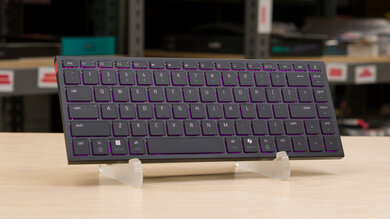
The Razer Joro is a compact, ultra-thin 65% scissor-switch wireless keyboard aimed squarely at Mac/Windows cross-platform users and anyone who loves the flat laptop-key typing experience in a portable gaming-capable package. At 374 grams it's genuinely light, and most owners appreciate the build quality and typing feel, calling it a solid daily driver. That said, Reddit sentiment is decidedly mixed: praise for its unique niche is consistently undercut by frustration over the price-to-value ratio, Synapse dependency, and the confusing 2.4GHz HyperSpeed dongle implementation. It fills a real gap in the market — there's essentially nothing else offering a chiclet-style compact wireless keyboard with RGB and gaming features — but the $140 asking price draws constant scrutiny given the non-replaceable switches and keycaps.
Pros

  • Virtually alone in its niche: the only compact chiclet/scissor-switch wireless keyboard with RGB gaming features, making it the default pick for users who specifically want laptop-style keys without using a laptop
  • Excellent cross-platform Mac and Windows compatibility, with Razer Synapse 4 for macOS now in preview — a major draw for hybrid workflow users switching between ecosystems
  • Typing experience praised as better than a typical double-scissor keyboard with a slightly clickier, crisper feel that resonates with flat-key enthusiasts
  • Exceptional portability at 374 grams with Bluetooth, wired, and 2.4GHz HyperSpeed wireless modes, and 1000Hz polling rate support over 2.4GHz
  • Aluminum top plate contributes to a premium look, and shine-through keycaps allow letters to illuminate through the key legends

Cons

  • Non-replaceable scissor switches and keycaps make the keyboard a throwaway if something breaks out of warranty — a hard pill at $140 compared to customizable alternatives like the NuPhy Air75 v2 at $120 with 7 hot-swappable switch options
  • The 2.4GHz HyperSpeed wireless mode is effectively broken for most users: it requires pairing through a compatible Razer mouse's dongle (only select models), not a standalone USB receiver — a major advertised feature that barely works
  • No true onboard memory — Synapse must be running for key rebinds and macros to function, meaning custom settings vanish on any PC without Synapse active
  • Single-zone RGB only (no per-key lighting), and secondary symbols like F-row icons and shifted number characters are not illuminated, making them invisible in the dark
  • Battery life tanks significantly when RGB lighting is enabled, and the only way to confirm it's charging is through Razer Synapse — a genuinely confusing user experience
  • Smaller-than-standard keycap sizing led at least one user to persistent mistyping and a same-day return; Mac key labels (cmd/option) don't light up, making them hard to locate in low light

The 2.4GHz Feature Almost Nobody Can Actually Use

Razer advertises HyperSpeed wireless on the Joro, but the implementation requires pairing through a compatible Razer mouse dongle. Users without the right mouse — which is most people — are stuck with Bluetooth or USB-C wired.

Is $140 Justified When Nothing Else Exists?

Reddit is split: some say the Joro is overpriced for a non-hot-swap scissor keyboard and shouldn't cost more than $99. Others point out there's simply no competition for a compact chiclet-style gaming keyboard, which changes the calculus entirely.

Mac Users Are the Joro's Happiest Owners

The Joro's cross-platform compatibility and Synapse 4 macOS support make it a standout for Mac/Windows hybrid setups. Multiple users replaced their Apple Magic Keyboard with it — and didn't look back.

User Reviews (36 of 82 analyzed)

5
0
Gordio83_counterr/razer2d agopositive

Counterpoints: This is the cheapest wireless keyboard in Razer's lineup. If you don't care about snapback or anti-ghosting feature, it seems the keyboard should work well without Synapse. This is the only Razer keyboard that is Mac compatible. Having owned a few mechanical keyboards, I kind of think they're overrated.

View Original Comment
5
0
Numerous-Scholar-874r/razer2d agopositive

Definitely an interesting board. Waiting in hopes they release it in white since all my setup is white. Probably won't see too many reviews since it's kinda a niche style of board.

View Original Comment
4
0
temporaldoom_replyr/razer2d agonegative

It's a laptop keyboard shoved into an aluminium housing, how on earth is that the best keyboard on the market?

View Original Comment
3
0
Gordio83r/razer2d agonegative

I just tested the keyboard. My impression: I was a bit underwhelmed. It really feels like a budget keyboard which I wasn't expecting (note: it is Razer's cheapest wireless keyboard). The aluminum top plate didn't make it feel less cheap. The RGB lighting was not that bright.

View Original Comment
3
0
temporaldoomr/razer2d agonegative

It's a single zone RGB so no individual key lighting.

View Original Comment
3
0
onevstheworldr/razer2d agonegative

Do not get the Royal Kludge. Its reputation is pretty bad. If you're like me, you'll eventually get sick of how terrible the software from ALL the mainstream gaming companies are — Razer Synapse included.

View Original Comment
3
0
dosukeber/razer2d agopositive

This is a much smaller and thinner keyboard than the Air 75. It's more comparable to the Vissles LP85 and the Mistel Airone, although both of those are mechanical keyboards.

View Original Comment
3
0
Gordio83_typingr/razer2d agopositive

On the plus side, the typing experience is pretty good though. It's like a bit clickier than a typical double scissor keyboard. I am a fast typist and found it responsive.

View Original Comment
2
0
Far_Cheesecake8148r/razer2d agopositive

I use Basilisk Mobile and Joro. Both devices are highly portable and fairly quiet, making them suitable for use in a variety of environments. Although the price is a bit steep, they are definitely the best portable devices available.

View Original Comment
2
0
Roee_Sr/razer2d agonegative

Synapse only supports the Razer Naga V2 Pro, not the Hyperspeed. That's really sad and dumb, as it is essentially the same mouse with slight variations...

View Original Comment
2
0
JohnsonJohnilyJohnr/razer2d agonegative

Oh, ok thank you. That sounds like a completely misleading advertisement tbh — saying it has onboard memory when Synapse needs to be running for custom settings to work.

View Original Comment
2
0
Guest4901244_zoner/razer2d agonegative

It's single zone, you can customize the lighting using either Synapse or Chroma Studio.

View Original Comment
1
0
WhisperingSloth85r/razer2d agonegative

As an owner of multiple Razer devices, I think this keyboard is a hit and miss. For 140 USD we got a non-replaceable scissor switch solution, a non-replaceable keycap set, Synapse which is still mandatory if we want to fully utilize the keyboard's capabilities, plus Bluetooth and wired connection, and long battery life.

View Original Comment
1
0
WhisperingSloth85_replyr/razer2d agonegative

In my opinion, it is quite overpriced in terms of price-value ratio. I know, I know, we have to pay the so-called 'brand tax,' but regardless, this keyboard is not worth more than 99 bucks. If it breaks and is not under warranty, it can go in the trash bin and I have to buy a new one.

View Original Comment
1
0
Ceel1r/razer2d agonegative

I recently bought a blackwidow 60 wireless keyboard and returned it as soon as I saw the Joro. I picked up the Joro today but never realized it didn't come with a 2.4hz dongle. It was advertised as a gaming keyboard so I thought that was a given. I'm sooo disappointed in myself rn, it seemed perfect for me.

View Original Comment
1
0
EternalBewmr/razer2d agonegative

The price is really rough to justify. I honestly feel like the Deathstalker V2 Pro TKL is leagues better than this Joro.

View Original Comment
1
0
Legitimate_Wear8449r/razer2d agonegative

Honestly, this doesn't look much better (if better at all) to the 4 years old mx keys mini. And the latter also has a logi bolt usb adapter for better interference handling.

View Original Comment
1
0
Zedakir/razer2d agopositive

I got it and I love it!

View Original Comment
1
0
xtrabetr/razer2d agonegative

The size of the key cap is kinda small tho. It's a really well-made keyboard and easy to use if your fingers are slim enough. I found myself mistyping letters all the time during the 1st hour test. Have to return it the same day later.

View Original Comment
1
0
TheReconditionerr/keyboards2d agopositive

I ordered the Joro. In short, it's super nice and feels premium, but that's to be expected at the price point. I might write a full review on this sub because I really haven't seen any others. I was pretty hard pressed to find a ~65% keyboard with chiclet (laptop) style keys, and the customizable lighting is the cherry on top.

View Original Comment
1
0
lolreddit0rr/keyboards2d agopositive

I have it. Main two selling points for me are the fact it is cross functional for both Mac and Windows (I work on and entire ecosystem is on Mac, game on Windows), and it's compact, so very mobile and I can bring it with me — it replaced my magic keyboard. My biggest issue with it: the window/option key on the keyboard itself is the command key on Mac and it can't be remapped through Apple's system prefs.

View Original Comment
1
0
Cota332r/keyboards2d agonegative

I just got mine. The keyboard feels great. Biggest downside for me, as a Mac user, is that only the Windows keys light up, but the Mac keys don't; making the cmd & option keys difficult to locate in low light situations.

View Original Comment
1
0
Angelshade421r/keyboards2d agopositive

I am reviewing it at the time of this post. Still some kinks to figure out, but so far I am impressed. The keys are great and the size and functions are super.

View Original Comment
1
0
MegaSquishyManr/keyboards2d agonegative

The battery life is the real deal breaker on this one. If you want any lights on the keyboard then the battery life tanks.

View Original Comment
1
0
Zedaki_keyboardsr/keyboards2d agopositive

I love it, there is no other options if you want a small chiclet style gaming keyboard.

View Original Comment
1
0
pulsarbroxr/razer2d agonegative

I paired it with Basilisk Mobile dongle but not using the Basilisk itself. I have issues while gaming with this way — it restarts, cancels continuous pressing (like W for walking) etc. I have to switch to Bluetooth or wired in order to resolve issues.

View Original Comment
1
0
TateRtings_memoryr/razer2d agonegative

Like most Razer products, the Joro doesn't have real onboard memory. Synapse pretty much needs to be running for its 'memory' to kick in. It's all software based. It's pretty silly given the rest of the market lets you save configs outside of needing the drivers open, but Razer likes to be special.

View Original Comment
1
0
RipSubstantial3875r/razer2d agopositive

Really enjoying mine as well. Paired my Joro with a Basilisk V3 Pro and use them on my Legion Go 1 — best setup for me.

View Original Comment
1
0
Hour-Amphibian-2772r/razer2d agonegative

The symbols not lighting up is also how they are with their Japanese lineup laptop keyboards too. It was a bit of a disappointment.

View Original Comment
1
0
Ozark_Zeusr/razer2d agonegative

Also the Joro is not per key RGB.

View Original Comment
1
0
lolreddit0r_chargingr/razer2d agonegative

The only way to know the Joro is in fact charging is to run Razer Synapse in the background (while keyboard is connected wirelessly) while the keyboard itself is plugged in. On Razer Synapse it'll show it's charging. Very weird process… but it works.

View Original Comment
1
0
AdjacentPrepperr/razer2d agopositive

I'm starting to think I'm going to end up with a Joro — it seems like the right size and style for my desk setup.

View Original Comment
1
0
TateRtings_pollingr/razer2d agopositive

The Joro supports 1000Hz polling rate over 2.4GHz — I had it running at 1k! But that's its limit.

View Original Comment
1
0
dinokiller001r/razer2d agonegative

I just got my hands on the keyboard and immediately noticed the W key losing input while walking and being pressed. Any suggestion? I wonder if it's a connectivity issue or if you really need to press it hard?

View Original Comment
1
0
Fine_Anywhere989r/keyboards2d agopositive

My first thoughts upon seeing it was that Razer finally made a Magic Keyboard. I've long adopted mechanical keyboards but I really liked Magic Keyboard when I only used Apple products back in the day.

View Original Comment
1
0
Guest4901244_chargingr/razer2d agonegative

The symbols not being lit will stay the same to 'preserve battery.'

View Original Comment