ZSA ZSA Moonlander
Keyboards

ZSA

ZSA Moonlander: What Real Users Say About the Thumb Cluster

Apr 2026

Last Analyzed

7/10

Overall Rating

25

Positive Reviews

18

Negative Reviews

Summary

The ZSA Moonlander is a premium split ergonomic mechanical keyboard that commands a devoted following among programmers, writers, and RSI sufferers who've made the switch from traditional layouts. Reddit sentiment is broadly positive but with persistent caveats — the thumb cluster is the most polarizing feature, praised by users with larger hands and criticized as awkward or unreachable by those with smaller hands or when tenting is applied. The Oryx configurator is consistently highlighted as one of the best keyboard customization tools available, lowering the barrier to layers and complex keymaps. It's a solid entry point into the ergo mech world, though many users eventually move on to more specialized boards like the Voyager or Glove80. For Europeans, import taxes on top of the already steep price are a recurring frustration.
Pros

  • Oryx configurator is widely regarded as the best web-based keyboard layout editor in the category — beginner-friendly yet powerful enough for advanced users who want to compile QMK from source
  • Solid build quality reported by the majority of long-term owners, with several users citing years of daily use including travel without a single hardware failure
  • Hot-swappable MX switches let you change feel without buying a new board, and a wide ecosystem of MX switch options gives you more variety than low-profile alternatives
  • Higher key count (72 keys) makes it easier to transition from a standard keyboard without immediately committing to aggressive layer-based minimalism
  • Tenting and palm rests are included out of the box — no need for third-party solutions or 3D printing just to get started
  • Onboard macro and shortcut storage via QMK means no software required at runtime — layouts work on any computer without installing drivers

Cons

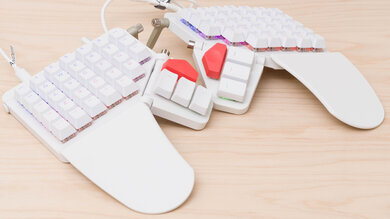
  • Thumb cluster geometry is a genuine ergonomic compromise — users with smaller or average-sized hands frequently report that only 1-2 keys are comfortably reachable, especially when the board is tented
  • Tenting and thumb cluster adjustment are mutually exclusive in practice: raising the tenting angle moves the thumb cluster further away, negating reach for many users
  • At ~$365 USD, it's expensive for a plastic keyboard — EU buyers face additional import duties and VAT on delivery, pushing real-world cost significantly higher
  • High-profile MX switches require more finger travel than low-profile choc alternatives, which can contribute to fatigue during long typing sessions
  • Portability is limited — the tenting kit makes the whole setup bulky; users who need to travel regularly often switch to the Voyager or a smaller board
  • Community consensus increasingly points to the Glove80 or ZSA Voyager as ergonomically superior options at comparable or lower price points

The Thumb Cluster Debate: Who Actually Benefits?

Users with larger hands consistently report a comfortable experience with the Moonlander's angled thumb cluster, while those with average or smaller hands — especially women — find it ergonomically problematic. The tenting mechanism compounds the issue: raising the angle that helps your wrists pushes the thumb keys further out of reach.

A Great First Split Board, But Rarely the Last

A recurring pattern in the community: the Moonlander serves as an excellent introduction to columnar layouts and layer-based typing, with Oryx making the learning curve manageable. Many users then graduate to more minimal or contoured boards like the Corne, Voyager, or Glove80 — and a secondhand Moonlander market has formed as a result.

Oryx Is the Real Product

Multiple long-term users across threads agree that the Oryx configurator is the Moonlander's most compelling feature — often more so than the hardware itself. The ability to flash layouts from a browser, preview key positions in real time, and export to QMK source for advanced tweaks is something few competitors match.

User Reviews (43 of 266 analyzed)

60
0
Mrlinuxfishr/ErgoMechKeyboards2d agonegative

Moonlander thumb cluster has always looked uncomfortable to me. It looks like there are very few good keys in the cluster and the rest you would need to reach for. If you're looking for a prebuilt, the voyager has many fewer issues than the moonlander from a layout perspective (imo) and fits with the low profile consideration.

View Original Comment
18
0
Frank_White32r/ErgoMechKeyboards2d agonegative

I got a Moonlander and wish I bought a Glove80 instead. Or a Voyager.

View Original Comment
17
0
crumb_factoryr/ErgoMechKeyboards2d agopositive

Unless something changed in later batches, the build quality of the moonlander is solid. There's nothing I could think to complain about. I took most of the keys off my moonlander, I've got 34 left with layers.

View Original Comment
13
0
drakarianr/ErgoMechKeyboards2d agopositive

It was my first board, I'm still happy with it. I was nervous with the firmware and key mappings business when I was getting into custom boards, and it's super easy to manage with the moonlander software.

View Original Comment
13
0
Boson_Higgs_Bosonr/ErgoMechKeyboards2d agopositive

I've had a moonlander for about a year and a half. Daily use. Not had a single issue with it, build quality is great.

View Original Comment
13
0
jeenajeenar/ErgoMechKeyboards2d agonegative

It's plastic. A keyboard with aluminum case is waaaay nicer. It has too many keys. If you go with a split programmable keyboard, it's probably because you care about ergonomic. The fewer the keys, the less the hand movements you will need to do. 34 / 40 keys should be enough.

View Original Comment
10
0
WhatHearsThisSoundr/ErgoMechKeyboards2d agonegative

I liked my moonlander, but love my glove80. Far more comfortable IMO (especially the thumb cluster).

View Original Comment
10
0
causal_fridayr/ErgoMechKeyboards2d agonegative

Yup, the thumb cluster kind of sucks. I use the big red buttons for nothing useful. The 3 1.5U keys are pretty useless; the middle one is hard to find, which isn't the case with the Ergodox where there are 2 1.5U keys and 1 1U key, which is easier to find by feel.

View Original Comment
9
0
claussenr/ErgoMechKeyboards2d agonegative

It's a stopgap at this point IMO -- still a ton of motion+force, awkward thumb cluster unless you have mega-hands. Better than Ergodox, worse than many other options. If you have a progressive RSI situation, skip a step and go lighter and closer to your fingertips -- Glove80 seems clearly superior by every metric if you don't want to blast through the $400 price point. Although I do think Oryx is a lovely piece of SW.

View Original Comment
8
0
CaptnEarthr/ErgoMechKeyboards2d agopositive

My first and it set the bar very high. The customization software is, from my experience, the easiest to manage and yet provides deeply thought out custom keymappings, led lighting control, and pretty much anything you'd want. But now that I've become so comfortable with layers and custom keymaps, I've 'graduated' and am now moving to a corne using zmk. But I wouldn't have gotten here without my moon lander first. Highly recommend.

View Original Comment
8
0
pgetreuerr/ErgoMechKeyboards2d agopositive

I've had a ZSA Moonlander for 3 years without any quality issues, and that's including the wear of traveling nearly every week with the keyboard. ZSA's quality is excellent, you'd be hard pressed to find better.

View Original Comment
6
0
eliugr/ErgoMechKeyboards2d agonegative

I would recommend to buy a moonlander second hand. You will save a lot of money, and probably it will be like new, as the keyboard is so well built. If you want to buy it new I think voyager is superior in almost any metric, it's more comfortable due to low profile and better thumb cluster.

View Original Comment
6
0
OppositeBarracuda855r/ErgoMechKeyboards2d agopositive

I second what others have said. The moonlander is very solid. I too wish for a 2u or even 1.5u outer column. All the ergo fanatics will tell you 1u is best which is probably why all the designs you can find are based around 1u keys.

View Original Comment
5
0
MoonWun_r/ErgoMechKeyboards2d agonegative

The moonlander is cool (for those that prefer it) but I prefer the Voyager. I got a dygma defy because I couldn't imagine myself being able to effectively use just two thumb keys on a voyager and figured I'd need more. Short answer, you don't. You'll get caught up in layers and dual action keys and such that you find yourself basically still having blank keys on the Voyager.

View Original Comment
5
0
LintStalkerr/ergodox2d agopositive

I love my Moonlander. Before, I was using a Microsoft 4000 split keyboard, and I like the Moonlander much better. I work from home 4 days a week and take the Moonlander into the office 1 day. I'm very careful about folding it up, and it's held up well.

View Original Comment
5
0
drashnar/ErgoMechKeyboards2d agopositive

The default keymap compiles to ~65kb, and it has 128kb total. Adding macros don't add very much usage, so you have plenty of space to play with. If you want more complex options (or just longer), then you can compile from source.

View Original Comment
4
0
FalconMastersr/ergodox2d agopositive

The moonlander is a great keyboard, the quality is so good, it has enough keys to do whatever you want and the web configurator is so powerful. My only issue with the moonlander is that I can't tent it because when you tent it the thumb cluster buttons get further and I can't reach them properly.

View Original Comment
3
0
krysalis_emergingr/ErgoMechKeyboards2d agopositive

3 zsa keyboards of different models. 2 have daily use for years. Zero quality issues and they include a warranty.

View Original Comment
3
0
minju9r/ErgoMechKeyboards2d agonegative

I own one. While I like it overall, the thumb cluster is at an unnatural angle (45ish degrees), looks to be mostly for aesthetics, rather than ergonomics. This kind of limits you to 2 keys for normal typing use. You can tent the keyboard, plus you can raise the thumb cluster, but not at the same time since the thumb cluster supports the keyboard while it is tented.

View Original Comment
3
0
SocialNetwookyr/ErgoMechKeyboards2d agopositive

I own a Moonlander. It is a great keyboard, I'm sorry to say. BUT ... if you reside in Europe you'll pay some HEFTY import fees, and with the tenting kit it's going to be quite expensive.

View Original Comment
3
0
eviljellomanr/ErgoMechKeyboards2d agonegative

The best thumb cluster I've ever tried is the Glove80. It's not even close. The fact that Glove80 exists is the only reason you need to not buy a Moonlander.

View Original Comment
3
0
Mundane-Taro-2508r/ErgoMechKeyboards2d agonegative

In my opinion, no, it is not a good first ergo mech. Because of the terrible thumb cluster and the price, if you agree with the price, for that price you can buy almost anything on the market: Dygma Defy, Glove, Kinesis. Moonlander is the worst in that list.

View Original Comment
3
0
OddCoincidencer/ErgoMechKeyboards2d agonegative

After my recent experience trying the moonlander, I'm convinced it only makes sense for people with gargantuan hands. I actually think it's dangerous for anybody else; see my recent post about the thumb, wrist, and forearm pain it caused me in only a couple weeks. And for reference I'm a guy with average sized hands.

View Original Comment
3
0
La_Croix_Tabler/emacs2d agopositive

Had the moonlander for 3 years. Love it, but share same frustrations regards the wobble and the plastic. That being said, customizing my own layout and layers have complemented emacs very well and very happy with it. It has held up great. The wobble hasn't gotten worse even though I've tightened it hard many times.

View Original Comment
3
0
ZunoJr/emacs2d agonegative

It is a nice entry drug but too pricey for what it is IMO. I'd take a look into all the open source models you can build yourself or have others build for you. There are lots of designs way ahead of the moonlander.

View Original Comment
3
0
jorgo1r/ErgoMechKeyboards2d agopositive

Moonlander build quality is great. My thumb cluster screw snapped after 14 months and they replaced it as a known issue with the first batch. This one is just as if not more solid than the first batch. I also have swung between 36 key and full. The moonlander feels the most solid especially as I'm a heavy typer.

View Original Comment
3
0
fkeelr/ErgoMechKeyboards2d agonegative

I stopped using mine because I could not figure out a way of creating the negative angle I like my keyboard to have. It would require a massive amount of work to customize it to fit my needs and I don't have the time to invest into it. So instead I'm back using my old Microsoft ergonomic keyboard.

View Original Comment
2
0
ghost_protokolr/ErgoMechKeyboards2d agopositive

I really enjoy my moonlander, it's been 2 years. I am not a programmer, but an artist. I don't have any issues with these thumb clusters, I use all of them. I printed a taller arrow thumb button, so it's wonderful to reach. It might be a good start, you can use it a year, get comfortable and if you fancy others you can sell it.

View Original Comment
2
0
unfulvior/ErgoMechKeyboards2d agopositive

I have a Moonlander since last October. I've finally adjusted using it as my daily driver after 4 months in and can now write comfortably at around 55wpm. I'm surprised how some people claim they switched to an ergonomic keyboard and type at 100wpm after few weeks. Not possible for the majority of people.

View Original Comment
2
0
SkittishLittleToastrr/ErgoMechKeyboards2d agopositive

Yes, it's solid. Especially good as a first board because the layout editor (Oryx Configurator) is quality, and easy to use. And the key count is high for a split ergo ortho, which gives you plenty of flexibility when designing and tweaking your layout.

View Original Comment
2
0
Thraegr/ergodox2d agopositive

I also have giant hands and have been really happy with the Moonlander. I've seen people complain about having a hard time reaching all the thumb keys, but my thumb naturally falls on the middle key and can easily reach up or to the side.

View Original Comment
2
0
HighVelocityDryerr/ErgoMechKeyboards2d agonegative

I received my keyboard and found that the tilting up barely went up from totally flat and thought that I was doing something wrong. Basically, as a 5'1" petite female the thumb cluster tilt up barely went up and there was no practical way to use it comfortably.

View Original Comment
2
0
Informal-Tea755r/ErgoMechKeyboards2d agopositive

Totally agreed about quality - more than year of daily use - no issues at all, typing, a lot of typing and gaming.

View Original Comment
2
0
Reckxnerr/MechanicalKeyboards2d agonegative

Always wanted one, but fuck off with that price.

View Original Comment
1
0
raytshr/ErgoMechKeyboards2d agopositive

It was my first ergo mech. I really liked it and I would recommend it. The configuration via the web app is very convenient. It has enough keys so you can put nearly everything where it used to be regarding a TKL row staggered board. It has a solid resell value if you ever want to move further down the rabbit hole.

View Original Comment
1
0
ImCaligulaIr/ergodox2d agopositive

I have pretty large hands and I have no problem at all, even if yours are comically large it'll still be more comfortable than a traditional keyboard, especially when tilted. I'd say go for it, I also got it as my first split keyboard and definitely do not regret it a year later!

View Original Comment
1
0
MarioPythonr/ergodox2d agopositive

I am 6'5", big hands as well, and software engineer that uses vim every day. I have a moonlander and I love it. You have to just keep in mind that the transition to be fast is slow, takes like at least 1 month to get used to it.. so you have to be persistent and think about long term, otherwise you will be very frustrated.

View Original Comment
1
0
Trout_Ticklerr/emacs2d agopositive

Fellow moonlander owner & Emacs keybinding user here! I never bothered with tenting for the exact reasoning you have; it's expensive and I'm paranoid about making the joint too tense. You don't touch on layers very much, I think it really is where it shines. I've got a full numpad and all the weird punctuation I could ever want in a far more comfortable place than would ever be possible on a regular keyboard.

View Original Comment
1
0
Nightey3s-r/ErgoMechKeyboards2d agonegative

Moonlander was my first ergo split, used for about 2 months and switched to the Glove80, been using the Glove80 for about 8 months now. Based on my experience, I really enjoy the keywell curve, and the Glove80 offers that. However I also miss the hotswap ability of the Moonlander and the wider range of switches for MX.

View Original Comment
1
0
rae2108r/ErgoMechKeyboards2d agopositive

I've been daily driving my moonlander since launch. No issues with quality or defects. I originally thought the 1u keys on the left side would be weird for gaming, but got used to it pretty quick.

View Original Comment
1
0
IdealParking4462r/ErgoMechKeyboards2d agopositive

Oryx and the software suite that comes with the Moonlander/ZSA boards is a huge selling point for them, it's very nice and beginner friendly and gives you the capability to move to compiling really easily down the line.

View Original Comment
1
0
AgeVivid5109r/ergodox2d agopositive

I've had it for a year and it's been great. However, it's not that portable. I just got the ZSA Voyager now and that one IS portable. The full keyboard fits in the same space as half the Moonlander.

View Original Comment
1
0
Healthy_Koala_4929r/ErgoMechKeyboards2d agonegative

I really don't think the moonlander is a good ergo keyboard, while still being a pretty good keyboard. However, as a beginner, figuring out the mappings is pretty tough and the moonlander software really helps on that front. But given the lack of ergonomics and price (I had to pay about 60-80 euros in import taxes), I cannot recommend it.

View Original Comment