Acer Acer Chromebook 315 (2020)
Laptops

Acer

Acer Chromebook 315: What Real Users Actually Think

Mar 2026

Last Analyzed

6/10

Overall Rating

27

Positive Reviews

13

Negative Reviews

Summary

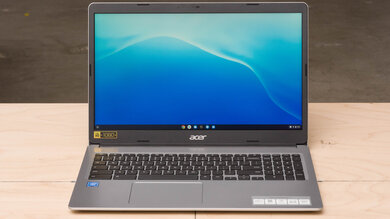
The Acer Chromebook 315 (2020) earns a solid reputation as a reliable budget Chromebook for light everyday tasks, but Reddit makes it clear this is a device with real limitations that buyers should understand before purchasing. Community sentiment is cautiously positive for the right use case — mostly YouTube, web browsing, email, and basic work — but turns critical when users push it toward multitasking or media production. The 4GB RAM ceiling is the most debated spec, with some users finding it perfectly adequate after disabling the Play Store, and others calling it a bottleneck even for casual use. The display quality is a recurring pain point, with the 1366x768 TN panel on base models drawing consistent criticism, while FHD variants receive much warmer reception. Overall, Reddit's verdict is that this Chromebook earns its place in the sub-$200 tier, but shoppers need to match expectations to the hardware.
Pros

  • Battery life of 8–12 hours is consistently praised across multiple threads — several users report getting through full days without plugging in, which is a genuine standout at this price tier
  • FHD variants (1920x1080) offer solid screen quality that surprised early buyers expecting worse at sub-$200; one user called the display a key reason they stayed with the purchase
  • Handles YouTube, Facebook, email, and light web browsing without complaints — multiple users set these up for elderly relatives and report zero issues for that specific use case
  • Linux support works reliably via Crostini or legacy firmware flashing, unlocking VSCode, Audacity, and even some older Steam titles (Portal 1, Kotor, Diablo 3 at low settings)
  • AMD variants (A6-9220C) offer hardware H.265 4K decode, OpenCL 2.0, and better GPU performance than typical Intel Celeron models, making them a quiet value pick at launch
  • Lightweight build and large 15.6" screen in a sub-$200 package consistently mentioned as a strong combination for home use and older users who prefer bigger displays

Cons

  • The base 1366x768 TN panel is widely criticized — Reddit comments range from 'adequate at best' to 'trash even in 2020'; the color depth (262,144 colors vs 16.7M on IPS) is a real visual downgrade
  • 4GB RAM creates noticeable bottlenecks when multitasking or running Android apps — multiple users report lag with a few tabs open, and the Play Store is specifically flagged as making things worse
  • WiFi reliability has been a documented issue on certain CB315 units — at least one Reddit thread describes the stock WiFi card as 'known for being extremely poor quality,' with replacement cards not always recognized by Chrome OS
  • Processor (Celeron N4020 / N4000) is underpowered for anything beyond the basics — Steam gaming requires heavy workarounds (legacy firmware, external drives) and even then tops out at 480–800p on older titles
  • No F-keys, no Insert key, and a unified touchpad frustrate users who try to use alternative operating systems or prefer traditional laptop input layouts
  • EOL (End of Life) for Chrome OS updates is an active concern — several users flag that the N4020-based models are approaching or past their support window, limiting long-term viability

The $30 Refurb Reality Check

Users picking up the Acer 315 secondhand are often surprised — but not always pleasantly. The FHD models hold up well for media consumption, but TN panel versions draw consistent regret, especially from buyers who assumed 'budget Chromebook' meant 'good enough screen.'

Reddit's Verdict: Buy It for One Person, One Job

The strongest endorsements in community threads come from people who bought the Acer 315 for a specific low-demand user — an elderly parent watching YouTube, a student doing basic coursework. Outside that lane, the hardware starts to show its limits fast.

The Play Store Is the Real Enemy of Performance

A recurring Reddit tip: disable the Google Play Store entirely. Multiple users report that the 315's 4GB RAM feels usable for web browsing once Android apps are out of the picture, but keeping the Play Store active is what pushes the device into 'borderline unusable' territory for some.

User Reviews (40 of 105 analyzed)

59
0
LobbyNoiser/chromeos9d agopositive

I just bought the Acer 315 Chromebook (CB315-3H-C2C3) at Walmart for $179 and I'm impressed and in love. Yes, the case seems a little cheap and the keyboard takes a bit of adjustment (it has a numeric pad so the keyboard is shifted to the left). But it's got a full HD 15 inch screen and the Celeron N4000 is pretty snappy. It's a great deal if you can find it in stock. I really think you need to hit over $300 to find something genuinely better.

View Original Comment
17
0
Hupror/chromeos9d agopositive

The AMD A6-9220C variant brings Radeon R5 graphics, hardware H.265 4K decode, H264 1080p60 encode, OpenCL 2.0, OpenGL 4.4, and DirectX 12 support. Up to 8GB RAM, 2 USB Type-C 3.1 ports, 2 USB 3.0 ports, and 10-hour battery. Starting price is very competitive.

View Original Comment
14
0
Chrome_Atlasr/chromeos9d agopositive

Keeping the price low is the big win here. If the specs and build quality of these AMD machines can keep pace with Intel machines, I really hope fewer and fewer folks will be willing to pay a premium simply for an Intel sticker.

View Original Comment
12
0
zaccer/chromeos9d agopositive

N4000 + 4GB RAM is a great combo and should meet the needs for most Chromebook users. The only reason one needs to go for a $300 device instead is if they need a touchscreen.

View Original Comment
10
0
Nandojkcolas1r/chromeos9d agopositive

4GB of ram is plenty for doing the basics. It's a Chromebook so you don't need all the extra memory like you do with a Windows PC. The Acer is a good choice for a bigger screen. Any of these would be fine for the basics and browsing YouTube.

View Original Comment
7
0
Hyrule34r/chromeos9d agopositive

I've been keeping an eye out for a cheap Chromebook for my niece these past few weeks, and all I've been seeing are prices that are way too high. I guess demand for Chromebooks is understandably really high these days.

View Original Comment
6
0
cybermisttr/chromeos9d agonegative

4gb of ram isn't enough even for a Chromebook. I have one and it often lags.

View Original Comment
5
0
zakatsr/chromeos9d agopositive

AMD claims the 9120c is faster than the N4200 and will certainly have a better iGPU. It's a shame AMD waited so long to join the party.

View Original Comment
4
0
Vaxtezr/chromeos9d agopositive

I find myself having little issue with 4GB RAM, sure it runs into issues, but for some basic browsing it's fine. You can open a few tabs and maybe run Android apps if need be. Besides, it's a sub-$200 Chromebook, it's not going to be the best of the best.

View Original Comment
3
0
earlesjr/chromeos9d agopositive

I have that Acer for about 2 years or so. It runs YouTube and browsing fine but it gets bogged down pretty easily when trying to multitask. Decent if you just want something to consume media. Battery life I get about 7-10 hours.

View Original Comment
3
0
regassert6r/chromeos9d agopositive

If you disable the play store a 4GB unit with even a Celeron type processor is perfectly usable for the original idea of what Chromebooks were for. As a web browsing machine, it is completely fine once I disabled the play store.

View Original Comment
3
0
KrillinBeChillinr/chromeos9d agopositive

Seems like a great upgrade from my 2016 Acer Chromebook 14. Honestly, that's a great price point.

View Original Comment
2
0
MoChromeBoxr/chromeos9d agopositive

The best and easiest way I've done it is to use MrChromeBox Legacy Firmware and then dual boot Linux from an external drive. I'm playing Diablo 3 right now at 800x600p 30fps. I've also played a fair amount of Oblivion and FONV at 480p 30fps. Kotor 1/2 and Portal 1 run great at 720p 30fps. Portal 2 is choppy but works. Morrowind is flawless on OpenMW.

View Original Comment
2
0
LinuxChromebookDuder/chromeos9d agopositive

If you are good with computer stuff, just install Linux. Will let you use Steam, Minecraft, etc. without as much hassle. Check out chrx.org and mrchromebox.tech.

View Original Comment
2
0
StyxCoverBndr/chromeos9d agopositive

I have the Acer CB315 (got it from Best Buy too) and I love it. It's light and has a great charge on the battery — I've had mine for a year and I still get about 8 hours with it. It's not the fastest Chromebook in the world, but I do a decent amount of stuff on it and don't really run into too many performance issues. I enabled Linux and I'm able to use VSCode and have 7-8 browser tabs open and it still runs pretty good. The only cons I've encountered is that the screen absolutely sucks.

View Original Comment
2
0
cluckclockr/chromeos9d agopositive

I bought an Acer Chromebook 314 a couple months ago with same specs and it's great. At first I was skeptical about ChromeOS, but now I'm really astonished that people keep using Windows 10 on their main machine as any other OS runs twice as fast on the same hardware. The N4000 chip works surprisingly well.

View Original Comment
2
0
SteveNYCr/chromeos9d agopositive

For this price point, the screen is a little brighter than average and that can make a nice difference.

View Original Comment
2
0
La_Rana_Rener/chromeos9d agonegative

I would recommend you save a little bit more or go for an open box model better than those two. That processor with 8GB of RAM is the minimum if you are going to keep it for yourself. For an older person that just wants to watch YouTube — if that's the case it's perfect, 1080p without issues.

View Original Comment
2
0
Large-Remove-1348r/chromeos9d agopositive

I've used lots of HP laptops. Don't buy HP. Acer's budget Chromebooks are the safer pick in this price range.

View Original Comment
2
0
povlovr/chromeos9d agopositive

I started using low price Chromebooks in January 2014 and one is still in daily use. 6 years of Chromebooks and about 1100 € spent. Happy.

View Original Comment
2
0
regassert6_2r/chromeos9d agonegative

4 GB of memory is fine if you disable the Play Store. It's borderline unusable if you keep the Play Store enabled.

View Original Comment
1
0
LegAcceptable2362r/chromeos9d agonegative

Acer's CB311/314/315 models with N4020 Celeron processors were their bargain basement offerings for 2020. For not a lot of money they're reliable workhorses, albeit with too little RAM for today, but the mediocre 1366x768 TN screen is what you expect at this price point. A CB514 from the same year has similar silicon but the full HD IPS screen and build quality blows away the entry level machines.

View Original Comment
1
0
Romano1404r/chromeos9d agonegative

You probably got the model with the 1366 x 768 TN screen, quite frankly that was already trash in 2020. I wouldn't wanna use such a device even if it was given to me for free, you can get much better Chromebooks nowadays for little more money.

View Original Comment
1
0
sadlermr/chromeos9d agonegative

You can run Audacity in the Linux container. DAWs are not casual apps so they won't run well on your hardware. Likewise for Steam, it's not going to run well. Just think of your Chromebook's specs as if it were a Windows PC. Would you try to run Steam and Ableton on a PC with 4GB RAM?

View Original Comment
1
0
icouldbne1r/chromeos9d agopositive

I've got the Acer 315. The only time I have an issue is either (A) when I have way too many tabs open, or (B) when I try to use Photopea. For some reason Photopea is almost unusable on the 315, regardless of how many tabs are in use. But if your grandfather will only be using this to watch YouTube videos (or check email, or browse a web site), he'll be perfectly fine with the Acer 315. And $149 is a GREAT price for it.

View Original Comment
1
0
agapecomr/chromeos9d agopositive

I bought that one for my dad a couple months ago and we both are satisfied. He mostly uses Facebook and YouTube and I set it up to automatically load those. It is much lighter than his old PC laptop so it is easier for him to pick up.

View Original Comment
1
0
Haunting-Walrus7199r/chromeos9d agopositive

I bought mine in 2020 and it works just fine today. The only difference I can see in my model is my screen is 1920x1080 vs the 1366x768 variant. I suspect very little difference in user experience for typical home use. I'm typing this while the Chromebook is docked.

View Original Comment
1
0
tapsum-bongr/chromeos9d agopositive

I went with the Acer CB315-4H, a little more expensive, but imo it was worth the few extra bucks. Intel Celeron N4500, 15.6" screen, 8GB RAM, and 128GB flash. It can handle a bit more obviously, especially if you want to play some ROMs — it can handle up to N64 for the most part if you configure the emulator properly. 10hr battery is pretty solid as well!

View Original Comment
1
0
stayjuicecomr/chromeos9d agonegative

Oh god no, not the 315, that's what I have right now. It has no printscreen button or F buttons, or insert button, and the touchpad is all one piece with no separated left and right.

View Original Comment
1
0
ConsistentWarning530r/chromeos9d agonegative

Not worth it — the CPU is outdated. Get an N100 or N6000 CPU instead.

View Original Comment
1
0
cosmica_akashicr/chromeos9d agonegative

Please grab anything with at least 8GB of RAM. The desktop version of Chrome will eat up most of the RAM memory after a few months of usage — it will be laggy as hell, almost unusable.

View Original Comment
1
0
AsHpersonr/chromeos9d agopositive

Acer has always been the king of cheap Chromebooks. You should know the capability of a low-spec'd Chromebook though.

View Original Comment
1
0
EnglishBeatsMathr/chromeos9d agopositive

I have the Acer 513. The 315 has the same twelve-hour battery life, which is by far its biggest draw. It's hard to go back to a normal laptop that only lasts half as long.

View Original Comment
1
0
sadlerm_2r/chromeos9d agopositive

I'd say so yeah. Despite the 4 year old processor, you're getting 64GB storage, a touchscreen panel and FHD resolution for $150.

View Original Comment
1
0
Norcalmannr/chromeos9d agopositive

I have an Acer Chromebook 14 and have had it for three years. I have owned numerous laptops and this is by far my favorite. Very practical and I have not had any issues.

View Original Comment
1
0
CurtLandsmanr/chromeos9d agonegative

I appreciate everyone's responses! I ended up getting an HP 15a-nb0013dx today for only $149 at BB. It's an improvement for sure over the older 315 I was using.

View Original Comment
1
0
bartturnerr/chromeos9d agopositive

My kids use Acer Chromebooks and I purchased most of them off of the Acer store on Ebay. They have pretty good deals and I have not had a single problem with any of the machines. That is with my kids being really hard on them.

View Original Comment
1
0
Missclocr/chromeos9d agonegative

I've had mine for 8 months now and the screen suddenly went black. Did you have this problem?

View Original Comment
1
0
StyxCoverBnd_replyr/chromeos9d agonegative

Yes I just had the black screen problem. I performed a hard reset by holding down the Refresh key and the power button for like 20 seconds and that fixed it.

View Original Comment
0
0
starkruzrr/chromeos9d agonegative

Searching this machine's model number and WiFi problems comes up with a lot of hits — I believe I ran across several posts on this sub complaining about it specifically.

View Original Comment