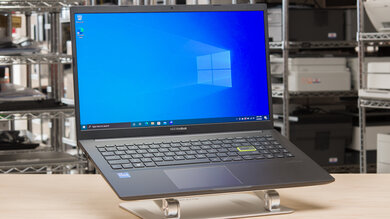
Asus ASUS VivoBook 15 OLED K513 (2021)
Laptops

Asus

ASUS VivoBook OLED K513: What Real Users Actually Think

Mar 2026

Last Analyzed

7/10

Overall Rating

12

Positive Reviews

14

Negative Reviews

Summary

The ASUS VivoBook 15 OLED K513 is widely regarded as one of the best value OLED laptops in the sub-$900 price range, and Reddit communities consistently point to its display as the main reason to buy it. It targets students, casual coders, and multimedia consumers who want premium screen quality without premium pricing. The overall sentiment is positive for the display but lukewarm on build quality, battery longevity, and gaming capability. Users who bought it primarily for content consumption tend to be satisfied, while those who pushed it for productivity workloads or gaming often found it lacking. Battery degradation has emerged as a recurring real-world complaint, with some owners reporting significant capacity loss within two years.
Pros

  • 15.6-inch OLED panel covering 100% DCI-P3 with up to 600 nits peak brightness — a display spec that competing IPS laptops in the same price range can't match
  • RAM is expandable via a free DIMM slot despite 8GB being soldered, allowing upgrades to 16GB or more for improved multitasking and light gaming performance
  • Intel i7-1165G7 with Iris Xe handles esports titles and older AAA games at 1080p 60fps, making it a workable choice for casual gamers who don't need a dedicated GPU
  • MX350 discrete GPU variant offers a modest but real step up for users who occasionally game or run GPU-accelerated tasks
  • Compact charger design compared to competitors like Dell in the same class, noted by users as a practical travel advantage
  • Harman Kardon-tuned speakers praised for noticeably better audio output than similarly priced alternatives

Cons

  • Battery degradation is a documented pattern — multiple K513EA owners reported near-total capacity loss within 80–115 charge cycles, well under two years of normal use
  • OLED burn-in is a real concern for students and coders who run static UIs for long sessions; the community recommends external monitors for heavy productivity use to protect the panel
  • MX350 GPU is a weak dedicated option that barely outperforms integrated graphics for gaming — users who need real gaming performance are pointed toward dedicated GPU laptops
  • Relatively heavy and thick chassis for its class — not an ultrabook despite the premium display, which disappoints users expecting a thin-and-light form factor
  • Battery life is shorter than IPS competitors at the same price, a tradeoff inherent to OLED panels at this brightness tier
  • Build quality is plastic and budget-feeling; ThinkBook and other competitors in the same price range offer better chassis rigidity according to users comparing both

The OLED Screen Is the Whole Point — and Reddit Knows It

Across multiple threads, users who chose the K513 over ThinkPads and Inspirons say the same thing: the display was the deciding factor. Competitors at this price offer 45% NTSC TN or entry IPS panels — the K513's DCI-P3 OLED makes the comparison feel unfair.

Is a Two-Year Battery Lifespan Acceptable on a Budget Laptop?

A recurring thread in the ASUS subreddit reveals a troubling pattern: K513EA owners hitting near-zero battery capacity at 80–115 charge cycles. If you're a student planning to use this through a full degree, factor in a battery replacement cost or plan to stay plugged in.

Coders Buying This for Uni Should Read the Burn-In Thread First

Reddit's OLED community flags a specific risk for programming students: static IDE elements, bright terminals, and taskbars left visible can cause uneven pixel wear over years of daily use. The consensus fix — external monitor for work sessions, OLED for everything else — adds cost to the real ownership picture.

User Reviews (26 of 73 analyzed)

12
0
keebs63r/buildapcsales10d agopositive

Seems like a pretty good deal if you need it. There's both a Notebookcheck review and an rtings.com review, so you can go into buying this knowing pretty much everything about it. The 8GB is soldered, but there's a RAM slot that should be free so you can add your own to up it to 16GB or more.

View Original Comment
4
0
N0SYMPATHYr/OLED10d agonegative

I wouldn't use an OLED laptop for heavy coding or school work personally. A couple of years if you are lucky and you'll definitely be seeing some of the windows you have up the most from uneven pixel wear — especially programs like Excel with bright white boxes and black lines. These laptops really are best for someone doing minor browsing and a lot of media consumption.

View Original Comment
3
0
mandya7771r/IndianGaming10d agonegative

Just search Iris XE gaming performance on YouTube. It is OK for 720p 30fps I guess — don't expect much beyond that.

View Original Comment
2
0
keebs63_replyr/buildapcsales10d agonegative

Ultrabooks are very thin and light with really good battery life and typically focus on the nice-to-haves like good build quality, good trackpad and keyboard, good screen, etc. This thing is relatively heavy for its class — not really an ultrabook despite the premium display.

View Original Comment
2
0
Accomplished_Emu_658r/ASUS10d agonegative

The batteries are just not the greatest. Also cycles do not matter if it is plugged in constantly or constantly run to zero.

View Original Comment
2
0
Maleficent-Neck-5258r/ASUS10d agonegative

I mostly used it on battery power and followed a 20-80 charging schedule, and the battery still died after just 2 years and 113 charge cycles. I think most of the K15 OLED have faulty batteries — fully degraded within 2 years. I have seen many other owners having the same problems.

View Original Comment
2
0
Silent_Knight16r/ASUS10d agonegative

Same laptop here — it just shut off and even when I plug it in, it doesn't start. Looking to find a replacement battery for the K513EA.

View Original Comment
2
0
Straight_Gear_6335r/ASUS10d agonegative

Same battery issue here. I'm still using it on the adapter — thinking of buying a new laptop entirely since the display is also broken now.

View Original Comment
2
0
X2Jasonr/OLED10d agopositive

As an owner of a Gigabyte OLED laptop for two years, I never had a single burn-in issue. The ONE biggest tip I can give is to ensure your taskbar is set to 'hidden' by default. This will remove any burn-in anxiety and is highly recommended.

View Original Comment
2
0
RiverZealousideal680r/IndianGaming10d agopositive

My friend has an Acer laptop with the same i5-1135G7 CPU — he plays eSport titles comfortably at 1080p 60FPS and AAA games at 720p 60FPS with just 8GB RAM. Your laptop with 16GB will perform much better.

View Original Comment
2
0
OrganicBnr/SuggestALaptop10d agopositive

The Asus VivoBook 15 OLED K513 is currently the best screen you can buy at this price point. Notebookcheck has done a review if you're interested — the display quality alone sets it apart from competitors in this budget.

View Original Comment
2
0
OrganicBn_replyr/SuggestALaptop10d agopositive

Asus likes to use different names for different regions — the European ASUS store model is essentially the same laptop. The Ryzen OLED variant in particular offers great value for its display quality at this price bracket.

View Original Comment
2
0
jankdcr/laptops10d agonegative

I've used the ThinkBook T-line for years and they've been incredibly durable. I don't have any experience with the VivoBook, but the ThinkBook chassis is significantly more durable — I've dropped a couple of them from 3 feet and had no problems.

View Original Comment
1
0
Mahdiy0r/buildapcsales10d agopositive

Asus is giving the best OLED displays at the lowest prices here. The 14" model with just the integrated Iris has a higher resolution and a higher refresh rate 90Hz panel plus Thunderbolt for eGPU.

View Original Comment
1
0
justamofor/OLED10d agonegative

I wouldn't use it for heavy university work. Even if you use dark mode, hide the taskbar and take every preventive measure, you'll inevitably have to deal with static UI elements for many hours in a row for weeks or months throughout uni.

View Original Comment
1
0
edwardgreen29997r/OLED10d agonegative

My Dell XPS OLED lasted 2 years before noticeable burn-in — I didn't hide my taskbar, had brightness on 100% all the time, and had a static screensaver for about a year. The only burn-in that shows up is the Win10 search thing in the taskbar.

View Original Comment
1
0
sintavovyr/OLED10d agopositive

If you experience burn-in, you can buy a new OLED display for less than 100 USD and replace it yourself.

View Original Comment
1
0
oled_buyer_replyr/OLED10d agopositive

I got a 3-year warranty with burn-in covered. Also planning to use it at around 150 nits, dark mode all the time, autohide taskbar, and enable all the OLED saver methods in the Asus app.

View Original Comment
1
0
monitor_suggestionr/OLED10d agopositive

I'd buy a monitor just for when you're back home and use the laptop screen off to the side. A good 24-inch display is around 150 dollars and a lot easier to replace. OLED would then be reserved for multimedia and light gaming — that's how you extend its lifespan.

View Original Comment
1
0
onime1r/SuggestALaptop10d agonegative

OLED Zenbooks and VivoBooks have been around for a while. They have their pros and cons — chief among which is the high reflectivity of the display. There should be a solid reason for selecting it over an IPS option, not just the OLED hype.

View Original Comment
1
0
ColdDour_Scotlszr/pcmasterrace10d agopositive

The Asus has less battery life than the Dell Inspiron 5515 in this comparison. The charger is more compact though. Audio is tuned by Harman Kardon and sounds very good compared to the competition.

View Original Comment
1
0
VtheMan93r/pcmasterrace10d agonegative

The Dell looks a bit smaller and more square. In terms of productivity the keyboard and trackpad would need hands-on testing to confirm comfort — the ASUS looks usable but that would have to be proven.

View Original Comment
1
0
goblin0100r/SuggestALaptop10d agopositive

Avoid laptops with 45% NTSC displays as they are lifeless. Find the cheapest laptop with a good 100% sRGB display — the ASUS VivoBook OLED fits this criteria at this price range.

View Original Comment
1
0
how-now-brown-cow-r/OLED10d agopositive

I just received an OLED laptop for coding in college and I'm trying to find software to help shift static content around or auto-dim static parts of an image. Meantime I set my taskbar to autohide, run Chrome in fullscreen, and set display to high contrast to invert white space.

View Original Comment
1
0
Castlenockr/OLED10d agonegative

I'm waiting for a proper 3-5 year burn-in warranty before committing to OLED for desktop use — we just aren't there yet for heavy computer usage unless you are extremely careful about static elements.

View Original Comment
1
0
Fluid-Pomelo7936r/ASUS10d agonegative

My unit bought in November 2021 has only 64 charge cycles but capacity has dropped from 42,067 mWh when new to just 27,349 mWh now — that's a massive degradation even with very few cycles.

View Original Comment