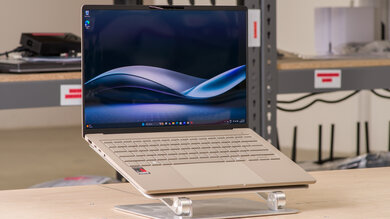
Asus ASUS Zenbook A14 UX3407 (2025)
Laptops

Asus

ASUS Zenbook A14: Reddit's Honest Take on the ARM Gamble

Mar 2026

Last Analyzed

7/10

Overall Rating

18

Positive Reviews

24

Negative Reviews

Summary

The ASUS Zenbook A14 UX3407 is a genuinely polarizing ultraportable: users who want a featherweight laptop for browsing, note-taking, and productivity love it, while those who need full Windows software compatibility run into real walls with the Snapdragon ARM architecture. At under 1kg with OLED display options and battery life ranging from 9 to 24+ hours depending on workload, it impresses on paper and in everyday use. The build quality earns consistent praise — sturdy, thin, premium-feeling — though a recurring issue with black scuffs out of the box has frustrated multiple buyers. Pricing at $549–$650 on sale makes it a compelling option for the right user, but anyone with niche software, gaming needs, or Linux ambitions should shop elsewhere.

Pros

  • Exceptional portability at under 1kg — multiple users describe it as 'MacBook Air light,' making it one of the lightest Windows laptops available
  • OLED display is a highlight across all variants; the screen quality consistently earns praise whether it's the 60Hz FHD+ or the 120Hz 3K panel available in select markets
  • Battery life is genuinely impressive for casual workloads — users report 9–11 hours for light tasks, with one law student claiming 24+ hours for note-taking and PDF reading
  • Silent operation in balanced mode; multiple users coming from Dell XPS and other x86 laptops note how quiet the fans are during everyday use
  • Excellent value when on sale — units regularly drop to $549–$650 at Best Buy, offering 16GB RAM and OLED at a price point few competitors match
  • Fast USB-C charging and solid port selection (USB-A, dual USB-C, HDMI) make it practical for travel and daily carry

Cons

  • Snapdragon ARM architecture causes real compatibility gaps — FL Studio VSTs won't run, some Adobe apps have issues, Steam gaming is largely off the table, and attempting Linux dual-boot can brick the device
  • Highly reflective glossy screen is a frequent complaint; users describe it as 'like a mirror,' causing eye fatigue in bright environments — a matte screen protector is the community's workaround
  • Several buyers received units with black scuffs straight out of the box that couldn't be removed, suggesting quality control inconsistencies at the factory or shipping stage
  • Performance benchmarks on the Snapdragon X Plus trail behind alternatives like the Vivobook S14 with Lunar Lake or the Surface Laptop 7 — users paying full $999 feel the value proposition weakens significantly at MSRP
  • Sleep/wake reliability issues reported on the Intel variant — some units require a forced shutdown to wake from sleep, pointing to firmware-level bugs
  • WiFi stability complaints on the Intel Zenbook 14 variant; multiple users note dropped connections in spots where other laptops stay connected

ARM Compatibility: The Feature That Defines Your Experience

Whether the A14 works for you comes down entirely to your software stack. Reddit's consensus is clear: browser-based workflows, Office, note-taking, and light productivity run flawlessly, but FL Studio, custom drivers, legacy Windows apps, and Linux installs can all fail. The Snapdragon chip isn't broken — it's just a hard line in the sand.

Best Buy Sales Have Become the Real Launch Event

At MSRP of $999–$1099, Reddit's reaction is skeptical — competitors with Lunar Lake chips offer better performance and no ARM trade-offs at similar prices. But at $549–$650 during Best Buy sales, the A14 becomes one of the most recommended ultraportables in the sub-$700 space. Most positive owners bought it on sale.

Out-of-the-Box Scuffs: A Surprisingly Common Problem

Multiple independent buyers across different threads reported receiving units covered in black scuffs that couldn't be cleaned off. It's unclear whether this is a packaging defect, a coating issue, or a logistics problem — but it's appeared often enough in the community that prospective buyers should inspect their unit immediately upon unboxing.

User Reviews (42 of 179 analyzed)

27
0
NeinThankur/buildapcsales9d agonegative

How is this a deal?

View Original Comment
24
0
MrMaxMasterr/buildapcsales9d agonegative

The vivobook s14 with lunar lake sometimes reaches below this price and is much better.

View Original Comment
20
0
groutexpectationsr/buildapcsales9d agonegative

Maybe if you just need a Facebook machine with an OLED screen, that's actually pretty lightweight. If this was snapdragon X Elite, then okay we would have a good deal.

View Original Comment
4
0
Nehal1802r/buildapcsales9d agopositive

I can't go back to an x86 laptop after using a snapdragon. Native ARM apps are so much quicker, battery life is amazing, and the machine is silent.

View Original Comment
3
0
No-Station-9087r/ASUS9d agonegative

I have the identical model. Battery — I've never gotten more than 3 hours of battery life. Maybe 3.5 hours if I'm just scrolling through Facebook and working on documents. If anything is running in the background (for example, YouTube), 3 hours is the maximum. Speed — When I turn on my Asus, the CPU temperature instantly reaches 80°C. With YouTube running, it climbs even higher.

View Original Comment
3
0
PM_ME_UR_BEWDsr/buildapcsales9d agopositive

If most of what you do on a PC takes place in a browser, ARM will work just fine (or perhaps even better than x86). You know who you are. Compatibility with other applications is hit and miss, mostly hit in my experience though. If there's a native ARM port of the program you want to use, there should be no compatibility issues. Games mostly don't work.

View Original Comment
3
0
Intelligent-Art-1534r/ASUS9d agopositive

I'm not lying and have no reason to be lying. I am not sponsored nor affiliated by Asus, literally just bought the laptop at my local Best Buy. One of the reasons why I upgraded my laptop was the battery life. My old laptop would get just about 2 hours on a single charge doing basic tasks like writing documents. The Zenbook's battery life is a massive upgrade over what I had.

View Original Comment
3
0
Icy_Marsupial940r/ASUS9d agonegative

There is no way a freaking zenbook lasts only 3 hours for basic tasks. I have my 2019 zenbook, and it still lasts longer than that for basic tasks. If you're getting 3 hours battery life on a zenbook you recently bought, that's definitely a factory defect — return it.

View Original Comment
3
0
FurnaceOfTheseusr/buildapcsales9d agonegative

Gaming being a wash on ARM configurations is probably the only thing preventing me from pulling the trigger on this laptop.

View Original Comment
2
0
UIUC_grad_dude1r/ASUS9d agopositive

Based on your review, I got the zenbook A14 due to a great sale at Best Buy. I can say I love this laptop, much more quiet and lighter than my Dell XPS 13 PCs. The battery life is amazing, and the overall experience is very smooth. It runs all of my x86 apps except one very old obsolete app due to driver issues, so it works just as well as my x86 XPS laptops. Great PC and I am enjoying it.

View Original Comment
2
0
BilliamOttr/ASUS9d agopositive

I'm getting like 10 hours just easy stuff and over 5-6 doing heavy excel docs with macros, encryption, and other apps running. Snappy, zero lag. I did have initial issues when I first booted, but after bios and firmware updates, it's been perfect.

View Original Comment
2
0
SalientLiquidityr/ASUS9d agonegative

Interesting OP comment on poor WiFi. I just got the similar zenbook from Costco and WiFi is dropping while placed in the exact spot my former Acer laptop never dropped WiFi. Stable WiFi is critical and for this brand new laptop with Win11 I expect stable internal WiFi.

View Original Comment
2
0
No_Substance_4078r/ASUS9d agopositive

I got 3 days ago the UM3406KA model with a Ryzen AI 7 and 32GB of RAM and so far it's been performing great the display is beautiful and feels really fast for regular daily use. I've tried only Valorant and Forza Horizon 5 both on medium settings and both get stable 60fps with 8gb of vram set on MyAsus app.

View Original Comment
2
0
patriciousr/ASUS9d agopositive

I have the exact same model with the 285H, I replaced the stock thermal paste with PTM7950 and its a night and day difference. Idle is 41-43, before it would thermal throttle on simple tasks according to HWinfo, but now I really have to push the laptop to even reach 96-98c on specific scenarios.

View Original Comment
2
0
Key_Prior_231r/ASUS9d agonegative

After living with the A14 for 3 days, I can give my honest opinion. And, in my opinion, it's unpolished. The actual laptop's build design quality is great, but it's the Snapdragon chip that turns me off. It's got great performance and battery life, but frankly, falls short due to its architecture. I tried to install Ubuntu for ARM64, but this basically bricked the device. Once I got the new laptop, I had trouble running DAWs and VSTs for FL Studio. I can't install games on Steam. But honestly, if you are just looking for a lightweight, thin, portable laptop for something like Adobe Lightroom, it's great.

View Original Comment
2
0
Present_Lychee_3109r/ASUS9d agonegative

Snapdragon laptops have compatibility issues. I think that should be apparent now. There's a reason why Snapdragon laptops have not killed Intel and AMD laptops.

View Original Comment
2
0
niceguyjinr/ASUS9d agonegative

Snapdragon doesn't work natively with some windows apps, but if you're fine spending time finding workarounds maybe it's ok. Also, Asus has issues with honouring warranties. Google 'Reddit Asus RMA' or 'Reddit Asus warranty' for some light reading. Gamers Nexus did a series of videos about their shady practices too.

View Original Comment
2
0
memnon8711r/ASUS9d agonegative

The Zenbook build quality this year and last year are not as good as previously if you ask me. I have tested a few and I think they are a step backwards from the 2023 Zenbook 14X. Asus warranty process has been broken for some time now.

View Original Comment
2
0
RoyaD3r/ASUS9d agopositive

The A14 has drastically better battery performance during active use. I'd only consider the A14 if most of your usage is browser based, and if the apps you do need are confirmed to be supported or use negligible resources.

View Original Comment
2
0
blazeeruptr/ASUS9d agonegative

It's pretty niche, but I want 120hz purely for the user experience. I've been a bit too used to anything above 60hz — my phone has 90hz, my desktop setup uses 144hz — so anything still at 60hz looks jittery to me (screen transitions, cursor movements).

View Original Comment
2
0
BilliamOtt_2r/ASUS9d agopositive

Just got it. The most perfect laptop I've ever used. I use multiple monitors and not lugging the external while these high res touch displays are integrated is beyond perfect execution. Keyboard is awesome, battery life fantastic. Super solid quality — almost got another X1 Carbon and now I laugh at almost making that big mistake.

View Original Comment
2
0
jpp59r/laptops9d agopositive

I received it here in Europe last week. Only one model available (the Grey, 1TB and 32GB RAM, 1699EUR). It is very well built and light. Very happy with the purchase.

View Original Comment
2
0
mcAlt009r/ASUS9d agonegative

Everyone knows that Windows ARM laptops can't really run Linux. That's among many reasons to just not bother with Snapdragon laptops. You lose a massive amount of potential functionality, plus if you ever need any hardware that needs a custom driver you're just out of luck.

View Original Comment
1
0
Responsible-Car-3744r/ASUS9d agopositive

I just bought the asus zenbook a14, oled, snapdragon x plus one, and i am really impressed by it specially with the price, i got it when it was on sale at 550 usd, and i gotta say love everything, the keyboard is decent, trackpad is top notch, display feels wonderful, it does not feel cheap, the chassis is sturdy, it is light, the battery life is unmatched though i am a law student and just write notes etc, the battery easily lasts for more than 24 hours, it charges fast as well, and uses usb c.

View Original Comment
1
0
therebelvoicer/ASUS9d agopositive

Seamless experience so far. Most portable Windows laptop I've ever gotten, quiet as a mouse and it's capable of handling my 50 tabs open in one school session without lag.

View Original Comment
1
0
AdComprehensive249r/ASUS9d agonegative

I just bought the A14. I love the portability, size and design, but the SCREEN! It's so reflective! It's like a mirror and incredibly distracting and causes eye fatigue. Has anyone found a good solution to this? I don't want a privacy screen, just something anti-glare. I'm a little disappointed as I didn't see this in the store.

View Original Comment
1
0
TransporterAccident_r/ASUS9d agonegative

I bought two A14 at Best Buy and both came out covered in black scuffs that I could not remove. Is this common?

View Original Comment
1
0
Major_Shiftr/ASUS9d agonegative

Purchased the base Snapdragon X version with 32gb RAM. Yes, it's light weight and quiet, but feels very sluggish on balanced mode. Tried a quick Speedometer 3.1 test against a 3 year old base spec M2 macbook air and the Macbook scores 42 & 27 depending on whether battery saver is on. The highest I can get from the Zenbook is 28 with everything maxed. When on efficiency mode it scored 12. For £800 it seems wildly over priced.

View Original Comment
1
0
FriendshipFun4992r/ASUS9d agonegative

I've been testing out the beige Zenbook A14 with the X Plus, and I really like it. The battery life is incredible, and the performance is decent. The finish felt a bit cheap at first, but it's really grown on me. I want to keep it, but I can get the Surface Laptop 7 for the same price. The performance boost of the better x plus chip and build quality of the Surface are just too significant for me to choose the A14.

View Original Comment
1
0
amarhany20r/ASUS9d agonegative

I am really confused, mine with 285H with even streaming shuts down. Even on 60C. How yours aren't shutting down. On both battery and plugged in. Even happens in diagnostics in BIOS. It dies a lot on me and people say it is overheating. Bought a cooling pad and still suddenly it dies. Is mine faulty?

View Original Comment
1
0
Ludicritsr/buildapcsales9d agonegative

Not worth the money. Was a headache to work on and ended up returning it. Far too many incompatibility issues to use it at work.

View Original Comment
1
0
Virtual_Focus_3510r/ASUS9d agopositive

I bought the 32 GB version to use Linux through WSL from ASUS directly ($899). The WOA platform is getting better over time, and using the A14 even just like a Chromebook, web browser only, is fine.

View Original Comment
1
0
TransportationOk8068r/ASUS9d agopositive

I own this laptop 16gb ram 1tb nvme and kind of love it. Admittedly I have factory reset the laptop 3 times — that was to solve a problem with installing a VPN. Chat GPT told me the VPN is not supported by the laptop even though I was installing the ARM version, then it clicked to install the normal version and it works. For my use the laptop is brilliant, can't really fault it.

View Original Comment
1
0
lenccr/laptops9d agonegative

Zenbook A14 has ARM based CPU (Snapdragon) and therefore also Windows 11 ARM edition. This means it has great battery longevity, but compatibility could sometimes be a weakness — mostly in terms of worse performance. Probably that's why it doesn't have such good reviews. For a STEM student it would probably be more suitable to have a classic x86 based CPU (AMD or Intel).

View Original Comment
1
0
Howeohr/laptops9d agopositive

For Software Engineering specifically, it depends on the stack you'd be using. Python only supported Windows on Arm in 2022 (version 3.11). Java runs fine. NodeJS has had Arm support for a long time. C# and other .NET languages work after recent updates. If you're using something like C++ I'd be more cautious.

View Original Comment
1
0
krovqr/ASUS9d agonegative

The zenbook a14 being sold in the Philippines is terrible. It's only 1200P, IPS, 60hz. Meanwhile ASUS HK's variant is 2.8K, OLED, 120hz. The specs discrepancy is insane.

View Original Comment
1
0
No-Scholar-13r/ASUS9d agonegative

Have you had any issues where when the display turns off or if it goes to sleep on its own, you can't wake it at all even with the power button? I have to hold the power button to force a shutdown before it will turn back on.

View Original Comment
1
0
Affectionate_Side587r/ASUS9d agopositive

Mine runs most indie games great. I've played Ravenswatch, Slay the Spire, Monster Train 2, and Dead Cells.

View Original Comment
1
0
bat0nasr/ASUS9d agonegative

Got the Ultra 5 225H variant yesterday. A few remarks after one day: it's a fingerprint magnet on the blue version. Fans ramp up quickly even with a silent profile. But let me use it longer — maybe updates were causing this.

View Original Comment
1
0
popopopopopopopopoopr/ASUS9d agopositive

What's the issue with running Linux via WSL2? I use that for local coding using VSCode and mounting some of my Windows folders for better interoperability. I got a good deal for it, the battery and ram are great for mainly browsing, coding and some entertainment. Compatibility is only improving with more and more ARM native builds.

View Original Comment
1
0
Laridianresistancer/ASUS9d agopositive

I solved the glossy screen issue on my Surface Laptop 7 (same problem) with a cheap matte screen protector — it made my laptop usable again, it was basically like looking at a screen that doubled as a mirror. Check your laptop dimensions and find one that fits, it should help a lot. It'll slightly dim the screen (like 5%) but it'll reduce reflections almost entirely.

View Original Comment
1
0
bhagatswr/ASUS9d agonegative

I was having issues installing Adobe Photoshop. If using Photoshop is one of your main use cases — I will not recommend this laptop.

View Original Comment