Asus ASUS Zenbook DUO UX8406 14 (2025)
Laptops

Asus

ASUS Zenbook DUO UX8406: What Real Users Actually Think

Mar 2026

Last Analyzed

7/10

Overall Rating

19

Positive Reviews

22

Negative Reviews

Summary

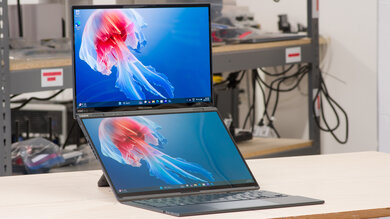
The ASUS Zenbook DUO UX8406 14 (2025) is a genuinely unique dual-screen laptop that earns strong loyalty from long-term users while frustrating those who hit its real-world limitations. The 2025 refresh (UX8406CA) upgrades to Intel Arrow Lake Series 2 processors, Wi-Fi 7, and USB-C ports on both sides — improvements that address some of the 2024 model's biggest complaints. Reddit sentiment is split: owners who got a good unit rave about the productivity boost from two OLED screens, while others report software glitches, thermal throttling, and inconsistent quality control. It's best suited for developers, students, and mobile multitaskers who genuinely need a second screen wherever they go, but buyers should be prepared for a software learning curve and the occasional hardware lottery.
Pros

  • Dual 14-inch 3K OLED touchscreens with 120Hz refresh — both panels look exceptional, and the 2025 model improved screen-to-screen brightness consistency that frustrated 2024 buyers
  • Detachable Bluetooth keyboard frees up the bottom screen as a second working display; long-term owners consistently report productivity gains that justify the form factor
  • Arrow Lake Core Ultra 9 285H (Series 2) in the 2025 model delivers better GPU performance and improved efficiency versus the Meteor Lake chips — early testing shows the iGPU is meaningfully stronger for light gaming and creative work
  • 2025 adds USB-C charging on both left and right sides plus Wi-Fi 7 and Bluetooth 5.4 — quality-of-life upgrades that 2024 owners frequently wished for
  • Kickstand is rock-solid at all angles; build quality on non-defective units is praised as excellent — one developer called it the greatest laptop ever made after 8-9 months of daily use
  • Light gaming is surprisingly capable given the integrated Arc GPU — users reported smooth Cyberpunk, Diablo II Resurrected, Last Epoch, and BG3 on medium settings

Cons

  • Core Ultra 9 versions historically throttle under sustained load because the chassis cannot feed the chip its rated 45W consistently — multiple users found Core Ultra 7 outperformed the i9 in real-world tasks, making the premium model a questionable buy
  • Battery life falls well short of ASUS's marketing claims: real-world usage with both screens active lands at 4–6 hours, not the 13–16 hours quoted — a recurring complaint across both 2024 and 2025 owners
  • QC is notoriously inconsistent: reported issues include screen flickering, mismatched color temperatures between the two panels, keyboard contacts scratching surfaces, bent keyboards, hinge wobble, and Bluetooth keyboard pairing drops
  • Software stack is glitchy — ScreenXpert and MyASUS consume significant RAM, gestures for multi-screen management fail out of the box for some units, and Windows 11 throttling adds another layer of performance unpredictability
  • The stock stylus underdelivers: palm rejection is poor in apps like Photoshop and OneNote, and the pen tip is noisy — not a viable Wacom replacement despite being marketed for pen input
  • At $1,699–$2,099+ USD (and higher in Europe), competing against MacBook Pro at similar price points is tough — buyers expecting flawless execution for that money frequently express disappointment

The Keyboard That Scratches Desks — Fixed in 2025?

One of the most viral complaints about the 2024 model was the detachable keyboard's connector pins gouging wood and painted surfaces during normal use. The 2025 refresh reportedly addressed this, but Reddit users are still watching closely — one of several hardware quirks that defined the 2024 experience.

Buy the i7, Skip the i9 — Reddit Is Clear on This

The Core Ultra 9 model costs more but delivers the same or worse real-world performance because the chassis can't sustain its power draw. Multiple users and reviewers confirm the Core Ultra 7 runs cooler, lasts longer on battery, and performs comparably in day-to-day tasks — making the i9 upgrade a trap.

Developers and Day Traders Are Its Biggest Fans

The use cases where this laptop genuinely shines are niche but passionate: developers running code on one screen while browsing docs on the other, day traders running order flow apps alongside charts, and students who want lecture notes and reference material open simultaneously — users who've tried returning it often end up keeping it.

User Reviews (41 of 213 analyzed)

5
0
HoleSearchingJourneyr/ASUS9d agopositive

Had mine 8-9 months, build quality and reliability are great. I consider it the greatest laptop ever made. It's just a little bulky in laptop mode but in dual screen mode it's absolute heaven. I take it everywhere and use it a lot of different positions... Coffee shops, on a desk, propped up on my bed. I'm a developer and productivity is through the roof on this thing.

View Original Comment
4
0
Witty_Heart_9452_br/ASUS9d agopositive

The moving the second thunderbolt port to the other side is a pretty nice improvement. That way you can now charge on both sides of the laptop. Ultra Series 2 should be more efficient as well, so battery life should be better. I would wait for reviews, if possible.

View Original Comment
3
0
coopermugr/ASUS9d agonegative

I noticed right away the difference in brightness and color profile between 2 screens. You can test the different brightness by turning it all the way to zero. You'll clearly see the bottom screen is brighter. Thinking about returning it. Paid almost $1900 I didn't expect to see this issue.

View Original Comment
3
0
sjswfsr/ASUS9d agopositive

I am fortunate that my ZBD does not seem to have the hinge issues. The software does seem a little glitchy at times but nothing that has stopped me from using it. I guess the hope is it gets better. Agree speakers leave something to be desired in quality dept but they do get fairly loud. But I also have a MBP and it's not even close.

View Original Comment
3
0
Calm-Vegetable-4889r/ASUS9d agonegative

Note to people considering this machine: There is a keyboard flaw — typing double characters. I am also having a problem with speaker crackling, especially when using Zoom. It is a great design. If only it didn't have so many problems.

View Original Comment
3
0
Witty_Heart_9452r/ASUS9d agonegative

Owning a 2024 Ultra 9 185h model myself, I can attest the quoted battery life is a lie. Actual use of the 185h model results closer to 4-5 hours at best while doing basic web browsing. If they are quoting 16 hours on the 2025 model, I will bet actual battery life will be 6 hours at most.

View Original Comment
3
0
SpecialistInfinite48r/ASUS9d agonegative

On the Duo, Core Ultra 9 is found to have the same performance as Core Ultra 7, but has worse thermals and battery life. They should've never rolled out a Core Ultra 9 model.

View Original Comment
3
0
Patient_Garage9453r/ASUS9d agopositive

I am currently using 2024 version for 8 months and here are things you should know. 2025v ultra 9 gen2 CPU is little better and GPU is much better, expecting better gaming performance. I recommend 2025v for battery life. Currently with both screen 60% bright gives me 5~6hr and with 50% CPU limit on silent mode gives me 7~9hr of use. With new CPU you could expect 8~9hr without CPU limit.

View Original Comment
3
0
doneworkin530r/ASUS9d agopositive

Yes it is possible to use the two screens separately and simultaneously. Windows picks it up just like any other 2nd monitor. It has never overheated. When the processor gets too hot it will throttle itself down to a lower processor speed. However, the fans are noticeable in Performance mode, as to be expected. Battery life is one of the downsides.

View Original Comment
3
0
doneworkin530_br/ASUS9d agopositive

Yes I still have the laptop, still love it. Do some light gaming on it like Diablo 2 Resurrected and Last Epoch. Still stand by it being a great machine if it happened to be good out of the factory, but quality control of Asus is sus and there are definitely a lot of bad ones out there.

View Original Comment
2
0
Drink8CupsOfWater90r/ASUS9d agonegative

Good: form factor, build quality (at least mine), keyboard (to me). Won't spend too much time here because there dozens and dozens of videos praising it. Bad: It can be glitchy and slow, loud and hot, doing the most simple of things. Transitioning between screens are slow and flickering. The specs on paper are not what you get in real life. Likely due to the unique power needs for the design, window 11 limiting power and performance controls, and asus's insufficient software all holding it back.

View Original Comment
2
0
Real_Policy1485r/ASUS9d agonegative

I have 2 issues since I received this laptop: 1 - Windows becomes either non responsive or laggy everytime when I switch between screens. 2 - Can't put it on lap as it becomes very very very (extremely) hot. I changed from Whisper to Standard mode but the heat is still an issue.

View Original Comment
2
0
goconfigurer/ASUS9d agonegative

Received my UX8406 today. No warped keyboard but the display is definitely loose. I can see the seams flex and it doesn't look good. Chances of me living with this are very slim. I could also see where debris could inadvertently get pushed into the bottom display when you attach the keyboard. I had such high hopes for this guy.

View Original Comment
2
0
Rhyalus2021_br/ASUS9d agopositive

This system is awesome, but 1) it does not have a fingerprint reader — it does have Win Hello which uses the camera, and 2) this is NOT a good AI laptop. The NPU is weaker with only 13 TOPS. It is not qualified as a CoPilot PC. Other than that, this system is fantastic.

View Original Comment
2
0
WAON303r/ASUS9d agonegative

Mine's around 6 weeks old and I had issues with audio not working and the bluetooth keyboard also not working. Updating the BIOS fixed all the hiccups which was: Audio cutting off, wallpapers not displaying and system unable to open some files. Laptop is still a bit janky but no real problems so far.

View Original Comment
2
0
doneworkin530_cr/ASUS9d agonegative

I always use the two screens stacked on top of each other. The side by side book mode is not great, because of how the screens are offset from one another — one of them is pointed a little too far to the left while the other is straight on. Not surprised to hear about the broken hinges — ASUS quality control is still super sus.

View Original Comment
2
0
AdministrativeSovietr/ASUS9d agonegative

Is the palm rejection good on the bottom screen when using the pen/stylus? It seems like different apps have varying experiences with ASUS products — Nebo Notes doesn't seem to cause as many problems as OneNote for example.

View Original Comment
1
0
Fresthor/ASUS9d agopositive

I got the 2025 version two days ago. The keyboard scratching issue from the 2024 model — they fixed it! Happy to say more or take pictures.

View Original Comment
1
0
GMANG4r/ASUS9d agonegative

I just got mine (Ultra 9, 1TB) and already have several issues. When the keyboard is detached, the BT connection is automatically established, but nothing happens when I type or use the touchpad. I'm forced to repair the keyboard, then it worked. But as soon as I dock it and undock it, the problem comes back.

View Original Comment
1
0
Firm-Cartographer578r/ASUS9d agonegative

I managed to get my hands on one last week. Curry's had one in stock after waiting about a month. I went for it, and boy was I disappointed. The fans on the back and right-hand side were loud from the moment I switched it on. I thought it might be due to all the updates. After a while, I put the fan on 'whisper' mode and decided to use it for light tasks like emails and Slack messages. However, the fans stayed loud.

View Original Comment
1
0
Glittering_Stay_8924r/ASUS9d agonegative

Mine arrived three days ago. The six finger gesture will not bring up the virtual keyboard. The five finger gesture will not spread an app across both screens. The auto-rotate will not work, and the lock in settings is greyed out. This is maddening. I've tried every solution I could find online. I got on the online chat, but the tech guy was not able to fix any of this.

View Original Comment
1
0
Timely-Double-5963r/ASUS9d agonegative

Got my laptop about 3 weeks ago and had to send it back. The main issues were: 1. If you opened the web camera app it would restart the machine. 2. If you open asus diagnostics it would restart the laptop. 3. Switching orientations caused it to lag quite a bit. Especially seeing as its a new laptop with nothing on it, was strange to see the lag.

View Original Comment
1
0
QuantumRS7r/ASUS9d agonegative

Has anyone found a solution to the double 'e' key issue? It doesn't affect any other letter except E. Mine is from Amazon — i9, 32gb ram and 2TB. This is my second one as I returned the first one for the same reason. Those suffering with the screen with two colour profiles, just update the Intel Arc software, it fixes 98% of the issue.

View Original Comment
1
0
Puzzleheaded_Ship947r/ASUS9d agonegative

I just got the same model. I don't know if you experience any screen flickering while streaming in one screen? The other issue is that when getting back from sleep mode it takes a while for the system to react, and even to open Google Chrome. I don't know man, 32gb and it feels that I am carrying 8gb. The other thing is that it gets warm after 20 min of watching Youtube with having three additional tabs.

View Original Comment
1
0
mikedoeslifer/ASUS9d agonegative

The palm rejection is terrible. I'm an artist and photo editor — I tried the stylus for about 30 minutes in Photoshop and Lightroom, and I doubt I'll ever bother again. Easier to do it on my far superior Tab S9 Ultra.

View Original Comment
1
0
Killuminati696r/ASUS9d agonegative

If you take the stock stylus that comes in the box, it is very bad. When you write, the tip of the stylus makes noise, the buttons make noise. The accuracy is quite low. The surface of the second screen is nicely matte. But I tried writing notes in OneNote, and it is very, very uncomfortable. The performance of the stylus is quite poor. I can't imagine how it can be for drawing.

View Original Comment
1
0
DescriptionMission90r/ASUS9d agonegative

The design of the zenbook duo is really cool, in spite of some obvious disadvantages, but it's become clear that Asus's build quality has gone way downhill. Add that to how the design seems to be actively hostile to any attempt to even swap the SSD (let alone repair anything), and increasing reports of connectivity problems with the BT keyboard, and I just couldn't justify dropping 1.5K on it.

View Original Comment
1
0
Rhyalus2021r/ASUS9d agopositive

I just purchased the 2025 version and I am very happy with it so far. Money saved now may be money spent sooner in the future. The Ultra 9 Series 2 is a better processor than the Series 1. Since you are running 2 monitors, you need a good CPU.

View Original Comment
1
0
snoozymuser/ASUS9d agonegative

I have the intel i9 version and I want to love this laptop but it has absolutely awful performance. Cinebench r23 is giving me numbers that are half of what's advertised for this processor and there are many moments, especially when I'm plugging/unplugging or switching between 2 vs 1 screen where the laptop is literally unusable for an entire minute. Even outside of that the CPU seems to be throttled constantly. Updating the drivers made everything worse as it introduced BSODs.

View Original Comment
1
0
SpecialistInfinite48_br/ASUS9d agonegative

The Core Ultra 9 chip is designed with 45W power draw in mind, and is constantly throttled because there's no way the Duo can feed it this much power consistently without overheating.

View Original Comment
1
0
pleasebekindtoNPCsr/ASUS9d agopositive

Which model do you have? I have the UX8406 (2024) and have definitely not experienced any of the issues you're describing, this thing screams. You've done virus scans? Bios updates? Kind of sounds like it could be a lot of things but can't rule out a hardware failure.

View Original Comment
1
0
pleasebekindtoNPCs_br/ASUS9d agopositive

I installed Cyberpunk Phantom Liberty and was pleasantly surprised by the performance.

View Original Comment
1
0
Wiidesirer/ASUS9d agopositive

Besides the obvious CPU upgrade from Meteor Lake to Arrow Lake, the 2025 model also bumps the WUXGA OLED panel from 60 to 120 Hz, swaps the headphone jack and second USB-C port so you can charge on both sides, and upgrades from Wi-Fi 6E to Wi-Fi 7 and Bluetooth 5.4. No more 512GB SSD option either.

View Original Comment
1
0
SomeAcanthocephala17r/ASUS9d agopositive

I also have the 2024 model and it is indeed around 4-5 hours normal usage with only one screen. So I wonder how they come to 13 hours. But even with these restrictions this laptop is the very best I ever had, and I had many. I love the kickstand, the second screen and the detachable keyboard which is backlit and has bluetooth.

View Original Comment
1
0
Old-Bowl1227r/ASUS9d agopositive

I had a roller coaster of mixed feelings of owning this laptop the first month but ultimately decided to keep it. I ended up going with Fedora Linux as it runs beautifully on this laptop. I had the screen switching and the keyboard working with Ubuntu, but I found that Fedora works better. I think the Gnome desktop environment works really well with this laptop.

View Original Comment
1
0
ryuhosuker/ASUS9d agopositive

I have mine almost 1 year, I love the dual function and it works. Nothing broken yet.

View Original Comment
1
0
njuser66r/ASUS9d agonegative

I got mine this week, but may return it. Great idea in theory, but the hinges design scares me. Given how stiff it is and that it is all plastic, I am worried, especially since a number of others had them break by the hinges.

View Original Comment
1
0
Patient_Garage9453_br/ASUS9d agopositive

Just do a clean install of the world version of Windows and get G-Helper instead of MyASUS or ScreenXpert. You will miss sharing mode but saves 800MB of RAM with better performance controls.

View Original Comment
1
0
joshaimmr/ASUS9d agopositive

I haven't had the keyboard scratching issue in the year I've had mine. It's not the fastest computer but I'm happy to see that they aren't abandoning the concept.

View Original Comment
1
0
booyapsvrr/ASUS9d agopositive

I may still get one for day trading. I could run my order flow app (Jigsaw Daytradr) on the top screen landscape mode and TradingView plus my two main options flow real-time scanners on the bottom screen in a trio split screen mode.

View Original Comment
1
0
Puzzleheaded-Math874r/ASUS9d agopositive

Guys this laptop is a game changer.

View Original Comment