Dell Dell Precision 3591 (2024)
Laptops

Dell

Dell Precision 3591: What Real Users Say About Crashes and Value

Mar 2026

Last Analyzed

6/10

Overall Rating

19

Positive Reviews

22

Negative Reviews

Summary

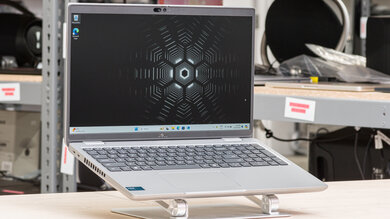
The Dell Precision 3591 is a 15.6-inch mobile workstation aimed at engineers, developers, and power users who need ISV-certified hardware in a portable form factor. Community sentiment is genuinely mixed — universities and IT departments deploy it confidently for CAD and engineering software, but individual buyers run into real reliability headaches including random crashes, BSOD events, and dock-related instability. It handles SolidWorks, Blender, and demanding dev environments (Docker, SQL Server, Visual Studio) without breaking a sweat when it's working correctly, but a non-trivial number of users have had to go through Dell support or hardware replacements. At its price point, it competes awkwardly against gaming laptops that offer similar raw performance for less money, and it sits below the Precision 5690 in Dell's own lineup which gets notably better thermals and GPU headroom.
Pros

  • Handles CAD software like SolidWorks and Blender competently — universities issue it to engineering students specifically for this use case
  • Highly configurable: supports dual NVMe slots, up to 64GB DDR5 RAM, and Intel Core Ultra 9 185H (16 cores, up to 5.1 GHz) in top configs
  • NVIDIA RTX 2000 Ada (8GB) is a proper workstation GPU with full driver support for professional apps — unlike the crippled 60W 4070 found in the XPS 16
  • Dell's ProSupport warranty is genuinely useful: users report successful motherboard replacements and hardware swaps under the 5-year plan
  • Fits standard backpacks despite being a 15.6" workstation; charging is fast even when battery drains quickly
  • BIOS is flexible for IT deployments — AHCI mode, dual-boot setups, and enterprise imaging are all supported once you enable Advanced Setup

Cons

  • Random crashes and BSOD events are a recurring complaint, often tied to dock usage (WD22TB4) and Nvidia driver conflicts — multiple users report needing motherboard replacements
  • Battery life is weak under load; users report only a few hours of real work when running demanding applications without a charger
  • At ~$3,000 AUD / $3,000 USD all-in, gaming laptops with comparable CPU/GPU performance undercut it significantly — the Precision premium is harder to justify for non-ISV workflows
  • The Precision 5690 beats it on thermals and GPU performance for ~$500 more, making the 3591 feel like a compromise between value and capability
  • No protective shell/case ecosystem — users can't find third-party hard cases for it, and the 3590 case doesn't fit
  • Single-channel RAM in base configs (one DDR5 stick) hurts iGPU performance and memory bandwidth until a matching stick is added

Universities Trust It, But Individual Owners Roll the Dice

IT departments and schools confidently deploy the 3591 for engineering cohorts, but solo buyers are more likely to hit the crash lottery — especially when docking. The support experience can resolve issues, but expect multiple calls and potentially shipping the unit back.

Is the Workstation Badge Worth the Price Over a Gaming Laptop?

Reddit is divided. For pure performance per dollar, gaming laptops win. The 3591's value is in ISV certification, ProSupport warranty, and enterprise BIOS features — if you don't need those, the premium is hard to defend.

The Dock Instability Problem Nobody Talks About in Reviews

Multiple users across threads report that crashes and black screens happen specifically when connected to a Thunderbolt dock with external monitors. Disabling the Nvidia display adapter or reinstalling video drivers (same version, over itself) has resolved it for some — a quirk that never shows up in official specs.

User Reviews (41 of 67 analyzed)

4
0
_jewishr/r/SolidWorks9d agopositive

If you're set on a dell workstation or any workstation for that matter, there's a pretty solid refurbished market for them.

View Original Comment
3
0
experienced3Dguyr/r/SolidWorks9d agopositive

Take a look at the factory refurbished Dell Precision workstations on the Delloutlet.com site. You can get some screaming deals there AND they come with full factory 3 year warranties. I swear by them and have only bought these machines as my CAD machines for nearly 20 years. My most recent computer from them is a Precision 7780 with 128GB RAM, 4TB SSD, and a 16GB NVIDIA RTX A5500 GPU. Retail price was $10K and I got it for much less.

View Original Comment
3
0
TrabantDaver/r/Dell9d agopositive

I have a 7740; lovely bit of kit! Bought used, I've replaced the battery, it now has 3x nvme drives, upgraded to 64gb RAM. The build quality is excellent; mine looks like new at five years old, and the ease of upgrading is a real plus. If you are looking for a great laptop/desktop replacement, the 7740 is a brilliant choice.

View Original Comment
3
0
tomscharbachr/r/Dell9d agopositive

Take a look at Dell Precision Mobile Workstations, which are a fancy way of saying 'Precision laptop'. Precision Mobile Workstations are as close as you are going to get in a Dell business laptop if you want desktop workstation-level performance.

View Original Comment
2
0
lucellentr/r/Dell9d agonegative

If money is no issue, the 5690 is the way to go. Way better thermals and GPU than the rest, and is virtually similar to the XPS. I have the 5680 and it's an incredibly solid machine. XPS 16 is getting backlash for the capacitive keys and the botched GPU performance.

View Original Comment
2
0
lucellent_2r/r/Dell9d agonegative

4070 PC? It's great. 4070 laptop 115W? It's great. XPS 16 4070? That shit is 60W. You can also get second hand 5680, I've seen some solid listings on eBay (I got mine for $3K on BH and it has the i9, 64GB RAM and 3500 Ada, very solid).

View Original Comment
2
0
TomVar/r/Dell9d agonegative

I got a Dell precision 3591 and a WD22TB4 dock month ago. It came with a 1 TB SSD and I added a 4 TB Samsung 990 pro secondary drive. I wanted it to last so I bought the 5 year I break it you fix it warranty. All in the computer the warranty and the dock set me back about $3000. This ain't a cheap laptop. The computer crashes with a combination of BSOD and blue screen saying do you want me to go to bios and troubleshoot.

View Original Comment
2
0
TomVa_solvedr/r/Dell9d agonegative

Solved . . . maybe. After 10 calls my tech support roulette person named Kimberly C had me download Dell_Log_Collector and run it. After reviewing the data she decided that it was related to the processor. So I am going to restore the system to virgin state and ship it back for a new mother board and, hopefully, some extensive testing before shipping it back to me.

View Original Comment
2
0
TomVa_heatr/r/Dell9d agonegative

I use HWiNFO64.exe which is also a free download to figure out that kind of thing. My previous laptop started going overtemp and giving me BSOD before the SSD got flaky. I ended up refreshing the heat sink compound to make it better. The core temperatures dropped 10 degrees C.

View Original Comment
2
0
12100Fr/r/Dell9d agopositive

Look for a match — the Precision 3591 is something that should match or exceed your desktop specs mostly. The CPU will be a little slower, but much more portable.

View Original Comment
2
0
12100F_5690r/r/Dell9d agonegative

The Precision 5690 will have much faster graphics, and probably be a sexier machine generally. It might suffer a little bit in other areas but the GPU difference is significant.

View Original Comment
2
0
lucellent_p16vr/r/Dell9d agonegative

If looks isn't important you can skip the 5690. From what I know the ThinkPads are the most solid ones, so you can't go wrong with it.

View Original Comment
2
0
sneesnoosnaker/r/Dell9d agonegative

I had to go to the top left and turn on 'Advanced Setup'. They hid the AHCI option under Advanced Setup. This completely forecloses any option to use Clonezilla if you don't find it.

View Original Comment
2
0
Internal_Ad_255r/r/Dell9d agopositive

I got a used 17" Dell 7750 Precision 10th Gen i7 off eBay for $400 shipped with 16GB and a 512GB Nvme. I got some used Crucial RAM 64GB off eBay for $100 shipped and a 2TB NVME for $103 from Amazon. Thing is a beast.

View Original Comment
2
0
Lonely_Explorer5654r/r/Dell9d agopositive

I've got a stock 7740 on Ebay with maxed out almost everything. Xeon CPU E2286, 128GB RAM, 4 slots NVME. It is bulky, and runs stable but really hot if you intensively game, but aside from that you can run almost anything being thrown at it. Beat any consumer-grade gaming laptops.

View Original Comment
2
0
TrabantDave_gpur/r/Dell9d agopositive

Yes, you certainly can change the GPU! The Nvidia GPUs can be changed — mine had the RTX3000 originally and it's getting the top of the range RTX5000. You need to use the correct heatsink. The RTX4000 and 5000 need the NV-256 heatsink part number OM2F8R. The heatsinks and cable are cheap on Aliexpress.

View Original Comment
2
0
socal_nerdtasticr/r/SolidWorks9d agonegative

Do you plan to work with SolidWorks as an electrical engineering student? I doubt you will. Probably you should look at the requirements for whatever software EEs use. I'm guessing OrCAD?

View Original Comment
1
0
Brilliant_Good_9882r/r/Dell9d agopositive

Its been good for me this semester! It loses battery pretty quickly but also charges fast. I don't know much of anything about computers but I would say it runs as well as other peoples laptops in my classes. Lots of my class uses them and they have worked well and not been slow when running SolidWorks or Blender (which is about the extent of modeling software ive done so far). Also they are kind of large but it still fits in my backpack fine. There are better out there im sure but it is certainly capable.

View Original Comment
1
0
TomVa_updater/r/Dell9d agopositive

I had a lot of trouble with my home 3591 that kept crashing. I downloaded current video driver and one of the steps when it was installing it was something like: 'The current driver is the same as this version. Do you want to delete the current copy install the new software?' I chose to install over the old one and have not had a problem in 6 months of daily use.

View Original Comment
1
0
paventosor/r/Dell9d agonegative

I have a 3591 which is running just fine, but my 3570 did have a phase in the beginning where it'd have the blue screen of death frequently. After an update on the BIOS it got better. However, I did remember reading reviews on the Dell website, maybe for the Precision 3581 model that a business bought several of the laptops to go with the dock, and 3 of them went kaput.

View Original Comment
1
0
Extension-Guide2758r/r/Dell9d agonegative

I had the same issue with my precision 7750 about 2 weeks ago. Fans would go wild, superheat, and then crash. I couldn't get it to stay on for more than 90 seconds. Spent 2 hours otp with tech support and turns out my heat sync is busted, and under the same 5 year warranty they sent me a box to ship it to them for part replacement.

View Original Comment
1
0
Illustrious-Set-8000r/r/Dell9d agonegative

My org has had two i9 models experience this same issue in the last month when connected to a dock. We first noticed this issue 6 months ago, and at the time we found the only way to resolve was to disable the Nvidia display adapter in Device Manager (our models have both Intel and Nvidia GPUs). Support had us put OEM windows on to prove a point that our image caused it, but surprise surprise the issue persisted.

View Original Comment
1
0
BendPsychological306r/r/Dell9d agonegative

We are not experiencing any Blue Screens of Death (BSOD). The PC reboots unexpectedly without showing any error message. We have installed all Windows updates as well as Dell updates, and we have downloaded and installed the latest graphics card drivers directly from the NVIDIA website.

View Original Comment
1
0
darshana2000r/r/Dell9d agopositive

I am doing software development, I run docker, many browsers, visual studio IDE, VScode, SQL server or postgres locally. I hope this machine would be able to handle all of them. I hope it does not slow down when its not plugged to a charger. How is the heat management? Does it get a lot of heat if you run heavy duty processors?

View Original Comment
1
0
TomVa_batteryr/r/Dell9d agopositive

It seems to be OK. One day last week the charger cord was not plugged in correctly and it lasted 8 hours plugged into a dock with external monitors. I have not really benchmarked it but I expect that I would only get a few hours out of the battery if I was running applications that seriously put a load on the processors.

View Original Comment
1
0
No_Excitement_1540r/r/Dell9d agonegative

Well, it will work with 24GB RAM if you add an 8GB stick. What you won't get is dual channel interleave — for that, the same amount and speed of memory would need to be installed in each channel. And, if you are using the intel iGPU, be aware that mismatched RAM has a heavy performance impact.

View Original Comment
1
0
Olde94r/r/SolidWorks9d agonegative

I will always say gaming computer for uni. You do not need a quadro gpu at uni.

View Original Comment
1
0
EnvironmentalAsk3531r/r/SolidWorks9d agonegative

Precision 3590 is all plastic. I have it and I regret.

View Original Comment
1
0
vanthevanishingvanr/r/Dell9d agonegative

I ended up just getting an inspiron 14 instead, it's enough for school and a lot cheaper. 1 TB SSD, and I think 32GB RAM. All the most recent software, and intel graphics card.

View Original Comment
1
0
Realistic_Iron_7676r/r/Dell9d agopositive

I also have a dell laptop (xps 15 9530) and also have the best support plan. I had some problem with my graphics card and after 2 calls they sent someone to replace the whole mainboard. After that everything worked fine.

View Original Comment
1
0
TomVa_mobor/r/Dell9d agopositive

They would have replaced the mother board on my dining room table but I chose to send it back where they could also do some more diagnostics before returning it.

View Original Comment
1
0
Able-Ambassador-921r/r/Dell9d agonegative

Update the BIOS. They sent out an email about 10 days ago about certain laptops going into a reboot loop.

View Original Comment
1
0
node0147r/r/Dell9d agopositive

7560, i've no complaints except the inability to configure for s3 sleep.

View Original Comment
1
0
gnexuser2424r/r/Dell9d agopositive

My precision t3600 desktop workstation is awesome for music production and so is my precision 3550 laptop! The 3550 was easy to upgrade the screen too.

View Original Comment
1
0
Jelno029r/r/Dell9d agopositive

I got it used off Ebay for what I would consider a good price, considering it came in great physical condition with the touchscreen (which has impeccable color & brightness specs, despite being glossy), a Xeon processor and RTX4000. It is insanely powerful, and that's without having done any changes yet to improve thermals and power efficiency, so there's still significant room to improve.

View Original Comment
1
0
Head-Owl9544r/r/Dell9d agopositive

As a Dell Representative the 3591 is a strong system for engineering! Also always call into Dell and talk to a rep. They can get you a better price and make sure you have the right specs.

View Original Comment
1
0
wolfgheistr/r/Dell9d agonegative

I had the 5520 and currently have the 5550 and time to upgrade. On paper, the XPS 16 and Precision 5590 look virtually the same other than the 4070 vs the 5000 ada. $4200 vs $7100. $2900 is a big difference, so even though I have been getting the Precision, not sure it is really worth $2900 more.

View Original Comment
1
0
CanineFuchsr/r/Dell9d agopositive

I run a Xeon 7730 and an i7 m3800. The m3800 looks slender while the 7730 is a chunky beast. Both have had their WiFi cards, RAM and SSDs upgraded. They are tough workhorses.

View Original Comment
1
0
MotoChoochr/r/Dell9d agonegative

Is this solution still good? I have 2 that randomly lock up with a black screen no rhyme or reason. No failures through diagnostics.

View Original Comment
1
0
hitmeifyoudarer/r/Dell9d agonegative

Maybe a fan not working? Use the free app, Core Temp 1.18 to see if the CPU is overheating. Also could be that they didn't put enough heat sink compound on the CPU during assembly.

View Original Comment
0
0
BalladorTheBrightr/r/SolidWorks9d agonegative

It will be much cheaper to just buy a gaming laptop for the same performance. Only Solidworks Visualize Boost is not going to work. Not exactly a huge loss when you have a price difference of literally thousands of dollars.

View Original Comment