Dell Dell Precision 5690 (2024)
Laptops

Dell

Dell Precision 5690: What Real Users Say About Reliability

Mar 2026

Last Analyzed

6/10

Overall Rating

16

Positive Reviews

25

Negative Reviews

Summary

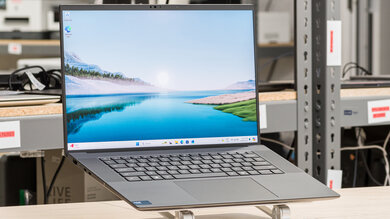
The Dell Precision 5690 is a premium 16-inch mobile workstation aimed at power users who need ISV certification, dedicated GPU options, and the familiar XPS-lineage build quality in a professional package. Reddit sentiment is genuinely mixed: owners who upgrade from older Precisions (5540, 5560, 5750) are impressed by the performance jump, strong thermals, and the all-Thunderbolt 4 port lineup, while a vocal group of IT managers and enterprise buyers report frustrating hardware reliability issues including motherboard failures, camera dropouts, and BSOD crashes. The 4K OLED display is widely praised — users who tried the FHD+ option often regretted it and switched — but the 60Hz refresh rate cap and the HDMI port being tied to the iGPU rather than the dGPU caught several users off guard. Battery life is workable for a workstation of this class, holding charge on 65W over USB-C during light use, though heavy workloads push consumption past what the dock can keep up with. It is a capable machine for CAD, design, and professional workloads, but the reliability record of the broader 5000-series Precision line gives some enterprise buyers pause.
Pros

  • Core Ultra 185H delivers a massive CPU performance uplift — one user coming from a Precision 7550 described it as a '100% speed increase' that made his old machine feel unusable by comparison
  • Thermals are impressively well-controlled for the form factor; multiple owners report no throttling even under sustained loads with the i9/Core Ultra 9, with the vapor chamber option on higher-end configs doing real work
  • All three USB-C ports are Thunderbolt 4 on the 5690 (vs only two on the 5680), and the machine can charge via 65W USB-C — confirmed to hold battery level on a plane and even accept input from a portable battery pack
  • The 4K OLED touch display is consistently called out as a highlight; users who ordered the FHD+ to save money and returned it for the OLED say it was the right call, especially for content-heavy or design work
  • Build quality and keyboard retain the XPS pedigree: physical function keys (unlike the new XPS 16), a larger haptic trackpad, and solid chassis feel — key differentiators for users coming from XPS or older Precision laptops
  • Two NVMe slots supporting up to 8TB each make storage expansion straightforward, a meaningful advantage over many thin-and-light competitors with soldered or single-slot configurations

Cons

  • RAM is fully soldered on the 5000-series — users planning to upgrade later are out of luck, and the 2x16GB description in Dell's configurator is misleading since it cannot be expanded post-purchase
  • HDMI port is connected to the Intel iGPU, not the dGPU; at least one user with a 57" ultra-wide monitor could not hit full resolution over HDMI, and Thunderbolt display output behavior has confused multiple buyers
  • Hardware reliability complaints are persistent across the Precision 5000 line — one IT team reported ~10 motherboard replacements across 26 units within roughly two years; individual user reports include camera failures, repeated BSOD crashes, and SSD replacements
  • SolidWorks users face a specific setup hurdle: SW 2024 crashes unless you install the certified NVIDIA driver (not the latest consumer driver) and configure both NVIDIA Control Panel and Windows Graphics settings to High Performance mode
  • Display refresh rate is locked at 60Hz across both the FHD+ and OLED options — a noticeable limitation for anyone coming from a high-refresh gaming laptop or modern consumer ultrabook
  • At maximum configuration the price climbs past $6,500, and even mid-range configs sit above $3,000 — at that price point, alternatives like the Lenovo ThinkPad P16 or a MacBook Pro M3 Pro are competitive, especially on battery life

The OLED Is Non-Negotiable, According to Everyone Who Tried Both

Users who ordered the FHD+ display to skip the touch screen almost universally returned their units and reordered with the 4K OLED. The resolution difference is described as jarring enough that one owner said going back to FHD+ 'was a mistake' after years on a 4K XPS.

Enterprise Buyers Are Watching the Reliability Numbers Closely

One IT team reported roughly 10 motherboard replacements across 26 units over two years. Individual posts add camera failures, BSOD clusters, and SSD swaps to the picture. The 7000-series is built differently, but the 5690 sits in the thinner XPS-derived chassis where sustained thermal loads are harder to manage.

CAD Users: Install the Certified Driver Before You Touch SolidWorks

Multiple Precision 5690 owners running SolidWorks 2024 with the RTX 1000 Ada hit immediate crashes after installing the latest NVIDIA consumer driver. The fix — certified SW driver plus High Performance mode in both NVIDIA Control Panel and Windows Graphics settings — isn't documented anywhere obvious, but it's the first thing to do on a fresh machine.

User Reviews (41 of 101 analyzed)

10
0
analoghumanoidr/Workspaces10d agopositive

Connect everything to the dock and then you should have only one connection to the PC which simultaneously charges and connects you to your mouse and monitor. If you don't need the laptop monitor as a second display, I'd get a keyboard and put the laptop in a vertical stand for more desk space.

View Original Comment
3
0
Rsflvr/Dell10d agopositive

I ordered and received a 5680, then a few days later the 5690 was announced. I'm returning the 5680 and the 5690 is scheduled to arrive in a couple days. They look to be very similar except for the new core ultra processors, wifi 7, bluetooth 5.4, and all three ports are now Thunderbolt 4. The similar spec 5690 was about $350 more. I liked the 5680 for the limited time I had it. Powerful, solid build, and battery life was reasonable.

View Original Comment
3
0
Rsflv_batteryr/Dell10d agopositive

I've received. I haven't done battery testing, but the battery life seems good (much better than my 3 year old Precision 5750). It should get a several hours of run time. I was concerned that with the 165W power supply I would need higher output to charge. However, I used it with a 65W charger on a plane and it maintains the battery level. I also briefly connected an external battery pack and it was able to charge.

View Original Comment
3
0
Adventurous_Fan_5901r/Dell10d agonegative

I bought one in late 2023, motherboard blew out within 40 days and I asked for a new model to which I was told I miss the cutout by 10 days. Dell used to be good, it sucks now.

View Original Comment
3
0
chrs_r/Dell10d agonegative

I have a Precision 7670 from work. The motherboard and battery have already been replaced and I'm still having issues. The battery life is awful — about an hour. The industry is screaming for quality machines.

View Original Comment
3
0
KapePaMore009r/Dell10d agonegative

The 3000 and 5000 series are thin and light designs that are not really meant for prolonged high GPU or CPU usage. I bet a lot of the failures that are being seen are thermal related. Even the 7000 series is too thin now.

View Original Comment
2
0
lucellentr/Dell10d agopositive

Looks like just a spec bump from the 5680, which is already known to be a very good laptop. I myself own it.

View Original Comment
2
0
lucellent_thermalsr/Dell10d agopositive

If anything, my i9 doesn't throttle at all, doesn't even get that hot. Even without the vapor chamber (only on 5000 Ada), the thermals are impressive.

View Original Comment
2
0
ntheer/Dell10d agopositive

I did, it's objectively a great machine. It will feel very comfortable and familiar to you if you're used to the XPS pre 2024 changes (so, up to the XPS 15 2023). The build, keyboard, and screen are as great as ever (the trackpad bigger, the keys slightly bigger than on the XPS 2019).

View Original Comment
2
0
experienced3Dguyr/SolidWorks10d agopositive

What you've shared looks like a great machine. Take a look for it in the factory refurbished Dell Precision workstations section on the Delloutlet.com site. You can get some screaming deals there AND they come with full factory 3 year warranties. I swear by them and have only bought these machines as my CAD machines for nearly 20 years.

View Original Comment
2
0
Blue_Saddler/Dell10d agonegative

In 20 years working IT this is honestly the worst machine I have ever worked on. On paper, this should be a speed demon but the hardware doesn't seem to play nice together. User has now asked if we can return this to Dell (we can't) and I am getting him the standard Latitude.

View Original Comment
2
0
tgaspard310r/Dell10d agonegative

I have the Precision 7680 and I can't say this strongly enough... I HATE this laptop. On paper it looks like a beast but in real life, it is so disappointing. It runs hotter than my previous Dell Latitude. I have also had issues with the monitor blacking out and requiring a series of power supply changes.

View Original Comment
2
0
Junior-Candidate2405r/Dell10d agonegative

I had precision 5560, 5570, 5760, 5480 — it's basically XPS with different video card, so if you like XPS like me it will be nice. Newer model 5680 has soldered ram and one M.2 slot and is overpriced which is not good so I don't want to upgrade.

View Original Comment
2
0
TieOGr/Dell10d agonegative

The touch screen really has no value for me and they're both locked at 60hz so I am debating whether to go with the much lower res FHD or the OLED. My OLED concerns are from a lot of the varying feedback I have read about burn-in and battery — I intend to replace an old desktop tower with the 5690, so it will likely be used as a second monitor with a dock and external display as the main driver for work (8-10 hours daily).

View Original Comment
2
0
needed1usernam3r/Dell10d agonegative

I need to upgrade my work computer as well, but need the 5690 to get SolidWorks certified first.

View Original Comment
1
0
nthee_displayr/Dell10d agopositive

At first, I opted for the regular FHD display, but could not bear looking at that pixelated screen for too long... I had gotten used to 4K since my old XPS 15, and honestly, going back is impossible! It was a mistake. Anyway, I returned the machine, ordered the same one with the 4K OLED, and all is well. My advice: Go 4K, your eyes will say thank you.

View Original Comment
1
0
old-thrashbargr/Dell10d agopositive

I got the Precision 5690 with almost maxxed out specs and Ubuntu. Really liking it so far. Very relieved they didn't do the horrible touchbar at top of keyboard like the new XPS machines. Crazy Dell can't see what a flop that was for Apple who reverted. It is heavy though — support told me this one would weigh between 2.03kg and 2.17kg depending on the specs.

View Original Comment
1
0
H4UnT3R_CZr/Dell10d agopositive

I switched from 7550 to 5690 with 185H, 64GB RAM, Ada 2000. It's good, light high performance laptop. It has great cooling, tried to play Stalker 2 (4xxx series has Frame Gen), it's on 2K great. Only problem I got when enhancing videos with max performance mode in Dell Power Management, it's slowly discharging on WD19S dock with 240W charger in it.

View Original Comment
1
0
H4UnT3R_CZ_upgrader/Dell10d agopositive

Yep, it's really big step — just CPU has +100% speed up. I had to do some things on 7550 and I was thinking like WTF how I could work on slow machine like that. You don't know it until you know faster one.

View Original Comment
1
0
mello_yellor/Dell10d agopositive

Just got one, coming from a Precision 5530 it seems less soft and smudgy than that fake carbon fiber rubberized coating. I mostly just use mine on the dock though when I do take it off I usually wipe it down at least once.

View Original Comment
1
0
Rsflv_comparisonr/Dell10d agopositive

I like it a lot. I was also deciding between the two (5690 vs XPS 16), but went with the 5690 for a few reasons: real function keys, visible track pad, more customization, higher spec available, and supposedly better Precision over XPS quality.

View Original Comment
1
0
HyperBlowfishr/GamingLaptops10d agopositive

The Dell has the RTX 2000 ADA, not the A2000. They are vastly different GPUs, and while the RTX 2000 ADA is most definitely built for productivity over gaming, you will absolutely not find a laptop for less than $1,000 new that would even come close to the gaming performance of the 5690 with even the RTX 1000 ADA. The Dell has two NVME slots that support up to 8TB drives in each.

View Original Comment
1
0
saturnotakur/GamingLaptops10d agopositive

The Mac port of BG3 is not as well optimized nor is it updated with patches as quickly as the Windows version. So the RTX card would be the better option for overall performance in that specific title. The Dell might be available with a high-resolution OLED touchscreen — that would absolutely put it over the top.

View Original Comment
1
0
Reddit-Banned02r/Dell10d agonegative

just got a precision 5690 and its a piece of shit. the track pad is insanely sensitive, i have Bluetooth and audio issues, the fan goes into jet engine mode often and ive had the mobo replaced once also.

View Original Comment
1
0
Wewillmeetagain1107_returnr/Dell10d agonegative

I did return the laptop and got Macbook Pro 16 M4. Dell was glitching every 15 min from random freezes to blue screen. However, I did change something in the BIOS menu for display output — in BIOS you can search 'Display' or 'Monitor' and it gives you the option to enable it.

View Original Comment
1
0
bcparkisonr/Dell10d agonegative

I'm starting to suspect the HDMI 2.1 port doesn't support full 48Gbps bandwidth. I've got one of these running Ubuntu for work, connected to a Samsung Odyssey G9 57 inch monitor, and it's maxing out at something like 5120x1440 and 60hz. I didn't see before that the HDMI port was tied to the iGPU — I just saw that it had HDMI 2.1, and figured I'd be good to go.

View Original Comment
1
0
Hot-String862r/Dell10d agonegative

I am facing something very similar with my Dell Precision 7680 (RTX 3500 Ada). The laptop is only 1.5 years old, and it has already failed four times. Dell has replaced the motherboard three times, plus memory, heatsink, battery, and cables. Even with Pro Plus support, which is supposed to be next-business-day, every repair has taken 5–30 days.

View Original Comment
1
0
Pasalacqua87_updater/Dell10d agonegative

Since making this post we've probably replaced about 5-10 more. My coworker has a pile of them on his desk waiting to go back to Dell. It's pathetic. Thankfully, we're moving on from the Precisions (only took 2 years). Gonna see how the Lenovo P16's fair.

View Original Comment
1
0
lucellent_negativer/Dell10d agonegative

I got a 5680 and it's been a shitshow. Powerful specs - yes; useless in every other aspect. Looking to sell it asap and get a Macbook.

View Original Comment
1
0
KaterinaStudiosr/Dell10d agonegative

Within the first month this computer crashed and went into an endless booting system over and over with no end. Screen didn't work. Couldn't do anything to it. Sent it back and within a week, got the same issue, and sent it back again. The speakers of the computer cut out within the second month, and it's been nothing but audio problems since.

View Original Comment
1
0
SnooCrickets3606r/SolidWorks10d agonegative

Keep in mind the RAM is soldered on the Precision 5000 series so you can't upgrade later despite the misleading 2x16GB description. If you prefer this form factor I would drop the GPU down a little and up the RAM — the RTX 5000 is limited in its power draw in this model anyway.

View Original Comment
1
0
NewCicada1542r/SolidWorks10d agonegative

SW 2024 + RTX 1000 Ada needs the certified driver not NVIDIA's latest. Grab it from the SolidWorks Hardware Certification page then in NVIDIA Control Panel + Windows Graphics settings set SW to High Performance. In SW disable enhanced Graphics Performance — fixes most new Dell Precision crash issues.

View Original Comment
1
0
Scared_Squirrel_1359r/Dell10d agonegative

I also have the Precision 5690 and the internal webcam suddenly stopped working. I'm sending it out to Dell as I have it covered under my warranty, but am curious if they fixed it for you.

View Original Comment
1
0
lucellent_batteryr/Dell10d agonegative

I'm only speaking from experience, but my 5680 can't really do 8-9 hours with web browsing, and I have the 4K display. When I had the 1080p one sure, I think 8-9 hours were doable but with very light use. If you care about battery life, Macbooks are still the best option (or maybe some Ryzen laptops).

View Original Comment
1
0
nthee_concernr/Dell10d agonegative

The only thing I'm a bit concerned about is potential thermal throttling with the Core Ultra 9... I hope some thorough review will talk about that.

View Original Comment
1
0
softwaremaniacr/Dell10d agonegative

Yes, we're seeing major issues with SK Hynix SSDs that come with the Dells. After a lot of back and forth with Dell, we discovered it was actually CPU related and they released a driver to fix it + a BIOS patch to disable C-States.

View Original Comment
1
0
MoonrakerLaserr/Dell10d agonegative

Can anyone with the 5690 confirm if the HDMI 2.1 port supports full 48Gbps bandwidth? I'm concerned because Dell indicates the HDMI port is connected to the Intel iGPU.

View Original Comment
1
0
Sea_Construction9612_batteryr/Dell10d agopositive

From the reviews, I'm seeing that the laptop can survive up to 9 hours or so. Hopefully with undervolting, I'm able to get close to 12 hours? Plus, all the snapdragon laptops do have issues with their drivers and stuff. So, probably need to wait for another year for all of it to be stable. I guess I am getting the Precision after all then.

View Original Comment
1
0
thetaylorschmidtr/Dell10d agonegative

Dell Precision 5690 vs XPS 16 (2024) — really tough choice. I checked out the XPS 16 in person and the larger screen is nice, but the mousepad is weird. Still a $800 difference with the Precision being higher in the configuration I'm looking at.

View Original Comment
1
0
DrawerReal241r/Dell10d agonegative

I am looking to replace my XPS 9500 and I absolutely hate the soft/rubber/carbon material that is impossible to keep clean because of the softness. Is the palmrest of the 5690 harder material?

View Original Comment
1
0
Wewillmeetagain1107r/Dell10d agonegative

I have the same issue with mine (just acquired) Dell Precision 5690. I have only one monitor Dell Ultrasharp 27 U2723QE with USB-C Hub. And... nothing is working from Thunderbolt ports, only charging. Only video signal works from the right USB-C port (USB-C with DisplayPort Alt mode).

View Original Comment