HP HP ZBook Power G11 A (2024)
Laptops

HP

HP ZBook Power G11 A: What Real Users Think

Mar 2026

Last Analyzed

6/10

Overall Rating

13

Positive Reviews

15

Negative Reviews

Summary

The HP ZBook Power G11 A is a mid-tier mobile workstation aimed at professionals who need ISV-certified performance in a more portable package than the heavier Fury lineup. Reddit sentiment is mixed-to-positive: users appreciate the value proposition at its price point, the AMD CPU options, and the notable inclusion of Thunderbolt 4 on an AMD platform, which stands out as a rare feature. However, the machine draws frequent criticism for its weak cooling under sustained load, poor battery life, and its positioning as an entry-level workstation that can be outclassed by upgrading to a ZBook Studio for a modest premium. It sits in a competitive space against the Dell Precision 5690 and ThinkPad P16v, where specs-per-dollar often favor the HP but build quality and cooling concerns give rivals an edge.
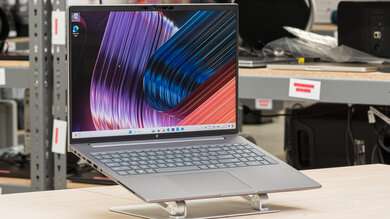
Pros

  • Thunderbolt 4 on an AMD platform — one of the first AMD laptops with genuine TB4, enabling full-speed eGPU, dock, and storage compatibility that was previously Intel-exclusive
  • Strong specs-per-dollar vs. competitors: at similar price points to the Dell Precision 5690, the ZBook Power G11 A typically offers more RAM, more SSD storage, and upgradeable SO-DIMMs
  • AMD Zen 4 CPU performance holds up well in professional CAD/AEC workloads like ArchiCAD and SolidWorks for moderate complexity projects
  • 5MP webcam gives it an edge over the ZBook Studio G11, which is still stuck with a 720p camera despite being a higher-tier product
  • Numpad included — a practical differentiator for architects and engineers who work with numerical input regularly
  • ISV certifications for major professional apps (SolidWorks, ArchiCAD) make it enterprise-deployable without driver certification headaches

Cons

  • Thermal performance falls apart under sustained load — the Power series cooling system can't maintain clock speeds, with users reporting significant throttling and a large, heavy power brick to compensate
  • Battery life is consistently criticized as 'very bad' — not a laptop you can use unplugged for extended sessions, which undermines its portability pitch vs. the older Alienware-style desktop replacements
  • Entry-level positioning in HP's own lineup hurts it: the ZBook Studio, available at a modest premium, offers a vapor chamber cooling system, a 500-nit DreamColor display vs. the Power's 400-nit panel, and dramatically better thermals
  • IT deployment friction: WinPE touchpad/cursor issues specific to this model require manual driver hunting (Intel Serial IO GPIO Host Controller fix), adding time to enterprise imaging workflows
  • MicroSD slot in some configurations instead of full-size SD — a step down for photographers or videographers who might consider this for field work
  • Faces stiff competition from used/refurbished ZBook Fury G10 units at similar price points, which offer superior build quality and cooling at the same budget

TB4 on AMD? The ZBook Power G11 A Delivers What Enterprise Users Didn't Expect

Thunderbolt 4 has historically been an Intel privilege, making the ZBook Power G11 A a genuine anomaly. Reddit's hardware community flagged it as potentially the first AMD laptop with real TB4, opening doors for eGPU setups and high-speed dock configurations that AMD mobile users previously couldn't access.

Good Specs on Paper, but the Studio Is Right There

At comparable price points, Reddit users consistently point out that HP's own ZBook Studio leapfrogs the Power with vapor chamber cooling, a DreamColor display, and better sustained performance. The Power G11 A is a solid deal — unless you shop one tier up within the same brand.

IT Admins Beware: WinPE Imaging Has a Known Driver Quirk

Enterprise deployments hit a specific snag with this model — the touchpad drops out in WinPE during OS imaging until the Intel Serial IO GPIO Host Controller driver is manually added to the boot image. It's a solvable problem, but one that caught multiple sysadmins off guard during rollout.

User Reviews (41 of 71 analyzed)

14
0
jdrchr/hardware9d agopositive

Is it me or is this the 1st AMD laptop (or PC, for that matter) with actual honest to God onboard TB4?

View Original Comment
11
0
frank3000r/SolidWorks9d agoneutral

Single core processor speed, and lots of RAM, is all that matters for SW. The top tier consumer class desktop Intel chips are usually on top.

View Original Comment
7
0
jdrch3r/hardware9d agopositive

It's for enterprise, not creation. Also USB adapters exist.

View Original Comment
5
0
rezarNer/hardware9d agopositive

There have been AMD motherboards with TB4 for some years now, I have an 'old' AM4 board with TB4 (ASUS ProArt B550-CREATOR)

View Original Comment
5
0
ctskifreakr/hardware9d agoneutral

ThinkPad P16V Gen 2's are the most direct comparison I can think of. The P1's can be specced a little higher.

View Original Comment
4
0
spamyakr/hardware9d agoneutral

My ThinkPad Z13 has it. Or maybe it's USB4/TB3? Whatever, it's 40Gb/s.

View Original Comment
4
0
dollaressr/hardware9d agoneutral

What's the keyboard like? I love Lenovo keyboards, both the old non-island style from my old T520 to the contemporary one on the Legion 5.

View Original Comment
3
0
jdrch2r/hardware9d agopositive

TB is a killer feature.

View Original Comment
3
0
vmostofi91r/SolidWorks9d agoneutral

I suggest in addition to running these benchmarks, ask one of your designers for a real large assembly model and run a test opening it. They are sufficiently close yeah, but in longer opening times the difference might become more apparent.

View Original Comment
2
0
Few_Environment_5654r/SuggestALaptop9d agopositive

So both cost about 3500 euros, so therefore I would go with the one that has better specs which is the HP.

View Original Comment
2
0
Few_Environment_5654br/SuggestALaptop9d agopositive

With the HP you also get more SSD space and more ram.

View Original Comment
2
0
Few_Environment_5654cr/SuggestALaptop9d agopositive

Also with the HP you can swap the ram if it breaks. Personally I would go with the HP for the better specs.

View Original Comment
2
0
kissoliverr/SuggestALaptop9d agonegative

The power series is entry level. You can buy a maxed out Studio for this price which will perform hundred times better. The cooling in the power series can't hold up under high load.

View Original Comment
2
0
MarceTekr/SCCM9d agonegative

I can confirm that EnableCursorSuppression is set to 1 so that's likely it. Will try your suggestion and let you know.

View Original Comment
2
0
krustyy2r/SolidWorks9d agoneutral

That would be fine for SolidWorks as long as you don't have issues. If you end up needing to contact support the first thing they will ask is what graphics card you have and they won't help you troubleshoot with a non supported graphics card.

View Original Comment
1
0
xylltchr/hardware9d agopositive

For anyone checking in on this later; it does in fact have a full-size SD card slot.

View Original Comment
1
0
unspe11r/ArchiCAD9d agonegative

Yes. The battery is very very bad.

View Original Comment
1
0
madhoney123r/ArchiCAD9d agonegative

Is it normal that the power adapter is as big as an egg carton? It is incredibly over the top.

View Original Comment
1
0
unspe11br/ArchiCAD9d agonegative

Yes it got hot. The computer required a lot of W at full throttle. So a big power brick came with it.

View Original Comment
1
0
letMeAskYouThisr/laptops9d agoneutral

What I saw what seemed to be a monster laptop at a crazy price, even though I'd already ordered the other parts, I grabbed it knowing I'd return it.

View Original Comment
1
0
mo-powerbuilderr/SuggestALaptop9d agonegative

If I were you I would go for a second hand Fury G10. You then get a much better price/quality ratio. Moreover, the Fury models are of a much higher class than the power models. This is reflected in build quality and cooling quality.

View Original Comment
1
0
kissoliver2r/SuggestALaptop9d agonegative

Don't forget the build quality difference between a Power and a Studio, the Dreamcolor 500nit display in the Studio (4K in Power just means a 400nit regular display) and the vapor chamber cooling system.

View Original Comment
1
0
Ok_Cicada_3347r/SuggestALaptop9d agopositive

The Power model has 5MP camera. Plus, the HP ZBook Power numpad is a plus too for me... not a dealbreaker but definitely an advantage.

View Original Comment
1
0
MarceTek2r/SCCM9d agonegative

Changed it to 0 successfully but still no cursor, so I'm back to thinking it's a driver issue. I'll keep trying different drivers.

View Original Comment
1
0
MarceTek3r/SCCM9d agoneutral

Figured this out, once I added the 'Intel Serial IO GPIO Host Controller - INTC1083' driver the cursor came back. So it was a driver issue after all.

View Original Comment
1
0
gwblokr/SCCM9d agoneutral

Interesting, like you I've always resolved it with those IO drivers. I don't have your specific model to test. I'd recommend reaching out to HP support — I know they have a pretty impressive group of folks to help figure those things out.

View Original Comment
1
0
ExcellentFix2736r/SCCM9d agonegative

I've had this issue for years. Whenever HP decides to change the mouse driver it is fun for me to fix it in winpe. What I've found over the years is that you can't have too many mouse drivers in the boot wim, the wrong one gets used and then it doesn't work.

View Original Comment
1
0
Boule250r/Laptop9d agonegative

Quite honestly, for these uses, a Power 16 is of no interest. It's just going to add price, weight and heat (and therefore cooling noise) for nothing. This machine is much more geared towards CAD professionals who need ISV certifications.

View Original Comment
1
0
krustyyr/SolidWorks9d agopositive

This laptop performs on par with a laptop having a mobile RTX 4070 GPU while functioning as a single system on chip with no dedicated GPU. For the non-tech person, it's pretty badass for mid tier stuff.

View Original Comment
1
0
Speaker_Saltyr/SolidWorks9d agopositive

Thanks a ton for this info! I'm actually looking at a used zbook studio for myself to use for SolidWorks.

View Original Comment
1
0
tymophy76r/elitebook9d agoneutral

Zbook Firefly that I have is LITERALLY just the Elitebook of the same generation with a different BIOS on it.

View Original Comment
1
0
tymophy76br/elitebook9d agopositive

Based on what you wrote, I'd go with whichever has the 400-nit 100% NTSC screen. Performance of the systems will be all but identical, but the improvement of the screen is MASSIVE.

View Original Comment
1
0
blcxr/elitebook9d agonegative

I've always thought that the zBook is one category up (more premium) from EliteBook but now I am starting to feel they are on same level.

View Original Comment
1
0
MeelyMeer/hardware9d agoneutral

More like Dell Precision's than ThinkBooks, 'mobile workstation' seems to be the product category.

View Original Comment
1
0
B4kSAjr/zbook9d agoneutral

My local HP reseller says G11 power available at the end of May/beginning of June.

View Original Comment
1
0
Caparaccir/SolidWorks9d agopositive

If you are paying annual maintenance, then you have a valid license. You just need to upgrade your license server to the 2025 version. It will still host licenses to your old versions and you can test 2025.

View Original Comment
1
0
Inquisitor--Noxr/SCCM9d agonegative

I added this driver for a 460 g11 and still can't get mouse cursor.

View Original Comment
1
0
TomMeleer/SCCM9d agonegative

I can't send screenshots here but I had to apply a cursor fix for our PE as well, perhaps you have the same issue.

View Original Comment
1
0
Bevo_The_Longhornr/SuggestALaptop9d agoneutral

Have you looked at the HP Zbook Studio?

View Original Comment
-4
0
RedTuesdayMusicr/hardware9d agonegative

MicroSD rather than SD, no photographer/videographer will look at this thing twice.

View Original Comment
-10
0
trololololo2137r/hardware9d agonegative

slow chip, no battery life

View Original Comment