Lenovo Lenovo Chromebook C340 15 (2020)
Laptops

Lenovo

Lenovo Chromebook C340 15: What Real Users Actually Think

Mar 2026

Last Analyzed

6/10

Overall Rating

9

Positive Reviews

14

Negative Reviews

Summary

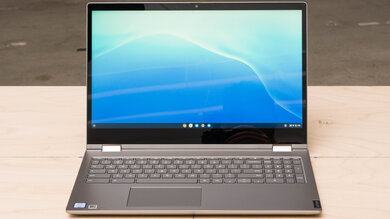
The Lenovo Chromebook C340 15 is a 15.6-inch 2-in-1 that earned a reputation as a solid budget option for casual users — web browsing, streaming, and light Android app use. Reddit sentiment is mostly positive among users who bought it at a steep discount, particularly those who understand and accept its ChromeOS limitations. The 1080p IPS touchscreen and flexible form factor (tent, tablet, laptop modes) are consistently praised, while the 4GB RAM ceiling and bottom-firing speakers are recurring frustrations. A significant WiFi bug in ChromeOS 80 soured many early owners' experiences, though it was later patched. It's a Chromebook through and through — great for low-demand tasks, frustrating if you push it.
Pros

  • 1080p IPS display is bright and sharp for the price — users watching movies and streaming content consistently praised the screen quality
  • Versatile 2-in-1 form factor handles tent, tablet, and laptop modes well; multiple users noted they primarily use it in tablet or tent mode
  • Strong value proposition at discounted prices — users who found it at $200–$250 at Costco or open-box considered it hard to beat for casual browsing and email
  • Fast boot times and smooth performance for its target use case: web browsing, YouTube, light Android apps, and even some Minecraft Education Edition
  • Multiple USB ports including USB-C make it more versatile than many budget Chromebooks in its class
  • Linux support works well for light tinkering — at least one user ran Linux apps alongside Play Store without issues

Cons

  • Only 4GB of RAM with no upgrade path — a hard ceiling that limits multitasking and makes the machine feel constrained with multiple tabs open
  • No active stylus support — the touchscreen is capacitive only, making it useless for drawing or precision input without third-party capacitive tips
  • Bottom-firing speakers are a real-world annoyance in laptop mode; sound gets muffled when the device rests on a flat surface
  • A ChromeOS 80 update triggered widespread WiFi drop issues across multiple C340 units — some users had to roll back to version 79 manually, which is a painful process for non-technical buyers
  • AUE (Auto Update Expiration) limits the device's long-term security support — users on older units are already approaching or past their update window
  • Mixed real-world battery life — the 15-inch x86 version gets noticeably shorter battery than ARM-based alternatives like the C330, with some users reporting under 6 hours

The WiFi Bug That Almost Killed It

Shortly after launch, a ChromeOS 80 update broke WiFi on C340 units across multiple networks. Users had to manually roll back to version 79 using recovery USB — not exactly plug-and-play for a casual Chromebook buyer. The bug was eventually patched, but it left a mark on early reviews.

Great Deal If You Catch It at the Right Price

At $299 or less, Reddit largely considers the C340 15 a reasonable pick for non-power users. At full retail, it's harder to justify — especially with only 4GB RAM and no active pen support. The value case depends almost entirely on catching a sale.

Artists, Look Elsewhere — No Active Stylus Here

Despite being a 2-in-1 with a touchscreen, the C340 15 doesn't support any active pens or pressure-sensitive styluses. Users hoping to sketch or take handwritten notes discovered this after purchase. It's touchscreen for navigation, not for creativity.

User Reviews (23 of 72 analyzed)

3
0
HappensNextr/chromeos10d agopositive

I got this last week from Costco for $200. Good luck finding a 2-in-1 touchscreen with a bunch of ports and weighing 2.6 lbs, for less. For me, it's perfect for casual browsing, email, and content streaming. Of course I could have gotten something better for $400-$500, but that would have missed the point of this purchase. I'm really happy with it.

View Original Comment
3
0
zaccer/chromeos10d agopositive

C340-11 is top of my list for replacing my 5-yr old CB. Waiting for a discount so that I can get new for $200, which was end of 2019 Costco price.

View Original Comment
3
0
JimDantin3r/chromeos10d agonegative

Your Chromebook is touchscreen, but it is NOT compatible with any type of active stylus. You can use one of the inexpensive stylus with a soft end that simulates your finger, but it must be a capacitive type, not active.

View Original Comment
2
0
bluemystsr/chromeos10d agopositive

I just got it. I love it! It plays all of the games that I normally played on my phone flawlessly. It boots fast and I can unlock it with my phone. I like never use it in laptop mode. I mostly use it in tablet form or propped up like a tent. The display is nice. 1080p IPS panel and movies and stuff look great. Only downside is the sound. The speakers are on the bottom so if you use it in laptop mode the sound gets muffled.

View Original Comment
2
0
marios_antr/chromeos10d agonegative

It's not your laptop nor your router — it's the latest update from Chrome OS. I had to do a recovery to 79 in order to get it back to working state.

View Original Comment
2
0
JAbraham201r/chromeos10d agopositive

I switched to the beta channel which contains the fix for this wifi issue and haven't seen any problems today. Once the beta channel was selected, I moved my c340-11 next to the router and hit the check for updates button which downloaded the M81 beta version and a reboot installed it.

View Original Comment
2
0
Just-Take-Oner/chromeos10d agonegative

I'm holding out hope that it will be fixed in the next update. In the meantime, I downloaded version 79 from cros-updates-serving.appspot.com, burned it to a USB using Chromebook Recovery Utility, and booted the Chromebook into recovery mode. The downside is I can't turn off auto-update, so as long as I keep it charged and don't turn it off, it works.

View Original Comment
2
0
musaartr/Lenovo10d agonegative

Thanks so much, I almost bought it last night, but really sad to see the 4 hr battery on tablet mode. My MSI GS63 gaming laptop gives 5.5 hrs. I really hope you make video logs on your laptop too to help people understand the practical side.

View Original Comment
2
0
manikur/chromeos10d agonegative

It's not a matter of active styluses not being available. It's a matter of your specific model not supporting them. Active pens require specific technology in addition to the standard touch screen, and it's not a standard part of chromebooks, or any touch screen device.

View Original Comment
1
0
Shiny_and_ChromeOSr/chromeos10d agonegative

That dim screen is super disappointing. I was always impressed by how bright these cheap Lenovo Chromebooks can get. My 100e makes up for its TN panel by being so bright I leave it at 50% in the house.

View Original Comment
1
0
Brianybugr/chromeos10d agopositive

I really like my C340 for basic tasks and tinkering with Linux. Also, with my school ID I can use Minecraft Education Edition from the Play store and it runs great with an XBOX One controller. It's also a nice handy way to watch YouTube content.

View Original Comment
1
0
Blue_velvet_skyr/chromeos10d agonegative

Oh that's a shame. It is really surprising to me that there aren't any active styluses available at all, since Lenovo does have at least one active pen that seems to be compatible with many Lenovo Chromebook models. Not mine though. I guess it is wiser to just go and buy a drawing tablet of some sort.

View Original Comment
1
0
ZackMorris_OsBror/chromeos10d agonegative

If that screen just had better resolution, it would fly off the shelves at this price point. That's the only thing holding me from pulling the trigger.

View Original Comment
1
0
KevinCTofelr/chromeos10d agopositive

It's 1920x1080, which might be considered low for a 15.6-inch display but I think it's still more than good enough for most people. If you want higher resolution, I don't think you can get that for under $500 to $600 right now in the Chromebook market.

View Original Comment
1
0
crazyweazelr/chromeos10d agonegative

I have the same Chromebook and the same problem. Have tried it in multiple networks and the issue happens in all of them.

View Original Comment
1
0
Much-Minimumr/chromeos10d agonegative

Mine also began to have connectivity issues after the latest update. Computer not connecting after waking up from sleep mode.

View Original Comment
1
0
JunklessMonkeysr/chromeos10d agonegative

Just bought one last night for my kid and after it working great in OS 79, it later asked me this morning to update to OS 80. Since then WiFi won't really work unless sitting next to the router. If I use a USB adapter and plug in with Ethernet Cable there are 0 issues and my fiber connection reports the full 500 up and 500 down.

View Original Comment
1
0
dagoiudexr/chromeos10d agonegative

Exact same issue here. New Lenovo C340-11 chromebook, wifi working great on chromeos 79 and practically no wifi after system update to 80. Either it shows 'out of range' error or it loses connection. Even when connected the connection quality is terrible — basically it's unable to load pages in chrome, not to mention any other processes.

View Original Comment
1
0
geenideemanr/chromeos10d agonegative

I bought this chromebook three days ago, because we are stuck in soft lockdown. Opened the Chromebook, turned it on and hit upon this WiFi problem. This sucks bad.

View Original Comment
1
0
TheRiseOfGruEnjoyerr/SuggestALaptop10d agopositive

The Lenovo Chromebook C340 15 would seem your best option. 4gb of ram though, but it is what it is.

View Original Comment
1
0
Smartini0508r/Lenovo10d agopositive

Really nice. I have it with the Ryzen 3700u, 20gb Ram and a 1tb ssd. I got it for 850€ as a Student Discount. Great performance, nice screen and the touch works really well (pen is also great). Battery life is okay — with power saving mode and screen not at the brightest level it lasts 7 to 8 hours, with YouTube or Netflix 5-6 hours.

View Original Comment
1
0
Tutustitcherr/Lenovo10d agopositive

Got one for my kids. Seems good so far, but we've only had it a month. Doesn't come with a pen, but we didn't need one anyway.

View Original Comment
0
0
Sabinnor/chromeos10d agonegative

This is literally worse than the C330. Significantly worse battery life (my C330 easily gets 14-15 hours every single charge); likely worse performance — hard to compare between ARM and x86, but definitively so when a poor Celeron has to emulate ARM to run Android apps; same bezels, less bright screen (!). Strange. At least it won't crack when you flip it over now.

View Original Comment