MSI MSI Summit E16 Flip (2023)
Laptops

MSI

MSI Summit E16 Flip: What Real Users Actually Think

Mar 2026

Last Analyzed

6/10

Overall Rating

9

Positive Reviews

21

Negative Reviews

Summary

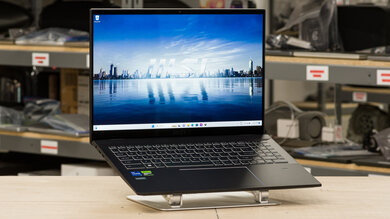
The MSI Summit E16 Flip is a 16-inch 2-in-1 productivity laptop aimed at professionals who need a large touchscreen, stylus support, and a discrete GPU in a convertible form factor. Reddit sentiment is genuinely mixed — owners praise the build quality, screen real estate, and the relative rarity of 16-inch flip designs, but the GPU is consistently flagged as severely power-limited and not suitable for real gaming workloads. Several threads expose hardware quirks that caught buyers off guard, including a locked VMD controller that blocks NVMe upgrades out of the box and the absence of Thunderbolt 4 on the 40-series variant — a step backwards from the previous generation. It fills a niche well but only for users whose primary need is tablet functionality paired with a capable productivity machine, not gaming.
Pros

  • Large 16-inch 2-in-1 form factor with a high-resolution 16:10 display is genuinely rare — users report it as one of the only options in its size class with a touchscreen, numpad, and discrete GPU under $2000
  • Build quality is well-regarded; owners describe it as sleeker and quieter at idle than comparable MSI models like the Creator Z16, with fan noise that stays low during normal productivity use
  • Stylus works well enough for note-taking and occasional sketches, with palm rejection — users found it acceptable for college use even if it falls short of Apple Pencil precision
  • 13th-gen Intel CPU handles demanding productivity workloads, Excel, coding, and light creative work without throttling complaints, making it genuinely capable as a business machine
  • The VMD NVMe lock issue, while frustrating, has a community-documented BIOS fix — users who persisted through the process were able to successfully install larger drives like 4TB NVMe SSDs
  • Convertible tablet mode works as advertised, opening fully 360 degrees — useful for digital drawing, note-taking in class, and presentation scenarios

Cons

  • The RTX 3050/4060 in this chassis is severely power-limited — users report the 3050 variant runs at 40-50W TDP versus 100W+ in proper gaming laptops, delivering performance closer to a $500 budget laptop than its price suggests
  • No Thunderbolt 4 on the 13th-gen 40-series variant — a notable downgrade from the previous generation and every other Summit model in the lineup, making eGPU setups and high-speed docking significantly less practical
  • RAM is soldered and non-upgradeable on the E16, limiting long-term flexibility — the E15 variant does offer upgradeable RAM, making it a better choice for users who want expandability
  • The VMD controller is locked by default in BIOS, preventing Windows from detecting replacement NVMe drives during installation — requires a hidden BIOS key combo or driver injection to resolve, with no documentation from MSI at purchase
  • At $1500+ used or new, value proposition is weak for anyone prioritizing gaming — for the same budget, users can get RTX 4060 or 4070 gaming laptops with far higher GPU TDP, just without the touchscreen
  • Pre-installed Windows image has been reported as problematic by some users, with bloatware causing sluggishness and crashes that require a clean reinstall to resolve properly

The VMD Lock Nobody Warned You About

Dozens of Reddit users discovered after purchase that upgrading the NVMe SSD requires unlocking a hidden BIOS setting MSI doesn't document. The fix exists — but you'll need a specific key combo or driver injection to find it.

A 2-in-1 That Costs Gaming Laptop Money But Isn't One

Reddit is consistent: the GPU in this chassis is power-capped to the point where it performs like a budget laptop in games. If you're buying it for the tablet functionality and productivity, you'll be satisfied. If gaming is the goal, look elsewhere.

The Only 16-Inch Flip With a Numpad — and That's Kind of the Point

Users who need a large touchscreen, numpad, stylus, and discrete GPU in a single laptop under $2000 keep arriving at the same conclusion: the Summit E16 Flip is basically the only option. For that niche, Reddit says it delivers.

User Reviews (30 of 72 analyzed)

5
0
Toni_PWNeronir/MSILaptops10d agonegative

Literally every other model in the lineup for the Summit Flip have Thunderbolt 4 ports. The previous generation of the E16 Flip with the 30-series Nvidia GPU has thunderbolt 4 ports, yet this one laptop doesn't. What is going on?

View Original Comment
3
0
claucreshr/MSILaptops10d agonegative

That would be a deal breaker for me, hoping it's just an error on the spec. Maybe the new rtx40 cards take more space or the way they have to be configured cause a technical constrain, the USB-C ports are next to the HDMI, maybe the USB-C ports now connect directly into the dGPU instead of directly to the CPU, making it impossible to reach the thunderbolt controller. Just a guess.

View Original Comment
2
0
Deb_2001r/MSI_Gaming10d agonegative

Faced this issue - spent 2 days researching it. Go to BIOS -> Right CTRL + Right SHIFT + Left ALT + F2 simultaneously if you have only one Ctrl press the new copilot key -> system agent configuration -> VMD configuration -> click disable

View Original Comment
2
0
CyDef_Unicornr/MSILaptops10d agopositive

So far it's been great! Still haven't explored its full potential but seems pretty solid and worth the wait.

View Original Comment
2
0
mrboltonzr/MSILaptops10d agopositive

Just in case anybody wants to check other vendors, I found this laptop on CDW website (a little more expensive than in Xotic PC). I ordered mine this morning. They said that it's 4-6 weeks the delivery. Hopefully the laptop is good lol. New with barely no reviews it's a tough bet. Gotta say that for the price, it's being hard to find something similar.

View Original Comment
2
0
Expert_Ad5108r/MSILaptops10d agonegative

Try reinstall stock windows (not the precome one), download windows iso, flash on flash drive, boot from it and install windows from there. The difference is there should not be any bloatware. I recommend you to check task manager during slowdown, see which one % very high, I suspect it could be the cpu being 100% because windows is updating in the background. I cant think of other reason for a new laptop.

View Original Comment
2
0
ruilin808r/laptops10d agopositive

would you say the pen is still good for notetaking and occasional sketches?

View Original Comment
1
0
superhakermanr/MSILaptops10d agonegative

is that japanese yen? Idk about the prices there but ~1500$ for a used laptop and rtx 3050 looks like a bad deal. But if the touch screen and pen is priority in your work then idk. But if its primarily for gaming then don't buy it

View Original Comment
1
0
superhakerman_replyr/MSILaptops10d agonegative

for 1500$ you can easily get a RTX 4060 or a RTX4070 laptop. No touch screen tho. RTX 3050 has piss poor performance and for 1500$? Hell no!

View Original Comment
1
0
gidle_stanr/MSILaptops10d agonegative

These things, like the ROG Flow X13/X16/Z13, fulfill a niche and are not worth it for most people who can buy a gaming laptop and a tablet for the same price. This laptop with a 90W charger will only provide its CPU and GPU with low amounts of power (maybe 40-50W). In comparison, Cyborg 15 has a 120W charger and only has 70W CPU+GPU TDP. Most gaming laptops run at 100-230W. It will game decently, but this is the performance level of a 500 dollar laptop.

View Original Comment
1
0
OnewithPUNSr/MSI_Gaming10d agonegative

Oh my fucking god, THANK YOU, YOU ABSOLUTE LEGEND!!! I have been struggling with this same issue for a good two hours now and finally found a link to this post, and after some super scuffed use of external ssd enclosures, I managed to find the folder and install the driver, and now that I managed that, it finally let me access the new sdd I installed and now I'm just waiting on windows to finish installing.

View Original Comment
1
0
SNAAP92r/MSI_Gaming10d agonegative

I found the solution to disable/enable VMD: Go to bios then Advanced Menu. In the advanced menu, touch the right ctrl, right shift, left alt and F2 together. Some advanced options will show up. Go then to SA Configuration, VMD menu. Here you can enable / disable VMD controller. No more grey out!

View Original Comment
1
0
No-Advertising5298r/MSI_Gaming10d agonegative

I never comment on reddit but you just saved my laptop's life. I was ready to throw a $5000 paperweight at the wall. This is it. This fixed it. Windows installation found the drive once I followed these steps.

View Original Comment
1
0
Herc08r/MSI_Gaming10d agonegative

If there is a sysadmin who finds this on Google, and you deploy with MECM, you will get a BSOD for incessabile boot device. To get around that, you need to use dism.exe. After the OS is applied, simply run this command within the folder of the drivers: dism.exe /image:c:\ /add-driver /driver:d:\drivers\iaStorVD.inf

View Original Comment
1
0
Rome105r/MSI_Gaming10d agonegative

The dism cmd was a life saver, thank you! Spent over a week trying to figure this out and this was the answer. For some reason I'm not able to disable VMD on the Summit E14 Flip Evo - A13M laptops so injecting drivers was my only choice.

View Original Comment
1
0
Kidwiththehairr/MSILaptops10d agonegative

I'm considering purchasing this laptop too but the lack of Thunderbolt stopped me dead in my tracks. I'm very confused why MSI would do this.

View Original Comment
1
0
wtathfulburritor/MSILaptops10d agonegative

The 3050 is going to be incredibly underwhelming compared to what you have now.

View Original Comment
1
0
ethidium_boromirr/MSILaptops10d agonegative

I didn't get this one for that exact reason. I asked in different threads too and the general consensus was that RTX 3050 wasn't as powerful as you'd expect from a GPU of its generation. This would probably be enough if you only plan to game casually now and then but I also wanted to be able to play VR games and the tablet pc aspect wasn't a big plus for me so I went with Lenovo Legion Slim 7.

View Original Comment
1
0
pilotdavidr/MSILaptops10d agopositive

The most demanding game I'd probably play is Cities Skylines. I really need a touch screen and I can't find a 3060/70/80 unless I go to the $3000 range. Plus trying to find a 15/16" with a touchpad, is just about impossible now.

View Original Comment
1
0
soDedInsider/GamingLaptops10d agonegative

Quick update: seems a factory reset did the trick. There is no problem now. Somehow the default software was faulty in some way.

View Original Comment
1
0
Fakename00420r/GamingLaptops10d agonegative

Found in a review: Don't buy it if you want a gaming laptop. Although every configuration of the Summit E16 Flip includes a Nvidia RTX 3050, this laptop GPU is more geared towards productivity and running creative software like Photoshop. You can still use it for light gaming but you may need to turn down the resolution to get higher frame rates in modern titles.

View Original Comment
1
0
soDedInside_egpur/GamingLaptops10d agopositive

Yep, already knew that the 3050 on the machine has not the wattage of an usual 3050. My plan was to make an eGPU setup that I can use on the go if needed (with my coding job I travel a lot).

View Original Comment
1
0
icalledthecowshomer/laptops10d agopositive

Checks all your boxes except the stylus is charged via usb a-c and magnet only sticks onto left side of keyboard. Cooling is great, the heat blows onto the screen and the 3050ti is warm but concentrated to the middle top of keyboard. It's nowhere near the 3060 or 3080 dGPU heat. It's quite heavy for school but by all means, it's more than enough for most applications.

View Original Comment
1
0
DavidkDavidr/laptops10d agopositive

I wound up buying it about a week after I posted this, and I do really like it. My biggest gripes are the weird aspect ratio and the pen is less accurate than the Apple Pencil. Everything else is pretty great.

View Original Comment
1
0
CyDef_Unicorn_fansr/MSILaptops10d agopositive

Noise is low under normal use. I still hear it but nothing that's disruptive. I also changed the thermal paste to Thermal Grizzly which makes a good difference in temps.

View Original Comment
1
0
CyDef_Unicorn_ramr/MSILaptops10d agonegative

The RAM is unfortunately not upgradeable, but storage is if you want to remove it and add a different/larger size. I did change the thermal paste on it and saw improvements on temps. I used Thermal Grizzly Kryonaut. Summit E15 does have the option to add RAM and additional storage slot.

View Original Comment
1
0
IllTryToReadComments_dotar/MSI_Gaming10d agopositive

I only play Dota 2 on it and am able to get 60+ fps on high settings at 1440p.

View Original Comment
1
0
lotz007r/MSI_Gaming10d agonegative

I never say anything in reddit. I actually just use it for adult stuff haha. But you just saved my life and laptop. Thanks to your on-spot comment I could disable VMD and now I can install my 980 pro nvme.

View Original Comment
1
0
Powerful-Medicine342r/MSI_Gaming10d agonegative

You my friend saved me a further 4 hours

View Original Comment
1
0
deleted_rtx_comparer/MSILaptops10d agonegative

Lack of VRAM will be the real limit. It's also at most a 13% improvement in performance, assuming that it isn't severely TDP limited.

View Original Comment