Keychron Keychron M6
Mice

Keychron

Keychron M6 Real User Verdict: Great Mouse, Flawed Scroll

Apr 2026

Last Analyzed

7/10

Overall Rating

23

Positive Reviews

18

Negative Reviews

Summary

The Keychron M6 is a productivity-focused wireless mouse that has carved out a strong niche as a lightweight, cross-platform alternative to the Logitech MX Master lineup. Reddit sentiment is generally positive but tempered — most users appreciate the 1000Hz+ polling rate, onboard memory, software-free configuration via WebUSB, and the absence of rubber coating that plagues many competitors. However, the mouse attracts repeated criticism for its scroll wheel mechanism: the ratchet mode is stiff and noisy by default, and there's no automatic smart-scroll switching like Logitech's MagSpeed — you have to press a physical button. The M6 has gone through multiple hardware revisions (1K, 4K, 8K, and now a Lite variant), with the 8K version introducing a metal scroll wheel and newer sensor that addresses several older complaints. It's a genuinely compelling buy for power users who want cross-device compatibility, but those coming from an MX Master should manage expectations around the scroll wheel experience.
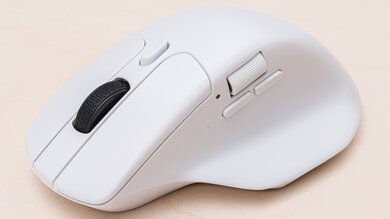
Pros

  • No proprietary software required — fully configurable via WebUSB Keychron Launcher, which is a huge advantage on locked-down work laptops
  • Onboard memory stores button remaps and DPI settings, so the mouse works plug-and-play across any device without reinstalling software
  • 1000Hz+ polling rate via 2.4GHz dongle (up to 8000Hz on the 8K model) — a major upgrade over Logitech's MX Master series which tops out at 125Hz via Logi Bolt
  • At 78g, it's significantly lighter than the MX Master 3S (~141g), making it more comfortable for long productivity sessions
  • No rubberized coating means no degradation or stickiness over time — a common complaint that drives many MX Master users away
  • Wired mode available — Logitech's MX Master doesn't offer this, making the M6 more reliable in high-interference environments

Cons

  • No automatic smart-scroll switching — unlike Logitech's MagSpeed/SmartShift, the M6 requires a physical button press to toggle between ratchet and free-spin modes, which is a dealbreaker for some productivity users
  • Ratchet scroll mode is notoriously stiff and loud on older 1K/4K models; the 8K improves this with a metal wheel but users still report the mode-switch button itself being loud
  • Slippery surface — multiple users across threads report the mouse wants to slip out of their fingers, with grip tape being a common workaround
  • Bluetooth polling rate locked to 125Hz — higher polling rates (1K, 4K, 8K) only work via the 2.4GHz dongle or wired connection
  • The 8K model ships only with a USB-A receiver (no USB-C), an odd decision for a modern premium mouse
  • Confusing product lineup — multiple variants (1K, 4K, 8K, Lite, Master Edition) with subtle but important hardware differences make purchasing decisions unnecessarily complicated

The Scroll Wheel Reddit Can't Stop Debating

Users consistently praise the M6's build but circle back to the same frustration: the ratchet mode is stiff and loud, and there's no auto smart-scroll. The 8K's metal wheel helps, but the physical toggle button remains a divisive design choice.

No Software, No Problem — Or Is It?

The M6's WebUSB configuration approach is genuinely loved by users on locked-down work machines. But the lack of an installable app also means no driver-level features like per-app profiles, leaving power users wanting more.

The Mouse That Thrives Without Rubber

A surprisingly popular reason people switch to the M6 is what it doesn't have: rubberized coating. As MX Master 3 and 3S users watch their grips degrade and yellow, the M6's bare plastic is being reframed as a long-term durability feature.

User Reviews (41 of 203 analyzed)

18
0
spirolkingr/MouseReview17h agonegative

Keychron M6 is a very good mouse. Unfortunately there is one thing that is horrible in this design - the scroll wheel in ratchet mode. It is very stiff, hard to move and creates this unpleasant rattling noise. I used the mouse mainly in freewheel mode because of it. Today I decided to fix the wheel and it turned out to be quite fast and easy.

View Original Comment
7
0
julian_vdmr/Keychron17h agopositive

I'm still working on the full review for Notebookcheck.net, but the M6 8K has become my go-to mouse for productivity. The metal scroll wheel is absolutely killer, although it is a little loud when unlocked, and the tilt mechanism means it's a little loose if you shake the mouse. Not at all noticeable in general use.

View Original Comment
5
0
ignatius-realr/MouseReview17h agonegative

On the 8k version, instead of cutting the springs, you have to grind down a tiny bit of the pin that sits under the mode switch button, and reapply some grease. At least that's what worked for me. I don't know about the previous versions, but I found the wheel aggressively loud for an otherwise silent setup.

View Original Comment
4
0
liftingfrenchfriesr/Keychron17h agopositive

The M6 got an 8K-version that has a better scroll wheel now. It might solve most, but not all, of your problems. I like the fact that Keychron M6 does NOT have any rubber on the surface. The Razer models unfortunately also have rubber on the thumb rest area.

View Original Comment
3
0
matthew1471r/MouseReview17h agopositive

If you look at the bottom of the mouse in the photo you took you'll see 'Remove Remove Remove' written on a thin layer of soft plastic. Also worth pointing out Keychron supports wired and Logitech does not. In times of high interference that's a necessity. The higher report rates was largely a waste of time for me as a non gamer.

View Original Comment
3
0
LordLakotar/MouseReview17h agopositive

Only with the button, as I said, the switching mechanism seems to be purely physical, think of it as a click pen mechanism moving the stop to or away from the wheel. Though the stop's spring is quite soft, so if you flick the wheel fast it will keep going a bit and even on ratchet mode is quite comfortable to move quickly.

View Original Comment
2
0
donskyrunnerr/Keychron17h agonegative

The new silent switches are lovely, comparable to my MX Anywhere 3 but the mechanism for engaging/disengaging the scroll wheel friction is clunky at best. I expected it to be electronic like my MX but it's a physical mechanism.

View Original Comment
2
0
l3oomll7r/Keychron17h agopositive

I've been using the MX Master 3S for about 2–3 years now — this is actually my second one since the first had issues with the left click. Now this one seems to be starting to have the same problem. I'm thinking about switching to the M6 8K and wondering if it could be a good replacement for the MX Master 3S.

View Original Comment
2
0
eusoudanielmaiar/MouseReview17h agonegative

I'm deciding if I'm gonna return mine or if I try this fix. I love the mouse but the main scroll wheel is just too tight in the ratchet mode. If it only had a normal scroll wheel I would love it so much.

View Original Comment
2
0
NoctysHiraethr/MouseReview17h agopositive

I really like this mouse. As a low cost, lightweight, more versatile MX Master, it is amazing. I have seen a lot of people say it feels cheap but a lot of that is due to the lightweight materials used - I have used MUCH worse feeling peripherals - for the price I think it is acceptable, at least personally.

View Original Comment
2
0
throwburgeratfacer/MouseReview17h agonegative

I visited a store that had a demo unit. It's so light that grip wasn't an issue. Although I did find the hump to be a little too forward placing on the palm and the body a little too narrow inspite of not having big palms. Currently mulling all over it.

View Original Comment
2
0
TofuBlizzardr/MouseReview17h agopositive

The battery life was perfectly fine, and for work purposes long use was fine! With the shape being intended with direct focus on productivity - gaming becomes really painful over spans longer than an hour, which with my lifestyle changing with the years has become more the norm for me.

View Original Comment
2
0
_MNSTRr/MouseReview17h agopositive

Can you confirm that it has onboard memory? That's a pretty big plus over the mx master if you can remap the buttons and still maintain them on a pc without the software installed, i.e. a company computer.

View Original Comment
2
0
zerosuneuphoriar/MouseReview17h agopositive

They keep doing refreshes. I got the m6 8k and it has quiet clicks, metal scroll wheel, 3950 sensor. Coating doesn't get fingerprints as easily as my old 1k (black). I really like the coating, not rough at all on mine.

View Original Comment
2
0
Haovikr/Keychron17h agonegative

I got mine and I don't know if it's defective, maybe other users can confirm this but when I shake the mouse it rattles very loudly.

View Original Comment
1
0
fuckyou_retardr/Keychron17h agopositive

I bought it recently because my mx master 3s broke after only a year of usage. Bought the m6 and the only real gripe I have with it is that it is slippery and doesn't have much grip, other than that it's a nice mouse. I like the rattley noise of the scroll and the tacky mouse buttons because it actually feels like I'm clicking.

View Original Comment
1
0
ColonelSevenr/Keychron17h agonegative

+1 In regards to the slippery (coating) experience. The Keychron M6 is a decent mouse however the coating makes it want to slip out of my fingers. Anyone else experiencing the same; grip-tape is your friend (e.g. Supergrip tape).

View Original Comment
1
0
TimurHur/Keychron17h agonegative

I used to have an MX Master 3 but the material started to degrade and I decided to try something else. My first choice was the Keychron M6 for the same reasons as yours. However, I found that the M6 is actually smaller and narrower than the MX Master and it made my hand hurt... so I returned the M6 and kept looking for something else.

View Original Comment
1
0
rogueqdr/Keychron17h agonegative

No Smart Scroll Switching like Logitech's MagSpeed. M6 requires a physical toggle press. That seamless behavior is sorely missed. This was the make or break for me. I'll stick with Logitech, despite the polling rate.

View Original Comment
1
0
endosaintr/Keychron17h agopositive

I think the biggest pro for the M6 that you're missing is that it doesn't require proprietary software to use many of the configuration features. This makes it a big help on my work laptops, which are super locked down.

View Original Comment
1
0
Illumetecr/Keychron17h agopositive

I've switched to an m6 after my another logitech mx went dead. Using it for a couple of days and...well...pretty much the same thoughts. It's a great design, it looks great, soft matte plastic feels amazing, mouse buttons have soft clicks also feel great. Internal memory is nice, polling rate is nice. But there are a few drawbacks: The side wheel has a too high threshold to scroll. A higher polling rate works only via wire or in a 2.4 GHz dongle. Otherwise, it's limited via bluetooth 125Hz.

View Original Comment
1
0
cszolee79r/Keychron17h agopositive

All I want is a Logitech Lift with 1000hz polling. Got a Keychron M5, it's decent but not quite there. Still, it became my main mouse after a few days. I also miss the SmartWheel. At least there's choice now. M6 was my previous planned upgrade but a vertical is better.

View Original Comment
1
0
Possible_Window_1268r/Keychron17h agonegative

I went on a similar journey as you, from mx master 3, then razer basilisk, then Logitech g502x, then Keychron M6. My main goal was to find something that fit the ergonomic shape of mx master, but a wired version of that. I have just started using the Redragon M811, and I'm loving it so far. It fits in my hand much better than the M6.

View Original Comment
1
0
Ok_Yoghurt_101r/Keychron17h agopositive

Back then, Logitech mice used to last decades. I have now gone through both an mx master 2s and an mx master 3s and in both cases, barely got over a year of use before running into the same issues. This forced obsolescence, landfill e-waste business is really grinding my gears. Switching to keychron next and hoping they last.

View Original Comment
1
0
TW3NTY2_Over_Parr/Keychron17h agonegative

Just got mine in the mail today. Took forever to come over from HK. The scroll wheel does not automatically switch and to be honest the button to go from infinite to tactile is quite clunky.

View Original Comment
1
0
TheThirdPager/Keychron17h agopositive

I've been using the Logitech MX Master 3 for over 2 years, but have never quite been happy with it. I like a weighty mouse, but the Logitech is too heavy and always feels like it's stuck in treacle. The cursor is so floppy and imprecise, especially on the Mac. The scroll is lovely though, although I do not use the notch mode.

View Original Comment
1
0
TW3NTY2_Over_Par_followupr/Keychron17h agonegative

The only gripe I have with the M6 is the scroll wheel. It is very mechanical and as such it is pretty loud. I also miss the auto infinity scroll feature that the MX offers. The MX4 did not improve on the polling rate either so for now I will stick with my Keychron setup.

View Original Comment
1
0
EvengerXr/Keychron17h agopositive

I also just replaced a MX Master 3S with the M6 8k a week or two ago because the rubber was getting gross and I was having issues with the wireless connection. I actually really like that it is browser based. All of the software is onboard so it works across devices plug and play. I was iffy on the scroll wheel at first, but I decided to just leave it unlocked all the time.

View Original Comment
1
0
MoleStranglerr/Keychron17h agonegative

The wheel rattle is really annoying. The smooth scrolling has no resistance, so it causes the scrolling to bounce and be less accurate when scrolling. It needs a slight increase of resistance to the wheel. Really annoying.

View Original Comment
1
0
saltierslugr/MouseReview17h agopositive

Can confirm that the wheel on the 8k version has fixed the problems from the previous version. It is much quieter to scroll. My one complaint is the button to switch modes for the scroll wheel is super loud. I'm shocked more people haven't mentioned this in reviews I've seen. Other than that, I'm a huge fan!

View Original Comment
1
0
Dr-Fish_Armsr/MouseReview17h agonegative

Had the M6 4K for about six months. Initially I liked it, but the back/forward buttons have started getting sticky. It's also started becoming unreliable in 2.4Ghz mode. Sometimes it works without issue, other times it loses signal constantly, even with the receiver mere inches away.

View Original Comment
1
0
PlankBlankr/MouseReview17h agonegative

The standard version holds up really well. The texture is smooth so it doesn't get dirty as much. The 4k version did get dirty a bit. But it doesn't matter cause it broke on me after a month or two, so I've switched back to Lamzu Maya.

View Original Comment
1
0
madderbearr/Keychron17h agonegative

This is so unnecessarily confusing. Not realizing there were so many different variations, I purchased the first one. Per the keychron site, this is the Micro Switch model, NOT the silent micro switch model. Also per the keychron site, the Micro Switch model is rated for 80M clicks lifetime whereas the silent micro switch is only rated for 20M clicks lifetime.

View Original Comment
1
0
HH-CAr/Keychron17h agopositive

My Logitech MX master 3 didn't last 14 months when my left click started to act inconsistently, I was so annoyed of the lack of quality control of such an expensive mouse, the warranty was already expired.

View Original Comment
1
0
pedro380085r/Keychron17h agopositive

Yes, but I think the scroll wheel is better on the 8k, so you are actually paying more for the actual mouse build, not just the polling rate.

View Original Comment
1
0
apocryphalmasterr/Keychron17h agopositive

Just returned an MX Master 3s after being unable to get used to the weight and rubberized coating. Keychron M6 was my next choice.

View Original Comment
1
0
dadof2bratsr/Keychron17h agopositive

I've been eyeing up the rapoo mt (mx master clone) and the Keychron M6. The M6 is winning so far, more so for software reasons and price. I'm aware of the Razer Pro Click and their gaming mice, but haven't considered them due to their software, lack of Mac support.

View Original Comment
1
0
ryzenxyzr/MouseReview17h agopositive

For office work, get the M6S-A72 (PixArt 3311, 1K Polling Rate, metal wheel). Keychron Thailand has a good comparison chart.

View Original Comment
1
0
divinethresholdr/Keychron17h agonegative

I didn't take to the M6 (I have the 8K version with metal scroll wheel) for similar reasons, and the Razer lacks side scroll. But what won me over was the M5. The almost vertical design is just SO comfortable, it has side scroll and is so much lighter than the 3 - those 50g make a BIG difference.

View Original Comment
1
0
sourmudkipr/MouseReview17h agonegative

I wanted a lighter version of the MX and the infinite scroll is pretty important but even just swiping the M6 across my desk I can feel the scroll wheel shift inside the housing. Don't know if it's just a design flaw or if my unit is defective.

View Original Comment
1
0
matthew1471_replyr/MouseReview17h agopositive

None whatsoever but mine is metal scroll wheel. The older version which was not metal got pretty trash reviews. You get different things with the different M6 models — even the dongles aren't the same. M6 8K with all silent switches gets you the best feature set even if you have no interest in ever using it in 8K mode.

View Original Comment