Logitech Logitech MX Anywhere 3S
Mice

Logitech

MX Anywhere 3S Reddit Verdict: Great Mouse, Fragile Switches

Apr 2026

Last Analyzed

7/10

Overall Rating

27

Positive Reviews

15

Negative Reviews

Summary

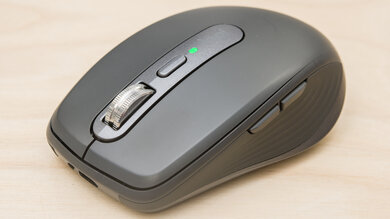
The Logitech MX Anywhere 3S is a compact wireless productivity mouse aimed at users with smaller hands who need portability above all else. Reddit sentiment is generally positive for its intended use case — travel, multi-device switching, and all-day desk work — but tempered by a well-documented left-click failure issue that affects a meaningful number of users within 1–2 years. The Darkfield sensor is consistently praised for working on virtually any surface including glass, making it genuinely useful without a mousepad. It sits in an awkward value position at $70–100 depending on region, where many feel the hardware does not justify the price given the switch reliability concerns.
Pros

  • Darkfield sensor tracks on nearly any surface including glass — praised across threads as a genuine differentiator for travel use
  • Multi-device switching via Bluetooth or Logi Bolt lets users hop between up to 3 devices seamlessly, including cross-OS setups (Windows + macOS)
  • Electromagnetic scroll wheel with configurable resistance from 0–100 is a standout feature, letting users fine-tune exactly how clicky or smooth the scroll feels
  • Compact form factor and lightweight design make it ideal for small hands and minimalist travel setups — some users have used it for 5–7 years
  • Quiet clicks on the 3S model are noticeably better than the original MX Anywhere 3, which users describe as quite loud by comparison
  • Works cross-platform without issue — the Mac edition functions normally on Windows via Bluetooth, and Logi Options+ works on both OSes

Cons

  • Left-click switch failure is the dominant complaint — multiple users report it dying within 5 months to 2 years, with symptoms including missed clicks and drag-release mid-action
  • Priced at $70–100 depending on region, which Reddit consistently describes as overpriced given the hardware specs and switch reliability
  • Too small for medium-to-large hands — users with palms above 18–19cm repeatedly report discomfort and fingertip-only grip, limiting all-day productivity use
  • Not suited for gaming: 125Hz polling rate, laser sensor with acceleration issues, and additional wireless latency make it objectively poor for FPS or competitive play
  • Rubber thumb grip degrades with prolonged use — some users report it wearing through entirely after a few years
  • No side scroll wheel unlike the MX Master 3S — a meaningful omission for heavy spreadsheet users who rely on horizontal scrolling

The Left-Click Problem Nobody Warns You About

A recurring thread topic is the left-click switch failing within months. Users describe drag-and-drop breaking mid-action and clicks not registering. The fix is a cheap AliExpress microswitch replacement, but many feel a $100 mouse shouldn't require DIY surgery within its first year.

The Best Travel Mouse — If You Have Small Hands

Reddit consistently positions this as the go-to compact travel mouse, but with a firm asterisk: if your palm is over 18cm, you'll likely find it cramped within days. Users with smaller hands, however, report using it for 5+ years as their primary daily driver.

Darkfield Is Still Unmatched for Surface Flexibility

Multiple users across threads call out Darkfield as the main reason to pick this over cheaper alternatives. Tracking on glass, marble, and rough surfaces without a mousepad is a practical travel win that cheaper $20–30 alternatives simply can't replicate.

User Reviews (42 of 145 analyzed)

11
0
evervescantr/MouseReview18h agonegative

I'm glad it's working for you, but this is an objectively terrible mouse for gaming. 99g, 125hz, additional wireless latency (even at 2.4ghz, no lightspeed tech here), no exact dpi adjustment, laser sensor.

View Original Comment
9
0
Miller_TMr/MouseReview18h agonegative

As someone who tried an MX Master 2s for gaming which basically uses the same sensor as the other MX series, it's awful for gaming. The sensor is not accurate, has acceleration issues, only 125hz polling rate and high latency wireless. It's not even comparable to any gaming wireless mouse.

View Original Comment
4
0
Cornbread7080r/MouseReview18h agonegative

For me it's too heavy. Also I find the cursor quite laggy on macOS despite software. I prefer a light gaming mouse for productivity work.

View Original Comment
3
0
No_Cricket5874r/MouseReview18h agopositive

I had the MX Anywhere 3 and it's one of the best travel productivity mouse I ever had. 1 charge last me about 1 month and I use it for work 5 days a week. Had it for 5 years before i lost it.

View Original Comment
3
0
Bacon-80r/logitech18h agopositive

I have both of these and each one has its quirks. I have smaller hands so I prefer the anywhere 10/10 but I like the added side scrolling on the master. I did find that you can horizontal scroll on the anywhere and I've just grown used to doing it on the anywhere mouse. I've also found that it's faster on the anywhere than using the side scroll button on the master mouse! (Hold down one of the side buttons & scroll)

View Original Comment
3
0
exclaimprofitabler/logitech18h agopositive

I am really torn between the 2. The master 3s has the much quieter click buttons and the side scrolling, but the main scrollwheel is much less premium. On the anywhere 3 I can exactly choose how loud the scrollwheel is on a scale of 0-100 thanks to electromagnets, but on the master 3s there is only the loud setting or quiet setting, nothing in between.

View Original Comment
3
0
deffy01r/logitech18h agopositive

The only difference between 'mac' and 'windows' edition is - windows gets additional usb dongle (still works without it) and mac comes without dongle, only mouse

View Original Comment
2
0
TungstenOrchidr/logitech18h agopositive

I have both, and I haven't noticed any difference. Same body, same feel and same weight. The only visible difference was in the text printed under the body of each mouse. The Bolt receiver is entirely optional. Both seem to be able to be configured with Bluetooth for all 3 connectivity options or Bolt or any combination.

View Original Comment
2
0
WhoTheFsAlicer/logitech18h agopositive

Haven't tried a Master but big fan of the Anywhere. I go between Anywhere and Magic Mouse and every time prefer the Anywhere experience over the MM (sadly). Touch gestures are lovely but productivity is so much better on the Anywhere with the right buttons set up.

View Original Comment
2
0
Quirky-Reveal-1669r/logitech18h agopositive

My go-to travel mouse, and I do not even have small hands.

View Original Comment
2
0
Narrow_Swimmer_5307r/logitech18h agonegative

The mouse itself is very good but the Mx anywhere 3S only lasted me 5 months. Not being able to last even 1 year is kinda sad for a mouse almost worth $100.

View Original Comment
2
0
elizabeth_thai72r/macbookair18h agopositive

I have the MX anywhere 3 connected via Bluetooth to my last gen Air. No lag at all and I love that I can keep it constantly plugged into a power outlet and still be able to use it.

View Original Comment
2
0
flipper125r/macbookair18h agopositive

I also have the MX anywhere 3 connected via Bluetooth and LOVE it! All my devices connect flawlessly, with no lag whatsoever (MacBook Air M4, MacBook Pro M3, and my work Windows laptop PC). Previously, I would be grabbing a different mouse, depending on which device I'm using but now, just push the button and BINGO, it works!

View Original Comment
2
0
Low-Confusion-8786r/macbookair18h agopositive

I've had the MX 3 anywhere for a couple years and I love it. Bluetooth/no lag

View Original Comment
2
0
adrian1911r/logitech18h agopositive

Yes it works like any other mouse or non mac edition 3S. I use it with both my MacBook and corporate Dell. Even the option to control both at the same time and copy/paste files between them works.

View Original Comment
2
0
griffindog_1r/logitech18h agopositive

I accidentally ran mine through a full cycle in the washing machine. It still works.

View Original Comment
1
0
killall-qr/MouseReview18h agonegative

I've been a fan of Logitech MX Anywhere mice for years, for the compact size and hyperscroll. But all of my MX Anywheres have suffered from the infamous Logitech "click of death" over time, where the switches start double clicking as they wear out. On top of that, the rubber thumb grip always starts wearing thin with use. On my Anywhere 2S that I'm still using, the thumb grip has completely worn through so there is a hole to the smooth plastic underneath.

View Original Comment
1
0
BeagleTheDogr/MouseReview18h agopositive

A big selling point with mx mice is the darkfield sensor which allows it to track on nearly any surface, including glass. Makes for a great travel mouse so you don't have to bring a mouse pad with you. If that doesn't matter to you, you'll get better value elsewhere. I don't think there is a comparable, modern technology that beats darkfield.

View Original Comment
1
0
Bacownedr/MouseReview18h agonegative

mx anywhere is a very small, nearly fingertip style mouse. at 70$ is wildly overpriced for the hardware. if you have big hands go for the MX Master series - you can find them openbox/used from amazon for a significant discount usually.

View Original Comment
1
0
Timbaman2r/MouseReview18h agonegative

I would skip this.... I also have MX Anywhere 3S and I'm having problems with the left mouse button sometimes not registering the press, and also sometimes interrupting the hold while dragging. As I've seen around the forums, this is not an uncommon problem with the switch, as many users report this issue.

View Original Comment
1
0
Fluid_Excitement_326r/MouseReview18h agopositive

If you don't configure it in the Logi-Options+ app, the middle button toggles 'clicky' and 'smooth' scrolling. The Logi+Options app lets you set a scroll-speed threshold where it switches from smooth to clicky scrolling automatically and you can remap the middle button to have another function.

View Original Comment
1
0
brightfeir/logitech18h agopositive

Based on Logitech's EOL notification document, here are the new features with the s version: New: Quiet Click technology, New: 8K DPI sensor, New: Made from certified PCR plastic, New: FSC-certified packaging. Other features are the same.

View Original Comment
1
0
ConcealedVolcanor/logitech18h agopositive

In terms of size, if you have a large hand, go with the master 3s. If not, the anywhere 3s will be the better option. You should test both of them before buying because the size issue is critical for long-term using.

View Original Comment
1
0
markdigir/logitech18h agopositive

I have both, it really depends on comfort of the grip and amount of space you work with. I use the Anywhere 3S at home (small desk) and it's fine, more of a finger tip grip. I prefer the Master 3S at work with palm grip with more space.

View Original Comment
1
0
Spiritual_Showr/logitech18h agonegative

mx 3s has left click issue and the company is well aware of this, if you can replace the switch, then it is a good one; else this is a severe issue, one of reason to not buy expensive mouse

View Original Comment
1
0
WinterMattr/logitech18h agonegative

2.5 years of near daily use before left click started being unreliable.

View Original Comment
1
0
Mean_Preference2953r/logitech18h agonegative

I have had a MX Anywhere 3 (not 3S), after 3 years the left click started to bug: when I keep it clicked like for drag & drop, it releases itself midway. I have lost in productivity. Very very disappointed for a "premium mouse" that I paid 99€. I contacted the support, the best they could do was to give me a 20% discount for another buy.

View Original Comment
1
0
chipmeal91r/logitech18h agonegative

The mouse itself is very good but Logitech used those cheap silent switches which are surely going to fail in a matter of months. I have received a few MX anywhere 3s for switch replacement and once good quality switches are installed the mouse can last for years without any problems.

View Original Comment
1
0
luckyF1shr/logitech18h agopositive

I know im very late but I have been using mine for about almost 4 years at this point, and I dropped it once quite badly in my first month of having it. It still works perfectly even now.

View Original Comment
1
0
vlykaryer/logitech18h agonegative

typically around 1 year. another one is starting to go out this week that i bought last year, same month

View Original Comment
1
0
Blood1iner/logitech18h agonegative

exact same issue here with the 3s, I have two of these and will never buy again.

View Original Comment
1
0
gobenji34r/logitech18h agonegative

I had an MX 3S which died and I replaced with an Anywhere 3S. It's a great mouse but I do find it too small and pretty uncomfortable so I'm either going to switch back or get a Keychron M6

View Original Comment
1
0
QuanT-r/logitech18h agopositive

Personally I prefer mx anywhere over mx master due to the weight.

View Original Comment
1
0
autopixel3r/logitech18h agonegative

At work, I had a professional examine my set up once. One of things he mentioned to me is that ideally your mouse should be large so that your palm / fingers are spread out. You don't want a mouse that is small to the point where hand / fingers are clamping the mouse. Based on that, I would totally go with the MX master.

View Original Comment
1
0
rikkarlor/logitech18h agopositive

I have anywhere for laptop traveling and mx master for desktop

View Original Comment
1
0
Aailurusr/logitech18h agopositive

Personally running both. MX Master for main desk setup (PC) and MX Anywhere for, as the name states, anywhere (laptop). Experience-wise, it's been nothing short of great. I don't have any complaints and having that increased portability really counts.

View Original Comment
1
0
gaMiNoosr/logitech18h agopositive

I've been using MX Anywhere 3 for 7+ years with an "Extended Finger Grip", no pain at all, using it daily for development work.

View Original Comment
1
0
Density5521r/macbookair18h agopositive

I'm team Anywhere MX 3s. Using it for months with my Macs via Bluetooth, no lag or "skipping" or anything. I'd prefer the 2s because it has the tiltable wheel, and I've been using that excessively over the past decade or so (tilt left: copy, tilt right: paste). With the 3s I can assign macros, so I can hold a button down and nudge the mouse into a direction, and assign the same copy/paste commands to those gestures.

View Original Comment
1
0
MontyLoveringr/macbookair18h agopositive

Been using an Anywhere 2S for years. Bluetooth connection. Super long battery life. Charging port in a place you can use it like a wired mouse when charging. Fits my hand well. Never been tempted by the Apple Mouse.

View Original Comment
1
0
FoxFisherr/MouseReview18h agopositive

As an owner of both 2s and 3, I can gladly say that 3 is better by miles. Build quality is MUCH better, laggy feeling is gone and clicks have very low click latency (around 9-12ms). Sensor has much higher DPI too. It's great for non competitive gaming, even better when paired with a laptop since it's very portable.

View Original Comment
1
0
PeterDeverauxr/MouseReview18h agopositive

Honestly, I don't get it why MX mice are so disrespected in gaming field. Sure, it's not for professional gaming, but for games like GTA or RDR it's completely fine. On the other hand, working with gaming mouse is a complete disaster.

View Original Comment
1
0
Such_Package_7726r/logitech18h agopositive

Bit late on this - have mine over a year and got it purely for 'anywhere'. Its still going great and i take it everywhere.

View Original Comment