Logitech Logitech MX Master 3S
Mice

Logitech

Logitech MX Master 3S: What Real Users Actually Think

Apr 2026

Last Analyzed

7/10

Overall Rating

14

Positive Reviews

29

Negative Reviews

Summary

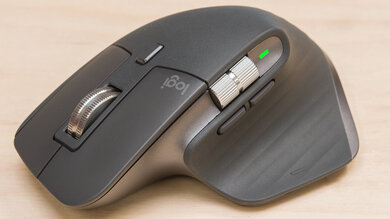
The Logitech MX Master 3S is a feature-rich productivity mouse that has built a loyal following among office workers, developers, and content creators, but it comes with serious caveats that reviewers rarely mention upfront. Reddit is sharply divided: long-term fans praise the ergonomics, MagSpeed scroll wheel, and multi-device switching, while a vocal contingent is frustrated by the 125Hz polling rate, recurring left-click failures around the 12–18 month mark, and rubber coating that degrades into a sticky mess over time. The mouse is genuinely excellent for the right user — someone doing spreadsheet work, coding, or document editing who doesn't need gaming-level precision — but for anyone coming from a gaming or high-polling-rate setup, the cursor motion will feel visibly choppy. Build quality concerns around switch longevity have become a recurring theme in the community, raising real questions about long-term value at the $100 price point.
Pros

  • MagSpeed electromagnetic scroll wheel is genuinely class-leading — switchable between ratchet and infinite modes on the fly, with smooth and precise feel that users consistently highlight as the standout feature.
  • Multi-device switching via Logi Bolt or Bluetooth is seamless and fast, making it a strong choice for people who regularly move between a desktop, laptop, and other devices throughout the workday.
  • Customizable buttons with per-application profiles in Options+ unlock serious productivity gains — thumb gestures for zoom, horizontal scroll mapped to tab switching, and app-specific macro bindings are commonly praised.
  • Battery life is exceptional, with most users reporting weeks to over a month of use per charge, and USB-C charging means a short top-up is rarely an issue.
  • For large-handed users who spend 8+ hour days at a desk, the ergonomic palm shape reduces fatigue compared to standard symmetrical mice, with many reporting wrist relief after switching from flat designs.
  • Silent clicks are genuinely quiet without feeling cheap in feel, making it ideal for open offices or late-night use.

Cons

  • 125Hz polling rate is the most consistent hardware complaint — at this price, competitors offer 500Hz or 1000Hz, and users switching from gaming mice report visibly choppy cursor movement, especially on high-refresh monitors.
  • Left-click switch failure around 12–18 months is a widespread and well-documented issue. Multiple threads confirm the silent switch design wears faster than standard mechanical switches, and Logitech's 1-year warranty in North America means most users are unprotected when it happens.
  • The rubber coating degrades into a sticky, discolored surface after 1–2 years, particularly on the white variant — a recurring complaint across the MX Master lineup that Logitech has not resolved across generations.
  • At 141g, the weight causes wrist strain and fatigue for many users, particularly those with smaller hands or a history of RSI — several users in r/MouseReview specifically linked the mouse to worsening tendinitis.
  • Options+ software is required for full functionality including gesture buttons and device switching, but it's blocked on many corporate machines for security reasons, and some users report it being unstable or resource-heavy.
  • No 2.4GHz dongle support — the 3S dropped the 2.4GHz Unifying receiver from the MX Master 3 and is Bluetooth-only (plus Logi Bolt), which causes interference issues for some users and limits compatibility with older Logitech setups.

The Left-Click Problem Nobody Warns You About

Across multiple Reddit threads, users consistently report left-click failure between 12 and 18 months of use — right after the 1-year warranty expires. Logitech's silent switch design appears to wear faster under normal office use, and replacement requires soldering. It's the single biggest reason otherwise-happy users say they won't buy another one.

Is a $100 Mouse Worth It If It Feels Choppy?

The MX Master 3S charges a premium price but ships with a 125Hz polling rate — a spec point that's become a lightning rod in the community. Users coming from gaming mice describe the cursor movement as visibly stuttery, especially on high-refresh monitors. Competitors in the same productivity segment have moved to 500Hz or 1000Hz, making this feel like a deliberate tradeoff rather than an oversight.

It Might Be the Best Mouse for Your Hands — or the Worst

Ergonomics on the MX Master 3S are polarizing in a way that goes beyond preference. Some users report it's the only mouse that eliminated their wrist pain after years of flat mice. Others — particularly those with smaller hands or existing RSI — found the 141g weight and aggressive palm shape actively worsened their symptoms within weeks. The consensus: try before you buy if at all possible.

User Reviews (43 of 392 analyzed)

27
0
1Stronkr/logitech20h agopositive

Not worth it in material value. But very much worth it in design, features, battery life and software. That's pretty much the only reason why all my peripherals are Logitech — even though their quality has been on a steep decline, there is no good alternative to their products.

View Original Comment
23
0
Machinegunraidsr/MouseReview20h agonegative

Unnatural grip, wrist pain — this is when you know you should switch to a new mouse. If you feel pain in your finger and wrist, stop using it and return it. It might cause some long-term damage.

View Original Comment
9
0
EnokiDogr/logitech20h agopositive

I upgraded from the 3 to the 4. My MX Master 3 was feeling old, so I pulled the trigger. The 4 does not feel significantly better than the 3 — some new bells and whistles for sure, haptic feedback, better material to stop the rubberized surface from becoming old and sticky, but 95% of the functionality is the same.

View Original Comment
7
0
financekidr/MouseReview20h agonegative

It's 125hz polling rate which is unacceptable for the price. I get not every mouse needs to be 8k but it should be 500hz or 1k as a productivity mouse. 125hz is legit not usable.

View Original Comment
7
0
Eze-Wongr/logitech20h agonegative

I'd say it's the best productivity mouse due to features. The features are well thought out. However the materials, shape and design need some work. My biggest gripe is the grip — I've gotten some sort of tendinitis from using it too much. It's huge in the palm and the thumb valley is too deep.

View Original Comment
6
0
dschmizr/MouseReview20h agonegative

Same thing happened to the right click on mine. Straight into the trash and got the Keychron M6 which I actually think is an upgrade.

View Original Comment
5
0
Aware_Operation8803r/logitech20h agonegative

I have the 3S for 1.5 years and the right click just died last week.

View Original Comment
5
0
TFABAnon09r/logitech20h agopositive

What are you animals doing to these poor mice?! My MX Master 3S has got over 12 thousand hours of use on it and, save for a few very slight wear marks, it's still like new.

View Original Comment
5
0
LandoStarfartr/MouseReview20h agonegative

My next steps: the only way to save this mouse is to perform surgery. I'm forced to order Kailh 6x6x7.3mm Square Silent replacement switches to fix a 'premium' product that should have lasted five years, not 500 days.

View Original Comment
4
0
pekz0rr/logitech20h agopositive

In my opinion there is no better mouse for productivity and as a professional, $100 every 3-5 years is nothing for the amount of usage you get out of it. It is not reasonable to just compare the price with the Bill of Materials. You also need to factor in supply chains, marketing, research and development.

View Original Comment
4
0
Nilla-WaferPDXr/MouseReview20h agopositive

Had mine since the day it released and still no issues whatsoever with clicks. The rubberized coating is starting to show age, however.

View Original Comment
3
0
Militopr/logitech20h agonegative

It's a fantastic mouse, then it goes downhill after maybe 1 year or 2. I do not recommend it unless Logitech fixes all these double clicks and persistent drag and drop issues that come over time.

View Original Comment
3
0
rui_lr/MouseReview20h agonegative

I have MX Master 3 (not 3S) at home and love it. Bought last week the 3S for the office and hated it — pain in the arm, shoulder and wrist. And I couldn't rest my hand without always activating the right click. Returned the 3S.

View Original Comment
3
0
xXsatisfiedxpunkXxr/logitech20h agonegative

I used this mouse for a year and started to have issues with my hand that lasted months. I thought I was developing carpal tunnel or arthritis but it turned out that the mouse is just way too heavy and causes a lot of strain on the hand and wrist. I switched to an ultralight from Logitech and my hand issues disappeared within a week.

View Original Comment
3
0
L0rdH4mmerr/logitech20h agopositive

For me, it's the most ergonomic mouse I've ever owned. It fits my hand perfectly. I don't really care about all the special features, just wanted a silent mouse that works well. It's been going 2+ years now and no signs of anything.

View Original Comment
3
0
beagleprimer/MouseReview20h agonegative

That failure time is extremely accurate — my wife's started having left click problems right at 14 months. Meanwhile my M720 has been trucking for years and was maybe $30 at the time. Frustrating.

View Original Comment
3
0
Sea_Worldliness3654r/logitech20h agopositive

I used the MX Master 3S for two years in the office. The 4 was an excellent upgrade for me. I never liked the way the gesture button operated on the 3S so never used it. The action ring works great and I like the way the horizontal scroll wheel protrudes more.

View Original Comment
3
0
Bacon-80r/logitech20h agonegative

I have both the MX Master 3S and the Anywhere 3S. The master 3S has the quieter click buttons and the side scrolling, but the main scroll wheel is much less premium than the Anywhere. The master mouse stains badly especially with the lighter color option.

View Original Comment
2
0
TimurHur/logitech20h agonegative

I also regret buying it, mainly due to durability reasons. The rubber material of the MX Master 3 and 3S degrade over time and becomes absolute trash in 2~3 years depending on use.

View Original Comment
2
0
GlitchHammerr/logitech20h agonegative

My left click died after 2 years, MX Master 3. Took the mouse apart and the button would intermittently click even after cleaning. Tried to resolder a better clicker button and ended up breaking the mouse. I took such good care of this mouse during those 2 years because I never spent $100 on a mouse before, but mouse and keyboard is my job so I splurged. I will never buy a Logitech product again.

View Original Comment
2
0
MayorDecayr/logitech20h agopositive

I've used the same MX Master 2S for 6-7 years without any problem — it's a great mouse depending on your usage. Office, design, music production, internet scrolling — it's my favorite. The scrolling mechanism itself is worth the money and the battery life is insane.

View Original Comment
2
0
OutrageousHamster3r/MouseReview20h agonegative

For work, I switched from an MX Master 2S to a Basilisk V3 Pro, and I love it. It has several more programmable functions, all of which I use. It's also quite a bit lighter, which I really appreciate, and the 1000Hz polling makes a massive difference in cursor responsiveness compared to the 125Hz MX Master.

View Original Comment
2
0
antftwxr/MouseReview20h agonegative

For me it's the polling rate. I found the 2 to be very comfortable and I guess I'm in the minority that loves heavier mice — makes the smaller movements much more precise for me. But the polling rate makes it feel so slow and laggy. If there was a gaming version with at least 1k polling and a better wheel it would be endgame.

View Original Comment
2
0
kuyucuter/MouseReview20h agonegative

Tried this mouse before and the polling rate itself made me sell it. It was just abysmal. I didn't reach the part where my wrist would hurt because I never used it for more than 30 minutes. But the mouse felt heavy as well. I changed it to Razer Basilisk X V3 Hyperspeed and never looked back.

View Original Comment
2
0
skillmakerr/logitech20h agonegative

I hate its polling rate of 125Hz which is too low for a mouse. The stutter is very visible for me when moving it around compared to my wired 500Hz polling rate mouse.

View Original Comment
2
0
Ronnyek42r/logitech20h agopositive

Rubberized coating is bad, and there isn't a way to replace it — that's ridiculous. That being said, I'd still argue this is by far the best mouse I've ever used/owned, and for my needs it's been amazing.

View Original Comment
2
0
Ok_Operation_2138r/logitech20h agonegative

I returned mine. My office does not allow 3rd party apps like Logi Options+, so I couldn't use the mouse properly. When I switched devices, every time my mouse went to sleep, the DPI and everything reset to default. The mouse does not have onboard memory — it fully relies on the software.

View Original Comment
2
0
FlickerJab408r/logitech20h agopositive

I also have the Master 3S — it's a great mouse, but my only issue is the Options+ software. It's resource intensive and not supported on most work computers due to security issues. If there was an alternative way to customize my 3S it would definitely make it the best mouse I've ever owned.

View Original Comment
2
0
Que_Ballr/logitech20h agonegative

The 3S mouse has widespread issues with the buttons failing after over a year. You can buy replacement switches and solder them on if they refuse a warranty replacement, but they have been granting one-time exceptions on out-of-warranty button issues lately to head off an inevitable class action case.

View Original Comment
2
0
giant-torquer/logitech20h agonegative

MX Master mouse is great. But it doesn't last. I'm on the fifth one in seven years.

View Original Comment
1
0
TFABAnon09r/logitech20h agonegative

I've been using my release-day Master 3S for years and the software (and thereby the user experience) is definitely getting/gotten worse and worse. I have a huge amount of screen real estate (2 x 34" @ 3440 x 1440 and 2 x 27" @ 2560 x 1440) and it's often difficult to get any sort of accuracy, as the movement seems to hitch and stutter.

View Original Comment
1
0
gatoradosaurusr/logitech20h agonegative

I'm selling mine because the input delay and low hz polling actually stops me from using it accurately. I have another budget version of this mouse by Logitech which doesn't have the side wheel, and it has their older dongle which is basically the same as my super light, idk why they couldn't just do it for the master.

View Original Comment
1
0
siegmourr/logitech20h agonegative

Personally I like my MX Master 3 for work/everyday use - namely due to the nice shape, side scroll and infinite scrolls. However I wholeheartedly agree with the downfalls of this mouse. To add insult to injury - for some reason they moved away from a very reliable 2.4Ghz connection from the MX Master 3, to Bluetooth only on the MX Master 3S and later.

View Original Comment
1
0
PrestigiousSwitch792r/logitech20h agonegative

I was thinking about the polling rate being this low. Like any average mouse has 1k and that's enough, you don't need more than this. I just tried using my mouse on 125 polling rate it felt like I was having a stroke.

View Original Comment
1
0
Practical-Pick-8444r/logitech20h agonegative

Polling rate 125hz in 2025 at $125 is garbage. I run a 180hz monitor and it hurts seeing the cursor teleport across the screen. The logi master app is pure rubbish — the standard one is inconsistent and doesn't work 2/3 of the time.

View Original Comment
1
0
Reddinautr/logitech20h agopositive

My use case these days is productivity and it's more than adequate for my needs especially when switching from PC to PC and not having to change batteries. One irk I had for quite some time until yesterday was the scroll wheel precision and response, but they updated the firmware recently and I have little to complain about.

View Original Comment
1
0
Common-Tonight-3238r/logitech20h agopositive

Video Editor here — very worth it. If you are a designer, photo editor, video editor, or really anyone who would benefit from custom key mapping, I'd recommend just pulling the trigger and start saving yourself some time.

View Original Comment
1
0
rikkarlor/logitech20h agonegative

My MX Master 3 rubber melted in 3 years, and the side button click started to double click in 2 years and some months — and I always treated it like a child. Every component seems to be designed to last just a bit more than the legal return period of 2 years. I call this programmed obsolescence.

View Original Comment
1
0
arm089r/logitech20h agonegative

Mine lasted 1 year, right click stopped working.

View Original Comment
1
0
evoLverRr/logitech20h agopositive

It's a great mouse, mine is like 3+ years. I opened it a couple of times because stuff stopped working and it was always due to something unplugging — easy fix. Order replacement teflon stickers from aliexpress, open the mouse, and attach any connectors that got unhooked.

View Original Comment
1
0
gobenji34r/logitech20h agonegative

I only used mine for work and loved it. Super comfortable after getting wrist issues from years of a Magic Mouse. 16 months in, left click issues became noticeable and went off a cliff within a week — at least 50% of clicks not registering.

View Original Comment
1
0
SpejsZlicar/logitech20h agonegative

I'm currently on my second Master 3S — first had click issues, both switches died around year 2. The second one is nearing the 2 year mark and has stopped firing in game when you hold the left mouse button. I'll never buy anything from Logitech ever again.

View Original Comment
1
0
totallyjadedr/logitech20h agopositive

I bought a MX Master 4 when my 3S developed the inevitable left-click problem, used it for about three days, and ordered another 3S. If you're going to use the ring, I suppose that's a major draw — but in terms of ergonomics, my hand was less relaxed on the 4.

View Original Comment