Logitech Logitech Pebble Mouse 2 M350s
Mice

Logitech

Logitech Pebble M350s: What Real Users Actually Think

Apr 2026

Last Analyzed

6/10

Overall Rating

11

Positive Reviews

14

Negative Reviews

Summary

The Logitech Pebble Mouse 2 M350s is a compact, silent wireless mouse aimed at portability-focused users — frequent travelers, MacBook owners, and people who work in quiet environments. Reddit sentiment is mixed-to-positive: fans love how light, quiet, and multi-device it is, while critics point to flat ergonomics and a recurring left-click durability problem that's been following the Pebble line for years. It works well across Windows, Mac, and Linux out of the box, and the Bluetooth + Logi Bolt dual connectivity is a genuine upgrade over the original M350. That said, it's clearly a niche pick — not a mouse for everyone, and power users or those with large hands will likely be frustrated.
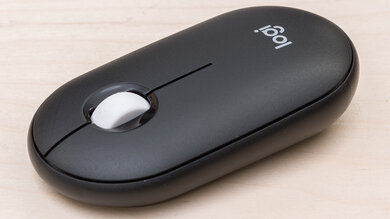
Pros

  • Supports three-device Bluetooth switching, making it ideal for multi-device setups like laptop + tablet + desktop without any dongle juggling
  • Virtually silent clicks — consistently praised by users working in offices, libraries, or quiet shared spaces where traditional click noise is a problem
  • Confirmed to work plug-and-play on Linux Mint, macOS, and Windows 11 via Bluetooth with no driver fuss
  • Extremely lightweight and compact, making it a top pick for frequent travelers or anyone who packs their peripherals daily
  • Customizable middle button via Logi Options+ allows shortcut assignment, a meaningful upgrade over the original Pebble
  • Swappable top covers are compatible between M350 and M350s, giving some degree of personalization and even parts reuse

Cons

  • Left-click button degradation is a well-documented recurring issue — multiple users report the left button becoming unresponsive within 7–12 months of heavy daily use
  • Flat, low-profile shape draws ergonomic criticism — multiple users compare the wrist strain to Apple's Magic Mouse, which is widely considered the ergonomic worst-case for mice
  • Silent clicks feel 'gummy' to some users, described as lacking tactile feedback — a real issue for those coming from clicky mice
  • Bluetooth wake latency can become a persistent daily problem on Windows 11, requiring workarounds in Device Manager power settings
  • The dongle connection (non-Unifying receiver) can fail independently of Bluetooth, leaving users stuck with only one connectivity mode
  • Logi Options+ app has app-specific settings that can silently override global button customization, making the custom button behave inconsistently across windows

The Left Click Problem Won't Go Away

Across the original M350 and now the M350s, Reddit is full of users reporting left-click failure within a year of heavy use. Logitech hasn't addressed it, and loyal fans keep buying replacements anyway because nothing else hits the same portability sweet spot.

Great Travel Mouse, Mediocre Daily Driver

Users who carry it in a bag and use it occasionally love it. Users who rely on it 8+ hours a day are the ones reporting wear, ergonomic fatigue, and connectivity quirks. The M350s is priced like a daily driver but performs best as a secondary mouse.

Linux Users Are Quietly Thriving With It

While Mac and Windows users debate ergonomics and durability, Linux Mint users report smooth out-of-the-box Bluetooth pairing with zero configuration. It's quietly one of the better plug-and-play Bluetooth mice for Linux desktops.

User Reviews (25 of 60 analyzed)

6
0
cboosterr/mac18h agonegative

Grab the MX Master, it's way better. As with any Logitech software, disable auto updates. Logi Options is pretty meh. It will try to force you to sign up so you can save your configuration.

View Original Comment
6
0
K_Click_Dr/mac18h agonegative

The ergonomics look worse than a Magic Mouse.

View Original Comment
4
0
AnimStarterr/mac18h agopositive

I use it every day, so far so good!

View Original Comment
3
0
RapperBugzapperr/mac18h agonegative

I've tried this mouse out, it is not great. The silent clicks make it feel really gummy too, like those old mac keyboards that felt like typing on wet newspaper.

View Original Comment
3
0
TheFredCainr/linuxmint18h agopositive

Yes, and very well too! I use a Pebble, an MX Anywhere 2S and a MX Master 3 and all of them are wonderful in Linux Mint.

View Original Comment
3
0
LemmysCodPiecer/linuxmint18h agopositive

I have never had a proprietary mouse not work on Linux Mint. That should be fine.

View Original Comment
3
0
jwrskr/mac18h agonegative

My hand and wrist hurt just from looking at the photo.

View Original Comment
2
0
LazaroFilmr/mac18h agonegative

It's baaaaaaad. There are $16 mice on Amazon with better ergonomics.

View Original Comment
2
0
stefanlightr/mac18h agonegative

After a year of usage it will miss clicks, so it's not for many years. I would buy better Logitech or something.

View Original Comment
2
0
jphilebizr/linuxmint18h agopositive

It works. I use a Logitech via Bluetooth on my laptop. You may need to delete and re-install the device for it to work — I had to, but could be an isolated incident.

View Original Comment
2
0
Nyls_frr/linuxmint18h agopositive

Mouse received, it works very well.

View Original Comment
2
0
SpiritOfTheVoidr/logitech18h agonegative

I had the original Pebble. The size was nice but the keys were round and too small which made typing harder and inaccurate for my finger size.

View Original Comment
2
0
Illustrious_Club2811r/logitech18h agonegative

I would like to have the combo I ordered delivered (UK) and test it for myself. However, Logitech are unable to get around to sending it to me despite taking payment immediately. And don't bother trying to contact them — they just ignore you.

View Original Comment
2
0
OldBob10r/linuxmint18h agonegative

I quit using wireless mice years ago. Wired mice seem to respond better, their batteries never go dead, and I never lose the dongle.

View Original Comment
1
0
YesterdayUpstairs828r/logitech18h agopositive

Was a Pebble 1 owner in black, and now picked up the 2 in white. I believe the only changes are on the connectivity side, but like I always say, 'if it ain't broke'...it's compact, light, sturdy, quick, accurate and has a very distinct, yet minimal clicking feedback that is both accurate and satisfying.

View Original Comment
1
0
Sorry-Ad-4521r/mac18h agopositive

It's amazing, I can't work without it.

View Original Comment
1
0
T0m_F00l3ryr/mac18h agopositive

I use it because the more flat mouse is better for packing for travel. I wouldn't really choose it as my primary mouse though.

View Original Comment
1
0
Unusual-Dog-8075r/logitech18h agonegative

I am really annoyed — I've bought two so far and each hasn't lasted me for a whole year.

View Original Comment
1
0
Scary-Independent-77r/logitech18h agonegative

The first one I bought has developed the same left-click problem. I started noticing when I was working in Photoshop. I did find that if I move my finger directly over the little piece that presses the actuator it works every time, but that's not a natural position for me. Had to replace the mouse.

View Original Comment
1
0
emaginr/logitech18h agonegative

My 2021 Pebble just died (May 2025). I dunno, that's 4 years and it's only $22 but I would expect a product to last a bit longer.

View Original Comment
1
0
Just-Acanthaceae1016r/logitech18h agonegative

Bought first one June 2022, second one April 2024 and now I think I need to buy a new one because the left click is no longer as responsive as it used to be. I keep buying the same thing because I have really small hands and regular-size mice make my wrist hurt.

View Original Comment
1
0
DwigGangr/logitech18h agopositive

I've not encountered the Bluetooth wake issue on Win11 (Dell 7610) or Android 15 (Galaxy Tab S9 FE) using my M350s. I suspect the issue is on the other user's Win11 computer's side.

View Original Comment
1
0
LiteratureCandid6094r/logitech18h agopositive

The first day of having the Pebble 2 combo, I almost returned it. But I thought I'd give it another day or two — thankfully I am very comfortable with it now.

View Original Comment
1
0
neon_overloadr/logitech18h agopositive

The M350 supports Bluetooth and Nano receiver (included) and Unifying receiver (not included). The M350s supports the same connectivity options with the addition of the Bolt receiver. The whole point of the M350 is that it supports a wide range of connectivity and is portable.

View Original Comment
1
0
kanikamaar/logitech18h agonegative

Every time I plug or unplug the receiver on any laptop, there's activity in Device Manager — devices appear and disappear normally — but it never connects to the mouse. No matter which computer I try, there's no connection. The Logitech software detects the receiver but won't pair, nothing works.

View Original Comment