Silent But Not Bulletproof
The Pro Click Mini's hushed switches are universally loved, but Reddit has accumulated enough RMA stories and button failure reports to suggest quality control is not as premium as the clicks feel.
Razer
Last Analyzed
Overall Rating
Positive Reviews
Negative Reviews
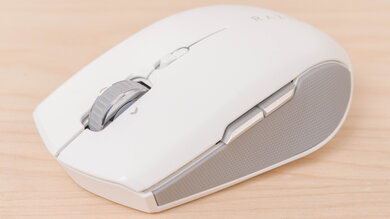
The Razer Pro Click Mini is a compact wireless productivity mouse designed for users who need silent clicks, multi-device connectivity, and gaming-grade performance in a portable form factor. Reddit sentiment is broadly positive, with users praising its silent switches, HyperSpeed 2.4GHz with 1000Hz polling rate, free-spin scroll wheel, and up to 4-device Bluetooth pairing. It's especially well-received among small-handed users and those who need a quiet office mouse that can double as a light gaming peripheral. The main recurring criticisms are its weight with two AA batteries (111g), a reported wobbly top cover on some units, and occasional hardware failures requiring RMA. It's widely compared to the Logitech MX Anywhere series, where it wins on sensor and polling rate but loses on build feel and charging convenience.
The Pro Click Mini's hushed switches are universally loved, but Reddit has accumulated enough RMA stories and button failure reports to suggest quality control is not as premium as the clicks feel.
Most quiet office mice sacrifice sensor quality — the Pro Click Mini doesn't. Its gaming-grade sensor and 1000Hz HyperSpeed wireless make it a rare dual-purpose option, though its weight with two batteries limits its ceiling for competitive play.
Despite Razer's historically Windows-centric software, multiple users confirm the Pro Click Mini works reliably on macOS via Bluetooth with side buttons functional, and third-party tools like Karabiner Elements extend its capabilities further.
It just seems like a direct competitor to the MX Anywhere, right?
View Original CommentI've used this mouse for the whole day doing computational work and I noticed that half the time the mouse is unresponsive even on 2.4GHz and 1000Hz polling rate. The mouse only works without flaws if I'm within laptop arm distance. Buttons are nice and silent for LMB and RMB, the side buttons are clicky and the wheel is extremely clicky.
View Original CommentSilent switches are IMO the best feature of this mouse for real world productivity use. I can spam clicks during meetings without drawing attention to myself.
View Original CommentBoth the MX Anywhere 3 and Pro Click Mini are small productivity mice with free-scroll and device-switching. Main differences are the Anywhere 3 has an internal rechargeable battery, and the Pro Click has tilt-scroll.
View Original CommentKind of weird your review doesn't mention one of the mouse's main advantages which is its silent switches.
View Original CommentI have tested both the Razer Pro Click Mini and the MX Anywhere and unfortunately the Razer feels horribly cheap. The top cover with the buttons moves a little from side to side which makes the mouse unusable. Nobody in any review mentioned this huge deal breaker. I went back to the MX Anywhere.
View Original CommentThe free-spin mechanism in the Pro Click Mini is a manually-operated mechanical latch, not electronic like the Basilisk. The electronic actuator takes too much instantaneous current to reliably work on AA batteries.
View Original CommentPricing appears competitive compared to MX Anywhere 3, which Logitech ruined by removing features. The only thing bothering me is the lack of a wired USB option, but if it doesn't need charging, then I guess that's not all that necessary.
View Original CommentEnergizer Ultimate Lithium Battery solves the weight issue. A pair of those weigh about 30g — only 5g heavier than one alkaline battery. For me the real issue of the Pro Click Mini is it comes only in one color, and I hate to see white peripherals get dirty in use.
View Original CommentThe main difference is Pro Click Mini having a gaming sensor plus HyperSpeed wireless and not some crappy 125Hz wireless with laser sensor. Also 5 built-in profiles — MX has none and requires software.
View Original CommentSlightly different? It has PTFE feet, 10 grams lighter, silent switches, better sensor, HyperSpeed instead of AFT, upgraded scroll wheel with a switch mode and left-right clicking, works with only one battery. It's not even Atheris v2, it's Atheris v3 — so many upgrades.
View Original CommentThe Atheris used to be half-productivity half-gaming mouse. With the Pro Click Mini they split that concept — Orochi V2 for gaming on the go, Pro Click Mini for productivity on the go.
View Original CommentThanks for this review. Straight to the point and no bullshit. Exactly what I'm looking for!
View Original CommentIt's an office mouse, not really made to be lightweight. That's why they designed it the way they did — you can't fit two batteries in the Orochi on purpose so it doesn't mess with weight balance.
View Original CommentI had to RMA it, first time in like 15 years I've ever had to RMA anything. I liked the weight, loved how it felt in my hands, and loved the completely silent clicks but nothing worked. The cursor very very slowly moved to the top left of the screen, clicks didn't register, only the mouse wheel worked. Tried everything (updating, reinstall drivers, rebooting, multiple batteries, etc).
View Original CommentHave been using the Pro Click Mini for about 2 years and absolutely love it. I have small hands so it fits me perfectly. Been looking in the market for an alternative and no other mouse comes close to it except the Logitech G604, which might fit your grip style as it is a larger mouse but is a much older mouse.
View Original CommentI recently came across the Keychron M6 mouse as an alternative to the Pro Click Mini. It has the MX Master series' shape but slightly smaller, infinite scroll wheel, 1000Hz polling rate, thumb wheel, scroll wheel tilt, 3-mode connectivity, 26K DPI, and Huano 80M click switches.
View Original CommentAs a self-proclaimed mouse nerd, this gaming mouse was my favorite for over six months. It's an excellent mouse in terms of specs, with a top-notch sensor and connectivity. The switches and button design make single and spam clicking enjoyable, and once you experience the silent mode, you'll never want to go back. Additionally, the smaller size and shape of the mouse feel fantastic.
View Original CommentI really love it. The clicks feel so premium and the mouse glides super well. The mouse is noticeably heavier than the orochi and I mean WAY heavier. So if you're gonna play games with it you might need to turn up the DPI. The side mouse wheel click is amazing, I use it pretty much always when I play games.
View Original CommentI have had this mouse for 10 months now, and I'm currently experiencing left-click button misfiring. I use it for work, and it makes me go crazy. It works most of the time, but sometimes I need to apply a lot of pressure on the button for it to function.
View Original CommentThe left-click misfiring is usually caused by the pad under the button having moved and needing to be repositioned. It should rest above the switch's bump.
View Original CommentI compared the Razer Pro Click Mini and Logitech Anywhere 3S. Between the two I would still recommend Logitech — it's quieter.
View Original CommentThe scroll wheel is great — it gives you an option between freewheel and stepped which can be changed at a click of a button. It ended up surprisingly being my favorite feature of the mouse, and one I missed in the other mice I tested.
View Original CommentI use Karabiner Elements to swipe between desktops using the side buttons and yes they work on macOS using Bluetooth, but the side buttons are not silent.
View Original CommentThe Pro Click Mini has on-board memory to save macros and customizations, but you have to first make the customization using the Razer Synapse software on another computer. On-board memory is usually a gaming feature so not all productivity mice have them.
View Original CommentJust got the Razer Pro Click Mini and my favourite things are the small form factor, the free spin wheel and how light it is.
View Original CommentI love the Pro Click Mini, but I noticed you always need a mousepad. Without a mousepad the lift-off distance is really high for competitive FPS.
View Original CommentI have the Pro Click Mini, Basilisk Mobile, Cobra Pro, Orochi V2, G304 and Razer Deathadder V3 Pro Wired. The click mini is comfortable with best silent clicks and is also good for gaming due to 1000Hz polling.
View Original CommentI have the Pro Click Mini and it is absolutely excellent. Perfect size, light, and its two connectivity modes (Bluetooth or USB dongle) are super practical. Disappointed by Logitech abandoning the MX370, I thought I'd never find a decent portable mouse until I found this Razer Pro Click Mini which is even better — magnetic cover, great battery life, dual connection and ultra-silent clicks.
View Original CommentMy friend loves its size because he has a claw grip. He plays Cyberpunk and Dota 2 with it.
View Original CommentIt takes two AA batteries and gets a bit on the heavier side, but it also works with only one battery. Battery life depends on the battery — I've had some run out in 100 hours but now I have a quality one that's lasted a couple hundred hours and is nowhere near running out. It works really well as both a gaming mouse and an office mouse.
View Original CommentI've used the Pro Click Mini multiple hours every day for over a year. Haven't noticed any color change on the white plastic. The occasional grease stains you get while using any mouse are easily cleaned off. The skates are a tiny bit scratched but that's due to my mousepad.
View Original CommentAfter my Basilisk died, this is my go-to.
View Original CommentPro Click Mini is silent switches, quietest mouse, superb battery life, uses batteries so quick to recharge. Cons: it's white so would need to wrap it, one less button than the Basilisk, no RGB, super heavy — but can use one less battery to help.
View Original CommentI still use an Atheris when I'm travelling and like it a lot. It's a little creaky since it's so old, but really the only feature I wish it had was a rechargeable battery instead of AAs. You should have a really good time with the Pro Click Mini.
View Original CommentThe Pro Click Mini will work and be silent too.
View Original CommentI personally use the Basilisk Mobile more often than not with my Legion Go. For that use case I'd pick Basilisk Mobile — but it also depends on your hand size.
View Original CommentFirst time hearing about the Basilisk Mobile but the Basilisk V3 Pro is my ultimate work and gaming mouse now that they finally added Mac support.
View Original CommentThat's literally just a very slightly different Atheris. C'mon Razer, dragging your feet on the mini wireless with these re-re-remakes of old mice.
View Original CommentThe Razer Pro Click Mini is a bit narrower in profile than the Logitech Anywhere 3S.
View Original CommentThe side mounted buttons are incredibly hard to reach.
View Original Comment