AOC AOC 24G4XE
Monitors

AOC

AOC 24G4XE Reddit Verdict: Fast But Flawed

Mar 2026

Last Analyzed

6/10

Overall Rating

21

Positive Reviews

21

Negative Reviews

Summary

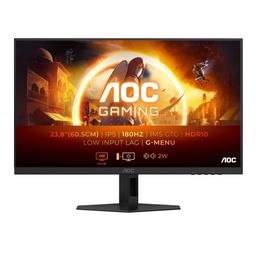
The AOC 24G4XE is a budget-friendly 24-inch 1080p fast IPS gaming monitor that punches above its price class in terms of raw speed, but divides Reddit opinion on panel consistency and color accuracy. At around $65–$90 depending on region, it's widely praised as a solid value pick for casual and competitive gaming, especially given its 180Hz refresh rate. However, a meaningful portion of owners report problematic viewing angles that rival TN panels, a pinkish or warm color cast out of the box that requires ICC profile tweaking or manual RGB adjustments, and a recurring concern about panel longevity — with some users in the AOC 24G4 lineup reporting horizontal lines developing after several months of use. The XE suffix simply denotes the non-adjustable stand version of the 24G4X, with identical panel specs. It's best suited for budget-conscious gamers who prioritize frame rate over color perfection and are willing to spend time on calibration.
Pros

  • 180Hz refresh rate at under $90 makes it one of the fastest budget 1080p IPS monitors available, outpacing many older 144Hz TN panels in image quality while keeping similar motion speed
  • Fast IPS panel delivers noticeably better brightness and color depth than competing TN options at the same price — users switching from TN report a clear upgrade in visual quality
  • G-Sync compatible and AMD FreeSync support works reliably over both HDMI 2.0 and DisplayPort, with users confirming 180Hz achievable over HDMI
  • Color accuracy issues are largely fixable via ICC profile from AOC's website or manual RGB calibration (50/48/44 with gamma 2.4 is a widely recommended starting point in community threads)
  • VESA mount support available via a hidden panel on the rear, and the monitor holds up well over months of daily use for the majority of owners who don't hit the panel lottery issue
  • Solid value for general productivity and 3D modeling/content work beyond gaming — users report low eye strain for 2-4 hour sessions

Cons

  • Viewing angles are a serious and recurring complaint — multiple users describe edge blurriness and color shift even when seated directly in front, with some calling it worse than TN in practice
  • Out-of-box color calibration is noticeably off, with whites appearing pinkish and deep blues shifting toward purple, particularly on the DCI-P3 wide gamut mode when viewing sRGB content
  • Panel reliability is a documented concern across the AOC 24G4 lineup: multiple users report horizontal lines developing after 8–18 months of use, with at least one user receiving two replacement units that both failed
  • The 24G4XE has a fixed non-adjustable stand with tilt only — no height or pivot adjustment — which limits ergonomic setup, especially for shorter users
  • No built-in speakers, requiring headphones or an external speaker for audio
  • OSD navigation buttons are nearly invisible against the plastic chassis, making menu adjustments frustrating to perform

The Calibration Tax Is Real

Almost every satisfied owner mentions going through the same ritual: download the ICC profile from AOC's site, dial in 50/48/44 RGB with gamma 2.4, and only then does the monitor start looking right. That's a lot of homework for a budget display.

180Hz for Under $90 — But Panel Lottery Exists

Reddit threads are split between owners who've used theirs for nearly a year with zero issues and those who got units with blurry edges and color shift severe enough to return. The value proposition is real, but so is the variance.

AOC's Horizontal Line Problem Haunts This Lineup

While most complaints target the older 24G2 series, the 24G4 family isn't immune — users are already reporting panel failures after less than a year. Whether AOC has truly fixed the issue or just shifted it downstream remains an open question on Reddit.

User Reviews (42 of 159 analyzed)

3
0
CrazyMarzipan9031r/buildapcmonitors13d agopositive

I just bought the 24G4E and I remember reading your article 2 days ago since I care a lot about the colors because I do color grading and photo editing beside gaming and when I just turned on the monitor I found what you said true — the deep blues were kinda reddish/pinkish but I did fix this issue with 2 steps: first step I went to the AOC website to download the ICC profile.

View Original Comment
3
0
PastRiver8899r/Zowie13d agopositive

The Zowie xl2411k will have better motion clarity, the AOC hugely better image quality — brightness and colors. You should also note that DyAc on the xl2411k is only really efficient in a dark room because the panel gets very dark with strobing.

View Original Comment
3
0
Ananas_boir/Monitors13d agonegative

I saw a bit of IPS glow and backlight bleed so I was just starting to overthink it a bit. I was also worried that I might have caused it when I tried to adjust the tilt — the tilt adjustment is so tough that when I tried tilting it forward the monitor made a bit of a squeaking noise that scared me.

View Original Comment
2
0
nyanproblemr/Monitors13d agonegative

The monitor is good overall except for its bad viewing angle. The color looks washed out when viewing it from the side.

View Original Comment
2
0
ryanfrogzr/Monitors13d agonegative

I got the curved version recently to replace my two-year-old model which was being overtaken by horizontal lines. The colors are quite good, but the viewing angles are horrendous. Gotta be dead center perfect height or the screen starts to get washed out — easier said than done, especially with the non-adjustable base.

View Original Comment
2
0
1nsertcreativenam3r/Monitors13d agopositive

The lack of speaker is getting annoying. I need to use a headphone or rely on my laptop because I don't have an external speaker. I wished I spent a bit more to get the non-E version to adjust the height. Very rarely, text fringing on white background websites happened. Other than these small issues, it's aight.

View Original Comment
2
0
Hectarear/Monitors13d agonegative

I was considering this monitor as my next purchase, but read some reviews here on the sub and on Best Buy, and this model seems to have defective panels. They all describe the exact same problem: usually starts to show horizontal lines after a few months.

View Original Comment
2
0
ddeeaasszr/Zowie13d agonegative

I'm kinda in the middle because I heard AOC has bad colors but I'm not sure.

View Original Comment
2
0
Balrogosr/buildapcmonitors13d agopositive

I am on the AOC website — both 24G4 and 24G4E are 1ms GTG and 0.5ms MPRT, which are not true anyway. The difference is just the stand they sit on. I bought the XE a few days ago.

View Original Comment
2
0
Felahliirr/Monitors13d agopositive

I'm now very much considering this monitor after finding out it has VESA mount holes behind the circular cover in the middle.

View Original Comment
2
0
Financial_Listen_406r/Monitors13d agonegative

Will this monitor cause eye strain if it's being used for long hour coding or text reading?

View Original Comment
2
0
Khorvairr/Monitors13d agonegative

I looked at HDR, saw it looked terrible, and then never touched the settings again. What settings do you use to get the best look?

View Original Comment
1
0
_chickE_r/buildapcmonitors13d agonegative

Colors are wack even after playing with the settings, the white is indeed pinkish. The biggest rage-inducing thing for which I'm returning the monitor are the horrible viewing angles. It's somewhat akin to a TN panel or maybe even worse than that. Even when looking at the monitor straight ahead at desk distance, the edges are very noticeably blurry, super dim with washed out colors — not an exaggeration.

View Original Comment
1
0
Smart-Disaster-858r/buildapcmonitors13d agonegative

Colors are ok only when looking straight at it, slight tilt of head and they dim significantly. I've read so much about IPS panels' superior viewing angles but this is worse than my old TN panel.

View Original Comment
1
0
Ackroshkar/buildapcmonitors13d agonegative

After a few hours of tweaking image settings and comparing to my old monitor I stopped at shadow control: 40, gamma: 1.8, brightness: 100, color temp: normal, everything else default / turned off. But it's definitely screwed on colors.

View Original Comment
1
0
roideusr/buildapcmonitors13d agonegative

One of the downsides of this monitor is how bright it is even at lowest brightness, causes eye strain for me — TN and VA don't, after years of use. Also, my monitor does have blurry/less contrast edges. I use two other monitors side by side, one TN and one VA, and I have a much easier time reading text/code in both of them; in this one the text seems hard to read and not as crisp.

View Original Comment
1
0
SappigeKiwisr/buildapcmonitors13d agonegative

I've gotten this monitor and in my opinion it has one big problem: whenever I'm playing a darker game, I can't help but stress my eyes because the contrast and blacks are not good at all. I used to play games on TV (console) but now using this monitor, games in darker environments look noticeably worse. Although people say they have issues with viewing angles and whites, I didn't seem to have those problems.

View Original Comment
1
0
CsrRolir/buildapcmonitors13d agopositive

Having used it for the last 6 months, the viewing angles are really not bad. It's not world-beating, but it is definitely usable once you apply the ICC profile to it.

View Original Comment
1
0
HenrySteinwayr/buildapcmonitors13d agopositive

Try not to set brightness to 100 — you'll get better angles and colors on 50. That's fair to all AOC monitors nowadays.

View Original Comment
1
0
KosherWareWareXr/Monitors13d agonegative

I agree with its bad viewing angle, the center of the screen looks good but the edges look blurry to me. Mine has a red tint in it.

View Original Comment
1
0
5huusuir/Monitors13d agonegative

Just had the horizontal lines issue after 8 months. Sent it for warranty last week and it got fixed today. I just hope it's not a recurring issue, but I wouldn't complain much at this price point.

View Original Comment
1
0
IbDX_p9r/Monitors13d agonegative

I got my monitor in February and had to RMA it in August because of panel failure — horizontal lines all over the screen. I got a new one back then. Yesterday the new one got the same failure too and had to RMA again. I can't tell if it's bad luck or if the panels of these models are defective.

View Original Comment
1
0
kirabananzar/Monitors13d agonegative

Two of them died on me — one 24G2 165Hz that lasted from September 2024 to September 2025 until it started developing horizontal lines. It started with one and then spread to the whole panel after a week. The replacement got the same issue after 3 months of use. I wouldn't suggest buying them; buy literally any other brand of monitor since there's tons of evidence something is wrong.

View Original Comment
1
0
Mobile-Shower6651r/Monitors13d agonegative

Just bought mine. But now seeing many posts that they get damaged easily.

View Original Comment
1
0
Snoo76312r/Monitors13d agonegative

Yes, this is the backlight bleeding through and is a normal characteristic of this type of panel — LCD panels without local dimming.

View Original Comment
1
0
Purple-Atolmr/Monitors13d agopositive

Wow, a 180Hz monitor for 65 bucks and I bet it curbstomps older 144Hz TNs. We have come so far.

View Original Comment
1
0
CAMl117r/Monitors13d agopositive

It's beautiful. Buy it, these deals usually go fast.

View Original Comment
1
0
JoseluPrzr/Monitors13d agopositive

For 65 bucks I'm not expecting a lot. Cheap enough to try it at least.

View Original Comment
1
0
General-Joke-4556r/Monitors13d agonegative

That white spot you see from an angle combined with dark dots in the center usually points to a panel-level issue — sub-pixel failure or a small diffuser defect — not cable or GPU related. Before deciding on RMA, I'd recommend running proper solid color and gradient tests.

View Original Comment
1
0
darkcoder123r/buildapcmonitors13d agopositive

It's been 20 days now, I'm using this monitor. It is good so far, worth it in this price bracket.

View Original Comment
1
0
WestPossibility1705r/buildapcmonitors13d agopositive

It's the same exact thing with a different stand.

View Original Comment
1
0
Mex_Penguinr/buildapcmonitors13d agopositive

I was so worried I'd made a horrible mistake buying this monitor, but thanks to the ICC profile fix I have no problems. You're a lifesaver.

View Original Comment
1
0
Berkellr/buildapcmonitors13d agopositive

From one review I watched, the best solution is to change settings to 50/48/44 and change gamma to 2.4 because 2.2 is noticeably brighter. I thought 2.2 felt somehow off and tried 2.4 myself but thought it might be wrong — turned out to be pretty good.

View Original Comment
1
0
CrazyMarzipan9031r/buildapcmonitors13d agopositive

Color Gamut sRGB, Overdrive Medium, Brightness 100 — that's all I changed and it looks perfect.

View Original Comment
1
0
1A_M11r/Monitors13d agopositive

In the official specs the color ratios are pretty good like Adobe RGB, NTSC, P3 — but many reviewers say it has bad default ratios. The bleeding in black is normal, no severe issue from what I've seen.

View Original Comment
1
0
Visible-Touch-8178r/buildapcmonitors13d agopositive

I am planning to buy this same monitor and I just want to know how it has been for you so far. I also care about the colors and do photo editing and colour grading.

View Original Comment
1
0
Diligent_Author_1724r/Monitors13d agonegative

Did the warranty replacement unit get repaired or replaced when sent in for the horizontal lines issue?

View Original Comment
1
0
Bronyconfigr/Monitors13d agonegative

The horizontal line issue also occurred to me. I want to ask how the warranty process goes, though it might be different for each country.

View Original Comment
1
0
Interesting-Care502r/Monitors13d agopositive

Still no issues after all this time with yours?

View Original Comment
1
0
gelu83r/buildapcmonitors13d agopositive

This thread was more useful than the whole internet! Thank you ALL of you!

View Original Comment
1
0
Equivalent-Fly-316r/Monitors13d agopositive

Looking to get this monitor or the 27G4. Just wanted to ask if you have experienced any issues with your monitor.

View Original Comment
1
0
Dangerous-Material72r/Monitors13d agopositive

If you're using an old GPU it causes the 120Hz cap problem. If you're using an old AMD GPU you can try the pixel clock patcher. I have an old laptop and pixel clock patcher fixed it for me.

View Original Comment