AOC AOC Agon AG493UCX
Monitors

AOC

AOC Agon AG493UCX: What Real Users Say After Years of Ownership

Mar 2026

Last Analyzed

7/10

Overall Rating

21

Positive Reviews

20

Negative Reviews

Summary

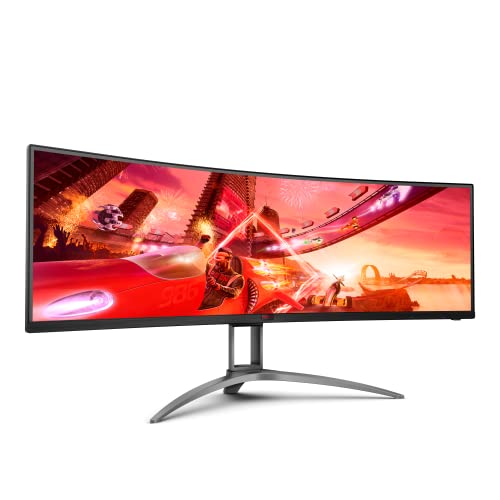
The AOC Agon AG493UCX is a 49-inch 32:9 super-ultrawide monitor that generates mostly positive sentiment from Reddit owners, with users consistently praising its immersive productivity and gaming experience at a competitive price point. It appeals most to productivity-focused users who want to replace dual-monitor setups, sim racers, and casual gamers who prioritize screen real estate over bleeding-edge specs. The 4-year zero dead pixel warranty is a standout selling point that frequently tips purchase decisions away from competitors like the Samsung CRG9. That said, the VA panel brings the usual caveats around ghosting and black smearing, and the PBP (Picture-by-Picture) mode is widely criticized for broken color calibration and disabled picture settings. Overall, owners who use it as a single-input gaming or productivity monitor tend to be satisfied, while those hoping to leverage its multi-input features run into frustrating limitations.
Pros

  • 4-year warranty with zero dead pixel guarantee is a major differentiator — frequently cited as the deciding factor over the Samsung CRG9 which has a notoriously vague warranty policy
  • Immersive 5120x1440 resolution across 49 inches makes it ideal for sim racing, flight sims, and productivity workflows that benefit from panoramic screen space
  • Built-in KVM switch with USB-C support allows users to share keyboard and mouse between a desktop and laptop from a single monitor hub, though it works best with USB-C + DP combo rather than dual DP inputs
  • FreeSync / G-Sync Compatible support works reliably for most users with NVIDIA GPUs despite not being on the official certification list
  • Strong build quality with a premium stainless steel stand noted favorably even when compared side-by-side with the Samsung CRG9
  • Includes a remote control for OSD navigation, a convenience no competitor in this segment offers

Cons

  • PBP mode has a well-documented color mismatch issue — one side renders warm, the other cool — with no fix available through monitor settings or software; multiple users returned the monitor because of this
  • VA panel ghosting and black smearing are present, particularly noticeable in dark scenes; users sensitive to this should look at IPS alternatives like the LG 38GN950
  • USB-C port on the original model only supports DP 1.2, capping resolution at lower than native when used as a single cable solution — full 5120x1440 requires a dedicated DisplayPort 1.4 connection
  • FreeSync flickering below 48fps in borderless/windowed mode is a known bug specific to AOC displays that Nvidia has not patched for this model
  • HDR 400 implementation is significantly weaker than the Samsung CRG9's HDR 1000, making it a poor choice for HDR-focused use cases
  • 1800R curvature is considered insufficient for the 49-inch panel size by users coming from the Samsung G9's 1000R — the screen edges can feel flat at normal viewing distances

The KVM Switch That Actually Works — With the Right Cable

Dozens of threads document confusion around the AG493UCX's KVM functionality. The trick: it only works reliably when pairing a USB-C input with a DisplayPort input — dual DP setups leave the KVM useless. Once users crack the config, most are satisfied.

AOC's Warranty Is Doing Heavy Lifting in This Price Range

At a lower price than the Samsung CRG9, the AG493UCX's 4-year zero dead pixel guarantee regularly converts undecided buyers. Multiple Reddit users explicitly cancelled CRG9 orders after factoring in Samsung's opaque warranty policy.

Don't Buy This for PBP — Buy It Despite PBP

The Picture-by-Picture mode is broken enough that several users returned the monitor specifically because of it. Color temperatures mismatch between the two inputs, picture settings are locked in PBP mode, and no software fix exists. As a single-input display, it's great. As a dual-computer workstation replacement, look elsewhere.

User Reviews (41 of 142 analyzed)

18
0
Mr_Joshyr/buildapcsales13d agopositive

Can many people actually tell the difference between 120hz and 144hz? Unless you're playing competitively or staring at your fps I doubt the majority of people could tell. 30 to 60 absolutely. 60 to 120 absolutely. 120 to 144 is starting to split hairs I feel. Super ultrawides are the size of two monitors, not three.

View Original Comment
16
0
sprinklesandlover/buildapcsales13d agonegative

Your Gigabyte has 144hz refresh rate. If you play FPS games, its a downgrade. Otherwise, personally 49" feels excessive unless you like working with 3 monitors.

View Original Comment
9
0
AldermanAlr/buildapcsales13d agonegative

As a Samsung G9 owner my opinion on this would be that the curve is not enough. The reason the G9 works so well is because of the 1000r curve. It pretty much just fits to your eyes. 1800r is not enough.

View Original Comment
5
0
FyveAlyver/ultrawidemasterrace13d agopositive

Issue solved. With the help of another poster - turns out the KVM switch works great. Plug the keyboard and mouse into the USB on back of the monitor. Then, plug Desktop into DP 2 input and laptop into USB C input. In OSD Setup for monitor select USB to 2.0 or 3.2Gen 1 and then put USB Selection to Auto. Then, when you use the monitor's remote control to quick change from DP 2 input to USB C input, the keyboard and mouse switch automatically.

View Original Comment
5
0
zen313r/buildapcsales13d agonegative

Owned this since released December 2019 up until August 2020. Traded it out for the LG 38GN950G. Upsides: Great 21:9 monitor, with a remote! Allowed PBP. Has a USBC powered port and USB hub. Downsides: it's a VA panel. Only 120Hz. Also, for some reason, the on screen built in crosshair was off center by about 5 pixels. It drove me insane.

View Original Comment
3
0
baddweaponr/ultrawidemasterrace13d agopositive

So far it's been great, the build quality is really good. It can also swivel a good bit which was a nice surprise. The only complaint I have is that there is a very slight flicker at times when using freesync and being under 48fps. Shouldn't be a problem in games but it can happen at times on some desktop apps.

View Original Comment
3
0
franznr/buildapcsales13d agonegative

The only issue I have with this monitor is that when you run this as dual monitors (P in P) one side is very cool and one is warm hue. You can get very close to fixing it with their software but not from the monitor itself. As a single monitor for gaming this is great. As a monitor for work it leaves a bit to be desired.

View Original Comment
3
0
Brown_Stater/ultrawidemasterrace13d agopositive

I cancelled my CRG9 order because I just saw this monitor. Why did I cancel the CRG9 for the AOC? Sure, it's $200 less expensive, but at this price range, it's not an influential factor for me. Type-C Connection/Charging: This is why I switched. One Cable Solution. Plug it in for power, display, AND access to the monitor's USB Hub.

View Original Comment
3
0
rekit1911r/ultrawidemasterrace13d agopositive

I have both sitting on my desk and I am tasked with sending one back. I've been looking at HDR media and really anything that will show me the Samsung is a superior panel and I haven't seen it yet. In fact, the AOC has a brighter more vivid image. I am thinking this must be a setting issue, but I have gone through the settings on both extensively.

View Original Comment
2
0
xb00fx_replyr/ultrawidemasterrace13d agopositive

I use dark modes wherever possible, haven't noticed it but don't really go looking for it but I also haven't noticed it - if your eyes are susceptible to it, than I would say, get something else.

View Original Comment
2
0
SparkMasterFrag_replyr/ultrawidemasterrace13d agopositive

AOC appears to have a slightly lower quality panel, but the best warranty. I want the CRG90, but samsung's warranty policy doesn't instill the sense of quality. Anything near these prices with a single pixel issue is unacceptable in my book.

View Original Comment
2
0
vodanhr/ultrawidemasterrace13d agonegative

Just finish setting this up myself. Had to send the first one back because of a couple of dead pixels. Still trying out all the settings. So far one of the disappointing things I've found is the PbP feature which have different colors between the two and the picture settings are disabled in that mode so I can't change it.

View Original Comment
2
0
Kajukotar/buildapcsales13d agopositive

I have this monitor, owned it for over a year. I sit just around 28" away. This monitor really fills my FoV at that point. And I can turn the FoV slider way up in most games. I wish it was 1000r curve, but it's decent enough and that's really personal preference. You need a deep desk for a monitor like this.

View Original Comment
2
0
BinaryPatrickr/ultrawidemasterrace13d agopositive

The AOC AGON 49" is more similar to the Samsung CRG9 49". Both are really great as far as image quality. I stuck with Samsung purely because it was $100 cheaper and I like the OSD better.

View Original Comment
2
0
rawrspacer/ultrawidemasterrace13d agopositive

I've had one since april and am very happy with it. If a game doesn't support 32:9 you can still run full screen with black bars or play in a window, borderless if desired. I will often have a 2560x1440 running on one half borderless and discord and stuff on the other side. You simply enable gsync from within the nvidia settings and it just works.

View Original Comment
2
0
FyveAlyve_pbpr/ultrawidemasterrace13d agonegative

I have this monitor. Its great. But does anyone know how the hell to use the KVM switch? I'm trying to switch between my desktop and my surface book 2. Keyboard and mouse are in USB slots on the monitor. But I cannot get the mouse and keyboard to switch over when I go from DP 1 input to DP 2 input.

View Original Comment
2
0
FranzVzr/ultrawidemasterrace13d agonegative

The USB Type C only has DP 1.2 support. You need to use a Type C to DP 1.4 cable. So 2 cables for full 5120x1440p (if you want the KVM support) instead of 1. Not the end of the world.

View Original Comment
2
0
frightfulpotator/ultrawidemasterrace13d agonegative

They both tick a lot of boxes: ultrawide (of course), high refresh rate, built in KVM. The main issue for me that the AG493UCX (non-2) has is that the USB-C connection doesn't support the max resolution of the monitor, so it makes the KVM use case a bit hobbled.

View Original Comment
2
0
dynastes1337r/ultrawidemasterrace13d agonegative

The larger video bandwidth on the USB-C port is a pretty big thing, basically makes for the difference between DFHD and DQHD when using my work laptop. So the USB-C limitation is a real problem for those of us who want the full KVM experience.

View Original Comment
2
0
isoleetedr/simracing13d agopositive

Honestly for that price I'd just grab it, give it a try if you don't like it flip it or even return it. In my region it's priced at double that.

View Original Comment
2
0
TechnicalMacaroonr/ultrawidemasterrace13d agopositive

The 3080 can't run games at 240hz anyways so the refresh rate difference doesn't concern me. I also run my monitors super dim to reduce eye strain so the HDR 400 vs 1000 doesn't matter to me either. Mainly I want an HDR capable setup that doesn't have these issues.

View Original Comment
2
0
CoachOldTimerr/buildapcsales13d agonegative

I felt same way - I think ghosting and flickering problems are known on this one, 15+ response sometimes.

View Original Comment
1
0
whispy_snippetr/simracing13d agopositive

I have this monitor and it's been absolutely A+. Love it. Had it for three and a half years and it's still working flawlessly. Buttery smooth performance and it's actually unofficially G-Sync compatible. I run G-Sync with my NVIDIA 3070 and it's bullet proof. Highly recommend it.

View Original Comment
1
0
xb00fxr/ultrawidemasterrace13d agopositive

I have one, love it. Could justify a G9 or Neo. I mainly do productivity stuff and it's hands down the best decision I have made. For the money they are pretty great and the accidental damage warranty for a year is fantastic addition too.

View Original Comment
1
0
HuaHua_Pupr/ultrawidemasterrace13d agopositive

Happy to report that I set it up last night and I freaking love the damn thing. It definitely took some display tweaking to get it where I like it, but aside from that its a gorgeous display. I have it paired to my RTX2070 Strix Scar 17 via USB-C to DP 1.4 adapter and its running at full resolution + 120Hz.

View Original Comment
1
0
mr_jppr/simracing13d agonegative

I wouldn't recommend it. I own one and it came with 4 defective pixels. Also, there's a known issue with PBP and not matching colours. This monitor loses picture settings in PBP and one side stays on Warm profile and the other side Normal profile.

View Original Comment
1
0
SparkMasterFragr/ultrawidemasterrace13d agopositive

The AG493UCX is at the top of my list because of the warranty. It seems to be the best of the 32:9 displays unless I'm missing something. 4 years no dead pixels.

View Original Comment
1
0
cbruffin121r/ultrawidemasterrace13d agopositive

I just got this today at Microcenter. Looks freaking amazing, colors are great, uniform black levels / almost no backlight bleed, no dead pixels, great build quality, great packaging.

View Original Comment
1
0
Terux94r/buildapcsales13d agopositive

Been running this monitor for over a year now with a 2080TI, love it.

View Original Comment
1
0
chromiumlolr/buildapcsales13d agonegative

It's probably fine because it's only 120Hz. I tried the AOC 34" 144Hz monitor, and the smearing was very noticeable. The pixel transitions to/from dark colors can't keep up with the higher refresh rates, which presents as smearing/ghosting. Response times are good for about 100Hz true refresh rate on most VA panels.

View Original Comment
1
0
CardMeHDr/buildapcsales13d agonegative

It's not the best but it's not the worst I've seen. If you're sensitive to ghosting you probably won't be happy with this monitor.

View Original Comment
1
0
gperson2r/ultrawidemasterrace13d agopositive

I have the AOC, I've had zero issues whatsoever (first panel was DOA though so buy from someplace you can exchange with easily).

View Original Comment
1
0
masterpiner/ultrawidemasterrace13d agonegative

Have had one for about 4 months, running it off an RTX3080. The GSYNC compatible support is good, but like a few other AOC FreeSync displays they exhibit 'flickering' when your game is running below 120fps if your game is borderless/windowed. Doesn't happen when running fullscreen. This behavior on other AOC monitors have been fixed by nvidia driver updates but the 49 is yet to get the treatment.

View Original Comment
1
0
bmac92r/ultrawidemasterrace13d agonegative

I was unable to solve these issues, and it's what ultimately made me return it. The PbP options were so lackluster and bothersome that the monitor didn't justify the premium over a standard ultrawide. I returned it and purchased their 34" 21:9 ultrawide instead.

View Original Comment
1
0
scgt1r/buildapcsales13d agonegative

Haven't noticed any ghosting yet but haven't tossed a ton at it either. Using Gsync with a 1080FTW. I will say the KVM is completely worthless if you're using two desktops and intend both to be connected via DP 1.4. KVM flat out does nothing. Switches over and all you have is a black screen.

View Original Comment
1
0
ConsiderationDismal2r/ultrawidemasterrace13d agonegative

To get the 5120 x 1440 resolution, you MUST use the display port on the monitor and video output device. Even if you want to run just 60hz, it is unsupported. Neither the USB or USB C display port will work.

View Original Comment
1
0
cleverestxr/ultrawidemasterrace13d agopositive

Been using this display with a desktop PC for a couple of years. LOVE IT, but I am changing it up this week to a 42" OLED 4k display soon. Losing the width will suck, but getting that vertical 4k res will be nicer I hope, not to mention OLED.

View Original Comment
1
0
rekit1911_returnr/ultrawidemasterrace13d agopositive

I purchased the AOC Agon over the CRG9 and I am contemplating returning it for the CRG9 - however, the AOC is beautiful, no dead pixels, it's brighter than I had hoped for and it was incredibly well packaged. I love the monitor, but with the CRG9 you have a much brighter display.

View Original Comment
1
0
Sharpevilr/ultrawidemasterrace13d agonegative

Not interested in plunking down that kind of cash without an extended warranty.

View Original Comment
1
0
cerevisaphile87_colorr/ultrawidemasterrace13d agonegative

Same source mirrored for both sides yields a different temperature setting. So we know it's not the computer settings doing it.

View Original Comment
1
0
Patient-Techr/ultrawidemasterrace13d agonegative

I had some issues going through an HDMI switch. My screen would go black in some areas and flicker. When I went right to the video card (both HDMI and Display Port) it worked fine. There's so many pixels you'll see issues if the lines aren't clean.

View Original Comment