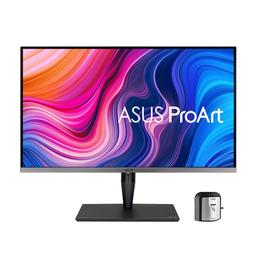
Asus Asus ProArt Display PA32UCG-K
Monitors

Asus

Asus PA32UCG-K: Real Users Split on FALD & QC Issues

Mar 2026

Last Analyzed

6/10

Overall Rating

7

Positive Reviews

24

Negative Reviews

Summary

The Asus ProArt Display PA32UCG-K is a 32-inch 4K mini-LED monitor aimed squarely at content creators and professionals who need accurate color reproduction, high peak brightness, and wide color gamut support. Reddit sentiment is genuinely mixed — users who need it for photo/video editing or HDR color grading tend to appreciate its color accuracy and Adobe RGB coverage, but many others feel let down by persistent QC problems, slow panel response, and a FALD implementation that struggles to justify the premium price. It's a niche tool that earns its place in serious creative workflows, but only when you get a unit without defects — and that's far from guaranteed.
Pros

  • Exceptional color accuracy with near-perfect Adobe RGB, DCI-P3, and Rec.2020 coverage, making it one of the most color-accurate desktop monitors available at its price tier
  • 1600 nits peak brightness with VESA DisplayHDR 1400 certification gives it real HDR headroom — useful for professionals mastering HDR content without spending $25k+ on reference monitors
  • 32-inch 4K IPS panel at 120Hz over Thunderbolt/DisplayPort allows macOS and Windows users to run at 100% scaling without squinting, a meaningful real-world advantage
  • Ships with an X-Rite i1 Display Pro colorimeter for panel uniformity calibration, and ASUS offers a guaranteed pixel warranty when purchased new from authorized retailers
  • Supports Dolby Vision, HLG, and HDR10 with multiple calibrated presets (sRGB, Adobe RGB, DCI-P3, Rec.2020) that users report are accurate out of the box

Cons

  • QC is a well-documented disaster — multiple users reported having to exchange units 2-3 times due to dead pixels, bad uniformity, or severe IPS glow before getting an acceptable panel
  • FALD performance is widely criticized: 1152 local dimming zones produce noticeable bloom and slow dimming transitions, especially with cursor movement on dark backgrounds, making dynamic dimming nearly unusable for many owners
  • Panel response time is slow — users note it misses BIOS POST screens on DisplayPort wake-up and feels sluggish compared to competitors; not suitable for gaming or fast content
  • Dolby Vision runs at 8-bit color over HDMI 2.1 at 120Hz due to bandwidth limitations, which undermines one of the monitor's headline features for serious HDR work
  • At $3,000–$5,000, alternatives like the KTC M32P10 offer higher brightness, faster panels, and more Hz at a lower price; professional colorists note streaming platforms won't accept content graded on consumer-tier displays regardless

The FALD Problem Nobody Warned You About

Despite 1152 local dimming zones, owners consistently report bloom that's slow and distracting — especially during desktop use with cursor movement on dark backgrounds. Many end up disabling dynamic dimming entirely.

An Affordable HDR Reference Monitor — With Catches

Colorists exploring the PA32UCG-K as a budget path to HDR mastering get pushback from Reddit pros: streaming platforms won't accept content graded on a consumer display, and 85% Rec.2020 coverage falls short of true reference spec.

macOS Users Report a Surprisingly Smooth Experience

Running at 120Hz in Adobe RGB over Thunderbolt has worked well for long-term Mac users, though a macOS update silently dropped it to 100Hz for some — fixable with BetterDisplay, but annoying for a $3k+ monitor.

User Reviews (31 of 74 analyzed)

21
0
_GlitchInTheVoidr/Monitors13d agonegative

Linus is totally not getting them cherry picked review samples /s. I don't want 4K MiniLED, I want 1440p 144hz+ OLED.

View Original Comment
9
0
mochili96r/Monitors13d agopositive

It's not meant for the average consumer. It would be bullshit I guess if you're just gaming on it, but that's not what this product was made for — it's for professionals that are making HDR content.

View Original Comment
9
0
_FlyingWhalesr/Monitors13d agonegative

This is the king of spec-war bullshit. What are you reasonably going to achieve with 1600nits 12bpc on an LCD? Unless you are using it in an insanely bright room there is no benefit at this contrast ratio.

View Original Comment
5
0
Soulshot96r/Monitors13d agopositive

It's a professional display that competes with the Pro Display XDR, which is the same price, doesn't work for shit on Windows, has like half the zones and doesn't come with a fucking stand. The price isn't weird for what it is, unfortunately.

View Original Comment
4
0
PTLover/Monitors13d agonegative

What is the input lag? What is the FALD delay? Those are the two questions people care about!

View Original Comment
3
0
lookingtocolorr/colorists13d agonegative

I think the main thing the higher cost monitors will have is better uniformity and accuracy when calibrating. Seems to be an issue that pops up with all these budget HDR 'reference' monitors. Might get pretty close to the expensive ones but will quickly suck if the monitor needs to be calibrated every month and can only be viewed at certain angles.

View Original Comment
3
0
qiuboujunr/colorists13d agonegative

I just don't see the point. None of the streaming services that support HDR would even accept content graded on an Asus display. And lower tier content don't even ask for HDR anyway?

View Original Comment
3
0
dizietemblessr/Monitors13d agonegative

That's barely a review though, no stats at all to go along with the statements. I'm not even sure how statements like 'While for gaming purists, the input lag is probably more than they would ideally like' are supposed to inform a purchasing decision. What is the input lag? I would take all TechRadar reviews with a bag of salt.

View Original Comment
3
0
Grin_r/colorists13d agonegative

If you are working for productions that want or need HDR, they should pay you enough to afford monitoring. There is no point in bending over backwards for nothing.

View Original Comment
2
0
CivilInvestigator416r/ASUS13d agonegative

I owned the PA32UCG for a month. The panel is slow but it has amazing color accuracy. I enjoyed watching movies on it but I couldn't justify keeping it for just that. Dolby vision is only 8-bit color on this panel.

View Original Comment
2
0
leinadseyr/ASUS13d agopositive

I've had this monitor for more than a year now. I really like it, but it's not without its quirks. I'm running macOS at 120hz in Adobe RGB mode over thunderbolt (into an OWC TB3 dock). One of the quirks is that macOS defaults the monitor to 100hz. It used to be fine at 120hz but some update had it fall back to 100hz which is quite annoying. You can change it to 120hz using BetterDisplay which works fine.

View Original Comment
2
0
No-Logic-Barrierr/ASUS13d agopositive

Colour accuracy is spot on for Photo & Video editing. It has almost no colour banding, colour and light uniformity is extremely good, guaranteed pixel warranty if it's not perfect Asus will replace (assuming you're buying brand new with receipt from a reputable retailer otherwise defaults to when the monitor was made).

View Original Comment
2
0
BrentC_333r/ASUS13d agonegative

It's the back light/dimming zones that are a problem. The dimming zones on this display are basically like 9 vertical bars that light up a vertical section of 2 inches wide. Very noticeable in full black frames. I just permanently enabled the backlights/disabled the adaptive thingy, not as irritating anymore.

View Original Comment
2
0
Faithlessness_Firmr/Monitors13d agopositive

It's an amazing monitor when it works haha. It's quite buggy sometimes losing DP signal when changing from HDR to SDR or when updating drivers, took a few resets for it to pick up a signal. Running it on HDR 24x7 it's quite an image it can produce — windows desktop looks better than SDR using PQ Rec2020 and hardclip.

View Original Comment
2
0
Trevor_Rollingr/colorists13d agonegative

Nits aren't everything. This monitor doesn't have the full gamut for Rec2020 (most don't) or even P3. I guess in the end it depends on the type of work you'll be doing but I wouldn't trust it as a reference display for professional work if you can't even see all the colours. It's definitely great to practice on and hone your skills though.

View Original Comment
2
0
CameraRickr/colorists13d agonegative

On paper, every 2nd display seems like an appropriate grading display, but the reality often looks quite a bit different. HDR means usually rec2020, no? With 85%, it basically means it's not compatible. Same with P3. And all those data but no contrast ratio.

View Original Comment
2
0
Eagleshadowr/colorists13d agopositive

Even the Eizo $30000 HDR reference monitor doesn't provide 100% DCI-P3 coverage, let alone Rec2020. It actually has near identical color gamut to the monitor OP linked (98% vs 99% P3). Rec2020 primaries are not meant to be achievable by real life hardware as they are placed at the very edge of what's perceptually visible.

View Original Comment
2
0
OnkelJuppr/Monitors13d agonegative

Get the KTC M32P10, it gets brighter and has a faster panel, same DCI-P3, more Hertz and faster.

View Original Comment
1
0
bicycle_enjoyerr/ASUS13d agonegative

Mine looks exactly the same unfortunately.

View Original Comment
1
0
Long_Meringue6079r/ASUS13d agonegative

Damn, appreciate the follow-up. Further research on lift gamma gain forums confirmed the FALD performance is disappointingly poor. Was hoping mine was just a faulty model.

View Original Comment
1
0
Jpstacularr/ASUS13d agonegative

The problem is the low native contrast + monitors have worse dimming algorithm than high end TVs due to weak processors. Which is why a 43 qn90b or 90c beats it handily with only 360 zones for instance. Even Mac displays with 2000+ zones perform worse than VA high end TVs with dimming count below 1000 zones.

View Original Comment
1
0
No-Logic-Barrier_2r/ASUS13d agonegative

My recommendation is just buy OLED if you're mainly watching movies.

View Original Comment
1
0
S_c_r_a_m_b_l_e_rr/ASUS13d agonegative

The solution was to: 1. Go to OSD/System Setup and do Reset All. 2. DDU the GPU drivers. 3. Freshly install the GPU drivers. But, god, this monitor is slow compared to PA32UCX — it completely misses the BIOS POST screen and Windows logo screen and only detects the signal when Windows is fully loaded while it is connected via the DisplayPort.

View Original Comment
1
0
n4ter/Monitors13d agonegative

There's such a thing as too bright, especially in the evening. I have to turn the brightness on this thing way down, even during the day.

View Original Comment
1
0
ISOHavenr/Monitors13d agonegative

Cons listed: Extreme wallet abuse, Very heavy, Illogical OSD controls, Cabling issues. I'll give them the OSD issue — that can be very frustrating especially when you need to use them all the time.

View Original Comment
1
0
LeonScottShawr/ASUS13d agonegative

With DisplayPort 1.4, in Dolby Vision mode it could run in 4K 10bit 60Hz, HDMI 2.1 only supports 4K 8bit 60Hz. I don't know why it doesn't support 4K 10bit 120Hz in Dolby Vision mode.

View Original Comment
1
0
TheSquidGame001r/ASUS13d agonegative

I literally just bought one and was like why is it doing this and thought it was broken. Now I see I'm not the only one — any fixes?

View Original Comment
1
0
The_Angster_Gangsterr/ASUS13d agonegative

I'm having the same issue, just bought this monitor. Did you find a fix for this in the last year, or did you move on to a different monitor?

View Original Comment
1
0
luoshuangr/Monitors13d agonegative

Are you using DP1.4 DSC? I found it very picky with the cable and no longer have the no signal after wake up issue after switching to a Club 3D cable which is well regarded.

View Original Comment
1
0
No-Logic-Barrier_hdmir/ASUS13d agopositive

In case you haven't found the solution yet — it's not a monitor issue, but just a GPU setting. Default Nvidia is 8bit limited colour range. Solution is in the Nvidia control panel: set Output colour depth to 10 or 12 Bits Per Channel, and change the Output Range from Limited to Full.

View Original Comment
1
0
StrangeMelody77r/ASUS13d agonegative

8-bit Dolby Vision means the color volume/range is clipped right? In a similar manner to the 'Limited' vs 'Full' in the NVIDIA control panel? What's the point of Dolby Vision if it is limited in colors. I'm guessing a TV might make more sense, waiting a few generations, or just sticking with the UQX — it is a fantastic monitor, my favorite so far.

View Original Comment