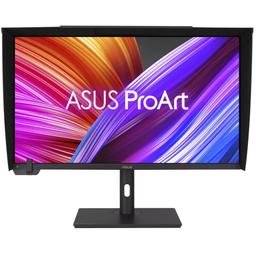
Asus Asus ProArt Display PA32UCXR
Monitors

Asus

Asus PA32UCXR: Real Users Debate Reliability vs Raw HDR Power

Mar 2026

Last Analyzed

6/10

Overall Rating

15

Positive Reviews

25

Negative Reviews

Summary

The Asus ProArt Display PA32UCXR is a high-end 32-inch 4K Mini-LED reference monitor aimed squarely at photographers, colorists, and HDR content creators who need extreme color accuracy and true HDR capability. Reddit sentiment is genuinely mixed — the display's hardware credentials are impressive, with roughly 2000 local dimming zones, 99% AdobeRGB coverage, and over 1500 nits peak brightness, making it one of the few serious alternatives to the Apple Pro Display XDR in the professional space. However, real-world ownership stories are riddled with reliability problems: recurring Thunderbolt bus failures, USB hub quirks that only work through Thunderbolt, and calibration software that doesn't function on Apple Silicon Macs undermine confidence in a monitor at this price tier. Those who make it work praise its HDR output as class-leading, but the consensus is that you're buying into a high-maintenance tool that demands patience and a compatible workflow.
Pros

  • Roughly 2000 Mini-LED local dimming zones deliver HDR contrast that users describe as class-leading among LCD monitors, with peak brightness measured above 1500 nits — significantly exceeding its 1000-nit spec
  • 99% AdobeRGB and 95% Rec.2020 color gamut coverage make it one of the widest-gamut monitors available for professional photo and video work
  • Built-in self-calibration hardware is a genuine differentiator for workflows that require regular, hardware-level color accuracy without sending the display out for service
  • Thunderbolt connectivity allows single-cable docking for laptop users, combining display signal, USB hub, and power delivery in one port
  • Widely cited as the primary competition to the Apple Pro Display XDR at a lower price, with the advantage of more local dimming zones than the XDR's ~570 zones
  • Handles professional TV frame rates including 23.98 and 23.976 fps without issues, confirmed by users using Blackmagic capture devices

Cons

  • Recurring Thunderbolt port failures reported across multiple units — some users have gone through RMA replacements only to have the same bus failure repeat within months
  • USB hub functionality is locked to Thunderbolt input only; connecting via DisplayPort 1.4 from a desktop GPU leaves the USB hub completely non-functional, a serious limitation for non-MacBook workflows
  • ProArt calibration software does not work with Apple Silicon Macs, making the built-in calibration hardware useless for a large portion of the monitor's target audience
  • HDR color profile setup on macOS is confusing and poorly documented — multiple users struggled to find a working profile, with Asus support described as unhelpful
  • Local dimming blooming is still visible in dark scenes, which makes it unsuitable as a dedicated color grading monitor according to professional colorists who compare it unfavorably to Eizo reference displays
  • 60Hz refresh rate with no variable refresh rate support limits appeal for anyone who also wants to use this display for motion-sensitive work or gaming

The Thunderbolt Port Is a Known Weak Point

Multiple owners report the same failure pattern: the upstream Thunderbolt port stops supplying power and signal after a period of use, sometimes recurring even after RMA replacement. For a monitor this expensive, users are calling for a recall.

More Dimming Zones Than the Pro Display XDR — At a Lower Price

The PA32UCXR's roughly 2000 local dimming zones against the XDR's ~570 is a genuine technical advantage that photographers and HDR creators on Reddit cite as the deciding factor when choosing between the two.

Colorists Are Split: Impressive Hardware, Frustrating Workflow

Professional colorists on r/colorists largely don't recommend it as a dedicated grading monitor — calibration quirks, local dimming inconsistency in dark scenes, and only two calibratable user modes make it a poor fit compared to Eizo, despite its impressive spec sheet.

User Reviews (40 of 96 analyzed)

40
0
carbonat38r/hardware13d agopositive

95% of Rec.2020 — holy shit. This is much bigger than the amount of dimming zones.

View Original Comment
33
0
xtrxrzrr/Monitors13d agonegative

I wish companies would stop making the consumer confuse MiniLED with the real deal MicroLED. It's quite embarrassing how they try to muddy the waters.

View Original Comment
31
0
MumrikDKr/hardware13d agopositive

1,400-nit, 1,152-zone backlight — I see why the HDR is good. The bit that many probably just want to know before clicking is that it's a 4K/60 monitor.

View Original Comment
19
0
Foritain_Techtestersr/Monitors13d agopositive

None of the current FALD displays on the market can do this brightness, and the uniformity is miles ahead of the FALD options too.

View Original Comment
15
0
dreiterr/hardware13d agonegative

Basically if they could bump it up to 120+ Hz then it would be a perfect monitor. It's still a tragedy that a great HDR monitor is $4k while you can get a great HDR TV for half that price.

View Original Comment
15
0
Soulshot96r/hardware13d agopositive

MiniLED is a type of backlight. This monitor uses a MiniLED backlight system — it is perfectly fine to call it a MiniLED monitor.

View Original Comment
10
0
guspazr/hardware13d agonegative

They're exactly the same thing as full array local dimming. The only difference is, because the LEDs are smaller, they were able to put twice as many zones as before. It's just a marketing term for full-array local dimming with smaller than usual LEDs.

View Original Comment
9
0
SonOfHonourr/hardware13d agonegative

God damn that price is steep. I was super tempted, but 4,400 AUD is just a little bit out of my price range.

View Original Comment
7
0
PhonesAddict98r/hardware13d agopositive

This should theoretically make this ProArt monitor a worthy contender to the ProDisplay XDR from Apple. 95% of the Rec.2020 is a big bold claim especially for a prosumer monitor considering it's even far less expensive than reference monitors, and coupled with the fact that the monitor has 10-bit colour for 1.07 billion possible colours, it should be a force to be reckoned with.

View Original Comment
5
0
higashiomiyar/colorists13d agonegative

Noooooooooo! If you haven't bought it already don't!!!! I have one. Sent away three times for servicing as the motherboard (replaced three times) fries and the image starts to glitch. The issue usually presents after about a month or two of use (presumably overheating) and progressively gets worse. I've been in touch with others who've had the same issue. Also, the calibration software does not work with Mac silicon.

View Original Comment
5
0
mostlikelynotarobotr/hardware13d agopositive

I don't think any TV is near 95% Rec.2020 — which is what makes this monitor's color gamut so remarkable compared to the TV alternatives people suggest.

View Original Comment
4
0
Adridulter/colorists13d agonegative

I think the main problem is that these monitors are just not used by a lot of professional colorists, so you will have a hard time to find real world data on them. The second question is why are they not used by these same professionals? There is maybe a reason that just a spec sheet can't explain. For me what makes a good reference monitor is: ability to calibrate, store it and hold it over time; perfect black and white homogeneity; support for all cinema and video frame rates; good contrast.

View Original Comment
3
0
AdmirableTurnip2245r/colorists13d agopositive

Yes, it'll handle those frame rates fine. Just note that if you opt for the Ultra Studio Monitor 3G you'll be limited to 1080p resolution on that 4K monitor.

View Original Comment
3
0
xjtianr/colorists13d agonegative

I have this monitor and wouldn't really recommend it even for hybrid usage. If you're looking for a dedicated grading monitor, this for sure ain't it. The preset modes can't be calibrated (by Calman or the ASUS software) and on my panel were pretty inaccurate out of the box (rec709, adobeRGB, and HLG presets average dE > 2). There's only 2 custom user modes that you can calibrate yourself, so if you need 2 different SDR modes, you're SoL for HDR grading.

View Original Comment
3
0
mecanr/colorists13d agonegative

I bought an Eizo CS2740 last year and it works well for me for web stuff. In Japan, Eizo has a 5 year warranty and they come to your house to pick it up, should it ever need repairing. I also know a few people who have Eizo's and have been using them for, in some cases, over 10 years.

View Original Comment
3
0
joewhitelondonr/colorists13d agonegative

Thank you so much for the warning about the motherboard failures. Really appreciate your honesty.

View Original Comment
2
0
quattroCrazyr/Monitors13d agopositive

This is a really exciting development for the creatives out there. It's essentially the monitor that I was looking to buy 2 years ago, although about 50% more expensive than I would pay. It means that we are finally getting somewhere after like 5 years of stagnation in the monitor market.

View Original Comment
2
0
bazooka_penguinr/Monitors13d agonegative

Twice the price of an OLED TV. I get it's for businesses and professionals but for everyone else it's a damn steep price.

View Original Comment
2
0
higashiomiya2r/colorists13d agonegative

I have an LG 31.5 EP950-B which has a better refresh rate — the ProArt refresh is 60hz which is visible out of the corner of your eye and very distracting when you're looking at your GUI monitor. I have no issue with the LG. Good image and reliable.

View Original Comment
2
0
Tensor3r/hardware13d agopositive

HDR brightness: 1562 nit at 75% coverage, 1356 nit at 100% coverage — NOTE: SPECCED FOR 1000 nit. HDR contrast: 1:78100. Power consumption at 1350 nit HDR: 220W. Noise at full HDR: 31db at 50cm.

View Original Comment
2
0
scarystuffr/hardware13d agonegative

220 watts?!? Yeah that will be a hard no from me.

View Original Comment
2
0
Geroluxr/Monitors13d agopositive

Looks like UCX is an updated version of UC. Depends on how important those things are to you — I don't know your situation so I have no idea if you need the differences in monitors to justify cost.

View Original Comment
2
0
Heiduckrr/colorists13d agonegative

I use the Eizo CG319x, and it's a fantastic SDR monitor — implying this ASUS is not the go-to choice for dedicated SDR grading work.

View Original Comment
2
0
fortnite_bad_nowr/hardware13d agopositive

Not everyone uses monitors for gaming — responding to criticism that the 60hz limit is a dealbreaker.

View Original Comment
1
0
bgreenstoner/Monitors13d agonegative

I ended up giving up and returning the monitor to B&H. Not only could I not find any color profile that looked remotely correct, but the USB ports kept malfunctioning. I'm just going to wait until Apple released a more affordable HDR monitor since I know it'll just work.

View Original Comment
1
0
bgreenstone2r/Monitors13d agonegative

To be honest, my entire experience with this monitor was baffling. A monitor, even an HDR one, should just be plug-and-play without having to mess with so much stuff to make it work right. I mean my MacBook Pro's 1600nit HDR display just works every time, and my iPhone 16's HDR screen just works too. This ASUS was a confusing mess. I'm so glad I got rid of it.

View Original Comment
1
0
Emma_sittingr/ASUS13d agopositive

This device is a direct, and in my awareness it is the only competitor to the Apple Pro Display XDR on the market right now, and the very niche HDR community WIDELY recommends it.

View Original Comment
1
0
L1ng0_b1ng0r/ASUS13d agonegative

I've also tried installing the ProArt calibration tool and it won't recognize any USB connections to the PC. This seems to be an oversight if the USB hub is only functional through thunderbolt since most Nvidia GPUs don't have a thunderbolt port.

View Original Comment
1
0
Asus_USAr/ASUS13d agonegative

We've tested HDMI + USB/C to USB-A cable that was supplied with the monitor. USB hub works perfectly. We also tested a Thunderbolt port without the icon, and it failed. If not using a Thunderbolt port, it will not work.

View Original Comment
1
0
S_c_r_a_m_b_l_e_rr/colorists13d agonegative

It's an HDR device in the first place. I wouldn't recommend it for color grading because of the local dimming zones. If you'll turn them off - you paid an extra for the features you are not using. If you turn them on - you can't color grade, because of blooming and backlight inconsistency. The calibration process is pretty tricky too.

View Original Comment
1
0
anakinmegatronr/mac13d agopositive

I will choose that Asus, because it is newest, then color accuracy less than 1 delta, AdobeRGB 99%, miniled with 2000 zones, Thunderbolt port, built self calibration, etc. XDR is most expensive, but is not the best for photographers and editors.

View Original Comment
1
0
Medovejr/mac13d agopositive

I want to buy some display that is on par with the Apple silicon MBP display, which has 2554 local dimming zones. I cannot find any solid comparison between the two and I am afraid that a Pro XDR display would have too much perceivable blooming.

View Original Comment
1
0
TexasAquaholicr/Monitors13d agonegative

I purchased one a couple months ago. Just went to post process photos using Lightroom in HDR mode for the first time and there are problems never experienced before with a previous SDR 32 inch monitor on the same NVIDIA Quadro P2000 Gfx card. There are significant lags when doing high level actions such as switching from album view to edit view, turning on the filmstrip. Reconnected the old 32 inch monitor and confirmed that still works properly.

View Original Comment
1
0
pizzalordzar/Monitors13d agonegative

If you will be gaming, then get the PA32UCX. If you are just doing professional artsy stuff, go with the PA32UC. Both will be extremely color accurate, but if not gaming why pay 3x more for features you may not use. Someone also mentioned in another thread that the PA32UCX represents the best of the best PC monitors available and it still suffers from quality control issues, and of course, horrible blooming in dark scenes.

View Original Comment
1
0
NelsonMinarr/ASUS13d agonegative

My brand new PA32QCV has USB ports that don't work, including what is supposed to be the Thunderbolt ports. I wonder if both monitors use the same USB parts and they have a problem.

View Original Comment
1
0
Lord_DFr/hardware13d agonegative

It's a young technology. I am never an early adopter of any tech. Learned my lesson.

View Original Comment
1
0
MrBob161r/hardware13d agonegative

Neat monitor but I can see why people are starting to migrate to TVs instead. Monitor market moves at a snail's pace for tech upgrades and the cost is too expensive. TV manufacturers are running circles around monitor manufacturers right now.

View Original Comment
1
0
Wellhellobr/Monitors13d agonegative

I can't get excited. It's too expensive. Monitor industry too slow.

View Original Comment
1
0
Odd_Finger1122r/Monitors13d agopositive

Start with 'Display P3'; it should give you HDR in the P3 color space. You can then try other profiles provided by this monitor. Read the manual of ASUS ProArt Calibration app to identify which profiles are from it and what they are for. Some of them are against HDR and you will never get HDR when they are in activation.

View Original Comment
1
0
SelectTotal6609r/mac13d agonegative

Is a second hand XDR also an option? I see some of them below $2000 on used market — suggesting the PA32UCXR's price vs the XDR used market is a real consideration.

View Original Comment