Asus Asus ROG Strix OLED XG27ACDNG
Monitors

Asus

ASUS XG27ACDNG Reddit Verdict: Great Colors, Broken BFI

Mar 2026

Last Analyzed

7/10

Overall Rating

28

Positive Reviews

14

Negative Reviews

Summary

The ASUS ROG Strix OLED XG27ACDNG is a 27-inch 1440p 360Hz QD-OLED gaming monitor that has earned a strong reputation among competitive and enthusiast gamers alike. Reddit sentiment is broadly positive, with owners consistently praising the display's vibrant colors, deep blacks, and HDR impact — especially those upgrading from TN or VA panels. It's particularly well-suited for esports players who want the visual fidelity of OLED without the bulk of a 32-inch 4K panel or an oversized stand. That said, the monitor comes with real caveats: text clarity falls short of 4K OLED, BFI/ELMB is reportedly broken post-firmware, and some users have encountered DSC-related flickering and instability issues that required workarounds. For competitive FPS purists who rely on backlight strobing for motion clarity, the XG27ACDNG may actually feel like a lateral move from a high-Hz IPS.
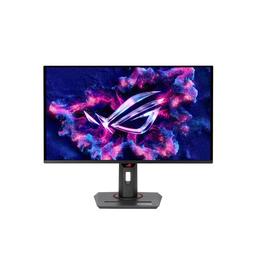
Pros

  • Stunning QD-OLED colors and contrast — owners upgrading from TN, VA, or IPS panels report the color and HDR transformation is dramatic, especially in triple-A titles played in HDR
  • 360Hz at 1440p hits the sweet spot for esports titles like Valorant, Apex, and Overwatch where users are consistently hitting 300-500fps on mid-to-high-end GPUs
  • Compact stand design is a deliberate advantage over competitors like the Gigabyte FO27Q3 and ASUS's own 480Hz variant, making it viable on smaller desks with large mousepads
  • KVM switch works reliably — users confirm USB-C and DP dual-input switching with USB device passthrough functions as advertised, a rarity in this category
  • Burn-in fears largely unfounded in practice — multiple owners with 1,800 to 10,000+ hours report zero retention issues when using the built-in pixel cleaning and OLED care features
  • Text clarity is competitive with 1440p IPS panels, and owners doing spreadsheet/number-crunching work report it as acceptable, even if it doesn't match 4K OLED

Cons

  • BFI/ELMB is effectively broken — a firmware update broke the backlight strobing feature, confirmed by RTINGS, and ASUS has not issued a fix, making this a significant loss for motion clarity enthusiasts
  • DSC is required for 1440p 360Hz on both DP and HDMI, and DSC-related flicker, black screens, and system freezes are a known hardware-level issue affecting a subset of users — firmware MCM103 helps some but not all
  • Motion clarity without BFI is disappointing for hardcore competitive players: side-by-side testing shows it matches or slightly underperforms a 280Hz high-Hz IPS like the ASUS VG259QM for Apex Legends due to OLED's persistence blur without strobing
  • The glossy/semi-glossy coating acts like a mirror in bright rooms and picks up micro-scratches easily, though users confirm these are invisible during normal use and the panel cleans easily with microfiber
  • Text rendering is noticeably softer than 4K OLED due to QD-OLED's subpixel layout — users doing pixel-level design or heavy document work will notice the difference versus a 4K panel
  • The 24.5-inch mode is limited to 240Hz on HDMI and only achieves 360Hz at 1080p resolution, limiting its usefulness for players who want a smaller effective screen size at max refresh

The BFI Is Broken and ASUS Hasn't Fixed It

Multiple users and RTINGS have confirmed that backlight flicker insertion no longer works on the XG27ACDNG following a firmware update. For competitive players who bought this monitor specifically for strobing-based motion clarity, this is a dealbreaker that ASUS has yet to address.

Best QD-OLED Value at 360Hz — If You Can Live Without Strobing

At $649–$750 street price, the XG27ACDNG consistently gets recommended as the top 1440p 360Hz QD-OLED option by community members — its compact stand, working KVM, and color quality set it apart. But buyers coming from high-Hz IPS monitors expecting a motion clarity upgrade may be disappointed.

Esports Players Are Splitting on Whether OLED Is Worth It at This Refresh Rate

A recurring thread in Reddit discussions is whether 360Hz OLED actually outperforms a well-tuned 280Hz IPS for competitive FPS. Several users returned the XG27ACDNG and kept their old monitors, while others say it runs like a dream. The divide seems to hinge on game genre and whether the user leans on BFI for clarity.

User Reviews (42 of 281 analyzed)

7
0
Ancient_Gate_kvmr/Monitors13d agopositive

KVM: Actually functions as intended! I have my Macbook connected via USB-C and desktop connected via DP and USB-B. Switching between them switches video inputs while bringing USB connected devices along and is quite fast.

View Original Comment
6
0
yourule97r/Monitors13d agopositive

Thanks for this review, this is eventually what made me pull the trigger and it just arrived. I'm not super versed in monitors, but I'd gotten the G6 before this and thought it was horrendous of the box. This is much better from what I can tell: KVM switch was important to me, and this works flawlessly. Racing mode out of the box looked great. Text is perhaps better than my old 1440p IPS panel. Semi-glossy panel is good so far too

View Original Comment
6
0
Vast-Bad-4086r/MotionClarity13d agonegative

I recently bought a XG27ACDNG, thinking it would blow my mind coming from ASUS VG259QM 24" 1080p 280hz. Colors are great, 1440p looks great, However as a competitive FPS player (Apex Legends), I am not impressed with motion clarity on this monitor. It is on par, or even slightly worse than my VG259QM monitor at 300hz. Overall, paying 800$ for this monitor, i did expect better motion clarity.

View Original Comment
5
0
RickyTrailerLivinr/MotionClarity13d agonegative

This is because the ASUS VG259QM is a goated monitor, I also returned an oled to and kept mine.

View Original Comment
3
0
Cephlotr/OLED_Gaming13d agopositive

Just got my XG27ACDNG today and it's awesome! Maybe a bit pricey and the 'wow' factor is a bit overblown, but I'm happy with my choice

View Original Comment
3
0
Pity_Pootyr/MotionClarity13d agopositive

In my experience it's complete bullshit. 360 OLED in motion is as clear as any display in still image. It's stupid how good it is.

View Original Comment
3
0
Ambitious_Addendum85r/OLED_Gaming13d agopositive

Just received the monitor its beautiful HDR works perfectly

View Original Comment
3
0
Suspicious-Half5758r/OLED_Gaming13d agopositive

You are right. I actually bought a qd oled shortly after this exact size and compared the two side by side. Went with the qd oled

View Original Comment
3
0
Tzunhaar/OLED_Gaming13d agopositive

Good to know it doesnt have the issue the WOLED version has.

View Original Comment
3
0
ChrisFheyr/Monitors13d agopositive

I have no idea where this rumour comes from, but I have no difficulties cleaning my QD-OLED panel whatsoever. I just use a microfibre cloth and distilled water. Spray water on cloth, wipe down screen, wipe off any leftover moisture with a dry microfibre cloth. Looks like new again afterwards.

View Original Comment
2
0
zBaLtOrr/OLED_Gaming13d agopositive

As a 4080 owner 1440p oled. Mine have 1800hours on and 0 burn in problems

View Original Comment
2
0
Impressive-Level-276r/OLED_Gaming13d agopositive

From a basic 1440p IPS, 4070 super. I bought it,

View Original Comment
2
0
-Strelizia-r/OLED_Gaming13d agopositive

I get around 300-500fps in those esports titles so the 360hz makes the most sense for me and I like the small stand better. Pretty sure the 480hz is that ridiculously wide triangle stand.

View Original Comment
2
0
jacat7r/MotionClarity13d agonegative

I had the same feeling about oled and returned it. Good IPS or TN has with native g-sync are better in terms of motion clarity then oled.

View Original Comment
2
0
Shehzademr/Monitors13d agonegative

i just got this monitor a couple of days ago, its really amazing i love it, but the flickering when the frames drop is way too aggressive, and i dont wanna turn vrr off to turn on anti-flicker because i dont like tearing in games, flickering makes me dizzy after a while for some reason.

View Original Comment
2
0
W1cH099r/OLED_Gaming13d agonegative

I got a oled 4k monitor a month ago and even tho is great in contrast and colors I do regret it, the 4 hour maintenance is annoying, they scratch like crazy and burn in is inevitable. Here everyone will tell you that it's a non issue tho

View Original Comment
2
0
-Strelizia-_reviewr/OLED_Gaming13d agopositive

If you mean heavy games like GPU-intensive triple A titles, I played Forza and RDR2 at 90hz with no problem. If you mean heavy games like the high fps esports shooters, I'm running a 13600K with a 4070TI so I don't really struggle with hitting the fps I need. And yeah, I don't use VRR. It's max refresh rate, uncapped fps, with Nvidia Reflex On+Boost.

View Original Comment
2
0
MistSecurityr/OLED_Gaming13d agopositive

The max you can tolerate is recommended. Pixel shift pisses some people off when they notice it shift, others don't notice it. Just comes down to what you're doing on your PC. Seems like static productivity type stuff makes the pixel shift much more obvious, whereas with media it's not really noticeable. I have mine cranked as it doesn't bother me at all.

View Original Comment
1
0
Killer_Ex_Conr/OLED_Gaming13d agopositive

Burn in isn't that big of an issue my asus does pixel cleaning automatically when in standby mode and i have had 0 issues so far with like 10k hours

View Original Comment
1
0
dz07r/buildapc13d agopositive

yes. I have the same one. Yes. yes and yes. Highly recommended.

View Original Comment
1
0
ItsJohnJohn_r/OLED_Gaming13d agopositive

Got this monitor a few days ago and wow, I love it.

View Original Comment
1
0
Drisbayner/OLED_Gaming13d agopositive

i have this and love it

View Original Comment
1
0
No-Rip7960r/OLED_Gaming13d agopositive

Got it the other day it's amazing. photos truly don't do it justice.

View Original Comment
1
0
Mightypeon-1Tapssr/MotionClarity13d agopositive

I have this monitor and extremely satisfied with the motion clarity and colors but I see your point. Maybe the 500hz QD-OLED is suitable for you.

View Original Comment
1
0
gomie_da_homie630r/MotionClarity13d agopositive

Something doesn't seem right. I have the same monitor and whenever I play Apex it runs like a dream.

View Original Comment
1
0
AriesNacho21r/Monitors13d agopositive

i got both DNG and the woled version called DMG, i paid $750 for the DNG 2k 360hz qd oled asus model, and paid $580 for the Asus DMG 2k 240hz woled model, the huge downside of DMG was the fact that it had hdmi 2.0 in 2024.. on top of that the text clarity was so bad i was shocked they approved of it

View Original Comment
1
0
snakcaz1r/OLED_Gaming13d agopositive

I have this monitor as well. You pretty much said most of the features I would say as well!

View Original Comment
1
0
Seiken83r/OLED_Gaming13d agopositive

I get the same monitor, i came from an old VA non Mini-LED panel (MSI MAG27CQ), so i literally said "wow" on the first OLED demo video and then when i played a game in HDR.

View Original Comment
1
0
Prior-Advantage-1341r/OLED_Gaming13d agopositive

Looking at getting the XG27ACDNG, to have as a 2nd for shooter games.

View Original Comment
1
0
cyberentrophyr/OLED_Gaming13d agonegative

I learned that the BFI function on this particular model became broken after a firmware update. It's been confirmed by the admin at RTINGS that BFI on this monitor doesn't work at all. I don't expect Asus to ever fix it, and decided not to purchase this monitor. I bought the PG27UCDM instead, and can confirm 120Hz BFI works perfectly without any issues.

View Original Comment
1
0
skywayzr/MotionClarity13d agonegative

I just got this monitor actually and came from the same ASUS monitor. When it comes to competitive FPS gaming there is no difference between these two monitors IMO. I think they are about equal when it comes to motion blur, and frankly think the OLED colors, specifically darks are harder to see so viability wise I would give it to my IPS ASUS.

View Original Comment
1
0
Bustazer/OLED13d agonegative

I did the update, and I still have the same problem between VRR and GSync. Black screens by flash or definitive, I have to go back to the Windows desktop otherwise the screen remains frozen black, even the OSD is crashed. It's not a big deal, I don't see any difference between VRR enabled or not, but on a €700 screen it's not normal.

View Original Comment
1
0
niwtskeapr/OLED13d agonegative

After months of ripping my hair out trying everything to try and fix my computer stuttering and freezing randomly in windows to the point it was unusable. I reinstalled Windows so many times. My only solution was linux. I thought maybe what if I unplugged one of my monitors? And bam, I unplugged xg27acdng, and the issues have been fixed. I'm so so mad.

View Original Comment
1
0
Upstairs-Gear-8413r/OLED13d agonegative

I have the exact same problem and it doesn't work for me neither after the MCM103 update, its always when you get into the game and it starts going black for 1-2 seconds and then it comes back. The only way that worked for me was to turn off DSC and make a custom resolution in nvidia control panel to 1440p 240hz.

View Original Comment
1
0
General_Factor_365r/Monitors13d agonegative

Have you noticed the monitor being a tad blurry? As it doesn't have sharpness settings? Compared to my msi ips panel it's no where near as sharp in call of duty warzone

View Original Comment
1
0
IdkWhyImHereMannr/OLED_Gaming13d agonegative

I just got this monitor and it's great but when I'm connected with DP and play COD it randomly goes black for a split second periodically. On HDMI it seems to be fine. Kinda annoying tbh.

View Original Comment
1
0
Ancient_Gater/Monitors13d agonegative

It is vastly improved over the previous gen. With that said, my work is text heavy and, given how text looks, I wouldn't want to use it as my main work monitor. Keep in mind, for text based work I prefer 4k. I think text even on a 1440p even on an IPS is not crisp enough.

View Original Comment
1
0
LoLEmpirer/buildapc13d agonegative

I played valorant on it for a month. It's obviously really nice but 1440p in general is just too annoying to get used to. 1080p and 24 inch is just superior for tac fps no matter what. I switched back to a 1080p and it's now my 2nd monitor.

View Original Comment
1
0
Selogonr/OLED_Gaming13d agopositive

I honestly find the text clarity is nothing to comment about, it's a match for my previous 1440p VA panel. The biggest change is that now the contrast is perfect between white font and black background so they shine a bit, but no fringe effect to notice.

View Original Comment
1
0
Mightypeon-1Tapss_settingsr/MotionClarity13d agopositive

Monitor: Brightness 25-35, Uniform Brightness OFF, Contrast 80, User Mode, Saturation 60. Windows and Nvidia: ASUS's color profile from Windows, HDR off, Nvidia Control Panel everything default except 65% color vibrancy, Windows auto color management off

View Original Comment
1
0
Nintendians559r/OLED_Gaming13d agopositive

it shifting the pixels, so statics image/pages won't leave a burn-in in the long run.

View Original Comment
0
0
hectic-eclecticr/OLED_Gaming13d agopositive

I just got it last month, and I love this thing. deep blacks, vibrant colors and snappy with gsync. I'm sure other high end monitors are also great, but I have this one and I love it

View Original Comment