ELMB at 240Hz Is the Real Feature
Owners consistently report that running ELMB at 240Hz beats raw 480Hz in perceived motion clarity — and unlike most BFI modes, this one is actually bright enough to use in a lit room. Many set it and forget it.
Asus
Last Analyzed
Overall Rating
Positive Reviews
Negative Reviews
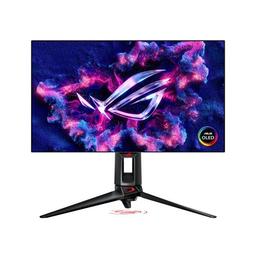
The Asus ROG Swift OLED PG27AQDP is a 27-inch 1440p/480Hz WOLED gaming monitor that earns genuine enthusiasm from owners for its image quality and motion clarity, while sparking real debate in competitive FPS circles. The ELMB/BFI implementation at 240Hz is widely praised as a standout feature — offering 480Hz-equivalent motion clarity at lower system load. Sentiment is mostly positive for enthusiasts who game across multiple genres, but a vocal subset of hardcore competitive players argue TN panels with backlight strobing still win for pure esports. The main friction points are technical: VRR flickering, DisplayPort 1.4 bandwidth constraints at 480Hz, and firmware reliability issues reported by a subset of buyers.
Owners consistently report that running ELMB at 240Hz beats raw 480Hz in perceived motion clarity — and unlike most BFI modes, this one is actually bright enough to use in a lit room. Many set it and forget it.
For a flagship 480Hz OLED, shipping with DisplayPort 1.4 means hitting the bandwidth ceiling at native resolution and refresh rate. DSC is required, and competitive players are split on whether it's truly imperceptible.
A surprising number of high-rank FPS players tested the PG27AQDP against Zowie TN monitors and switched back — citing screen size, DyAc feel, and color tuning for enemy visibility. OLED wins everything except the purist competitive argument.
These long leg stands need to die. Zero benefit. All stands should be as small as possible.
View Original CommentAt this rate, we might actually see 1000Hz be achievable, even if it is just at 720p. When this monitor releases, I honestly believe there will be no spot for eSports TN panels at any price point above $700, including the HKC 750Hz variant and especially the Zowie ZL2586X.
View Original CommentYou need to read about persistence blur on BlurBusters. I'm sorry but you're satisfied with the 248QP? That monitor is garbage in comparison other than ELMB 2. The response times aren't even quick enough to keep up with refresh at 480Hz let alone 540Hz. TN LCD is literal garbage.
View Original CommentI have both 240hz OLED and 400hz Zowie at home, but I have also compared the 480hz OLED and 600hz Zowie. For me I have the exact opposite experience, I actually built an entire new setup, just so I can use Zowie specifically while having an OLED setup for casual gaming. I found the 27inch to be too big and if I am not using 2k res, I found the experience to be worse.
View Original CommentI for one changed from IPS 390hz to OLED 240hz and OLED is so much better, I play CS and my FPS is constantly above 500. I'm waiting for my 480hz pre order and I can't even fathom it being worse than a 240hz that is also a WOLED panel, so for me it will probably be awesome.
View Original Commentyou are correct. ppl still misinterpret the old blurrbuster thread. we are talking about 480hz and not 144 or 240. gsync+vsync+reflex is the best of both worlds with the same inputlag as uncapped at these frames.
View Original CommentFull DP2.1 / Glossy finally but silver bezels, whyyyy.
View Original CommentOne point I should have made that I think is very important. I normally find BFI or ELMB implementations to not be bright enough to use and normally turn it off. This is the first BFI implementation on OLED that I've seen that IS BRIGHT enough. I believe rtings tested it at around 210 nits in SDR with BFI, which is good brightness even for a well-lit room.
View Original CommentThe biggest benefit imo is that you get 480hz clarity with 240hz effort on your system. Makes it way easier on the system to handle.
View Original CommentThat's what I found as well. I didn't necessarily perform worse on OLED than zowie but zowie just feels more comfortable. Had a 240 zowie then 360 oled then 400 zowie.
View Original CommentThis will most likely be my next monitor purchase SO LONG AS they drop the Silver/White for black. I have an all black setup and damned if I'm changing all that now. The "-W" at the end leads me to believe this SKU is specifically White and a black one will come eventually.
View Original CommentI ran it on testufo motion test. The diff between 120 - 240 is clear. 240 - 360 very slightly. 360 - 480 takes real focus to spot the diff but identifiable. Above 200 seems to be the sweet spot. 300 would be ideal. 400 is excessive. If I could choose again, I would find a 300 level monitor. If I'm strapped for cash I would do 200.
View Original CommentI got an AORUS FO27Q3 and have no idea what people are referencing, as the text is clear: I'm around 4 feet away from the screen, or 120 cm. It looks different than my IPS monitor, for sure, but that's mainly because the blacks and whites have different contrast.
View Original CommentI have a PG27AQDM and a XL2546K, so two 240Hz older models. My go to is competitive fps too since ever. At the moment back on CS after a very long break. For CS the strange thing is I'm way more consistent on the OLED, my shots are cleaner but I'm never comfortable with it. I feel awkward using it.
View Original Commentit pixel cleans everytime the monitor turns off. i'm at....103 hours of usage with 13 cleanings.
View Original CommentCongrats and enjoy. I have the same monitor and it's great. Only thing is occasionally I'll get vrr flicker on some game menus since I play with gsync. It doesn't happen that often though. Sometimes I do wonder if it's a bit overkill and if I should have went 360hz instead.
View Original CommentI don't recommend it. I now play CS2 at 1600×1200, otherwise it looks too blurry.
View Original CommentI've had both monitors side by side, even tried using the duplicate function on my tests. TN colors may be literal garbage, but it night and day, TN takes the cake.
View Original Commentimportant to note that ELMB adds delay and latency because a black frame is inserted between each frame. so if you're really into competitive games better turn it off. it's fine however for casual games but still not perfect.
View Original Commentthis photo alone made me switch to elmb 240hz, fascinating how it looks so much clearer. Now my only complaint is that I have to switch ELMB back on every time I reboot my PC.
View Original CommentYo I wanted to say thank you for this post. I've had this monitor since launch and being a complete noob I set it to 480hz and have been playing since. I built a pc and bought this monitor FOR overwatch and thought it was as good as it got. These settings changed everything.
View Original CommentAnyone here that owns this monitor notice any input lag with elmb on?? I've owned it for about a week and have been switching between turning it on and off and have come to the conclusion there's an increase in input lag with elmb on. I mainly play competitive cod and elmb on has been tanking my performance albeit it looks amazing in terms of motion clarity.
View Original CommentI had a similar upgrade from a PG27AQDP To a XL2586x+. I couldn't play for shit on the OLED since it was so big but god it looked beautiful. The zowie on the other hand was so perfect for me, all I play is CS, and siege and the size and motion clarity of the zowie was just perfect.
View Original CommentYeah if you cant handle the dyac it's no point in going Zowie. I had the oled 480hz and now I'm in the xl2586x and can't go back because of the smoothness of the dyac. I also want to mention for my 4:3 lovers out there that stretched res feels more blurry on the oled even when you have it in 24.5 inch mode.
View Original CommentI tested the Alienware AW2725DF OLED at 360hz and the Zowie XL2566X+ at 400hz. If we just talk about FPS and office work, I prefer the Zowie. On the other hand, OLED is incredible if you watch beautiful games in a dark room. OLED is beautiful and precise, but it is dark and has panel reflections. The Fast TN is ultra sharp in motion, a size more suited to FPS and usable in any brightness, but only in 1080p.
View Original Commentdont buy this trash, i get black screens often.
View Original CommentFrom all the games I've tested, I've noticed something specific. When the whole screen is moving, especially rapidly, clarity is lost. The best way to describe it — if you stand still and a player runs across the screen, clarity is insanely good. However, if you're waving your mouse around, clarity is lost.
View Original CommentI'm a full believer (got the ROG 480hz OLED) and what people often miss is that you can't *see* the difference as much as you can *feel* the difference. They're not necessarily wrong about not seeing more than xyz Hz — if I setup a 360hz and 480hz test and watch someone else play, I can't tell the two apart, but as soon as I'm the one playing I can immediately notice the lower latency by just moving the mouse in-game.
View Original Commentrtings tested this and total input lag with ELMB on was still only 7.9ms. Motion blur is horrible for competitive gaming, it's well worth it.
View Original CommentYeah, the problem with this. Is that VRR on this monitor awful. It literally causes terrible flickering even at stable frame rates. This has been reported by a lot of users to immediately turn off VRR. I had issues in every game. Before turning it off. So unless something is wrong with my monitor and many others. VRR should always be left off until a firmware patch is created to minimize it further.
View Original Commenthave the same. great monitor but the stand sucks since it will be on your mousepad if you dont put it far behind. get a nice monitorstand, you will love it.
View Original CommentNice. I just ordered mine and it's supposed to be here tomorrow. I am downgrading from 4k @ 144hz on a 27" IPS because I like oled and at 27" 4k isn't a major difference and runs better on my 4070 ti Super. I'm hoping it is worth the 1K.
View Original CommentI have the aqdp and unless U only play competitive games (and r rlly good at them) 240hz is more than enough. I also don't like the matte coating on the aqdp.
View Original CommentI went from a non dyac xl2740 (2017 model) to the PG27AQDP and I definitely had to adjust over time but I feel better and more consistent with the Oled now. I had well over 5k hours on my Zowie so I'm sure there was some degradation in the panel. If I was still in the competitive scene I would have gone with the 500hz zowie but I'm 36 and game a few times a week so the colors and the performance of the Oled is sufficient for me.
View Original Commenti returned the monitor and waiting for it to be replaced with another one, but at the same time I am afraid that the problem will happen again in the long run because I have a feeling this model was a mistake by Asus, Sony and LG because it does not support DP 2.1 full bandwidth 80 because the amount of data transfer is very high. We are talking about a huge amount of data transfer from the monitor, around 74gbps, which is higher than 4K 240 Hz, so how can Asus issue the monitor with a DP 1.4.
View Original Commentyou are correct about transfers, they had no right to not put display port 2.1 here, only having hdmi2.1 here is stupid design.
View Original CommentSame I went to buy it on Amazon and there's a giant red box under the title saying 'Frequently Returned' lmao. Might just get the MSI MPG 271QRX instead.
View Original CommentI have the Sony m10s which is the same panel as this monitor. I agree to an extent with the comments on VRR. I mainly play escape from tarkov which is a horribly optimized game with bad frame pacing. In VRR mode I notice micro stutters everywhere even when avg reported fps is 150-200. I get much much better results just running in 480hz with vsync off, haven't even noticed any tearing at all.
View Original CommentI been using mine for a month it's fire besides the menu flickering in valorant for some reason. Old games like black ops 2 not working on it and that. It's so much I'm like scared to adjust the monitor. Also 2 inches makes a big difference if u like playing with ur monitor 3 inches away from ur eyes, get a 24 inch. Also u can't play true stretched in Val, personally I like it tho, takes some getting used to but I feel like I will stick with OLED from now on.
View Original CommentI went from 360hz ips alienware 2523hf to a rog strix oled 240hz. It was worth it even though the less fps is noticeable — I used 360hz for 1 year but the response time and color accuracy plus video watching is worth it.
View Original Comment