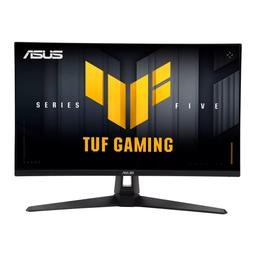
Asus Asus TUF Gaming VG27AQM5A
Monitors

Asus

ASUS TUF VG27AQM5A: What Reddit Really Thinks

Mar 2026

Last Analyzed

7/10

Overall Rating

22

Positive Reviews

18

Negative Reviews

Summary

The ASUS TUF Gaming VG27AQM5A is a 27-inch QHD IPS monitor with a 300Hz refresh rate and 0.3ms response time, widely seen as one of the better value options in its class. Reddit sentiment is cautiously positive — most owners are happy with the speed and price, but a recurring coil whine issue is the biggest concern that keeps coming up across threads. It targets gamers upgrading from 1080p/60Hz or 144Hz setups who want near-OLED responsiveness without paying OLED prices. Colors require calibration out of the box, particularly the default SRGB profile, but owners report solid results after tweaking. It's a monitor that delivers on raw performance for the money, though QC inconsistency and the coil whine lottery make buying from a returnable retailer essential.
Pros

  • 300Hz / 0.3ms response time puts it in near-OLED territory for motion clarity at a fraction of the price — one user upgraded from a 165Hz HP OMEN and called the difference 'actually insane'
  • Wide color gamut coverage with DCI-P3 and Wide Gamut modes gives flexible calibration options; after tweaking, owners report vibrant and accurate results
  • Competitive pricing — frequently found on sale around $175–$230 USD, making the specs-per-dollar ratio hard to beat in the 1440p segment
  • ELMB Sync (Extreme Low Motion Blur) adds a free 40–50 nit brightness boost as a side effect, useful for those who find the 300 cd/m² peak a bit dim
  • Improved contrast ratio of ~1300:1 compared to older TUF IPS panels at ~1000:1, with multiple owners reporting minimal IPS glow on their units
  • Solid build quality for the price; multiple owners report months of trouble-free use, and the AI crosshair overlay is a surprisingly popular bonus feature

Cons

  • Coil whine is a documented and recurring problem — multiple owners across multiple threads report audible hissing or buzzing, especially when switching between dark and bright content; headphone users won't notice but it's a dealbreaker for silent setups
  • DP 1.4 bandwidth instability at high refresh rates: several users experienced random screen flickering and blackouts at 200Hz+ via DisplayPort, with the only reliable fix being a drop to 165Hz or below
  • Default color profiles are poor out of the box — SRGB mode adds a yellow tint, and most presets look oversaturated; reaching good colors requires manual OSD tweaking or an ICC profile
  • Brightness cap of ~300 cd/m² is limiting for bright room use without enabling HDR mode or ELMB Sync; not competitive with mini-LED panels in peak brightness
  • IPS panel means black levels can't match VA or OLED — dark vignetting at screen edges was notable enough to cause at least one return from a user who works with on-screen text
  • Firmware update process is unreliable for some users, with the update getting stuck at 19% and requiring a USB-C cable plus the original DP cable simultaneously

The Coil Whine Problem Nobody Warns You About

Across multiple Reddit threads, owners consistently report an audible hissing or buzzing sound tied to refresh rate and screen content changes. It's not universal, but it's common enough that Reddit's consensus is clear: buy from somewhere with easy returns.

Near-OLED Speed Without the OLED Price Tag

At its frequent sale prices, the VG27AQM5A sits in a rare spot: 300Hz and 0.3ms on a 1440p IPS panel for under $230. Reddit users upgrading from 144Hz or older 1080p monitors consistently describe it as a meaningful, noticeable step up.

Racing Mode + Wide Gamut Is the Only Setting That Actually Works

The default presets are widely considered broken, but Reddit has collectively converged on a fix: factory reset, Racing Mode with Wide Gamut enabled, Power Saving off, and tweak from there. The SRGB mode in particular gets consistently called out as a yellow-tinted mess.

User Reviews (40 of 154 analyzed)

14
0
nerdslayer69r/bapcsalescanada13d agopositive

$1 per Hz, pretty good deal.

View Original Comment
5
0
MaxDragonManr/bapcsalescanada13d agopositive

Wow, looks like a great deal for 1440p, though I don't know much about the specific panel.

View Original Comment
3
0
Expensive-Time-7209r/Monitors13d agopositive

Brightness: 100, Saturation: 65, Color space: DCI-P3, Color temp: user R: 100, G: 98, B: 100 (G is 98 to have better whites). HDR: off. If you want an extra tip, turn on ELMB Sync. Not only does it slightly improve motion clarity, but it also slightly increases the brightness for some reason. I tested it and it's true, improves by around 40-50 nits.

View Original Comment
2
0
hani_yassiner/Monitors13d agonegative

After 2 months of usage I'm starting to hear hissing or coil whine coming from the screen especially noticeable when you switch between black and white background so if there is no ambient sounds around you or you don't use use headphones all the time i don't recommend this screen. I tried to change the dp cable and changed to location of the power cable (originally connected to a ups) but still same thing — lowering the hz to like 60hz seems to reduce it but obviously this is not an option.

View Original Comment
2
0
LittleLuniar/Monitors13d agopositive

Factory reset it, leave it in it's default Racing Mode with Wide Gamut and only disable the Power Saving mode. Tweaking anything on this screen beyond that does weird things to the colors for me. Everything except the default Racing Mode with Wide Gamut will mess it up for some reason.

View Original Comment
2
0
_Whyeverynameistakenr/Monitors13d agopositive

Bought the monitor, doing really great for me, but I'd say the colors are a bit saturated. You may need to calibrate it to your needs.

View Original Comment
2
0
ImKrispyr/bapcsalescanada13d agonegative

It's still a cheap IPS, contrast sucks — not good if you play darker games.

View Original Comment
2
0
AlexandorTr/Monitors13d agopositive

L stands for adjustable stand (height). As long as they have M in their name - the panels are the same (or at least same max. refresh rate). I also suspect that models without M are the same as well, just limited to 210Hz (and HDMI 2.0B).

View Original Comment
1
0
WalrusProofr/Monitors13d agopositive

I upgraded from an OMEN 27inch 165hz 1440p 1ms, and the difference is actually insane, everything feels so smooth and it comes with AI crosshairs to adapt to whatever is on your screen if you decide to turn it on. Some how the resolution looks better than my Omen monitor as well even tho they're both 1440p. With a refresh rate of 300hz and 0.3ms response time you're touching OLED specs. Right now it's on sale for $230 on Amazon!

View Original Comment
1
0
Intrepid-Ad4146r/Monitors13d agopositive

M5A value is insane for the price. Top 3 monitors with them specs and it's so close to an Oled monitor it isn't funny. Even has the Oled monitor settings to control the screens settings

View Original Comment
1
0
RockBlesnarr/Monitors13d agonegative

I'm happy with the colours on Racing mode & Wide gamut. However, my screen makes a high pitched noise which is annoying for those who sit in silence. Tried different HZ settings and that just changes the pitch a little.. it's least annoying at 144hz (lower pitch). Also, while the screen can be moved in all the ways.. the panning to the left / right / front are all quite limited. it does tilt quite far back.

View Original Comment
1
0
hani_yassiner/Monitors13d agopositive

after the calibration for the price definitely [worth it]. The dead pixel is a luck thing with all the brands but i choose ASUS because i read online they have better quality control in terms of ips glow, i got it for 185$ wholesale price but retail it's 199$ so very good price for the specs.

View Original Comment
1
0
Expensive-Time-7209r/Monitors13d agopositive

For anyone with this monitor: turn on ELMB sync, it increases brightness by 40-50 nits for some reason. I can't notice any flicker whatsoever, it's just free brightness. Better settings for gaming imo: saturation: anything between 60 to 70, I keep mine at 65 (50 is very washed out imo). Color space: pick wide gamut for saturated blues and dci-p3 for worse blues but saturated reds and oranges or pink.

View Original Comment
1
0
duckytheworrierr/Monitors13d agonegative

I have this too bro it driving me nuts. The only solution I find stable enough is to lower the refresh rate to 165hz. Nothing else works. 200hz seems too unstable with random flickering and blackouts. Seems like ASUS lied in our face, that monitor can't handle that much frequency with DP 1.4 not even with 180hz.

View Original Comment
1
0
Cathfaernr/Monitors13d agonegative

It doesn't have glow, but have dark vignette. Which may or may not be a problem for your use case, so definitely order from a place where you can return it. As I'm using it for MMOs where there is a lot of text on the sides it is disturbing, so I returned mine.

View Original Comment
1
0
Healthy_Fondant4057r/Monitors13d agonegative

I'm so disappointed by this monitor... Yes is fast very fast but the view angle is bad for an IPS panel.

View Original Comment
1
0
DoubleAgent333r/Monitors13d agonegative

The DCI-P3 colors look oversaturated to me, specifically with a reddish tint. I lowered the saturation to 43, but the results are still not good. I found an ICC profile, but Windows 11 won't apply it; I have tried three different profiles, but I see no difference when switching between them. I hate oversaturation in gaming and content. Regarding brightness, I dislike playing in dark rooms, so I keep all my lights on. 100% SDR brightness is not enough for me, so I have to enable HDR just to get more brightness.

View Original Comment
1
0
Alert_Ninja_8407r/Monitors13d agonegative

I bought this monitor on sunday for 179 euros. I have gtx 3060ti. If i put it on 200hz and 2560x1440 resolution then theres flickering and screen goes black for 2-3 seconds randomly (on desktop and in games). Did it few times at 165hz but not anymore. Bought a second dp cable and its the same.

View Original Comment
1
0
EGSB_ECUr/Monitors13d agonegative

My screen started making a buzzing sound out of nowhere. It's very quiet, but annoying when it's very silent. Since I bought it on Amazon, I think I'll return it eventually. I discovered that in my case, it's related to the refresh rate. If it's below 180 Hz, you can hear it. If you disable dynamic frequency and leave it fixed at 180 Hz, the sound disappears.

View Original Comment
1
0
Actual_Serve_4119r/Monitors13d agonegative

Just got the monitor delivered, instantly got coil whine. Only goes away if I reduce refresh rate to 120, I'm gonna return it and get something else more premium. It's not worth cheaping out, my 13 year old Asus monitor I spent 500£ on is still perfect to this day so I'll just invest the same amount and get a better display.

View Original Comment
1
0
Trombone1928r/Monitors13d agopositive

I ended up going with the VG27AQM5A, its been great so far and haven't had any trouble yet. Just hope I haven't now jynxed it and have a dead pixel in my future.

View Original Comment
1
0
pallypalr/bapcsalescanada13d agopositive

Grabbed this today, but I'm thinking I might return it. The anti-glare is really aggressively applied and ends up vignetting the corners a bit when looking at the center of the monitor even straight on. Very different panel to the Dell D2719HGF I was planning to replace this with. Edit: I got used to it. Don't notice it anymore.

View Original Comment
1
0
AdRare1477r/Monitors13d agopositive

Very good settings: I adjusted mine to display color space -> wide gamut. The rest are good. HDR off for everything else except gaming and HDR movies.

View Original Comment
1
0
LSL1337r/Monitors13d agopositive

I have it for a few months now, it's great!

View Original Comment
1
0
rd-pror/Monitors13d agopositive

I got one for almost 2 months now and there's no issue with ips glow/bleed, usual IPS light leak only but nothing to worry about!

View Original Comment
1
0
Dry_Monitor_8961r/Monitors13d agonegative

I got this monitor during sales and a lot of presets are ASS! They look like AIDS!

View Original Comment
1
0
Zeolysser/Monitors13d agopositive

Do your games run over 200fps? If yes buy the cheapest one, if no buy the cheapest one. To be clear, it's most likely the same panel overclocked — just get the 300hz one it'll be slightly faster and it's cheaper anyway.

View Original Comment
1
0
UnbreakableDiamond4r/bapcsalescanada13d agopositive

This new model has contrast ratio of 1300:1 compared to old one of 1000:1, so it should be slightly better. But I haven't personally checked any good monitor in person, not sure if that's good or just mediocre still.

View Original Comment
1
0
DaFrenzyGuyr/Monitors13d agonegative

Do you have a gpu that can run 1440p 300hz? Besides, if you dont play fps games a lot, that refresh rate is too much. Anything over 240hz overkill. I'd go for an oled with a lower refresh rate for around the same price.

View Original Comment
1
0
Interesting-Sky6400r/Monitors13d agonegative

I can't update this monitor — the firmware programming gets stuck at 19%, the monitor turns off and on, then the application closes completely.

View Original Comment
1
0
Capable_Issue4410r/Monitors13d agonegative

I try to update my firmware but it stuck 19%. I used the original dp cable and a usb to type c cable of my cellphone.

View Original Comment
1
0
PuzzleheadedLock1676r/Monitors13d agonegative

Does anybody know if you can make the blacks better? Left one is the VG27AQML5A and the right one is the old VG27VH1B. The old one has worst colors but the black is way better.

View Original Comment
1
0
Sufficient-Impress55r/Monitors13d agonegative

Because your old VG27VH1B panel is VA, it will have deeper blacks.

View Original Comment
1
0
HiImNoobier/Monitors13d agonegative

I have same problem [screen flickering at high refresh rates], try uninstall gpu driver using DDU and reinstall it.

View Original Comment
1
0
Aware-Garlic651r/Monitors13d agopositive

Apart from the adjustable height and 360 rotation of the stand, they both are the exact same, just ordered the non height adjustable one for 319 AUD here in Australia, would have gone with the adjustable stand option but we don't have it in our region.

View Original Comment
1
0
Remarkable-Dog9185r/Monitors13d agopositive

I finally bought it, it should arrive on the 27th. I honestly don't know how much of a difference this HDR makes in many games, but I still think I made the right choice. I could have gotten the AOC MiniLED model, but I was too worried about ghosting.

View Original Comment
1
0
Grand_Excuse2056r/Monitors13d agopositive

I just bought 2 of this monitors. Before my main was Asus VG258Q 25.5 inch. The asus one looks like having brighter colors but I really can't tell if that's true.. just a feeling. For me it looks like the sides of the VG27AQL5A is a bit darker, is that true for you too?

View Original Comment
1
0
69_po3tr/Monitors13d agonegative

Is it truly so low in brightness? 300cd.

View Original Comment
1
0
zBaLtOrr/Monitors13d agopositive

Its a good monitor, and more if you play with a console.

View Original Comment
1
0
Churrch98r/Monitors13d agopositive

That sounds so good. I wish the monitor is available in my country.

View Original Comment