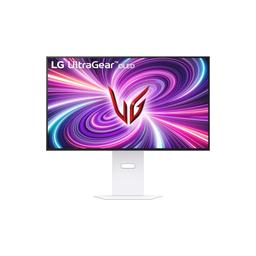
LG LG UltraGear 32GS95UV-W
Monitors

LG

LG 32GS95UV-W: What Real Gamers Actually Think

Mar 2026

Last Analyzed

8/10

Overall Rating

21

Positive Reviews

10

Negative Reviews

Summary

The LG UltraGear 32GS95UV-W is a 4K 240Hz WOLED gaming monitor that earns strong approval from the Reddit community for its stunning image quality and versatile dual-mode feature. Most owners love the deep blacks, sharp text rendering, and the ability to flip between 4K@240Hz and 1080p@480Hz in about three seconds — a genuinely useful option for players who switch between competitive and immersive gaming. Compared to its predecessor the 32GS95UE, the UV swaps the experimental pixel sound speaker system for a traditional bottom-mounted speaker setup and comes in at a lower price, making it the more sensible buy for most users. The monitor sits firmly in the premium tier and is often praised for punching above its weight when it goes on sale around $900-$1000 USD, but it draws some criticism for an HDR brightness-clipping issue at 600 nits when running in DP 1.4 DSC mode, which requires a workaround to unlock the advertised 1300 nit peak. Overall it's considered a top-tier 32-inch OLED gaming monitor, though audiophiles and those expecting effortless HDR out of the box may need to manage expectations.
Pros

  • Dual-mode is a genuine differentiator — switching between 4K@240Hz and 1080p@480Hz takes about 3 seconds with no reboot required, giving competitive FPS players and immersive gamers a single monitor that covers both use cases
  • WOLED panel delivers reference-level black depth and excellent text clarity at 4K, with users consistently praising readability over QD-OLED alternatives that can look grainy at pixel level
  • Input lag is measurably better than key competitors — community comparisons show roughly 9ms at 4K@60Hz vs 16ms on the Asus PG32UCDP, which matters when frame rates dip during GPU-intensive scenes
  • HDR color volume edges out the Asus PG32UCDP according to rtings data cited in threads, and a community-discovered firmware fix (porting the 32GS95UE update) unlocks true 1300-nit peak brightness via DSC for those willing to troubleshoot
  • Matte anti-glare coating is widely preferred over glossy QD-OLED alternatives for mixed-lighting environments — users switching from glossy panels cite eliminated eye strain and easier cleaning as major quality-of-life wins
  • Excellent value proposition when on sale — frequently spotted at $899-$1000 USD, making it significantly cheaper than the near-identical Asus PG32UCDP which retails $250+ higher for the same WOLED panel

Cons

  • HDR brightness clipping at 600 nits in DP 1.4 DSC mode is a known firmware bug — reaching the advertised 1300-nit peak requires either disabling DSC (dropping to 120Hz) or applying the 32GS95UE firmware workaround, which LG has not officially released for the UV variant
  • Active cooling fan is audible in quiet environments — at least one owner returned the monitor specifically because the fan noise was unacceptable in a silent room setup, unlike the fanless passive cooling on Samsung competitors like the G80SD
  • No USB-C connectivity — users wanting to connect a MacBook or ultrabook without an adapter are out of luck and need to look at alternatives like the Samsung G8 series that support USB-C input
  • 1080p dual-mode image quality is mediocre on a 32-inch screen — the downscaled resolution looks soft for general use and web browsing, limiting the 480Hz mode to fast-paced competitive games only where image sharpness matters less
  • WOLED HDR punchiness falls short of QD-OLED out of the box — multiple users switching from QD-OLED panels note that SDR and HDR colors look washed out on default settings, requiring manual calibration time to get close to the vivid look they expected
  • Burn-in risk requires active management — one user reported visible retention after roughly 3 months of mixed productivity and gaming use, though LG's built-in OLED Image Cleaning tool resolved the issue when run manually

The Fan Noise Problem Nobody Talks About

The 32GS95UV uses active cooling — and in a quiet room it's noticeable enough that at least one owner returned it and switched to a Samsung G80SD just to get passive cooling. If your setup is already loud you'll never notice it, but quiet-room users should factor this in before buying.

Same Panel as the Asus PG32UCDP — So Why Pay $250 More?

Reddit's verdict on the LG vs Asus matchup is pretty clear: both run the same WOLED panel, the LG has better input lag and slightly better HDR color volume per rtings, and it costs significantly less. Unless glossy coating is a hard requirement, the community consistently calls the price gap unjustifiable.

Dual Mode Is Legitimately Useful — But Not for Everyone

The 1080p@480Hz mode switches in seconds and works well in fast competitive titles like CS2, but text and web browsing at 1080p on a 32-inch screen look noticeably soft. Users who only play one type of game probably don't need it, but for anyone who mixes immersive and competitive play it's a real feature, not a gimmick.

User Reviews (42 of 212 analyzed)

12
0
LightMoisturer/OLED_Gaming13d agoneutral

I'm looking at the LG32GS95UE page right now and they advertise it as 275cd/m typical brightness with same MLA+ tech. I'm failing to actually see any differences between the 2 models. Actually it looks like they are no longer using 'Pixel Sound'. Now it's 'Spatial Sound' and it appears the audio now comes from the bottom like traditional speakers.

View Original Comment
11
0
Guns_and_Potionsr/buildapcsales13d agopositive

Very tempting. I picked up the AW3225QF but was honestly wanting a dual mode oled. Only $100 more, might be worth returning my Alienware.

View Original Comment
8
0
SnuffyFuckaluffagusr/buildapcsales13d agonegative

I owned this model but ended up returning because the fan noise was too annoying for me. YMMV but my PC is quiet and the room it was in had low ambient noise. No complaints about performance but I didn't care for the 480Hz 1080p mode but I'm also not a sweaty FPS player. Ended up with the Samsung G80SD and I'm happy with it.

View Original Comment
8
0
Oh_Skillerr/OLED_Gaming13d agopositive

$200 cheaper for no pixel sound seems like a good difference. Especially since I use a headset for gaming.

View Original Comment
7
0
Interdimensionr/buildapcsales13d agonegative

I'm a hobbyist car detailer and used distilled water solution with the same clean & plush microfibers that I use to avoid microscratches on car paint. It still left a few microscratches on my QD-OLED glossy screen. It really does have the hardness of plastic. Thankfully, those scratches aren't noticeable in room lighting, but it's still extremely annoying.

View Original Comment
6
0
One-Influence-3681r/OLED_Gaming13d agopositive

Honestly, this is the main reason why I moved to matte coatings and do not regret it at all. QD with glossy is good, but with all of things that you have to do in order to make them run at their top performance, it makes no sense, at least for me. Sacrifices my eye lifespan for a little bit of image quality. No, thanks.

View Original Comment
5
0
hamfinityr/OLED_Gaming13d agonegative

The first thing to check is to make sure the Black Level is set properly. Oddly, it's only available in SDR but affects both SDR and HDR. Next step is to try a different Game Mode. My 45GS looked terrible out-of-the-box in HDR Gamer 1 mode but Gamer 2 fixed that. Not sure how LG manages to screw their monitors up when their TVs are great.

View Original Comment
5
0
Twiglerr/buildapcsales13d agopositive

I went to Best Buy to compare glossy and matte and didn't like the reflection so I just went with this one.

View Original Comment
4
0
Fallout_New_Vegar/OLED_Gaming13d agopositive

Glossy is objectively clearer though but depends on how bright your room is and whether reflections will be an issue. I use mine in a small home office with 1 window in the UK and I don't have any issues with reflections.

View Original Comment
3
0
ChocolateyBallNutsr/OLED_Gaming13d agonegative

The speakers are dogshit.

View Original Comment
3
0
tanvirh5r/pcmasterrace13d agonegative

They still using display port 1.4? Come on.

View Original Comment
3
0
klow9r/buildapcsales13d agopositive

I was able to grab this deal a couple of weeks back when I saw it was available again. It keeps on showing on and off randomly. I didn't bother thinking about it and just got it. Loving it so far!

View Original Comment
3
0
Engarde_Guardr/OLED_Gaming13d agoneutral

Glossy looks better but does present the 3 issues OP mentioned. For me the biggest was the coating scratches the moment you look at it.

View Original Comment
3
0
bigrealaccountr/OLED_Gaming13d agopositive

I have the LG and it's pretty much perfect. Colors are amazing, and the mostly glossy but slightly matte coating is better for the ambient light in my room. Also good for the WOLED as the blacks don't look purple. If the LG is way cheaper just get the LG, it's the same panel. Unless you really really care about glossy, which looks basically the same tbh.

View Original Comment
3
0
Greenzombie04r/OLED_Gaming13d agopositive

They are pretty similar. If they were same price I'd go Asus but I don't think it's worth $250 more.

View Original Comment
3
0
RuaXYzr/OLED_Gaming13d agopositive

Having an LG32GS95UE for almost a year it is flawless.

View Original Comment
3
0
IdleAllex25r/OLED_Gaming13d agoneutral

Reddit seems to be the only place online, and maybe that dude The Display Guy, that seems to shit on matte and praise glossy as if it's 1000x better than matte. But it's working, despite me preordering a matte oled after researching for hours and knowing fully well that a matte is better for me based upon the research, I'm still doubting my choice.

View Original Comment
3
0
Mshiayr/OLED_Gaming13d agopositive

But according to rtings woled monitors have better HDR brightness than QD-OLED.

View Original Comment
2
0
Simple_Echo_6129r/OLED_Gaming13d agonegative

I started experiencing burn-in after just a few months of use. Though I use it way more for productivity than for gaming, so that tracks. Still, I thought this should only start occurring after a year of use or more. For reference I keep it at 80% brightness, and for the most part I keep the same wallpaper on the desktop. The burn-in is mostly visible on dark gray backgrounds.

View Original Comment
2
0
tarpexr/OLED_Gaming13d agopositive

So yeah you're running oversaturated colours in gamer1. For sdr content, the most accurate mode is sRGB, which is very damn good on these panels - I had a calibrated sub delta0.5 IPS display before, and the difference is practically nonexistent to my eyes with the sRGB on the woled.

View Original Comment
2
0
Wrong_Brain2478r/OLED_Gaming13d agoneutral

AFAIK the only hardware difference is UV don't have the pixel sounds. It has two 5w speakers at the bottom of screen just like regular monitor. And UE is using the pixel sounds that the screen is the speaker. LG can't reduce cost on pixel sounds as they initially thought they could.

View Original Comment
2
0
Suite303br/OLED_Gaming13d agoneutral

UV is $1449.99 on Amazon Canada right now. Comes in two colours (dark grey and white). Everything looks similar to the 'UE', but as others have said the speakers are changed to 10W x 2, and the stand appears to have gone on a slight diet. Panel specs appear the same as do the inputs... I was hoping for DP 2.1, but no such luck.

View Original Comment
2
0
Fromagener/OLED_Gaming13d agopositive

I love matte as well for the same reasons, easier on my eyes, way more resistant, I already spat on the screen and still was able to clean it easily whereas on my previous QD I was never able to clean a mark that was there from the beginning and made it worse creating a blue halo around it visible even when the screen was on.

View Original Comment
2
0
_TuRrTz_r/OLED_Gaming13d agopositive

LG. Had both the ASUS is not worth another 250$ at all. And HDR looks better on LG. It's a terrific monitor.

View Original Comment
2
0
zyarrar/OLED_Gaming13d agopositive

Use windows hdr calibration, nvidia fixed the problem so now you can actually get 1300 nits if you do windows hdr calibration.

View Original Comment
2
0
rashad_shayoupr/OLED_Gaming13d agonegative

Still no firmware at all, idk why.

View Original Comment
2
0
yoyigu38r/OLED_Gaming13d agoneutral

Something similar happened to me, I had the ROG PG32UCDM for 8 months, I really liked the image, good HDR and vibrant colors. Then I sold it and wanted to try the LG 32GS95UV 4K 240HZ OLED, the image in SDR and HDR was horrible at first, after adjusting several things it was 'ok', but after 1 week of testing I started to like it, I was able to get to a configuration that looks pretty good, the blacks are perfect, the texts better than in QD OLED, but I still think that the brightness in HDR is dimmer.

View Original Comment
2
0
Joblowcheeseheadr/OLED_Gaming13d agopositive

I've had it for about a month with zero complaints. It looks amazing to me even on gamer 1 mode. I've never heard any noise (coil whine) coming from the monitor only the speakers. It's definitely the best monitor I've ever owned which I've never owned a high-end monitor before.

View Original Comment
2
0
LugiaS_Ruinedr/OLED_Gaming13d agoneutral

Hello! Sure you can connect your mac with a hdmi cable, the monitor does not support a USB-C connection, if you prefer this option you need to check samsung g8. If you connect with hdmi just buy a good quality 2.1 cable.

View Original Comment
2
0
Routine-Bug-6843r/OLED_Gaming13d agonegative

Get a cheaper monitor like 600-800 on discount then buy a OLED TV and connect PC+controller to it. The PC monitors have insane prices and suck compared to a great tv.

View Original Comment
2
0
PerisK4r/OLED_Gaming13d agoneutral

I didn't know it was that easy to buy expensive monitors, try them and then return them. If I can I would like to do that.

View Original Comment
1
0
Simple_Echo_6129r/OLED_Gaming13d agopositive

It's much better! There is an OLED Image Cleaning option under the General menu, and it fixes image retention for the most part. I had to run it manually a few times over the weeks. I think it must be running automatically sometimes because I no longer have to run it manually and the image appears ok. Still a great screen.

View Original Comment
1
0
Small_Flan7706r/OLED_Gaming13d agopositive

No burn in at all, 1500 hours and going.

View Original Comment
1
0
StrikeElectronicIOr/buildapcsales13d agopositive

Also got it a few weeks back for this price. Very happy with it. Had low expectations for 1080p on a 32" screen, but doesn't look too bad in CS2 imo. Text and web browsing look pretty bad at this ppi obviously, but not a problem to use a bit during queues. Switching between modes is very quick too, but I have to close the game first. Highly recommend this or dual mode monitors if you play games that could benefit from the refresh rate.

View Original Comment
1
0
Best_Escape2579r/OLED_Gaming13d agoneutral

AFAIK the two monitors are quite similar. UCDP offers a dual mode if you are into fps games. Some LG owners complain about the fan's noise; UCDP has a better cooling system.

View Original Comment
1
0
Warm_Construction749r/OLED_Gaming13d agopositive

The input lag for asus is a shame, LG input lag is so much superior. 9ms at 4k60hz for LG and 16ms for ASUS, when you game with gsync and 4K you know your fps are low sometimes, and it's a shame 16ms.

View Original Comment
1
0
Hindesiter/OLED_Gaming13d agonegative

I never did find a suitable fix to the problem. People have responded in this thread with various suggestions claiming it worked for them, but none of it worked for me. I've just been using it without any Windows HDR Calibration applied and I set the max luminance to 600 in games that support HDR. I'm not happy with doing that, especially knowing how much brighter the display can get, but it's the only way I found to reliably retain detail in brights while gaming in HDR.

View Original Comment
1
0
Brainmast3rr/OLED_Gaming13d agopositive

Download the OnScreen Tool for the 32GS95UE and do the firmware update. I have the 32GS95UX (german version) and was in the same boat as you. Firmware Update works just fine.

View Original Comment
1
0
techraitor/OLED_Gaming13d agoneutral

Gamer 1 looks bad. Change the different profiles. Vivid is hidden going down lower than RTS, and it is great if you like more saturation and just punchy colors for HDR.

View Original Comment
1
0
LugiaS_Ruinedr/OLED_Gaming13d agoneutral

I don't think it's such a useful feature (dual mode). I only used it for 4K, while 1080p mode would be a noticeable downscaling. To play at those resolutions and refresh rates, for specific competitive games an IPS would be better. However, the presence of this feature is definitely an advantage if someone is interested in it.

View Original Comment
1
0
Aggravating_Fun_7692r/OLED_Gaming13d agonegative

LG monitors kind of suck. There I said it. Samsung based displays just own. I said that too.

View Original Comment
1
0
jibjab23r/OLED_Gaming13d agopositive

I'm curious to know what brightness levels you're using the screens at for you to be getting eye strain. I've got mine turned down quite low, although to be honest I'm using it in a dim room most of the time. So I never needed it to be bright, it still shines brightly for HDR content when it needs to.

View Original Comment