LG LG UltraGear 34GS95QE-B
Monitors

LG

LG 34GS95QE-B: What Real Users Say About the Curve

Mar 2026

Last Analyzed

7/10

Overall Rating

26

Positive Reviews

17

Negative Reviews

Summary

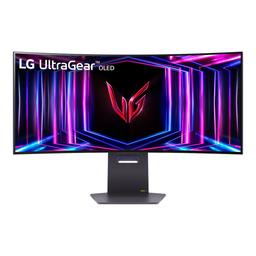
The LG 34GS95QE-B is a 34-inch WOLED ultrawide that earns strong praise from gaming-focused users, with its 240Hz refresh rate and deeply immersive 800R curve standing out as genuine highlights. Most owners who were initially skeptical of the aggressive curvature end up embracing it, saying it reduces head movement and keeps every part of the screen equidistant from their eyes. Text clarity draws mixed reactions — the WOLED subpixel layout causes color fringing that some users don't notice at all while others find distracting, making it a gamble for productivity-heavy workflows. A burn-in case appearing at roughly 13 months of ownership has reignited the ongoing Reddit debate about OLED panel longevity for desktop use. Overall this is a monitor enthusiasts love for gaming but approach cautiously for all-day office work.
Pros

  • 800R curve wins over most skeptics after hands-on use — owners consistently report it feels natural at typical desk distances (~80cm) and eliminates the need to move your head to see edge content
  • 240Hz WOLED panel delivers exceptional motion clarity with near-instant pixel response, a major upgrade over IPS and VA panels in fast-paced games
  • Matte anti-glare coating is a genuine advantage over glossy QD-OLED competitors — reduces eye strain in lit rooms and makes it more versatile as a dual-use display
  • HDMI 2.1 and DisplayPort 1.4 with DSC support offer flexible connectivity, with full 240Hz reachable via either connection unlike monitors with micro-HDMI ports
  • LG's simpler monitor firmware is preferred over Samsung's Smart TV-style bloatware by users who've owned both
  • HDR performance is well-regarded for a monitor in this class, with peak brightness sufficient for impactful highlights in supported titles like Cyberpunk 2077 and RDR2

Cons

  • WOLED subpixel fringing on text is a real limitation — some users notice color edges on fonts especially in browsers, making it a questionable choice for developers or heavy document work
  • Burn-in documented in real-world use at ~13 months with normal desktop hours raises longevity questions, particularly for users who keep static elements like taskbars or browser toolbars on screen
  • No firmware updates from LG since release despite known issues — multiple users flagged this as a support concern
  • 800R curvature makes the 34" panel feel smaller than flat or 1800R ultrawide competitors at the same physical size, since the edges wrap away from you
  • QD-OLED alternatives like the Alienware AW3423DWF offer better color pop and glossy-panel vibrancy for similar or lower prices, with the DWF available around $699 at sale
  • Dynamic contrast / ABL behavior in mixed SDR/HDR content frustrates some users and has no clear in-menu toggle to disable it

The 800R Curve: Dealbreaker or Best Feature You'll Ever Own?

Hundreds of Reddit comments show a clear pattern — buyers arrive skeptical of the aggressive curvature and leave converted. Owners say the curve stops head movement entirely at normal desk distances and makes the ultrawide format feel purpose-built for gaming immersion.

Is LG's WOLED Worth It When OLED Burn-In Hits at 13 Months?

A viral Reddit post documenting visible burn-in after just over a year of desktop use has put the long-term value of this panel under scrutiny. LG's two-year burn-in warranty provides some protection, but the community is increasingly recommending Mini LED alternatives for users who keep the same static layouts on screen daily.

Surprisingly Workable for Productivity — With One Caveat

Several owners who use the monitor for engineering CAD, university work, and coding report the text clarity issue is manageable day-to-day and often only noticeable when you're actively looking for it. The exception is browser-heavy workflows on white backgrounds, where WOLED fringing becomes more apparent.

User Reviews (43 of 252 analyzed)

18
0
sneakertingsr/OLED_Gaming13d agopositive

I personally love the 800r curve. Added plus for playing RPG/JRPG games and racing games.

View Original Comment
8
0
Adoravivos1r/ultrawidemasterrace13d agopositive

Hi, I have this model and was also concerned about the steep curve (coming from 34 ultrawide 1500R) but I like it, it's not distracting, nothing look crooked, it really feels optimal to me. It's true what LG says that every part of the screen is exactly 80cm from your eyes.

View Original Comment
7
0
Pwood2022r/Monitors13d agonegative

Sorry that happened. I have a 1440 P 2025 LG ultragear VA panel with amazing contrast and stories like this continue to steer me away from OLED. I love your monitor also, watched a ton of reviews.

View Original Comment
7
0
abdx80r/Monitors13d agonegative

MiniLED ftw!

View Original Comment
5
0
DottorInkubor/Monitors13d agonegative

Just bought one, and this post is the exact reason why I went Mini LED. No matter how much people will try to cope, OLED is disposable tech at best, for the price of an extremely durable product.

View Original Comment
5
0
Darkangel-86r/Monitors13d agonegative

All OLED monitors will end up like this. People here will dog on you HARD, pixel shift, don't run full brightness, don't run HDR, run at 10% brightness, bla bla bla bla bla... In reality OLED is a sh*t tech for PC monitors, laptops and TVs, it got popularized by a bunch of YouTubers who are paid by the manufacturers.

View Original Comment
5
0
HiCZoKr/Monitors13d agopositive

Don't worry they are clueless. I have logo dimming off and tpc and gsr off and have 14k hours on my c1. No burn in. Pixel shift is good to have but it's not that important.

View Original Comment
5
0
AthenodorosGRr/ultrawidemasterrace13d agonegative

What bothers me about this monitor is the zero support from LG. Not a single firmware update since release. And it has its share of problems!

View Original Comment
5
0
Innssanner/OLED_Gaming13d agonegative

Here is my experience with this model bought off Amazon — first one came DOA did not power on at all. Returned to Amazon they sent a replacement. Out of the box it worked as intended for roughly 64 days. Now it doesn't power on unless I unplug everything and factory reset it. It will also randomly get red and white lines across half the screen.

View Original Comment
5
0
SchwizzelKick66r/OLED_Gaming13d agonegative

If this had a more "normal" curve of 1800r, like the QD-OLED ultrawides, it would be a viable option. As it stands though with a ridiculous 800r curve, I'm not sure how well it will do. Very weird decision. It couldn't have been based on market research, as most every other gaming ultrawide is 1700-1900r.

View Original Comment
5
0
Ilikejointsr/OLED_Gaming13d agopositive

I just picked this up and I much prefer the more aggressive curve. It takes up slightly less space on my desk and more of the monitor is in my fov.

View Original Comment
5
0
xwolfchapelxr/pcmasterrace13d agopositive

Natural daylight doesn't seem to be strong enough in my current configuration to cause any reflections or glare, or make the monitor seem "dull" with its peak brightness, no matter what time of day, but only when the monitor is on and being used.

View Original Comment
4
0
BigTwitchyr/OLED_Gaming13d agopositive

I know this post is old, but I was looking up settings recommendations and found this and thought I should add something. I thought the 800r curve would be bad, but ended up finding it far more immersive. If you sit about 3 ft from your monitor, it puts everything perfectly into your peripheral and I never need to turn my head.

View Original Comment
4
0
Gravity--r/Monitors13d agonegative

Pixel shift isn't gonna really delay the block of pixels from your taskbar burning in lol. We need more mini led options.

View Original Comment
4
0
applesauce_92r/OLED_Gaming13d agopositive

LG is always better than Samsung on the fact that it lacks much of Samsung's "stupid"... I mean "smart" features.

View Original Comment
3
0
tessirr/OLED_Gaming13d agopositive

I thought LG 800R is too much but after using it for like first 5min I realized that I'm not moving my head at all. While using Samsung 1800R I had to keep moving my head. No problems while working (I'm an interior designer) and much better immersion while gaming.

View Original Comment
3
0
SubstanceWorth5091r/OLED_Gaming13d agonegative

The AW3423DWF on the other hand, has similar text clarity to my C2, has good HDR presentation and is more of a "monitor", so its easy to sit down and play anything. I do miss the vertical screen space, but after going through multiple OLEDs, the DWF is the one I kept.

View Original Comment
3
0
Zhllr/ultrawidemasterrace13d agopositive

I down graded from neo g8 (32inch 4k 240hz). One reason is that I wanted a 240hz panel. With a 4090, some games can't run at 4k240. So I think 3440x1440 at 240hz is great. Curve isn't an issue for me.

View Original Comment
3
0
PersonalTangelo610r/OLEDGAMING13d agopositive

UPDATE: vertical lines were removed by doing LG's integrated OLED Image Cleaning.

View Original Comment
2
0
steiNettir/OLED_Gaming13d agopositive

For me personally 800R is perfect. I could never stand curved monitors (1600R+), it always looked "off". 800R is the first curvature that actually feels "natural" to me. So much so, that I don't ever want to use a flat screen for desk gaming.

View Original Comment
2
0
Xyesr/Monitors13d agopositive

Yes warranty was simple and I received the monitor back in about 2 weeks.

View Original Comment
2
0
schutmandur/ultrawidemasterrace13d agonegative

Whether or not the 800r curve is too much is very subjective. You won't know unless you use it. I prefer it and can use it for any task. I would be much more concerned about the matte display. The visual clarity of this monitor sucks when you are not immersed in a game. It's an out of focus look that bothers me more every day that passes.

View Original Comment
2
0
letsmodpcsr/OLED13d agopositive

I regularly do productivity work on mine. If I stop and really pay attention to it, I can see it. But otherwise I rarely notice and it doesn't bother me.

View Original Comment
2
0
amick1995r/ultrawidemasterrace13d agopositive

I've been using this monitor since the beginning of April and haven't had any issues with anything at all. It's a fantastic monitor. HDR is beautiful on it.

View Original Comment
2
0
munky8758r/OLED_Gaming13d agopositive

I tried Samsung's 4k oled 32 inch 240hz and 49" oled g95sc, I wanted a monitor and not a smart tv, I'm not buying Samsung again. Bought the LG and I love the curve and menu settings. Inputs feel solid, great monitor, not returning it.

View Original Comment
2
0
aPHAT88r/OLED_Gaming13d agonegative

I used both the DWF and the 34" LG and the DWF was superior by a mile. The matte coating on the WOLED LG just made everything look grainy and just lower quality vs the glossy QD OLED.

View Original Comment
2
0
PCPAYLOADr/OLED_Gaming13d agopositive

I have tested all 3 models. Build quality is very good on all three. I still have both LGs in my possession and will keep one likely.

View Original Comment
2
0
Proper-Door-4981r/OLED_Gaming13d agopositive

I went from 34 LG (800r curve at this size made the screen seem smaller than normal ultrawides) to the 39 LG and at first the res was off putting for a few days but in game it's hard to tell especially with sharpening and once you get playing for a while it sucks you in.

View Original Comment
2
0
Fine-Freedom-5607r/OLEDGAMING13d agonegative

Yes LG says this is normal. My LG displayed picture way worse than this. Return it while you still can. LG ended up denying my warranty claim saying I obtained my proof of purchase on YouTube after 2 failed repair attempts. My Alienware QD-OLED has been perfect.

View Original Comment
1
0
BlixnStix7r/Monitors13d agonegative

Damn! Only after 2772 hours? That's disappointing. You must've ran it 100% brightness, HDR all the time. Mine is at 2281 after 7 months. But I rarely run it 100% brightness, HDR only during gaming and watching movies. 99% of the time its at 20% brightness, 2 minute screen off after no interaction, No background, no Taskbar, dark mode. The main thing I'm worried about is Google address and favorites bar. Sucks having to baby it much. That's one thing I really hate about OLED.

View Original Comment
1
0
duckbutter888r/pcmasterrace13d agopositive

Nope. No dead pixels or stuck pixels since day one. It's been a couple months since I had it and has been used for work from 8am to 5pm within minimal break and from 8pm to 12pm for gaming sessions. It's been rock solid with no issues.

View Original Comment
1
0
vokillist66r/pcmasterrace13d agopositive

I bought this monitor after coming across this and a couple of other reviews. To me, it just seems too bright as I mostly game in a dark room. I prefer keeping the peak brightness at low and used Windows HDR calibration which had me at 600nits brightness. This monitor has become my favorite that I've owned and my first OLED.

View Original Comment
1
0
Virginia_Verpar/OLED13d agopositive

Given how subjective it is, it's probably best to just try it out and get one with a good return policy. Both WOLED and QD-OLED can have issues with text clarity due to how the subpixels are designed, but not everyone is bothered, and some can't even see it without getting painfully close to the display.

View Original Comment
1
0
cognitiveglitchr/OLED13d agonegative

I'm very particular about my ultrawides for work. No curve, must be IPS. Not OLED because of the subpixel arrangement, though I love OLED for gaming and TV.

View Original Comment
1
0
taptwoblue93r/OLED13d agonegative

If you're not an avid gamer, this monitor doesn't make any sense. It's best use case is for playing games. That's what I got it for and it's amazing. Watching media it's less good at because most things have black bars, which actually causes reverse burn-in. For work? Forget it, buy a mini LED display instead.

View Original Comment
1
0
megatieeer/OLED13d agopositive

I love the aggressive curve for gaming and productivity - the amount of screen space I can see without moving my head too much is great! Text clarity for reading and writing is absolutely fine to me. Somehow it looks worse when my Macbook is connected compared to Windows. Of course it's not extreme.

View Original Comment
1
0
Hakeemjjr/OLED_Gaming13d agopositive

I listened to your advice and got the LG. I'm happy to say that I'm glad I did. The 1800r was just too wide for me and it felt like a burden looking at the right and left edges of the screen. The 800r really isn't as bad as it looked online. As for the matte coating thing ppl were whining about, it's only noticeable in a full white screen. I always use dark mode, and how often are you gonna have a full white screen scenario.

View Original Comment
1
0
hamfinityr/OLED_Gaming13d agopositive

The 800R curvature means you should be sitting 800mm (31.4") from the screen. Any closer and it's easy to see issues with the low PPI. Any further and the screen will look distorted. The more relaxed 1800R curvature of the AW doesn't allow you that immersion.

View Original Comment
1
0
GomJabbarr9r/ultrawidemasterrace13d agopositive

I have the 39GS95QE-B. Loooooooove this monitor, completely awesome and immersive. The 800R is aggressive but goddamn the immersion is amazing. I recommend, if it's possible, to go check the monitor in a store near you but for me that curve is the sweet spot.

View Original Comment
1
0
trashpandateer/OLEDGAMING13d agopositive

Most OLEDs will have vertical banding issues out of the box. Mine looked just like this until I ran a pixel refresh cycle and it went away. Give it like 8 hours of use then run refresh, if it doesn't go away, return it.

View Original Comment
1
0
Rwolfe89r/OLED_Gaming13d agonegative

It's pretty bad for me — I just picked this up and besides reading text on Firefox it's amazing.

View Original Comment
1
0
AmongThosePeopler/OLED_Gaming13d agopositive

I don't have ANY issues with text clarity. Not even using ClearType.

View Original Comment
0
0
Arcmond_r/OLED13d agonegative

There's always noticeable fringing in resolutions lower than 4K. I tried the 34" and 39" variants, and both gave me some headache. I think the combination of matte with the fringing was too much for me. Also, ANY yellow detail will have a red line on the left, like Best Buy logo. Got a QD-Oled glossy and I'm much happier.

View Original Comment