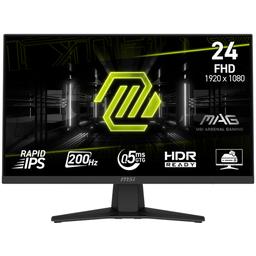
MSI MSI MAG 244F
Monitors

MSI

MSI MAG 244F Reddit Verdict: Great Colors, Tricky DP

Mar 2026

Last Analyzed

7/10

Overall Rating

10

Positive Reviews

10

Negative Reviews

Summary

The MSI MAG 244F is a 24" Rapid IPS gaming monitor targeting budget-conscious competitive gamers who also dabble in creative work. Community sentiment is cautiously positive — owners appreciate the wide color gamut (~126% sRGB), solid build quality, and the included HDMI 2.0 cable that enables 200Hz out of the box without needing a DisplayPort upgrade. It's a relatively new release with limited long-term user data, but early impressions suggest it punches above its price class for color-sensitive tasks. The main pushback from Reddit is around value: at this price point, some users argue upgrading to a 27" 1440p display is a smarter long-term investment.

Pros

  • Wide color gamut of ~126% sRGB and ~80-90% DCI-P3 makes it genuinely capable for light graphic design and photo editing — rare at this price tier
  • Rapid IPS panel delivers no noticeable ghosting or smearing in fast-paced competitive titles like Overwatch and CS2
  • Includes an HDMI 2.0 cable in the box that supports full 200Hz — many competing monitors at this price require an overclock or a DisplayPort cable to unlock max refresh rate
  • True 8-bit panel (no 6-bit + FRC) on the G244F E2 variant means more accurate color reproduction without dithering artifacts
  • Fully ergonomic stand with height, tilt, and rotation adjustment — a feature often missing from budget monitors in this range
  • MSI service center availability in more regions compared to LG and AOC, a practical advantage for buyers in markets like India

Cons

  • Some DisplayPort cable compatibility issues reported — certain DP 1.4 cables (including Ugreen) fail to push beyond 120Hz over DP, while HDMI works fine at 200Hz; requires troubleshooting
  • HDR Ready label is marketing fluff — the panel doesn't meet HDR400 certification and lacks the brightness for meaningful HDR, misleading buyers expecting real HDR performance
  • FHD 1080p resolution at 24" produces noticeably less crisp text compared to higher-density displays — users switching to productivity tasks report readability issues
  • Limited real-world owner reviews available due to recent launch, making it harder to assess long-term reliability or panel lottery risks
  • At ~$180-190 USD, the 27" 1440p segment is within reach for buyers willing to stretch ~$20-40 more, offering a substantially better experience for non-competitive workloads
  • Occasional FPS drops reported by at least one user in GPU-intensive games when using DisplayPort, potentially cable-related but not yet fully diagnosed by the community

200Hz at Launch, Zero DisplayPort Hassle

Unlike many budget monitors that require overclocking or a specific cable to hit max refresh rate, the MAG 244F ships with an HDMI 2.0 cable that does 200Hz straight out of the box. That said, several users report that DisplayPort connections cap at 120Hz depending on the cable — a quirk that's caught a few owners off guard.

Is 1080p Still Worth It When 1440p Is This Close in Price?

Reddit's biggest debate around the MAG 244F isn't about the monitor itself — it's about the category. Multiple commenters point out that stretching the budget by $20-40 unlocks 27" 1440p options, and for anyone not locked into competitive eSports framerates, that jump in pixel density changes the daily experience significantly.

Surprisingly Capable for Creative Work at This Price

Users coming from laptop displays or older monitors consistently call out the color jump — one owner switching from a 62.5% sRGB laptop panel described the ~126% sRGB coverage as transformative. The true 8-bit panel variant and DCI-P3 coverage make this a legitimate option for light photo and video editing, not just gaming.

User Reviews (20 of 70 analyzed)

95
0
12thfailstudentr/IndianGaming13d agopositive

Wide Color Gamut and vibrant colors, 180 Hz, no noticeable ghosting, Adjustable Brightness, True 8-Bit Panel (no 6-bit + FRC), Build quality, Pricing, Software support, OSD menu. No Dead Pixels, minimal backlight bleeding, there was a stuck pixel but I got it fixed by using flashing videos available on YouTube and by applying some mild pressure on that area.

View Original Comment
32
0
ViditM15r/IndianGaming13d agopositive

Did not use AI for writing such a detailed review, did his due diligence with the research, fully understands the pros and cons, understands HDR is a gimmick in this price range and lastly, is satisfied with his purchase because again, he did his research as best as he could. My god, you are a rare breed amongst the IndianGaming folk. Truly.

View Original Comment
10
0
Quaytsarr/bapcsalescanada13d agonegative

"HDR Ready" is such a meaningless marketing term. Sure, it won't give an error when playing HDR content, but it doesn't even meet the standards for HDR400 certification, which is already stretching the definition of HDR.

View Original Comment
6
0
PonyMeir/bapcsalescanada13d agonegative

Don't bother with HDR if its not a Mini-Led or OLED display, imo.

View Original Comment
4
0
Daniel_H212r/bapcsalescanada13d agopositive

Only worth it if you have the budget to stretch and a PC good enough to push that many pixels. Something like this is a much better buy for eSports on a budget.

View Original Comment
2
0
BoiledFrogsr/bapcsalescanada13d agonegative

It's worth the extra money to go 27" 1440p imo.

View Original Comment
2
0
SabAccountBanKarDiyer/IndianGaming13d agonegative

Using the same monitor on a similar mount. Agree with your review. Though i think 27inch 4k is the sweet spot. This one has reading issues with crisp texts.

View Original Comment
2
0
Scared_Professionalr/IndianGaming13d agopositive

I got upgraded to this one by RMAing my MSI G242 (144Hz) & the first thing I noticed was how bright this panel was compared to G242 + more colors (112% sRGB).

View Original Comment
1
0
Blu3Jell0P0wd3rr/pcmasterrace13d agopositive

I'm currently using the LG model, it is a good display, no issues with ghosting for the games I play, colors look decent, contrast is meeh compared to the office VA panel i use as secondary, but you can adjust gamma and contrast to make up for most of it. Not sure if the MSI would be worth the extra, I would say it is, especially for color performance.

View Original Comment
1
0
RancidTerrorr/Monitors13d agopositive

I ended up going with the MSI MAG 256F. According to MSI's official site, the only real differences are that the 256F has 180Hz and 1ms response time, pretty much the same otherwise. I chose it because it was around $40 cheaper. I've only had it for a couple of days, but so far I'm happy with it. Even though it was the cheaper option, it doesn't feel low quality at all.

View Original Comment
1
0
Loose-Internal-1956r/Monitors13d agonegative

According to the video bandwidth calculator I use, you shouldn't even need DSC for 1920x1080 @ 200Hz actually. Even DisplayPort 1.2 can handle the bandwidth whether at SDR or HDR color. Things to rule out: DisplayPort cable under-spec or defective — try a different cable. Make sure it's VESA-certified.

View Original Comment
1
0
delespanar/Monitors13d agonegative

So I bought this monitor and have been using it for a week now, and I had an MSI G241 144 Hz. I use it for gaming, mainly Overwatch, with the MSI MAG 244F as the main monitor. My problem is that when I'm playing Overwatch, I keep getting randomly low fps, dropping to 15-30, and my guess is my DisplayPort cable I'm using. I don't think it supports 200 Hz or something.

View Original Comment
1
0
Lower_Quote_3243r/Monitors13d agonegative

You need to have a 1.2 or above DisplayPort cable for 200Hz.

View Original Comment
1
0
InternationalAerie15r/IndianGaming13d agopositive

With Christmas im looking to upgrade the setup a bit more and i was browsing around for a new 180hz monitor. This post was really helpful and for the price (€89) it sounds to be amazing. The monitor i currently use is a 100hz VA monitor from TUF and it costed me more. Also been a while ago so maybe time and luck came into favor now.

View Original Comment
1
0
KillerOpenr/IndianGaming13d agopositive

Go with MAG 244F, it has 126% sRGB and 80-90% DCI P3.

View Original Comment
1
0
RepresentativeDry742r/IndianGaming13d agonegative

I have the same monitor, how did you calibrate it? I couldn't find icc profile anywhere and had to install official drivers from Msi website and I eyed the RGB points using my phone as comparison R:41, G:41, B:40.

View Original Comment
1
0
Durenasr/bapcsalescanada13d agonegative

If you're looking to buy an HDR monitor, look for something advertised as 'HDR Certified'. Also, look for the brightness value in nits. The higher the value in nits the better, otherwise you'll end up with extremely dark HDR or washed out images.

View Original Comment
1
0
zehuicxkayr/Monitors13d agonegative

I have a question, I got the same problem — can't get above 120Hz over DisplayPort. Also, are there any ghosting issues while using this monitor?

View Original Comment
1
0
Mineplayerminerr/Monitors13d agopositive

It's usually just some difference in the stand, panel or maybe the newer/older revisions. Try copying over the description and specs of each one and put them next to each other.

View Original Comment
1
0
samm56784r/bapcsalescanada13d agopositive

Damn is this going to be the new standard price or a really good deal? Cause that seems very good imo.

View Original Comment