MSI MSI MPG 321URXW QD-OLED
Monitors

MSI

MSI MPG 321URXW QD-OLED: What Real Users Actually Think

Mar 2026

Last Analyzed

8/10

Overall Rating

27

Positive Reviews

15

Negative Reviews

Summary

The MSI MPG 321URXW QD-OLED is a 32-inch 4K 240Hz QD-OLED monitor that draws genuinely enthusiastic responses from most owners, particularly those upgrading from IPS or older panels. Gamers and media consumers consistently praise the image quality — infinite contrast, vivid colors, and deep blacks — as a clear generational leap. That said, the monitor has a vocal minority of critics, mostly focused on MSI's OLED Care firmware behavior and text fringing that makes it a tough sell for pure productivity use. It's best suited for mixed-use or gaming-first setups where visual impact is the priority, with the caveat that heavy office workers may want a separate IPS panel for text-heavy work.
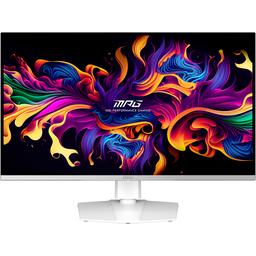
Pros

  • 4K QD-OLED panel delivers a dramatic visual upgrade over IPS — owners consistently describe the contrast, color depth, and black levels as 'next level' for both gaming and media
  • 240Hz at 4K is a rare combination that feels immediately impactful, especially coming from lower refresh rate monitors
  • Compact, well-built stand that doesn't dominate desk space, with an intuitive OSD and clean industrial design
  • MSI bundles a 3-year burn-in warranty, giving peace of mind that competitors like LG don't always match
  • OLED Care firmware has improved significantly — firmware updates pushed the pixel cleaning notification window to 24 hours, and the monitor handles standby-triggered cleaning automatically for most users
  • Works well as a PS5 Pro and Xbox Series X display via HDMI 2.1, making it a strong crossover gaming monitor for console and PC

Cons

  • Text fringing is a real issue for productivity-heavy users — the QD-OLED subpixel layout causes noticeable color fringing on text, and several owners ended up pairing it with a separate IPS for office work
  • Uses DisplayPort 1.4 with DSC rather than DP 2.1 — running 4K 240Hz requires compression, which some users report causes signal artifacts on certain GPU downclocking scenarios
  • KVM functionality is unreliable for multi-PC setups — a specific pain point for remote workers who switch between machines regularly
  • Glossy panel, while vibrant, can be a dealbreaker in bright or daylight-heavy rooms where reflections reduce usability
  • At 32 inches, 4K offers less pixel density uplift over 1440p than the smaller 27-inch version — users who want maximum sharpness may prefer the 27-inch QD-OLED instead
  • MSI's Gaming Intelligence software has been inconsistent — some users report panel protect notifications triggering at inconvenient times before firmware updates resolved the worst behavior

Is 32-Inch 4K QD-OLED Actually Sharp Enough?

Reddit debates whether the pixel density at this size justifies the premium — several users note that the 27-inch version offers a noticeably crisper experience, while others say 4K at 32 inches is plenty sharp for gaming from normal viewing distances.

MSI's OLED Care Firmware Drama: Mostly Resolved

The monitor launched with aggressive pixel cleaning notifications that frustrated early adopters, but firmware updates since release have pushed the warning threshold to 24 hours and made the process largely automatic during standby — turning a once-common complaint into a non-issue for most current owners.

Productivity Users Are Buying a Second Monitor

Multiple owners report keeping the 321URXW for gaming and media while running a separate 4K IPS display alongside it for text and coding — a workaround that says a lot about where QD-OLED text clarity currently stands for mixed-use professionals.

User Reviews (42 of 162 analyzed)

45
0
Disconsentedr/hardware14d agonegative

DP1.4 on this is taking the piss a bit, it's not like there aren't DP2.0 devices to test with even if Nvidia doesn't support it.

View Original Comment
42
0
pomyuor/hardware14d agonegative

While OLED is a night and day difference compared to IPS, I'm not sure how I could ever justify purchasing this. It's over double the price of a decent 4k IPS monitor and has a real risk of burn in, and worse text clarity. I love OLED but I'm passing until these hit $500-600.

View Original Comment
42
0
andrcor/hardware14d agonegative

I really want this but I'm certain I'll destroy it very quickly. I tend to dual boot with Linux where I use a tiling WM. Not just that but I tile the same programs in the same ratios 90% of the time for full work days. OLED would be so awesome to game on but I just don't see how it would work out for me as a dual use screen.

View Original Comment
34
0
Lurtzaer/OLED_Gaming14d agonegative

I don't get how you can't find five minutes time in 16 hours to let your monitor go to Standby once and just do its thing. Bad firmware can kill the whole display experience, however that's not exclusive to OLEDs.

View Original Comment
21
0
NoLikeVegetalsr/hardware14d agonegative

Wait until 2025-26 then, when they should drop down to under £1000.

View Original Comment
16
0
limbpoxr/OLED_Gaming14d agopositive

I've had the same monitor and have had 0 issues. If oled care pops up at a bad time, I turn off display, turn on, use as intended and then let it run its course when it needs to. This post is some of the most dramatic emotions about a monitor I've seen.

View Original Comment
13
0
thoomfishr/hardware14d agonegative

Worse text clarity is the kicker for me. I don't just use my monitor for gaming.

View Original Comment
8
0
Doubleyoupeer/hardware14d agonegative

AW3423DWF can be found for $800 already, pretty close to the price target for this category.

View Original Comment
7
0
Historical_Leg5998r/OLED_Gaming14d agopositive

That's a whole lot of writing for what basically boils down to: I didn't do enough research before my purchase.

View Original Comment
7
0
travisliciousr/OLED_Gaming14d agopositive

There are honestly not a lot of monitors with native G-Sync coming out anymore. It's not really worth the cost of putting an extra chip in them. The G-Sync compatible that your monitor has is good enough generally.

View Original Comment
6
0
iDontSeedMyTorrentsr/hardware14d agopositive

Nice to see more focus on burn-in mitigation features. Price is also good and will hopefully see more discounts on earlier OLED monitors.

View Original Comment
5
0
Confident_Hyena2506r/MSI_Gaming14d agopositive

Eh how is an OLED inferior to IPS? It looks way better unless you are doing something very wrong. Did you update firmware and calibrate it? Did you even change settings?

View Original Comment
4
0
Party_Orange_7493r/OLED_Gaming14d agonegative

No such issue on my Samsung G80SD — zero requirement or notification to run the refresh and I can easily interrupt it and continue doing whatever I want. This is entirely on more gaming-focused brands like MSI.

View Original Comment
3
0
omgkenisherer/OLED_Gaming14d agonegative

I used to run a LG C2 42" before also moving to the 321URX and to be honest, I completely agree with your pain points — I just think your initial statement for not buying an OLED again doesn't apply because this seems to be a MSI-only thing. The LG C2 + LGTV Companion seemed to work way better than 321URX + Gaming Intelligence.

View Original Comment
3
0
BellyDancerUrgotr/OLED_Gaming14d agopositive

I use mine for work and I have had it since release, I have never seen the thing popup. Whenever I get up to get food or coffee the monitor enters standby and does the thing itself, sometimes I just turn it off and it does oled care stuff before turning off.

View Original Comment
3
0
WilliamShatnerFace7r/OLED_Gaming14d agopositive

Most of your issues here aren't exclusive to OLED. I've never seen a panel that didn't let you skip or delay the panel refresh. I have mine and love it.

View Original Comment
3
0
Mneimnehr/OLED_Gaming14d agopositive

I just purchased one after reading this thread. It's a protection for the OLED monitor. I wouldn't buy a QD-OLED without it.

View Original Comment
3
0
oreofror/OLED_Gaming14d agopositive

Most of what you're describing doesn't happen on the vast majority of OLEDs. Even just the notification popping up isn't an issue on most displays because you can massively delay the cycle — mine is set to 16 hours — or just ignore it entirely.

View Original Comment
2
0
jb00gie_r/OLED_Gaming14d agopositive

There was a firmware update in June that changed the Protect Notice for OLED Care from 16 hrs to 24 hrs. I don't deal with the OLED care issue anymore while actually on and using the PC. It hasn't been an issue since FW.016 and overall feels good to me.

View Original Comment
2
0
mahanddeemr/OLED_Gaming14d agopositive

FW0016: Panel shows the display needs to run Pixel Cleaning. You have 3 options — Run now, Postpone 24 hours, or cancel and dismiss (it will run when monitor is in standby). If you ignore it the message auto-dismisses itself in one minute and the message box is pretty much transparent.

View Original Comment
2
0
4Arrowr/OLED_Gaming14d agopositive

I've owned 4 OLEDs so far — 27GR95QE, 321URX, AW2725Q, 272URX — and on all of them you can defer the OLED care function long enough unless you run the monitor 16 hrs straight.

View Original Comment
2
0
Shadow-Kingr/OLED_Gaming14d agopositive

I've had this since day 1 and have not had any of these issues. You can select cancel and it'll either wait until the screen isn't getting input or after 16 more hours. The pixel refresh lasts for 10 minutes at most.

View Original Comment
2
0
T_K_9r/OLED_Gaming14d agopositive

You can use it for anything — my main usage is gaming, YouTube, and video editing. For me it was either MSI or LG. In the end I went MSI simply because of the extra burn-in warranty and the built-in OLED care. Just a bit of peace of mind. Color wise, magnificent.

View Original Comment
2
0
PsychologicalAd6389r/OLED_Gaming14d agopositive

The brightness and colors on the AW3225 are absolutely atrocious. Do NOT recommend.

View Original Comment
2
0
wilsondar/OLED14d agonegative

Text fringing is subjective but I would argue that in this case you, like me, are more sensitive to it. I just could never get past the text clarity issues with QD OLED even though it was supposed to be so much better. My move was to just keep my IPS panel for work and productivity, and keep a separate setup for gaming and content consumption.

View Original Comment
2
0
p1rate88r/OLED14d agopositive

I personally enjoy mine. I work on it 95-98% of the time in MacOS.

View Original Comment
2
0
hamfinityr/OLED_Gaming14d agonegative

I find it strange that people tolerate these interrupts from these manufacturers when the makers of OLED panels like LG and Samsung never have these popups for their own monitor models.

View Original Comment
1
0
dogdiarrhear/OLED_Gaming14d agopositive

Change the warning to 4 hours, and click cancel when you get the warning. Then make a mental note to step away from your computer for a few minutes sometime in the next 12 hours. I've had this monitor since launch and it's never been an issue for me.

View Original Comment
1
0
MiserableForce7070r/OLED_Gaming14d agonegative

Mine's a pile of trash. Has a black dot that developed on top of the screen after 2 months of use. Always buy ASUS.

View Original Comment
1
0
Annual-Error-7039r/MSI_Gaming14d agopositive

Love my 321URX. I'm not sure what the W means, but I've had zero problems and I wouldn't trade it.

View Original Comment
1
0
T_K_9r/OLED_Gaming14d agopositive

I went with this over the LG 32GS95UE Dual Mode Monitor. The LG doesn't seem to have the same warranty in regards to burn-in as MSI does, and doesn't have the same Panel Protect feature. I ended up getting the 321URX cause it went on sale on Currys. I think I made the right choice — the colours look way better.

View Original Comment
1
0
jaiden2310r/OLED_Gaming14d agopositive

Best monitor for a PS5 Pro hands down.

View Original Comment
1
0
Same_Advertising_925r/OLED_Gaming14d agopositive

I totally agree. I'm super happy with my purchase.

View Original Comment
1
0
LetterheadClassic306r/MSI_Gaming14d agopositive

I made the jump to OLED a few months back with the same model and honestly it's hard going back to anything else now. The colors really do pop compared to standard IPS panels. The 3-year burn-in warranty gave me peace of mind when I grabbed mine.

View Original Comment
1
0
WilliamG007r/OLED14d agonegative

Text on all current OLEDs is rubbish currently. It's why I have a 321URX for gaming, and right next to it an LG 32GQ950-B 4K IPS display for anything MacOS/work related.

View Original Comment
1
0
randomballgor/OLED14d agopositive

I had the fringing issue till I went to 4K and that fixed it for me. I had both WOLED and QD-OLED side by side, both 32-inch 4K. You either get text fringing with QD-OLED or some blurriness with WOLED. I found the text better for me personally on the QD-OLED.

View Original Comment
1
0
Cythiriyar/OLED14d agopositive

I'm sensitive to text issues too, so I got a 27-inch 4K QD-OLED and text looks great on it. That size and resolution is very crisp.

View Original Comment
1
0
Rasmus_DC78r/MSI_Gaming14d agonegative

No doubt OLED has some of the best picture quality but I returned mine — could simply not live with the purple tint because it was worse blacks in daylight and my PC is mostly used in daylight environments.

View Original Comment
1
0
ufasasr/OLED_Gaming14d agopositive

So now I want to buy this monitor even more, because cash allows it, and you didn't stop me. I need something to do with yourself bro, this is some anti-technology hate writing.

View Original Comment
1
0
Leather-Regret365r/OLED_Gaming14d agopositive

If the picture is only slightly better you must be using it in a light room. OLED is always good, but the primary benefit of infinite contrast ratio is for use in a dark or darkened room.

View Original Comment
1
0
AdaptzGr/OLED_Gaming14d agopositive

You can literally just turn off the display and it will automatically run the refresh if it needs it.

View Original Comment
1
0
Lonely_Platform7702r/OLED14d agonegative

A matte screen also helps with the fringing as the matte coating diffuses the effect quite a bit. I am also pretty sensitive to it and I didn't really notice the fringing on a G8 with matte coating.

View Original Comment