MSI MSI MPG 491CQPX QD-OLED
Monitors

MSI

MSI MPG 491CQPX: What Real Users Actually Think

Mar 2026

Last Analyzed

8/10

Overall Rating

32

Positive Reviews

9

Negative Reviews

Summary

The MSI MPG 491CQPX QD-OLED is a 49-inch, 240Hz super-ultrawide monitor that has earned strong praise from Reddit users across gaming and productivity use cases. Sentiment skews positive, with most owners describing it as a significant upgrade over multi-monitor setups and a compelling alternative to the Samsung Odyssey G9 lineup. The monitor appeals to users who want a single-cable, KVM-capable solution that works equally well for remote work and gaming. Text clarity divides some users but the consensus is that with proper settings adjustments — lowering sharpness, hiding the taskbar, enabling OLED care — it becomes genuinely comfortable for all-day use. Build quality and MSI's 3-year burn-in warranty are frequently cited as differentiators over Samsung's competing models.
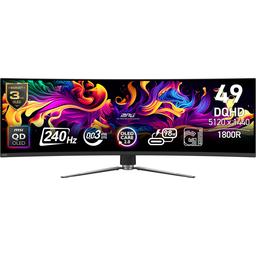
Pros

  • 240Hz refresh rate with QD-OLED panel delivers excellent motion clarity for gaming; users with RTX 4080 and 4090 setups report hitting 150–180fps in demanding titles
  • 98W USB-C with DisplayPort Alt Mode enables true one-cable laptop connectivity, covering video output, peripheral passthrough, and charging simultaneously
  • Built-in KVM switch lets users run a work laptop and gaming PC through the same monitor and peripherals with seamless switching — a major workflow benefit for hybrid users
  • 3-year burn-in warranty from MSI provides peace of mind for productivity users; owners using it 8–10 hours daily for coding and data work report no burn-in after months of use
  • PBP (Picture-by-Picture) mode supports dual 2560x1440 inputs at 120Hz each, enabling simultaneous PS5 and PC use or split workstation setups
  • Priced $100–500 less than the Samsung Odyssey G9 G95SD while offering similar or better specs — currently available around $899 at Amazon and Microcenter

Cons

  • Text clarity is inconsistent out of the box; the default settings (high sharpness, HDR on) produce noticeable fringing for some users, requiring manual calibration before it's comfortable for productivity
  • PBP Mode 1 has a confirmed firmware bug where the secondary screen resolution doesn't apply correctly, leaving the second window unusably small — workaround is to use the 50/50 split instead
  • 240Hz requires DSC (Display Stream Compression) to be enabled; users who prefer uncompressed output are limited to lower refresh rates
  • At 108 PPI the pixel density is the same as a 27-inch 1440p monitor — acceptable at 80cm distance but noticeably softer than 4K displays like the Dell U4025QW, which some productivity-focused users prefer
  • At least one user reported the monitor failing completely within 3 months, and MSI's RMA process offered a $200 cheaper replacement model rather than a like-for-like unit — a real support concern
  • The glossy coating, while great for color vibrancy, creates reflections in bright rooms; Samsung's G95SD offers a matte anti-glare coating that some office environments will prefer

The Settings Make or Break It

Reddit is full of split opinions on text clarity — but almost every 'it's terrible' post comes from users testing it at a store or with default settings. Owners who dial in sharpness to 0, disable HDR for desktop use, and enable OLED care consistently report it's comfortable for full workdays of coding and data work.

Why Pay More for the Samsung When MSI Has KVM and USB-C?

The MSI 491CQPX and the Samsung G95SD use essentially the same panel, but the MSI adds a full-size KVM switch, 98W USB-C, and two HDMI 2.1 ports — while Samsung's version includes a smart TV OS most PC users don't want. At $100–500 less, Reddit's consensus is clear: MSI wins on value unless you specifically need the matte coating.

The Burn-In Fear Is Mostly Overblown — But the RMA Process Isn't

Owners with 12–18 months of heavy all-day use report zero burn-in with basic precautions. The bigger risk Reddit flags is MSI's warranty support: at least one user had their unit fail at under 3 months and was offered a $200 cheaper model as a replacement, suggesting the 3-year warranty is only as good as the support team enforcing it.

User Reviews (41 of 155 analyzed)

11
0
The_Effect_DEr/MSI_Gaming13d agopositive

I wanted so hard to get into QD-OLED 34" but every one I had here had massive fringing or lacked in Software aspects. Now 3rd Gen 49" was a compromise for me, even though I think it's a bit too wide. Samsung provided bad build quality and I had two of their 49" monitors with dying pixels or whole lines within 14 days. Now I finally decided to give MSI a chance and damn their monitor is great. Good build quality, very good menu and superb image quality. The colors are perfectly tunes and intense, the brightness is very good and the contrast is awesome and with this panel Generation Color Fringing isn't a thing either anymore.

View Original Comment
9
0
boltbreakrr/ultrawidemasterrace13d agopositive

I bought this monitor a month ago as my first ultra wide and oled monitor with no regrets, truly one of the best purchases I've made. I have the same spec computer as you and I can't really make use of the 144Hz refresh rate in demanding games, so I don't see it as worth it to wait for the new model, especially when I got this one for $850 before tax.

View Original Comment
4
0
thehomicidalhamr/ultrawidemasterrace13d agopositive

I've had an OLED G9 for over 18 months, work from home and always have static stuff on my screen; I've yet to have any issues with burn in. It has the pixel saver, so every few minutes the image will shift a little bit. I don't think I can ever go back to not having an OLED, even for work.

View Original Comment
4
0
Cbeckstrand_2r/ultrawidemasterrace13d agopositive

Similar situation but on the 491CQP for almost a year now. No burn in issues and I would recommend it.

View Original Comment
4
0
580OutlawFarmr/MSI_Gaming13d agopositive

MSI monitors are some of the best out there...people just dont realize that sometimes shit happens...theres thousands made... Been running my mag321up (msi 32in 4k 16thz qd-oled) for 3 years now, upgrading to the 322urx x24 very soon.

View Original Comment
3
0
allergictotaxesr/ultrawidemasterrace13d agopositive

The main difference is coating, smart features, and inputs. The MSI has a glossy coating, no built in tv/smart functionality and inputs are little better: 2x full size HDMI 2.1, 1x display port and 1x usb-c with displayport alt mode and power delivery. The G95SD has a matte antiglare coating, smart tv functionality built in with a remote, and 1x full size hdmi 2.1, 1x mini hdmi 2.1 and 1x displayport 1.4. MSI is likely the better value unless you just absolutely need the smart tv functionality.

View Original Comment
3
0
Cbeckstrandr/ultrawidemasterrace13d agopositive

I have worked from home on my 491CQP and it has worked well for me but I also use it for gaming a fair bit as well. No burn in issue but an OLED is also not going to benefit much for productivity.

View Original Comment
3
0
SnooWords406r/ultrawidemasterrace13d agopositive

Have a 4080s and 7800x3d paired with the monitor. Amazing single player game experience, with path tracing on in cyberpunk I still get 75-85fps, RDR2 im getting 90-100fps at all times. Good features on the monitor too such as picture by picture in case you wanna use a console and still use the PC, has hdmi 2.1 and will upscale the console to 4k 120fps.

View Original Comment
3
0
alex416416r/ultrawidemasterrace13d agopositive

I have 57 g9 and I do work on it. Having good experience - when I use mac (m4pro) I use virtual display 5120x1440hidpi 120hz. No issues. When on windows I have rtx 5090 to run 240hz full resolution at 150% scale. Not much difference between 120hz vs 240hz unless you scroll full screen browser text. In 240hz it's so good. But when in windows not so much.

View Original Comment
2
0
HabanosJoer/ultrawidemasterrace13d agopositive

Great panel. 49" is great for productivity as twin 27" equivalents. Sitting 80cm away from the screen the text clarity of 108 PPi is good for me. The QD OLED pops and it's a newer gen 3 panel. PBP works well. I love the UI and the oled care options MSI gives. Also it's a great gaming monitor. Very happy with it.

View Original Comment
2
0
Shandduder/ultrawidemasterrace13d agopositive

I have the MSI 491CQPX OLED is awesome burn in is covered under a 3 year warranty from MSI if you manage to burn it in MSI will replace it under warranty. I got 2 QD Oled monitors I have no LCDs after experiencing QD OLEDs you wont go back!!

View Original Comment
2
0
MeRollstar/buildapcsales13d agopositive

I have the Samsung G95SC. They are essentially the same panel. If you don't want the smart features and just want to use it as a pc monitor, get the MSI. Samsung's UI is an abomination.

View Original Comment
2
0
pantsofmagicr/ultrawidemasterrace13d agopositive

Picked up one of these yesterday to replace a triple monitor setup on my desk that was made of various monitors from over the years. Microcenter has them for $899 right now which is an incredible deal and much less than other retailers. Text quality is okay - there isn't noticeable fringing but it's not super clean looking. Still, the screen space is really wonderful - the form factor is perfect for multitasking.

View Original Comment
2
0
IsNullUserr/ultrawidemasterrace13d agopositive

Purchased this screen. Bought it for $1,600 AUD, can confirm I'm happy with it. Albeit, im only 1 Week in. PBP is already in use, work on one side, PS5 running black ops 6 at 120hz on the other. Works going well.

View Original Comment
2
0
devilzangelzr/ultrawidemasterrace13d agopositive

I just picked this up as my 3rd 49" display on a BFCM deal for $700 USD +tax for work. I look forward to using it for coding and data analytics!

View Original Comment
2
0
Eximirahr/ultrawidemasterrace13d agopositive

If you are okay with practicing the usual OLED care techniques (hiding your taskbar, using dark modes, and letting the monitor run its refresh cycles), the visual payoff is worth it. Although it does have a built in nanny feature thats basically a pixel refresh that is prompted to prevent burn in. While it can be postponed, it may get in the way of productivity during long workdays, especially since the pixel refresh can sometimes take 5 to 10 mins on average.

View Original Comment
2
0
ripsqlr/ultrawidemasterrace13d agonegative

You want text quality, go ips. You want best gaming performance, go oled. Qd-oled is not known for its text clarity, though it depends on the person. I don't have an issue with qd-oled but some do. It's not really for work but it should function ok for it.

View Original Comment
2
0
saxnbassr/ultrawidemasterrace13d agopositive

I won't buy another Samsung product. Got an Odyssey OLED for the wife and the button joystick on the back that controls everything on the monitor, including power, broke within the first 5 months of owning the monitor. It's made of a super cheap and thin plastic that just split and fell right out. Contacted Samsung support and they told me I have to have a repair technician come to my house to give me an estimate; this is considered 'wear and tear'.

View Original Comment
2
0
Exact_Confidence_501r/ultrawidemasterrace13d agopositive

You got the same setup I have but 7-9800x3d, and I can't imagine how much you feel as I feel very accomplished with buying this unit, it looks fantastic, and making over 150 fps at stock.

View Original Comment
1
0
Southern_Ad1096r/ultrawidemasterrace13d agopositive

I've had it for about a month now, and omg this thing is great! I use it for work laptop and gaming pc. The kvm works great in this application, and the screen is beautiful. I have a samsung qd oled tv and hate the OS so much, so the G9 was a no-go. I would recommend this one to anyone who doesn't want to wait for 4k super ultra wides and uses for productivity and gaming. Also, my 4090 can run most games at 180 fps, so it's worth it to me to get the 240hz version.

View Original Comment
1
0
coolkwcr/ultrawidemasterrace13d agopositive

I just purchased 2 weeks ago, what i can tell it is an amazing screen, reasonable priced compare to Samsung and without any unnecessary bit like useless RGB on the back. Fanless design with huge compartment behind, i don't feel alot of heat at the compartment during operation, the power board is integrated in the housing and i really like this kind of simplicity design. So far don't have flicker or black screen issue as reported in Samsung G9.

View Original Comment
1
0
TheSarcasticMonkeyr/buildapcsales13d agopositive

I got this monitor recently and absolutely love it. It's plenty bright – although I'm in a basement, I keep it at 40-50% of max – and the colors/blacks are amazing. MSI has a 3 year burn-in warranty that can be extended 3 months by registering online, which sold me on MSI over other brands. Most games I've tried work seamlessly with the super ultrawide resolution.

View Original Comment
1
0
elmallocr/ultrawidemasterrace13d agopositive

I have this monitor and the text is super clear, clearer than my Alienware 34" QD-OLED. I have 2 of the MSI 49" QD-OLED and 2 of the 34" QD-OLED. I can work on both but the MSI is one of the best monitors I've ever used for work and gaming.

View Original Comment
1
0
hariiii22r/ultrawidemasterrace13d agopositive

Final verdict, i settled with MSI oled, i played around with sharpness and picture type settings and i was convinced. Oled seems to make my eyes feel good in the night time, i sit straight next windows even in bright room its very clear and sharp, just set all the oled panel care to a good setting and you are good to go.

View Original Comment
1
0
solomon2668r/ultrawidemasterrace13d agopositive

I will admit the base setting are bad for productivity/work. You can turn the brightness and sharpness down, and the text becomes very readable. Its a flexible panel.

View Original Comment
1
0
Cbeckstrand_3r/ultrawidemasterrace13d agopositive

I have owned the 491CQP for a little over a year and have loved it. I work from home so probably a similar split of work and play as you have listed. No issues with burn in and the size has worked very well for me.

View Original Comment
1
0
Jonah__Complexr/MSI_Gaming13d agopositive

I have the G95SC currently and am going to sell it to a buddy. I love that feature with synergy. I mean like using it with two video sources like two monitors? Yes that works. You've sold me on it then thank you.

View Original Comment
1
0
RampageDeluxxer/ultrawidemasterrace13d agonegative

Bought the monitor last week and put it through some paces. No 240hz without DSC. PBP dual 2560x1440 can do 120hz each. PBP 3840x1440p/1280x1440p limited to 60hz from what I can see. Natively can power/drive a macbook, but the KVM sometimes wont wakeup the mac. The monitor has an aggressive sleep timer I cant find.

View Original Comment
1
0
ciceroripir/ultrawidemasterrace13d agonegative

Anyone that have this monitor, can you check if you're able to run PBP Mode 1? One screen gets 3840x1440 ok, but the other screen also gets the same resolution, instead of 1280x1440. It just makes the second screen really small and not usable. Monitor is awesome btw, love it, even with my 3080.

View Original Comment
1
0
ciceroripi_2r/ultrawidemasterrace13d agonegative

It's a bug on their firmware, I'm just using split in half for now. I did open a case with them about it, but they are very obscure with that, so no way to tell if they are actually doing anything about it.

View Original Comment
1
0
Careless_Run_7120r/ultrawidemasterrace13d agonegative

Is anybody else struggling as me with the PbP mode of the MSI? I just bought it for this functionality, to display PS5 and computer input in the same time. The functionality is blocked in OSD menu, I've tried a lot of things (firmware update) but even with inputs from MSI support it doesn't work. I'm disappointed.

View Original Comment
1
0
hariiii22_2r/ultrawidemasterrace13d agonegative

I just tested it out both msi and g95c. Saturated colors from oled, good for gaming definitely no for work, it gets annoying if you are into lot of coding in which ide has multiple colors. I find whites are but yellowish and doesnt feel natural. Text fringing is barely noticeable on this oled, unless you sit nose touch to your monitor.

View Original Comment
1
0
Killerbsting16r/ultrawidemasterrace13d agonegative

Beware of how hard it is to clean this screen.

View Original Comment
1
0
Bulky_River3358r/ultrawidemasterrace13d agopositive

Don't get the Samsung. I had that monitor and it just shattered in the middle of the game I was playing. Other users have experienced the same. I now play with the msi 49 in.

View Original Comment
1
0
Shanddude_2r/MSI_Gaming13d agopositive

If a game supports 21:9 resolution—like Quantum Break—this monitor scales it down properly without any issues. Unlike the ASUS, which gave me headaches by stretching the image, the MSI handles it flawlessly. Even older titles like Duke Nukem 3D work perfectly in 16:9. Hands down, the scaling on this monitor is among the best—if not the best—I've seen.

View Original Comment
1
0
ScaleAccurate3686r/ultrawidemasterrace13d agopositive

While static images are the worst for OLEDs the tech has progressed to a point where it will be a non issue. The quantum dot tech helps the display age evenly and gracefully. The blue OLEDs are more stable, and the technology can monitor and adjust pixel performance, reducing the risk and severity of burn-in. I say go for it. I do a lot of things on my computer with static images and you will be gold.

View Original Comment
1
0
Conscious_Hair_222r/ultrawidemasterrace13d agopositive

I am using this monitor for work and gaming. Text looks OK to me, I don't have any issues reading technical documents etc. Is it better comparing to my normal monitor - no, but still usable and not the end of the world. What I like is having 2 windows open side by side.

View Original Comment
1
0
bigpricetv24r/ultrawidemasterrace13d agopositive

I love mines I have the 240hz one just got it last week.

View Original Comment
1
0
Minute-Street8043r/ultrawidemasterrace13d agonegative

Hello guys, I bought this monitor 3 weeks ago and since day one the monitor makes some noises at the back, I don't know how to explain which noise, but sounds like static noises. Is not loud but I have a great ear and I can hear it at night. I don't know if my monitor has some defects from factory.

View Original Comment
1
0
HabanosJoe_2r/ultrawidemasterrace13d agopositive

You need to turn off HDR and Adaptive-Sync, so PIP/PBP won't be greyed out. Also you need to drop refresh down, because PBP caps at 120 Hz per side. PBP works great for me doing these steps.

View Original Comment
0
0
SundaeNo4552r/MSI_Gaming13d agonegative

The issue is that I hadn't even had the device for 3 months, it started malfunctioning, and they can't replace it. How sad. I doubt they can even give me a refund because I purchased it through a retailer, so I'm pretty shit out of luck. They may just send my broken device back if I don't accept the downgraded replacement, and I'll be left paying $900 for 2 months of use that turned into an expensive paper weight.

View Original Comment