MSI MSI PRO MP251 E2
Monitors

MSI

MSI PRO MP251 E2 Reviewed by Real Users: Worth It?

Mar 2026

Last Analyzed

7/10

Overall Rating

27

Positive Reviews

14

Negative Reviews

Summary

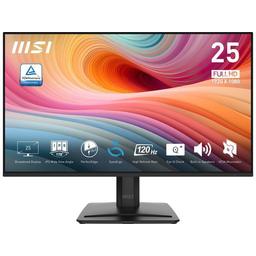
The MSI PRO MP251 E2 is a 24.5-inch IPS budget monitor running at 120Hz (or 100Hz depending on the variant and connection), and Reddit's overall reception is solidly positive for the price. It's aimed squarely at casual gamers, students, and office users in budget-constrained markets — particularly popular in the Philippines where it competes in the 4.5k–6k PHP range. Users consistently report good color accuracy for the price, a clean bezel-less design, and reliable build quality with no dead pixels or flickering issues reported after months of use. The main frustrations stem from confusion between the MP251 E2 (with speakers) and the MP251L E2 (without speakers or audio jack), and a few hardware limitations like the external power brick and lack of DisplayPort on certain variants.
Pros

  • IPS panel with 99–101% sRGB coverage delivers vivid, accurate colors for a sub-$100 monitor — users report it punches above its price in color quality
  • 120Hz refresh rate with Adaptive-Sync support reduces screen tearing for casual gaming without needing a dedicated G-Sync or FreeSync premium display
  • Supports 10-bit color depth (via DisplayPort), though refresh rate drops to 100Hz — a rare feature at this price tier
  • VESA 100x100mm mount compatibility allows ergonomic arm setups despite the basic tilt-only stand
  • Clean, slim bezel design with no branding on the panel — multiple users specifically called out the aesthetic as a plus
  • Long-term reliability reported by multiple owners using it daily for 4–8+ months with zero panel defects

Cons

  • External power brick required — not ideal for multi-monitor setups or clean cable management
  • MP251L E2 variant lacks both built-in speakers and an audio jack, with no way to output sound directly from the monitor — a source of buyer confusion
  • 1080p resolution limits sharpness for productivity-heavy or coding workloads — community consensus suggests a 32" 4K at ~$250 is a better long-term buy for programmers
  • Basic stand offers tilt only, no height or swivel adjustment — VESA mount purchase recommended for ergonomics
  • Competitors like the Acer EK251 offer 144Hz and 3-year carry-in warranty at a similar price point, making the MSI's value proposition less clear-cut
  • Adaptive-Sync via HDMI behavior with Nvidia cards is inconsistently reported — DP is the safer path for VRR

Speakers or No Speakers? The MP251 E2 vs MP251L E2 Confusion Is Real

Reddit threads are full of buyers who accidentally ordered the L variant and discovered too late it has no speakers and no audio jack whatsoever. MSI's naming convention trips up even attentive shoppers, and the L model offers no audio output path at all — not even a 3.5mm port.

At This Price, the Value Case Is Strong — But Not Unopposed

The MP251 E2 hits a sweet spot for budget buyers, but the Acer EK251 lurks at a similar price with 144Hz and a 3-year warranty. For buyers who care about refresh rate headroom or after-sales support, the competition is a real factor worth weighing.

Owners Are Actually Keeping It — Months Later, Still Happy

Unlike monitors that get praised at unboxing and complained about later, the MP251 E2 shows up repeatedly in 'still using it after X months' comments with no major issues. For a budget panel, that kind of staying power in Reddit threads is a decent signal.

User Reviews (41 of 80 analyzed)

40
0
hades182r/bapcsalescanada13d agopositive

Because you should be getting 3

View Original Comment
10
0
RionXair/PHbuildapc13d agonegative

Built-in speakers on monitors are not that good tbh. You are better off getting headphones or a dedicated speaker you plug in to the desktop itself.

View Original Comment
8
0
imcoolbeansthor/bapcsalescanada13d agonegative

The deal breaker for me was that these monitors require external power adaptors, having one or two power bricks for additional monitors that would not be doing much more than browsing websites or youtube videos was not worth it to me.

View Original Comment
7
0
jolsiphurr/bapcsalescanada13d agopositive

I bought one and for $100 it is pretty hard to beat. Even most productivity focused monitors will cost that much or more. The colours look good on the monitor and it works fairly well. Downside is an external power brick. It also only has HDMI or VGA, which is not a huge problem but it is something to consider.

View Original Comment
4
0
chanchan05r/PHbuildapc13d agonegative

Built in speakers suck. Sounds like it comes from underwater. Even 200 peso speakers from random PC parts shops are better. There is no issue with not having an audio jack on the monitor anyway, just plug directly into the back of the PC.

View Original Comment
3
0
Leonida__Manr/buildapcmonitors13d agonegative

If you are a programmer, you should be seriously considering a 32 inch 4K monitor, which is like having four 1080p monitors in one. 4K monitors are really cheap now days, I am talking like 32 inch 4K starting at around $250 USD in the US.

View Original Comment
3
0
Conarrotir/PHbuildapc13d agopositive

For the price, okay naman siya overall. IPS panel so decent ang colors and viewing angles, and the 120Hz refresh rate is a noticeable upgrade if galing ka sa 60-75Hz. May Adaptive-Sync din so less screen tearing for casual gaming. On the downside, 1080p lang so don't expect super sharp text or productivity-level clarity. Basic lang yung stand, tilt lang, no height adjustment.

View Original Comment
3
0
BoiledFrogsr/bapcsalescanada13d agopositive

This monitor is bizarre. 25 inch and 100hz. I do not look at monitors much, but I never see either of those specs. With that being said, I did not expect it to be over 60hz for this price. This seems like one of the best monitor sales I have seen at the $100 range in a while.

View Original Comment
3
0
Malakhovr/bapcsalescanada13d agopositive

I need two monitors for home office, this looks like the best option. Value wise it is pretty hard to beat. I will go pick two this weekend.

View Original Comment
3
0
guthixjrr/bapcsalescanada13d agopositive

It does have VESA support. Not sure why it says no in the listing specs but it is shown on the first image and listed on the product main page. 100x100mm.

View Original Comment
3
0
popop143r/PHbuildapc13d agonegative

Do not use built in speakers on any monitor. Even the most expensive monitors have bad built-in sound. All modern motherboards and PC cases have decent audio ports anyway.

View Original Comment
2
0
Tight_Locksmith9516r/PHbuildapc13d agonegative

Bro I am using this monitor too (24.5 inch). Can you tell me how can I get 10 bit colour. I am using HDMI cable but display settings only shows 8bit colour. Also can you tell me how to turn on HDR. It always says HDR off.

View Original Comment
2
0
Putrid-Gain8296r/PHbuildapc13d agonegative

Go with acer EK251 instead you can find ones for the same price, they have 3 years warranty which you can bring to any authorized service center which is everywhere and its 144hz.

View Original Comment
2
0
Daniel_H212r/bapcsalescanada13d agopositive

MSI specs page for this display says 101% sRGB coverage, pretty good at this price. Combined with 1ms MPRT and 4ms GTG response time, 300 nits brightness, and adaptive sync, this could be a pretty well rounded ultra budget gaming monitor. They even advertise 1300:1 contrast ratio which is higher than the 1000:1 average for IPS.

View Original Comment
2
0
GoToGoatr/bapcsalescanada13d agopositive

For $100 a piece this is pretty sick. Cannot imagine finding anything better especially if you appreciate the 100hz smoothness. This is a newer IPS panel so the colours and images should be nice.

View Original Comment
2
0
whatismynaemr/PHbuildapc13d agonegative

I mean it is what it is, your standard 100hz IPS monitor that is likely using an identical panel with all its competitors at the same price range. If your main goal is to edit and code then you can spend more for a higher resolution color accurate monitor if that matters to you.

View Original Comment
2
0
Historical_Swing2035_ownerr/PHbuildapc13d agopositive

I am not really sure but I am using mp251 monitor for 8 months and I can say it is worth the price.

View Original Comment
2
0
OnlookOnlookerr/PHbuildapc13d agopositive

Just bought one. Hope it is worth it.

View Original Comment
2
0
Tinney3r/PHbuildapc13d agonegative

You will be much better off using cheap IEMs or headsets than a monitor built in speaker.

View Original Comment
2
0
schubaltzr/PHbuildapc13d agopositive

That is the only difference? Built in speakers? Not a big deal at all.

View Original Comment
1
0
pleasekillme14r/PHbuildapc13d agopositive

I have been using this monitor since January 2025, and it has been very solid. The monitor can support 10 bit color, although it will be limited to 100hz instead of the full 120hz. It has served me well until now, have not encountered any issues whatsoever.

View Original Comment
1
0
Scary_World123r/PHbuildapc13d agopositive

i got it its pretty nice

View Original Comment
1
0
SimpleMonarchr/PHbuildapc13d agopositive

the lg has no display port while the msi has, heck it even has speakers

View Original Comment
1
0
pleasekillme14_tipr/PHbuildapc13d agopositive

I am using an intel platform right now, its in the intel graphics software settings, its in the display options, look for color depth.

View Original Comment
1
0
pedrokndr/buildapcmonitors13d agonegative

Similar situation. Currently with a 34 inch WQHD, but going to move to a 32 inch 4K. The main downside of the ultrawide is the vertical resolution. 80% programming 20% gaming.

View Original Comment
1
0
erza730r/PHbuildapc13d agopositive

I have mine for 4 months now. If you only do casual gaming, it is a nice upgrade from 75Hz. I play mostly RPGs, casual Valorant, and I am happy with its performance. I also dock my Switch to this monitor, so the speakers are nice to have.

View Original Comment
1
0
rain-menr/PHbuildapc13d agopositive

Walang Displayport yung 251L but okay lang naman since 1080p 120hz lang. I don't have a way to test the colors but based on my other monitors I think accurate naman yung 99% SRGB coverage. What I like about it is how sleek the bezels are. There's no branding.

View Original Comment
1
0
JnyBwingr/PHbuildapc13d agopositive

I own one and my experience is all good. Color accuracy is good for me. Gaming is smooth, though it is 1080p but texts are still good enough and sharp to me. Overall amazing for me since I was looking for a budget monitor around 5k.

View Original Comment
1
0
ibigfirer/bapcsalescanada13d agopositive

This seems like a decent deal for a budget monitor. Even though the $20 shipping cuts into the deal a bit. Money is tight but I am still using an old Dell 2209WA 1680x1050 monitor from 2008.

View Original Comment
1
0
Specialist_Music3978r/PHbuildapc13d agopositive

Worth buying! I bought it for only 4.3k since I had a voucher on Shopee. The colors are clear and vivid, I also tried watching high res videos on YouTube and it was clear.

View Original Comment
1
0
One-Effect-6321r/PHbuildapc13d agopositive

i got the same monitor all good for a office worker and casual gamer like me

View Original Comment
1
0
no_issues_ownerr/PHbuildapc13d agopositive

nope, okay naman all goods hahah gamit na gamit ko pa now

View Original Comment
1
0
NeoNatrixr/MSI_Gaming13d agonegative

I think MP251L e2 does not have a built in speaker. The version that does is the MP251 e2.

View Original Comment
1
0
Pprox0vr/MSI_Gaming13d agonegative

I lately realized i bought the wrong version, i was supposed to buy mp251 e2 but did not realize there was another version. Anyways i will stick with this and just buy an external speaker.

View Original Comment
1
0
LoveObjective6707r/MSI_Gaming13d agonegative

I actually have the same monitor, and there is no audio jack port on it. I checked everywhere on the PRO-MP251L-E2, and it does not have any output for external speakers. So unfortunately, there is no way to get sound directly from the monitor.

View Original Comment
1
0
Pprox0v_updater/MSI_Gaming13d agopositive

It is great, light weight but it does not have a built in speaker unlike the other version. But overall it is great, no problems for me.

View Original Comment
1
0
Conarroti_comparisonr/PHbuildapc13d agopositive

Comparing to Xiaomi A24i/A27i, the MSI PRO MP251L E2 is more worth it because it has 120Hz refresh rate and Adaptive-Sync versus only 75-100Hz on Xiaomi, plus MSI has more consistent panel quality and more reliable local after-sales support.

View Original Comment
1
0
Chance_Sandwich_updater/PHbuildapc13d agonegative

I ended up not needing it anymore. But I also found a better alternative. Gigabyte had a new monitor with speakers and better specs than the MSI one for the same price or lower.

View Original Comment
1
0
one_tiny_sandwich_qr/PHbuildapc13d agopositive

How is your experience so far especially with color accuracy? Did you color calibrate it or leave it at default? I also game every now and then so refresh rate is also a consideration for me.

View Original Comment
1
0
lhkpo1c_colorownerr/PHbuildapc13d agopositive

I haven't calibrated it yet but for me the color is already bright and vivid.

View Original Comment
1
0
Remarkablefourr/PHbuildapc13d agopositive

I've seen some videos on YouTube that the extra 50 nits on MSI seem to make better colors. I also want to keep my budget under 6K. I will be using the monitor for some productivity apps and a bit of video editing.

View Original Comment