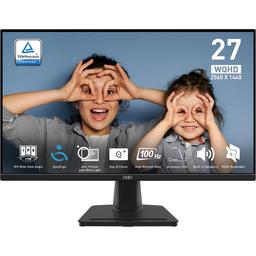
MSI MSI PRO MP275Q
Monitors

MSI

MSI PRO MP275Q: What Real Users Say on Reddit

Mar 2026

Last Analyzed

7/10

Overall Rating

24

Positive Reviews

18

Negative Reviews

Summary

The MSI PRO MP275Q is a budget-friendly 27-inch 1440p IPS monitor that Reddit users generally recommend for productivity, office work, coding, and light gaming. Sentiment is largely positive for the price point, with long-term owners reporting solid reliability after 7+ months of daily use. It's consistently described as a strong value pick for anyone stepping up from 1080p, where the sharpness improvement is immediately noticeable. It's not a serious gaming monitor — the 100Hz refresh rate and tilt-only stand are real limitations — but for the intended audience, it delivers a satisfying experience.

Pros

  • Significant sharpness upgrade from 1080p — text, images, and UI elements look noticeably cleaner on the 2560x1440 IPS panel
  • Adaptive sync support (FreeSync) works reliably with both AMD and Nvidia GPUs, reducing tearing without extra cost
  • Built-in speakers provide emergency audio; HDR support on Windows 11 reportedly delivers decent quality despite the budget price
  • VESA 100mm mount compatible, which users say fully compensates for the weak stock stand and poor ergonomics
  • Proven long-term reliability — one owner reported zero issues after 7+ months of daily use including video editing
  • Suitable for web design, UI/UX, digital art, and light photo editing, making it versatile for creative productivity work

Cons

  • 100Hz refresh rate is low by today's standards — competitors at $10-20 more offer 144Hz or higher, and the 100Hz cap is a real downgrade for anyone coming from a 165Hz panel
  • Tilt-only stand with no height or swivel adjustment is a recurring ergonomics complaint — VESA mount is essentially required for comfortable daily use
  • IPS backlight bleed is present, particularly in dark scenes and corners — typical for the price range but acknowledged by multiple owners
  • Achieving 100Hz over HDMI requires specific cable handling — several users reported the screen stuck at 60Hz until they unplugged and replugged the cable after changing settings
  • Advertised 1ms response time is a marketing figure; real-world grey-to-grey is closer to 4-5ms average, per community expectations for budget IPS panels
  • Build quality feels cheap — plastic stand is wobbly when the desk is bumped, which is noticeable in daily use

The 100Hz Question: Does It Actually Matter for This Monitor?

Most MP275Q owners say 100Hz is perfectly fine for non-competitive gaming and productivity, but users migrating from 144Hz+ panels consistently feel the downgrade. The Reddit consensus: if you're coming from 60Hz, it's a revelation; if you're coming from 165Hz, it's a step back.

Budget 1440p Done Right — If You VESA Mount It

The MP275Q's weak point isn't the panel — it's the stand. Reddit users almost universally suggest pairing it with a VESA arm, after which the ergonomics complaints disappear entirely and the value proposition becomes much harder to argue against.

Coders and Designers Are Its Real Target Audience

While marketed broadly, the monitor found its strongest Reddit endorsement among programmers and digital designers. The 1440p resolution at 27 inches hits a sweet pixel density for reading code and editing UI work, and the IPS colors are considered accurate enough for web-targeted design work.

User Reviews (42 of 94 analyzed)

8
0
DomiDom77r/bapcsalescanada13d agonegative

Can you tell us why it's a bad deal?

View Original Comment
7
0
maybepantsr/bapcsalescanada13d agonegative

100Hz is odd, right?

View Original Comment
6
0
Far-Letterhead4945r/buildapc13d agopositive

Yeah, sure. So I got it for under $120. The monitor is good; it has bleeding...which you will only notice when there are pure black or dark scenes. But as the bleeding is pretty common at this price range, that is not an issue. I was using a 1080p 24-inch monitor before... But after switching to it, I don't think I can go back to 1080p. The images are clearer and sharper. So are the texts. The Speakers it has can be used in an emergency, but you will need a dedicated soundbar.

View Original Comment
6
0
Coompar/bapcsalescanada13d agopositive

I have one of these. It was this price a couple months ago. I love it. It has the typical IPS back bleed in the corners. No dead pixels. Only complaint is it's pretty wobbly if you hit your desk. No height adjustment. I don't game a lot so 100hz is fine. Really anything over 75hz is fine to my eyes. The HDR on Win 11 is actually pretty good quality on this. I had to turn it off though because it makes RDP all washed out when connecting remotely.

View Original Comment
6
0
Sadukar09r/bapcsalescanada13d agonegative

Not bad for a cheap 1440p IPS monitor, more suited for a secondary monitor, but can game on a pinch. Ergonomics suck though if you don't VESA mount it. Jeff Bezos has a better Acer one for $10 more.

View Original Comment
5
0
comFiver/bapcsalescanada13d agonegative

Get a decent desk mount.

View Original Comment
5
0
deleted_perfect_avgr/buildapc13d agonegative

There is no catch, it's a perfectly average monitor for a perfectly average price. It'll be edge lit, there is 0 chance it actually has 400 nits brightness average (maybe 200, the 400 will be 'peak'). It'll have a bit of backlight bleed. The response time is a lie — it'll be 4-5ms average. Not a bad monitor, just temper your expectations. If you've never had a high end gaming monitor it'll still feel like a huge upgrade.

View Original Comment
4
0
deleted_100hz_opinionr/bapcsalescanada13d agonegative

I'd say it's odd since monitors are usually 120/144/165/240hz nowadays. Sad part is though; at one point 720-1080p 100hz was considered as advanced as OLED/4k/165hz+ back then.

View Original Comment
3
0
Far-Letterhead4945_ipsr/buildapc13d agopositive

The bleeding is an issue that's present in any IPS monitor... The question is how much. In my case the bleeding is minimal and only happens during really dark scenes... As for the low black... It's the same all IPS panels have that. But I would say as I am using this monitor for 2 months now... The blacks are pretty good... Though not as good as an OLED of course. The viewing angles are good... And yes the 2K is real...

View Original Comment
3
0
alvarkreshr/bapcsalescanada13d agonegative

No height adjustment was one of the dealbreakers for me when I was looking at 1440p ~140+Hz monitors a while back. I like being able to adjust the monitor to my particular ergonomics.

View Original Comment
3
0
achzee_issuer/buildapc13d agonegative

I used the cable that came with the monitor, but I don't know which version it is. I went to settings and changed from 1080p FHD to 1440p 2K, and that went smooth no problems, but when I try to change from 60hz to 100hz it doesn't change — the screen turns black for a few seconds but nothing changes, it keeps the 60hz in the settings menu.

View Original Comment
3
0
LuRo332r/bapcsalescanada13d agopositive

Overclocking as in enabling higher refresh rate on the monitor than stated by the manufacturer. For example some 60hz monitors can go as high as 74/75Hz without crashing, which makes a huge difference imo.

View Original Comment
3
0
Thin_Librarian_5636r/buildapc13d agonegative

I am counting on this but bleeding and low black issues are the main setbacks. I am also looking at full HD monitors from DELL and HP who have good dark panels compared to this. Right now I will use this as an extended screen for office and trading but in future I will surely upgrade with a good GPU.

View Original Comment
3
0
Practical_Marzipan93r/buildapc13d agonegative

I decided to go for the MAG 274QRF QD E2 instead, as it has quite a few good reviews. Was a bit over budget for me but I think it's worth it.

View Original Comment
3
0
Medium_Entertainer27r/buildapc13d agopositive

Hello, is the MP275Q good for playing games? Any problem about ghosting?

View Original Comment
3
0
Natural_Respond7253r/buildapc13d agopositive

Bro any review if you bought it? It would be helpful as I am currently thinking to buy it.

View Original Comment
2
0
Far-Letterhead4945_gamingr/buildapc13d agopositive

Nope...I am playing pubg pc and Marvel rivals at 90+ fps...no ghosting whatsoever. But, if you are playing fast-paced esports...I would suggest another monitor with 120-144fps.

View Original Comment
2
0
achzeer/bapcsalescanada13d agonegative

Thanks for your answer it was just a settings problem and I had to disconnect the HDMI cable from both PC and monitor in order to have the change from 60 to 100hz.

View Original Comment
2
0
Pristine_Wing5716r/bapcsalescanada13d agopositive

100hz is actually the sweetspot so that your GPU doesn't have to work hard and waste power for frames you can't see.

View Original Comment
2
0
rupesh01r/buildapc13d agopositive

How is your experience with this monitor, is it good? Because I am also planning to buy this monitor.

View Original Comment
2
0
Sadukar09_pinchr/bapcsalescanada13d agopositive

Should be fine for a Series S and Switch 2.

View Original Comment
2
0
Fatesadventr/buildapc13d agonegative

Does this monitor have an adjustable stand? Can you raise and lower the screen?

View Original Comment
1
0
Far-Letterhead4945_longtermr/buildapc13d agopositive

So, I do youtube and edit my videos too... After 7 months of daily use it's working just fine. Never had any problem. Enjoy your purchase!

View Original Comment
1
0
Far-Letterhead4945_designr/buildapc13d agopositive

For web/digital design, UI/UX, social-media graphics, digital art — yes, this spec is quite usable.

View Original Comment
1
0
Far-Letterhead4945_standr/buildapc13d agonegative

No only tilt.

View Original Comment
1
0
Ashexx2000r/bapcsalescanada13d agopositive

It's actually a decent monitor! Minimal light bleed, decent brightness of 300nits, good colors if you use the sRGB mode, and it also has built-in speakers.

View Original Comment
1
0
Ahmad00syrr/bapcsalescanada13d agopositive

I got one a week ago, good value for the price ($200), I use it for work not gaming.

View Original Comment
1
0
gulupetir/bapcsalescanada13d agopositive

Adaptive sync, 100hz, works perfectly with AMD video cards, but also with Nvidia.

View Original Comment
1
0
BlyatMcFuckShitr/bapcsalescanada13d agonegative

The one I got only does 60Hz max, instead of the 100Hz advertised. Is it due to me using an HDMI cable, or did I just get ripped off, cause I can't think of anything else.

View Original Comment
1
0
Knukr/bapcsalescanada13d agonegative

I've been browsing this sub for monitors since my MSI started to fail, horizontal lines showing with the problem being worse when the monitor is set to higher update frequencies. Looks like a relatively common problem for MSI monitors, wouldn't recommend.

View Original Comment
1
0
Petro_92r/bapcsalescanada13d agopositive

For 10 dollars difference definitely go for MSI. I had an MSI monitor for the last 4 years and it still works like day 1, it's a brand that in general never let me down. My only concern is the 100hz because my other monitor is 165 and I am worried about feeling the downgrade on that, but what most people say online I should not feel any difference unless you play first person shooter games at high fps.

View Original Comment
1
0
ARSEThunderr/buildapc13d agopositive

For $160, it is excellent. Great colors. The build quality definitely feels cheap, and the stand is plastic junk...but it is VESA mount compatible so nothing to worry about.

View Original Comment
1
0
ARSEThunder_100hzr/buildapc13d agopositive

It's excellent! It's mainly a secondary monitor but I do some light gaming on it while using my main monitor for work and honestly 100hz and 144hz are pretty close, and the jump from 60hz to 100hz is still very noticeable.

View Original Comment
1
0
BlueberryUnique9941r/Monitors13d agopositive

About to receive one, studied a lot to understand that it is good for web design and ok for photo editing.

View Original Comment
1
0
deleted_user_fhdr/bapcsalescanada13d agopositive

I used to have 2 of these in the 1080p 25" version for my second and third monitor at work. Wish I would've gone with the 1440p 27" version. Other than that, they were perfectly fine and looked pretty good at 100hz.

View Original Comment
1
0
Gam20r/bapcsalescanada13d agonegative

It's 2.0b according to the specs table on the page. As for why you can't do 100hz, I don't know, maybe your cable does not support that bandwidth?

View Original Comment
1
0
Petro_92_primer/bapcsalescanada13d agonegative

This is now $118 on Amazon prime big deals day. I have a 3060Ti with an i5 12400, I currently use an MSI 1080p but with 165hz. I was thinking to use my current monitor as a second monitor and use this one as my new main monitor to upgrade to 1440p gaming. I don't play FPS competitive games but should I be concerned about the 100hz?

View Original Comment
1
0
ptgljr/bapcsalescanada13d agonegative

I was looking at this same deal. There's another with exact same specs (KTC brand) but no screen-tilt for $109. I think I need the screen tilt but I know nothing about either brand.

View Original Comment
1
0
According_Hat8386r/bapcsalescanada13d agopositive

I am trying to find out if this monitor has FreeSync or any kind of sync that would work with AMD.

View Original Comment
1
0
WassufWonkar/buildapc13d agopositive

Great, looking forward to the review.

View Original Comment
1
0
x_Neomopr/bapcsalescanada13d agopositive

How is this for a secondary monitor (probably in portrait orientation, paired with a 34" Ultrawide)? Currently using a 165hz 32" 1440p LG IPS as my secondary but that's way overkill and would rather put some money back in my pocket.

View Original Comment
1
0
Ahmad00syr_gpur/bapcsalescanada13d agopositive

Yeah I like it, my GPU is low so I cannot benefit from most of the monitor features like 100hz.

View Original Comment