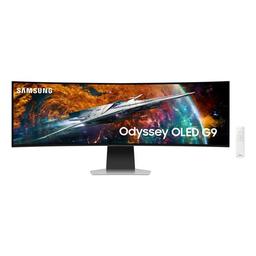
Samsung Samsung Odyssey OLED G95SC
Monitors

Samsung

Samsung Odyssey OLED G95SC: Real Users Split on Smart TV OS

Mar 2026

Last Analyzed

7/10

Overall Rating

26

Positive Reviews

16

Negative Reviews

Summary

The Samsung Odyssey OLED G95SC is a 49" QD-OLED ultrawide running at 5120x1440 and 240Hz, and virtually everyone agrees the panel itself is stunning — deep blacks, vivid colors, and an immersive 1800R curve that makes gaming feel cinematic. What divides Reddit is the built-in Tizen OS: the G95SC is essentially a Samsung Smart TV dressed as a monitor, and that brings invasive popups, internet-locked features, extra heat output, and occasional DisplayPort instability. Many owners find firmware updates and a service remote resolve the worst offenders, but users who can get the non-smart G93SC at a comparable price are consistently told to go that route instead. At its frequent sale price around $899–$1000, it's considered one of the best value entries into 32:9 OLED — if you can tolerate or disable the smart TV baggage.
Pros

  • QD-OLED panel is genuinely exceptional — owners consistently describe it as the best display they've ever used, with blacks, colors, and contrast that make VA and IPS panels look flat by comparison
  • 240Hz refresh rate and 0.03ms response time make fast-paced gaming feel buttery, and 32:9 immersion in supported titles is repeatedly called a game-changer
  • Smart Hub has legitimate upsides: eARC passthrough for premium audio setups, built-in streaming without a Chromecast, Xbox Cloud Gaming support, and a remote that simplifies settings navigation
  • Multiview (PBP) works well for dual-PC setups — supports split-screen with Freesync Premium Pro active, making it a viable multi-source monitor
  • Frequently discounted to $879–$1000, often hundreds cheaper than the G93SC, making the OLED panel accessible to buyers willing to deal with Tizen
  • Long-term owners with 18+ months and high screen hours (including heavy office use) report no burn-in and continued satisfaction with the panel

Cons

  • Tizen OS is the main complaint: obnoxious boot popups, Samsung account required to unlock features like PBP, and the smart hub can't be fully disabled without a separately purchased service remote
  • G95SC runs measurably hotter than the G93SC — users report warmth near the bottom center controls, and it draws roughly 10W more at idle due to the always-on smart processor
  • DisplayPort connectivity issues are a recurring problem — random black screens and signal drops, particularly without a certified DP 1.4 cable (Club3D recommended) and latest firmware
  • The G93SC offers a cleaner, faster OSD experience with no account requirements and better PBP flexibility (70/30 split vs G95SC's 50/50 only); if similarly priced, most experienced owners recommend it
  • QC consistency is a real concern — multiple users document vertical banding, loose housing, or dead-on-arrival issues, and Samsung's warranty service has been described as slow
  • At 5120x1440 with a 1800R curve, vertical real estate feels constrained for productivity — several users returned it citing claustrophobia when sitting close, with the LG 45" or 4K alternatives preferred for mixed-use work

The Service Remote Is Almost Mandatory

Multiple G95SC owners say the smart TV popup on boot is tolerable but annoying — and buying a separate Samsung service remote to suppress it has become a near-universal recommendation. It's not a dealbreaker, but it's an extra step Samsung shouldn't require.

A Panel Worth Chasing on Sale, a TV OS That Isn't

When the G95SC drops to $899, Reddit consistently calls it a great deal for the QD-OLED panel. When it's near the G93SC's price, the community flips: the non-smart version is faster, cooler, and less annoying to live with. Value depends almost entirely on the sale gap.

Surprisingly Viable as a Smart TV Replacement

A subset of users — especially those with Samsung phones and Smart Things setups — actually lean into the Tizen features. eARC for Atmos passthrough, remote-controlled streaming, and Xbox Cloud Gaming are genuinely useful for living room or hybrid setups where a PC isn't always the input source.

User Reviews (42 of 281 analyzed)

45
0
cfuredditr/buildapcsales13d agopositive

I own this. It used to be annoying for the first few months but after a firmware update after connecting it to my Wi-Fi it acts like a normal monitor without needing to turn it off like a TV. The smart TV thing can be completely ignored.

View Original Comment
25
0
Mage1strider1r/buildapcsales13d agopositive

The smart TV stuff is tbh... kinda nice. You can stream at proper quality without having to get a Chromecast and the remote is a godsend for changing settings or setting up Bluetooth. The only real gripes I've had are the stupid bar it pops up whenever you turn it on, and when you press the home button it sends you over to a menu instead of just to the primary input.

View Original Comment
8
0
Jump_Streamr/ultrawidemasterrace13d agopositive

I've had 0 issues with mine almost 10 months on. Have had a blast and the smart functionality is really not that much of an issue. Especially if you already have a Samsung account due to a phone. Bit overblown in my opinion. Just get whichever is the cheaper deal at the time.

View Original Comment
6
0
GetHitNerdr/buildapcsales13d agopositive

Yep - can confirm this is the smart one. Not a fan of it at all, but I wouldn't say its a dealbreaker for the monitor. Love everything about it besides for the built in OS.

View Original Comment
6
0
ImSoRuder/buildapcsales13d agopositive

Having used this at a friend's place, I'd say the 34" still feels like a single monitor with some extra real estate, but I could not use the 49" without basically treating it as two separate monitors without a panel gap. And I mean that's literally the case — the resolution is two 1440p monitors put together.

View Original Comment
5
0
OldScruffr/ultrawidemasterrace13d agonegative

As someone who owns the G95SC, I would highly recommend the G93SC over it. The UI on the G95 is literally copy pasta'd from Samsung's TVs, and it makes changing basic settings a huge pain in the ass. It's slow, laggy, and has stupid smart features that don't even let you use the damn monitor as a monitor without creating a Samsung account and having an internet connection. Wish they would have had the G93SC available at launch, as I'd do anything to go back to a basic monitor UI.

View Original Comment
5
0
subsequentr/buildapcsales13d agopositive

It has Freesync Premium Pro and has support for split screen. Samsung calls it Multiview. I used it to hook up a PS5 and my desktop at the same time.

View Original Comment
4
0
Highlander530r/ultrawidemasterrace13d agonegative

49" G9 is a great monitor, but very vertically challenged. I feel claustrophobic when using it.

View Original Comment
3
0
Dawnawaken92r/ultrawidemasterrace13d agonegative

I returned 4 of the monitors for various reasons. So I feel your pain entirely.

View Original Comment
3
0
ShadowStryker24r/ultrawidemasterrace13d agopositive

I LOVE my oled. Wouldn't return it.

View Original Comment
3
0
GodforgeMinisr/buildapcsales13d agonegative

The issues with its form factor — letterboxing some games, or half screening some windows — exasperates the issues with oled burn-in, and Samsung's warranty doesn't cover that.

View Original Comment
3
0
ButtercupsUncler/ultrawidemasterrace13d agopositive

G95SC is currently $700 off, making it significantly cheaper than the G93SC. I bought two. Just waiting for the mount unit to arrive so I can stack them. Meanwhile the first one looks great and works great.

View Original Comment
2
0
tigglysticksr/ultrawidemasterrace13d agonegative

Firmware updated. Monitor sitting on an arm by itself on a desk in a 19°C room. No direct sunlight or heat sources. Computer isn't even near it. G95SC runs hot, G93SC runs cool and uses 10W less on average (I have a power monitoring plug connected to it).

View Original Comment
2
0
keirmeisterr/ultrawidemasterrace13d agopositive

I bought the G95SC. The 'TV' OS part of it is invasive and was a complete eyesore when switching inputs. I bought the service remote and turned that crap off. I'm also using optical HDMI and DP cables and the picture is fantastic. But yeah… were it not for the service remote hack, I would have considered returning the monitor. Now I like it much more.

View Original Comment
2
0
kidwgmr/ultrawidemasterrace13d agopositive

Just got the 95 version. Love it. Doesn't get hot that I have noticed. Wasn't expecting to like the smart hub but it's actually been really nice to have the option and I have been actually using it. The remote is great. I now have the option to use Xbox cloud gaming and that wasn't really thinking about using it at all. Overall, this monitor is awesome.

View Original Comment
2
0
murrflexr/ultrawidemasterrace13d agopositive

I set it up yesterday, and I'm pretty blown away by the level of quality. If you plan to double down on this monitor as a tv from a couch or something, I can see the benefit in the extra features, but I really don't think it's $200 in value. All of these things are replaceable to an extent.

View Original Comment
2
0
Psychadelic-Twisterr/ultrawidemasterrace13d agopositive

49 is amazing, almost too much monitor sometimes. But god damn it is such an immersive experience for newer titles that support it fully.

View Original Comment
2
0
Dizzy149r/ultrawidemasterrace13d agonegative

I went from the Samsung OLED to the non-OLED. The color was nice, but the fuzzy text bugged the crap out of me. If you won't be doing much with text then keep the OLED.

View Original Comment
2
0
d111yr/Monitors13d agopositive

I use it in both day time and night time settings and never think twice about the brightness. Review sites like rtings — you gotta take them with a grain of salt. They always have to find something wrong with every product.

View Original Comment
1
0
dugi_or/ultrawidemasterrace13d agopositive

Own it. Use for office work and gaming for 18 months. Treat it like any other monitor. I've had 3 or 4 times where my pc doesn't detect it. Unplugging the display port cable from my GPU and plugging it in again fixed it every time. The software is trash and everyone should be fired, but you don't have to use it at all after initial set up.

View Original Comment
1
0
arandomscottr/ultrawidemasterrace13d agopositive

I have the smart version. I thought I finally got burn in, turned it on in the morning and it's gone. Been running solid for 2 years. I love my monitor. The OS has actually gotten better now. Almost 8k screen hours and still going strong.

View Original Comment
1
0
Silent_R493r/ultrawidemasterrace13d agopositive

My G95SC (2023) had been working fine since the beginning. You set your input source once and change the settings to remember the last input used and you'll never have to use TizenOS unless you want to. Most of the complaints on this sub about it are from user error or bad luck of QC from factory.

View Original Comment
1
0
Complete_Iron_2656r/ultrawidemasterrace13d agonegative

I've experienced issues with both models immediately. It generally amounts to terrible software/hardware, bad warranties, terrible track record when it comes to fulfilling said warranties, and again, terrible quality assurance. With the G95SC, the smart TV functionality bleeds through to the desktop experience. You will have obnoxious notifications telling you to update, trying to stuff remote control features in your face.

View Original Comment
1
0
Luemmeltuete3000r/ultrawidemasterrace13d agonegative

Mine died 2 days before the end of warranty. Took Samsung 3 month to send someone to replace the panel. Sold it right afterwards.

View Original Comment
1
0
MistaKrebsr/ultrawidemasterrace13d agonegative

I literally have a tech coming out to see how terrible these exact issues are. If I don't get a replacement with the non smart version or my money back I'll never buy another Samsung product. I paid way too much for this junk. It looks beautiful when working but it barely works. Even when it's not having black screen and glitching issues it has weird flickering.

View Original Comment
1
0
No_Step_1692r/ultrawidemasterrace13d agonegative

They've had to come fix my G95SC twice for the white screen of death in the first 6 months.

View Original Comment
1
0
Haunting-Pound7728r/buildapcsales13d agopositive

It's the LED panels from Samsung that have bad QC. The QD-OLED is very thin and light for its size, runs relatively cool, and I haven't had a single QC issue personally. Highly recommend this monitor. The only thing that could top it is a 57" super ultrawide in QD-OLED.

View Original Comment
1
0
qwertyuiop132465r/ultrawidemasterrace13d agopositive

I have the smart model and the menu popping up for 5 seconds when I boot up doesn't bother me. Never noticed heat issues, I don't care about power consumption. The monitor has been fantastic and I have not once wished I bought the 'dumb' model.

View Original Comment
1
0
InconvenientFacts23r/ultrawidemasterrace13d agonegative

I have the G95SC and for the most part, the Tizen interface and processor are not needed when you mostly use it on a PC. Also Samsung QC is generally bad for its monitors. The center of the screen gets burning hot as does the bottom of the monitor along the silver metal edge.

View Original Comment
1
0
ZionBKr/ultrawidemasterrace13d agopositive

The G93SC doesn't have eARC and that is such an important feature. That was the reason I decided to buy the G95SC.

View Original Comment
1
0
Tripleppaulr/ultrawidemasterrace13d agopositive

I'm on month 3 with the G95SD (refresh version of the smart one). I assume the OS and general features are the same. I really haven't had any issues. You don't need to use a remote to access your PC settings, only to access the monitor settings. Tbh I use the OS nightly as it basically works like Google home and it's basically how I watch streaming services.

View Original Comment
1
0
HeftyArgumentr/ultrawidemasterrace13d agopositive

Most of the problems with the smart version have been fixed with firmware updates. Smart version is worth it just because Netflix doesn't work properly on 32:9 screens in Windows.

View Original Comment
1
0
Nezacantr/ultrawidemasterrace13d agopositive

I have both of these monitors and I love them both. The OLED however is far and away the better display.

View Original Comment
1
0
Leather-Cod2129r/ultrawidemasterrace13d agopositive

I switched to OLED for all the screens and TVs in the house, then I changed one and got a VA panel. I sent it back immediately: zero viewing angles, grayish blacks. The only technology that would suit me would be the mini LED.

View Original Comment
1
0
Efficient-Bid-3050r/Monitors13d agopositive

I bought one in October of last year. I got it on sale for $800 off. Really enjoying it. I have two laptops hooked to it and can use it as a smart TV.

View Original Comment
1
0
Manager-_r/ultrawidemasterrace13d agopositive

No burn-in. I've had it for about 7 months now so it's not insanely old but no issues. It's the nicest panel I've ever owned.

View Original Comment
1
0
Revan7evenr/ultrawidemasterrace13d agonegative

Samsung likes to discount the smart version to try and get more people to buy it so they can farm their data. I bought my G93SC when it was on sale for $1000 USD — wait until Black Friday and see if they discount it.

View Original Comment
1
0
Tree06r/ultrawidemasterrace13d agonegative

My panel had horrible uniformity with two huge pink hue circles on both sides of the monitor. It took a couple of months, but Samsung replaced the panel and everything looks fantastic.

View Original Comment
1
0
Buttered_Toast1911r/Monitors13d agopositive

We just got this monitor for my wife to work on and me to game on. We found out how to use the picture in picture to split the screen to a dual monitor setup. The monitor looks great.

View Original Comment
1
0
stifman2kr/ultrawidemasterrace13d agonegative

People love OLED mostly for gaming. If you don't game that much and use it more for productivity and want clear text, maybe a non OLED is the better choice. For myself I would love to have OLED, but as I'm using it mostly for productivity and static images, I went the non OLED route.

View Original Comment
1
0
Sav89_r/Monitors13d agonegative

I found if you have the non-glare model near a window it is extremely distracting if you are playing an FPS or something that requires attention to detail. In a dark room it's a phenomenal screen. Unfortunately I like my big bright windows uncovered and this screen couldn't deal with the ambient light.

View Original Comment
1
0
Nguy94r/ultrawidemasterrace13d agonegative

I don't like smart features in my monitors. I have a smart G6 and it interferes with my computer's WiFi. I never lag on my computer unless the G6 is connected to WiFi. The menus also pop up every time it wakes and make an annoying beep.

View Original Comment